HDD "Access Denied" (help!!!)

richprice

New member
Local time
10:06 PM
Messages
12
I am using Win 7 Pro x64 on a Sony VAIO notebook, 8GB RAM, 500GB HDD. I also have an external 500GB HDD on USB.

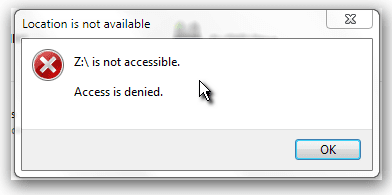
I was backing up my drive (creating a drive image) and during the process the notebook bluescreened. After rebooting, I tried to access the external HDD, but access was denied.

I ran "chkdsk Z: /R /B" and it took 14 hours to complete. Once it was done, same thing, "access denied."

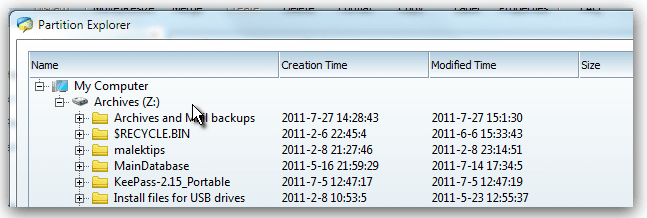
I ran my partition manager, and rana repair with it, and it took a couple of hours. The partition manager can explore (and see) the folders and files on the drive.

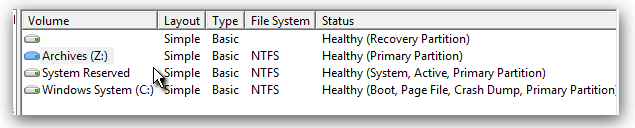
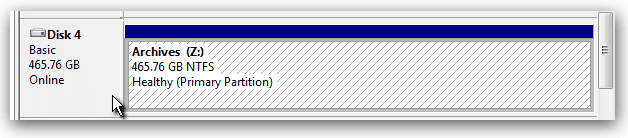
Windows Drive Manager says it is a healthy partition, NTFS formatted. But Windows cannot or will not access the drive. I powered the drive down and let it sit a few hours, tried changing the drive letter, etc...

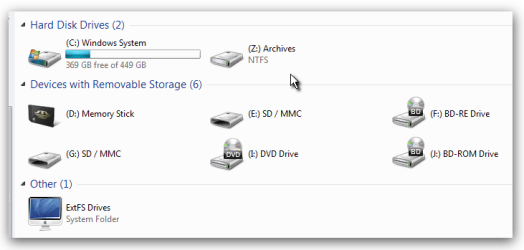
"Computer" in Windows Explorer shows the drive letter and label (correctly) but not the "used/free space" indicator.

Does anyone here know how I can regain access to this drive? I need to rescue my backups! They are there, but windows just won't open the drive.

See the screenshots for details.
 

Attachments
  • Snap_2011.08.01_20h37m26s_003.png
    Snap_2011.08.01_20h37m26s_003.png
    14.2 KB · Views: 21
  • Snap_2011.08.01_20h38m36s_004.png
    Snap_2011.08.01_20h38m36s_004.png
    6 KB · Views: 13
  • Snap_2011.08.01_20h40m00s_005.png
    Snap_2011.08.01_20h40m00s_005.png
    16.5 KB · Views: 24
  • Snap_2011.08.01_20h36m18s_002.png
    Snap_2011.08.01_20h36m18s_002.png
    5.4 KB · Views: 18
  • Snap_2011.08.01_20h34m50s_001.png
    Snap_2011.08.01_20h34m50s_001.png
    4.5 KB · Views: 14
Last edited:

My Computer

Computer Manufacturer/Model Number
Sony Vaio VPCEC290X
OS
Windows 7 Pro x64 SP1
CPU
Core i5 Quad-core M520 @2.4 GHz
Memory
8 GB
Graphics Card(s)
ATI Radeon
Hard Drives
500 GB Sata 5400rpm
richprice,

Boot from a System Repair Disc.

Can you now access the files?

CREATE A SYSTEM REPAIR DISC

START | type System Repair | Enter key | Create Disc button
 

My Computer

Computer Manufacturer/Model Number
Toshiba Satellite S875D-S7239 laptop
OS
MS Windows 7 Ultimate SP1 64-bit
CPU
AMD A10-4600M
Motherboard
AMD Pumori (Socket FT1)
Memory
6.00 GB Dual-Channel DDR3 @ 798MHz (11-11-12-28)
Graphics Card(s)
AMD Radeon HD 7660G
Sound Card
High Definition Audio Device
Monitor(s) Displays
Generic PnP Monitor (1600x900@60Hz)
Screen Resolution
1600x900@60Hz
Hard Drives
SSD 119GB Corsair CSSD-V128GB2 ATA Device
Keyboard
Standard PS/2 Keyboard
Mouse
HP Wireless Optical Mobile Mouse Model FHA-3410
Internet Speed
What the local pub, local coffee shop offers.
Other Info
Optical Drive:MATSHITA BD-CMB UJ160B ATA Device


Also have an Asus ha1002xp netbook with Win 7 Ultimate installed.
Problem Solved !!!

Well, I've gotten past the problem and recovered all my backups.

I have a lot of different system repair discs (including the Windows System Repair Disc for this system) and I can't get into the drive with any of the Windows or WinPE-based CDs.

However, I did create a bootable USB key using MEPIS Linux v, 11 x64. It opened the drive, let me copy all my files and now everything is safe. I'll have to fix that external HDD or buy a new one, but at least I have all my files.

I do thank you for the repair disc suggestion.
 

My Computer

Computer Manufacturer/Model Number
Sony Vaio VPCEC290X
OS
Windows 7 Pro x64 SP1
CPU
Core i5 Quad-core M520 @2.4 GHz
Memory
8 GB
Graphics Card(s)
ATI Radeon
Hard Drives
500 GB Sata 5400rpm
rich,
The repair disc should have gotten you in.

Now if you are interested in making that drive usable, let us know.
 

My Computer

Computer Manufacturer/Model Number
Toshiba Satellite S875D-S7239 laptop
OS
MS Windows 7 Ultimate SP1 64-bit
CPU
AMD A10-4600M
Motherboard
AMD Pumori (Socket FT1)
Memory
6.00 GB Dual-Channel DDR3 @ 798MHz (11-11-12-28)
Graphics Card(s)
AMD Radeon HD 7660G
Sound Card
High Definition Audio Device
Monitor(s) Displays
Generic PnP Monitor (1600x900@60Hz)
Screen Resolution
1600x900@60Hz
Hard Drives
SSD 119GB Corsair CSSD-V128GB2 ATA Device
Keyboard
Standard PS/2 Keyboard
Mouse
HP Wireless Optical Mobile Mouse Model FHA-3410
Internet Speed
What the local pub, local coffee shop offers.
Other Info
Optical Drive:MATSHITA BD-CMB UJ160B ATA Device


Also have an Asus ha1002xp netbook with Win 7 Ultimate installed.
Thanks

Well, I don''t know why none of the repair discs (and rescue CDs) would give me access. All of them SHOULD have. I only tried the Linux thing out of desperation. (I REALLY needed those files and backups.

Just so you know, I used my partitioning tool to reformat the drive, and it is usable again. I'm not going to trust it as much as I used to, so I'm getting 2 more backup drives. I get paranoid that way.

But I really do thank you all for your advice. I find a lot of good posts here just searching.
 

My Computer

Computer Manufacturer/Model Number
Sony Vaio VPCEC290X
OS
Windows 7 Pro x64 SP1
CPU
Core i5 Quad-core M520 @2.4 GHz
Memory
8 GB
Graphics Card(s)
ATI Radeon
Hard Drives
500 GB Sata 5400rpm
in the future, add the "Everyone" group to the ACL with full control. This will fix your problem anytime you format or change computers.
 

My Computer

OS
7 Pro
The everyone group will automatically be added if he cleans and formats a new disk. Not only that, the everyone group will have full permission.
 

My Computer

Computer Manufacturer/Model Number
Toshiba Satellite S875D-S7239 laptop
OS
MS Windows 7 Ultimate SP1 64-bit
CPU
AMD A10-4600M
Motherboard
AMD Pumori (Socket FT1)
Memory
6.00 GB Dual-Channel DDR3 @ 798MHz (11-11-12-28)
Graphics Card(s)
AMD Radeon HD 7660G
Sound Card
High Definition Audio Device
Monitor(s) Displays
Generic PnP Monitor (1600x900@60Hz)
Screen Resolution
1600x900@60Hz
Hard Drives
SSD 119GB Corsair CSSD-V128GB2 ATA Device
Keyboard
Standard PS/2 Keyboard
Mouse
HP Wireless Optical Mobile Mouse Model FHA-3410
Internet Speed
What the local pub, local coffee shop offers.
Other Info
Optical Drive:MATSHITA BD-CMB UJ160B ATA Device


Also have an Asus ha1002xp netbook with Win 7 Ultimate installed.
Yep !!!

It's been cleaned and reformatted. It seems fine now; I'm going on the supposition that the error that caused the bluescreen during imaging corrupted the MFT or something else with drive info on it.

The drive is probably perfectly good now, but I'm still going to buy a couple more drives as redundant backups so that if one fails again, I still have the others to fall back on.

Thanks a million guys.
 

My Computer

Computer Manufacturer/Model Number
Sony Vaio VPCEC290X
OS
Windows 7 Pro x64 SP1
CPU
Core i5 Quad-core M520 @2.4 GHz
Memory
8 GB
Graphics Card(s)
ATI Radeon
Hard Drives
500 GB Sata 5400rpm
rich,
Glad to hear that all is well now.

and enjoyed your sig advice on passwords.
 

My Computer

Computer Manufacturer/Model Number
Toshiba Satellite S875D-S7239 laptop
OS
MS Windows 7 Ultimate SP1 64-bit
CPU
AMD A10-4600M
Motherboard
AMD Pumori (Socket FT1)
Memory
6.00 GB Dual-Channel DDR3 @ 798MHz (11-11-12-28)
Graphics Card(s)
AMD Radeon HD 7660G
Sound Card
High Definition Audio Device
Monitor(s) Displays
Generic PnP Monitor (1600x900@60Hz)
Screen Resolution
1600x900@60Hz
Hard Drives
SSD 119GB Corsair CSSD-V128GB2 ATA Device
Keyboard
Standard PS/2 Keyboard
Mouse
HP Wireless Optical Mobile Mouse Model FHA-3410
Internet Speed
What the local pub, local coffee shop offers.
Other Info
Optical Drive:MATSHITA BD-CMB UJ160B ATA Device


Also have an Asus ha1002xp netbook with Win 7 Ultimate installed.
Back
Top