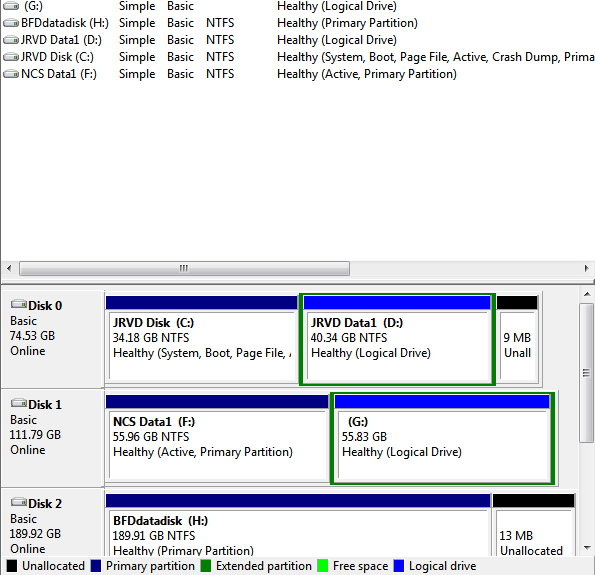
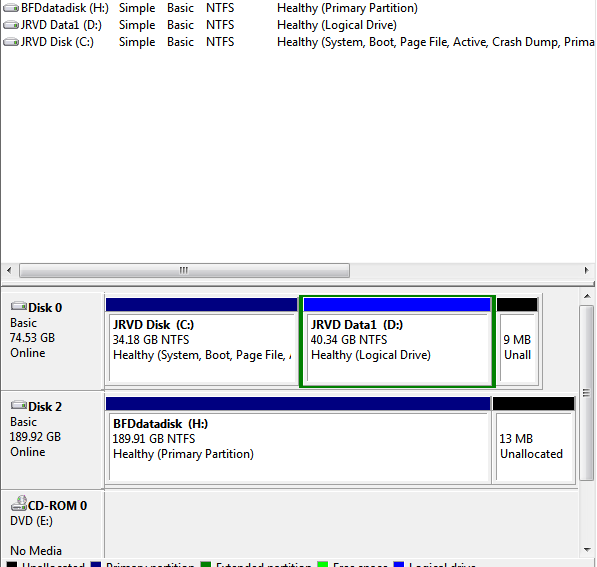
HDD Can't be detected.

Justrae

New member
Local time
3:27 AM
Messages
22
Even though I haven't completely touched it inside the CPU
It started glitching out I can't see the 2 drives in My Computer, sometimes I even go to disk management and rescan disk and it appears, but after a few minutes it disappears again.
I checked Event Viewer is this is the constant error I get.
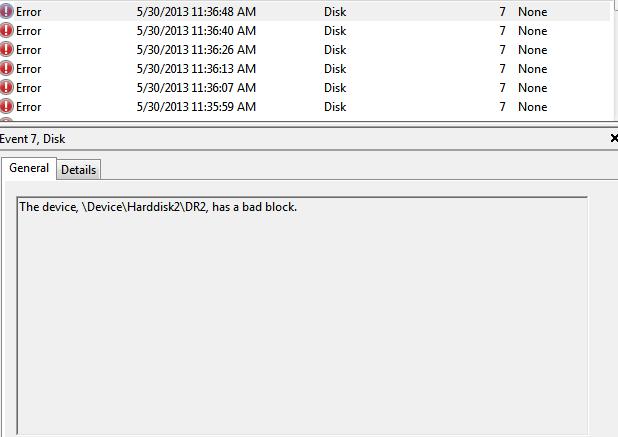
aaf2942898bc4f92643db9527f8a0928.png


I can't see also the third Drive in Device Manager, only the other two appear.
I can't diskcheck the missing drives. If I try to diskcheck them while I can see it, it will stop since the drives will disappear.
 

My Computer

Computer type
PC/Desktop
Computer Manufacturer/Model Number
Custom Build
OS
Windows 7 Professional 64-bit.
CPU
Intel Celeron G540 2.50GHZ
Motherboard
Biostar H61MLV
Memory
4GB
Graphics Card(s)
Nvidia GeForce 210 512mb
Antivirus
AVG Internet Security 2012
Browser
Google Chrome
3f0143e98e9c5441fe29a614393cca19.png

The drives that keep on disappearing are G and F.
acfbf666cc98afcf2c42e03d2ec84e45.png
 

My Computer

Computer type
PC/Desktop
Computer Manufacturer/Model Number
Custom Build
OS
Windows 7 Professional 64-bit.
CPU
Intel Celeron G540 2.50GHZ
Motherboard
Biostar H61MLV
Memory
4GB
Graphics Card(s)
Nvidia GeForce 210 512mb
Antivirus
AVG Internet Security 2012
Browser
Google Chrome
Log Name: System
Source: Disk
Date: 5/30/2013 12:51:34 PM
Event ID: 7
Task Category: None
Level: Error
Keywords: Classic
User: N/A
Computer: JRVD-PC
Description:
The device, \Device\Harddisk1\DR1, has a bad block.
Event Xml:
<Event xmlns="http://schemas.microsoft.com/win/2004/08/events/event">
<System>
<Provider Name="Disk" />
<EventID Qualifiers="49156">7</EventID>
<Level>2</Level>
<Task>0</Task>
<Keywords>0x80000000000000</Keywords>
<TimeCreated SystemTime="2013-05-30T04:51:34.661409200Z" />
<EventRecordID>129985</EventRecordID>
<Channel>System</Channel>
<Computer>JRVD-PC</Computer>
<Security />
</System>
<EventData>
<Data>\Device\Harddisk1\DR1</Data>
<Binary>030080000100000000000000070004C0000100009C0000C000000000000000000010C7BA0E0000002FB1000000000000FFFFFFFF00000000580000840201000000200A1240032000000000003C0000000000EC0600000000B853CC0480FAFFFF000000000000000060DACA0480FAFFFFE0B7810480FAFFFF88635D07000000002800075D638800010000000000000000F00003000000000B00000000000000000000000000000000</Binary>
</EventData>
</Event>
 

My Computer

Computer type
PC/Desktop
Computer Manufacturer/Model Number
Custom Build
OS
Windows 7 Professional 64-bit.
CPU
Intel Celeron G540 2.50GHZ
Motherboard
Biostar H61MLV
Memory
4GB
Graphics Card(s)
Nvidia GeForce 210 512mb
Antivirus
AVG Internet Security 2012
Browser
Google Chrome
Bump.
 

My Computer

Computer type
PC/Desktop
Computer Manufacturer/Model Number
Custom Build
OS
Windows 7 Professional 64-bit.
CPU
Intel Celeron G540 2.50GHZ
Motherboard
Biostar H61MLV
Memory
4GB
Graphics Card(s)
Nvidia GeForce 210 512mb
Antivirus
AVG Internet Security 2012
Browser
Google Chrome
Seeing the size of the drives tells me that they're really old. They'll need to be replaced.
 

My Computer

Computer type
PC/Desktop
Computer Manufacturer/Model Number
Home Built
OS
Windows 7 x64 Home Premium
CPU
Intel i3-2105
Motherboard
Gigabyte B75M-HD3
Memory
Two 4gig Corsair Vengeance Blue
Graphics Card(s)
Sapphire Radeon HD 6670
Sound Card
Soundblaster Audigy
Monitor(s) Displays
AOC LM742
Screen Resolution
1280 x 1024
Hard Drives
Seagate Constellation 1TB
PSU
Seasonic M12II 520 Bronze
Case
Xigmatek Gigas cube
Cooling
Intel stock
Seeing the size of the drives tells me that they're really old. They'll need to be replaced.
That should be my last resort, but is there any other solutions? I'd want to get my stuff before I buy a new one or reformat it.
 

My Computer

Computer type
PC/Desktop
Computer Manufacturer/Model Number
Custom Build
OS
Windows 7 Professional 64-bit.
CPU
Intel Celeron G540 2.50GHZ
Motherboard
Biostar H61MLV
Memory
4GB
Graphics Card(s)
Nvidia GeForce 210 512mb
Antivirus
AVG Internet Security 2012
Browser
Google Chrome
Also I got this error.
'An error was detected on device \Device\Harddisk2\DR2 during a paging operation.'
 

My Computer

Computer type
PC/Desktop
Computer Manufacturer/Model Number
Custom Build
OS
Windows 7 Professional 64-bit.
CPU
Intel Celeron G540 2.50GHZ
Motherboard
Biostar H61MLV
Memory
4GB
Graphics Card(s)
Nvidia GeForce 210 512mb
Antivirus
AVG Internet Security 2012
Browser
Google Chrome
I don't know if you can. They sound like they're pretty far gone.
 

My Computer

Computer type
PC/Desktop
Computer Manufacturer/Model Number
Home Built
OS
Windows 7 x64 Home Premium
CPU
Intel i3-2105
Motherboard
Gigabyte B75M-HD3
Memory
Two 4gig Corsair Vengeance Blue
Graphics Card(s)
Sapphire Radeon HD 6670
Sound Card
Soundblaster Audigy
Monitor(s) Displays
AOC LM742
Screen Resolution
1280 x 1024
Hard Drives
Seagate Constellation 1TB
PSU
Seasonic M12II 520 Bronze
Case
Xigmatek Gigas cube
Cooling
Intel stock

My Computer

Computer type
PC/Desktop
Computer Manufacturer/Model Number
Custom Build
OS
Windows 7 Professional 64-bit.
CPU
Intel Celeron G540 2.50GHZ
Motherboard
Biostar H61MLV
Memory
4GB
Graphics Card(s)
Nvidia GeForce 210 512mb
Antivirus
AVG Internet Security 2012
Browser
Google Chrome
You can check the connections that they're seated. That's about it.
 

My Computer

Computer type
PC/Desktop
Computer Manufacturer/Model Number
Home Built
OS
Windows 7 x64 Home Premium
CPU
Intel i3-2105
Motherboard
Gigabyte B75M-HD3
Memory
Two 4gig Corsair Vengeance Blue
Graphics Card(s)
Sapphire Radeon HD 6670
Sound Card
Soundblaster Audigy
Monitor(s) Displays
AOC LM742
Screen Resolution
1280 x 1024
Hard Drives
Seagate Constellation 1TB
PSU
Seasonic M12II 520 Bronze
Case
Xigmatek Gigas cube
Cooling
Intel stock
Does anyone have other suggestions?
 

My Computer

Computer type
PC/Desktop
Computer Manufacturer/Model Number
Custom Build
OS
Windows 7 Professional 64-bit.
CPU
Intel Celeron G540 2.50GHZ
Motherboard
Biostar H61MLV
Memory
4GB
Graphics Card(s)
Nvidia GeForce 210 512mb
Antivirus
AVG Internet Security 2012
Browser
Google Chrome
A lil bit extra.

Take the HDD out, put it in a new external case and see what happens.
 

My Computer

OS
Windows 7 Home Premium 32 bit
Me and my dad cleaned the PC today, he sprayed Mr. Mckenic on the connector and we cleaned each HDD. I was able to kind of fix yesterday using the disk check but now today while I was downloading and the download was saved in that HDD, it disappeared again.

EDIT: ERROR = Unexpected failure. Error code: 2@01010013
 

My Computer

Computer type
PC/Desktop
Computer Manufacturer/Model Number
Custom Build
OS
Windows 7 Professional 64-bit.
CPU
Intel Celeron G540 2.50GHZ
Motherboard
Biostar H61MLV
Memory
4GB
Graphics Card(s)
Nvidia GeForce 210 512mb
Antivirus
AVG Internet Security 2012
Browser
Google Chrome
Bump,
also do you think reformatting will help?
 

My Computer

Computer type
PC/Desktop
Computer Manufacturer/Model Number
Custom Build
OS
Windows 7 Professional 64-bit.
CPU
Intel Celeron G540 2.50GHZ
Motherboard
Biostar H61MLV
Memory
4GB
Graphics Card(s)
Nvidia GeForce 210 512mb
Antivirus
AVG Internet Security 2012
Browser
Google Chrome
If you have nothing to recover from that hard drive and want to format it, do this way:

To format your drive follow this procedure - this keeps Windows out of the loop.

Run MiniTools Partition Wizard Home edition. Download the bootable CD version from Free download Magic Partition Manager Software, partition magic alternative, free partition magic, partition magic Windows 7 and server partition software - Partition Wizard Online (the last one on this page)

You may either burn the ISO to a CD and boot from it or create a bootable pen drive with that ISO using Rufus Rufus - Create bootable USB drives the easy way

Note: If you had created a bootable pen drive, when booting with it you have to type linux0 against the boot prompt and press Enter for the boot process to continue. ( It is zero and not the alphabet O. You may press TAB key to see all available options linux0, linux1, local, I think.)
 

My Computer

OS
Windows 7 Home Premium 32 bit
If you have nothing to recover from that hard drive and want to format it, do this way:

To format your drive follow this procedure - this keeps Windows out of the loop.

Run MiniTools Partition Wizard Home edition. Download the bootable CD version from Free download Magic Partition Manager Software, partition magic alternative, free partition magic, partition magic Windows 7 and server partition software - Partition Wizard Online (the last one on this page)

You may either burn the ISO to a CD and boot from it or create a bootable pen drive with that ISO using Rufus Rufus - Create bootable USB drives the easy way

Note: If you had created a bootable pen drive, when booting with it you have to type linux0 against the boot prompt and press Enter for the boot process to continue. ( It is zero and not the alphabet O. You may press TAB key to see all available options linux0, linux1, local, I think.)

Thanks, but I've got to recover a file, so I'll keep this in mind.
 

My Computer

Computer type
PC/Desktop
Computer Manufacturer/Model Number
Custom Build
OS
Windows 7 Professional 64-bit.
CPU
Intel Celeron G540 2.50GHZ
Motherboard
Biostar H61MLV
Memory
4GB
Graphics Card(s)
Nvidia GeForce 210 512mb
Antivirus
AVG Internet Security 2012
Browser
Google Chrome
Before I close down my station today, I just came across some information on the error message:

Please check the Vcore voltage in the BIOS and change it to the correct Vcore voltage of your CPU.

This seems to have resolved the problem atleast in one user's case.
 

My Computer

OS
Windows 7 Home Premium 32 bit
Before I close down my station today, I just came across some information on the error message:

Please check the Vcore voltage in the BIOS and change it to the correct Vcore voltage of your CPU.

This seems to have resolved the problem atleast in one user's case.

Alright, thanks I'll try that.
 

My Computer

Computer type
PC/Desktop
Computer Manufacturer/Model Number
Custom Build
OS
Windows 7 Professional 64-bit.
CPU
Intel Celeron G540 2.50GHZ
Motherboard
Biostar H61MLV
Memory
4GB
Graphics Card(s)
Nvidia GeForce 210 512mb
Antivirus
AVG Internet Security 2012
Browser
Google Chrome
Bad block errors usually appear when HDD's condition reaches its life limit and HDD needed to be replaced.
 

My Computer

Computer type
PC/Desktop
OS
Win7
Where is exactly the vcore voltage*
 

My Computer

Computer type
PC/Desktop
Computer Manufacturer/Model Number
Custom Build
OS
Windows 7 Professional 64-bit.
CPU
Intel Celeron G540 2.50GHZ
Motherboard
Biostar H61MLV
Memory
4GB
Graphics Card(s)
Nvidia GeForce 210 512mb
Antivirus
AVG Internet Security 2012
Browser
Google Chrome
Back
Top