
HDD failing? Need advise.

Outro

New member
Local time
5:15 PM
Messages
1
Hello all,

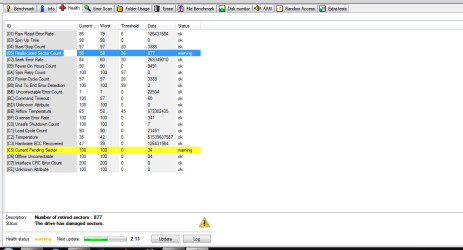
Recently my laptop started freezing randomly when using programs and started making buzzing sounds while watching a movie or anything else. So I ran a HDD diagnostic tool. Is the drive practically dead and is there something I can do to fix it? Any other suggestions also are greatly appreciated.
 

Attachments
  • hdd.png
    hdd.png
    24.5 KB · Views: 6

My Computer My Computer

Computer type
Laptop
Computer Manufacturer/Model Number
Asus
OS
Windows, 64-bit
It's ill. "Practically dead" is a matter of opinion. It could die today, but it could have died at any moment without warning beginning with the day you bought it.

It can limp along in that state for an unknown period of time.

Drives come with a fixed number of "spare" good sectors. If the drive tries to write something to one of the bad sectors, that bad sector would be automatically replaced with one of the spare good sectors. Which is good, but there are only a limited number of spares. The data in that bad sector would be lost. Which is bad, unless you are indifferent to the contents of the drive.

I'd assume the worst and at least back up anything I cared about on it.

Personally, I'd replace the drive.

You can always just run it until it literally will not start, depending on your level of patience and indifference.
 

My Computer My Computer

Computer type
PC/Desktop
Computer Manufacturer/Model Number
Ignatz Special; 4 speed manual gearbox; factory air conditioning; one of one
OS
Windows 7 Home Premium SP1, 64-bit
CPU
Intel Skylake i5-6600K, not overclocked
Motherboard
AsRock Z170M Extreme 4, micro ATX
Memory
8 GB HyperX DDR4-2666 (2 x 4 GB)
Graphics Card(s)
none; graphics are integrated on CPU
Sound Card
onboard: Realtek ALC1150; external: USB Behringer UF0-202
Monitor(s) Displays
Dell S2340M 23 inch IPS
Screen Resolution
1600 x 900
Hard Drives
System: Crucial MX100 series SSD, 128 GB;
Data: Samsung Spinpoint 103SJ, 1 TB;
Backup: WD Caviar Green WD30EZRX-00D8PB0, 3 TB
PSU
Rosewill SilentNight 500 watt fanless, semi-modular
Case
Antec Solo II
Cooling
Noctua NH-U12S; Noctua F12 intake, Noctua S12A exhaust
Keyboard
Microsoft 200 6JH-00001 USB
Mouse
Dell or Microsoft optical wired; USB
Antivirus
Microsoft Security Essentials and Malwarebytes Premium
Browser
Pale Moon
Other Info
All fans PWM; speeds at idle: CPU circa 500 rpm; intake circa 600 rpm; exhaust circa 600 rpm; CPU temps 27 idle and 47 C load in a warm room (27 C/81 F) when running Intel Extreme Tuning Utility stress test.
Your symptoms are likely being caused by the "Current Pending Sector" problems. These are sectors that the drive has attempted to read but failed. As the data in the sectors is unknown it is not possible to remap them at this time. Some may be remapped eventually but by then there will likely be more. Such problems tend to get worse as time progresses.

Backup all important files ASAP. You have a windows of opportunity to backup your data which may close at any time. There is no way to fix such problems.
 

My Computer My Computer

Computer type
PC/Desktop
Computer Manufacturer/Model Number
HP
OS
Windows 7 Pro 64 bit
CPU
Xeon W3520
Memory
8 GB
Graphics Card(s)
Nvidia Geforce 210
Back
Top