
HDD Filling up with Data quickly, Unknown Reason. Help Needed.

arlo1020

New member
Local time
3:42 PM
Messages
2
This is my first time ever posting here, but I'm desperate for help. A few weeks ago, I decided to ressurect my HP Envy 4t by doing your standard out of box restore due to problems before, which included this one. My HDD fills up on its own, a few gigabytes more taken away over the course of a few days, and it does this continually. When it was doing it before I restored it, my HDD was practically full. Once restored, it was clean again, back to the point of having the standard amount of memory free with a new computer. Ever since, it has been filling up once again. Here is a picture of a program I used to show percentages of where my data is being used, but I'm still clueless. Someone help?
 

Attachments
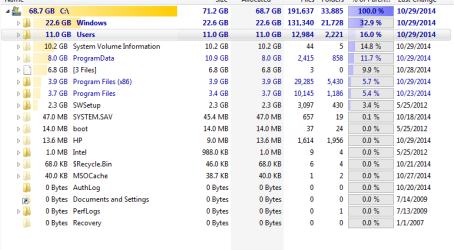
  • computer10292014.PNG
    computer10292014.PNG
    21.4 KB · Views: 2

My Computer My Computer

At a glance

Windows 7 Home Premium x64
Computer type
Laptop
Computer Manufacturer/Model Number
HP Envy 4t-1000
OS
Windows 7 Home Premium x64
Hi arlo1020!

I see you have an OS on this drive.
In many other cases when space on the hard drive, which contained the OS, is inexplicably filled up, it has been due to a virus or malware. You could run your antivirus program to clean the disk from any of the sort.
Also, check your programs, it could be that one (or may be more) are creating too much of temporary files too fast, for instance.
Another idea is to defragment the hard drive.

I hope this helps! :)

CK_WD
 

My Computer My Computer

At a glance

Windows 7 Home Premium x64
Computer type
PC/Desktop
OS
Windows 7 Home Premium x64
Thank you! Is there a standard free antivirus that is recommended around here?
 

My Computer My Computer

At a glance

Windows 7 Home Premium x64
Computer type
Laptop
Computer Manufacturer/Model Number
HP Envy 4t-1000
OS
Windows 7 Home Premium x64
I would start by running CCleaner to cleanup Windows and application temp files. (it doesn't touch any user data. No need to worry about it deleting any personal files)

I also see you having a whopping 2.3GB in the SWSetup folder. When you download HP drivers and apps for installation, HP stores the extracted files under SWSetup (but doesn't delete the files when done). You can safely delete the folder. If you ever need to reinstall the HP software, just download it again.

System Volume Information is where Windows saves Windows Restore points. This grows from 0 to a max size as defined in Windows. See How much disk space does System Restore require?.

I would next use your tool to look at the major space grabbers under Users (your data files), under the Program Folder directories, and under Program Data.

Some programs (like Adobe) can take a lot space (and not much you can do about it unless you choose to run something else, e.g. Foxit Reader instead of Adobe). But look at the program names taking the biggest amount of space. Recognize them? Do you need them installed?

After cleanup take another snap shot of disk space. Use it to compare to later snap shot to see where space is going.

IMO I wouldn't worry about antivirus at this point. Most likely above will answer most questions
 

My Computer My Computer

At a glance

Desk 1: Win 7 Pro x32; Desk 2: Windows 10 x64
Computer type
PC/Desktop
Computer Manufacturer/Model Number
Dell Optiplex 360 and Optiplex 755
OS
Desk 1: Win 7 Pro x32; Desk 2: Windows 10 x64
Hard Drives
500GB Crucial SSD in both Desktops
Other Info
Buffalo 6TB NAS, Raid 1
I would look in scheduling and see if have things happening you don't want or need to happen.

Then take a long look at this tutorial by Brink. Lots of great information.

http://www.sevenforums.com/tutorials/129976-hard-disk-space-free-up-recover.html


Many people use Bitdefender without problems but some do have strange problem with the program.
The problems seem to vary from user to user.

I use MSE without problems.

Microsoft Security Essentials - Microsoft Windows


If you want to try MSE you must remove Bitdefender using their online tool first and then install MSE.
 

My Computer My Computer

At a glance

Windows 10 Pro. 64/ version 1709 Windows 7 Pr...Intel i7-6800K @ 4.3Corsair Platinum 16 gig @2400EVGA GTX 1070 OC
Computer type
PC/Desktop
Computer Manufacturer/Model Number
Home made Desktop
OS
Windows 10 Pro. 64/ version 1709 Windows 7 Pro/64
CPU
Intel i7-6800K @ 4.3
Motherboard
ASUS X-99 Deluxe II
Memory
Corsair Platinum 16 gig @2400
Graphics Card(s)
EVGA GTX 1070 OC
Monitor(s) Displays
Asus 27" LED LCD/VE278Q
Screen Resolution
1920-1080 or 1280-720 HDMI
Hard Drives
INTEL SSD 730-240 Gb Sata 3.0/
PSU
EVGA Platium 1200W
Case
Phanteks Luxe Tempered Glass 8 fans/ one radiator
Cooling
XSPC/ Water Cooled CPU
Keyboard
Das 4 Professional
Mouse
Logitech M705/MX Anywhere 2-S
Internet Speed
100 mbits
Antivirus
Microsoft Security Essentials/ Malwarebytes Premium 3.0/ SAS
Browser
I.E. 11 default/Firefox/ ISP Time Warner Cable/Spectrum
Other Info
LG BluRay Burner/
Sound system-KLipsch-THX/
Icy Dock ssd Hot Swap bays.
To free up some space Start menu > accessories > system tools > disk clean up. Right click and select run as administrator. More options tab hit cleanup in the system restore and shadow copies area. That should clean up most of that 10 gb. As suggested you can also use ccleaner to clear up unneeded crap which will help with your users folder. As for windows what does your program show beneath that? You might also consider uninstalling some large programs but face it, 80 gb is not a lot today in the world of digital media. I think I know what is taking up the bulk of the space in windows and if i am right there isn't much you can do about it.

You might also want to turn off hibernation and decrease your page file especially if you have a lot of memory. http://www.sevenforums.com/tutorials/819-hibernate-enable-disable.html
http://www.sevenforums.com/tutorials/129976-hard-disk-space-free-up-recover.html
 

My Computers My Computers

  • At a glance

    Windows 7 pro/Windows 10 ProIntel i7 860 Quad core 2.8 ghz8 gbATI Radeon HD 5770 1 gb ram
    Computer type
    PC/Desktop
    Computer Manufacturer/Model Number
    HP Pavillion Elite HPE-250f
    OS
    Windows 7 pro/Windows 10 Pro
    CPU
    Intel i7 860 Quad core 2.8 ghz
    Memory
    8 gb
    Graphics Card(s)
    ATI Radeon HD 5770 1 gb ram
    Monitor(s) Displays
    Alienware 25 AW2521HF & Viewsonic
    Screen Resolution
    1920 x1080 & 1680x1050
    Hard Drives
    WD blue 1 tb & 500 gb.
    Browser
    FF of course.
    Other Info
    https://www.bestbuy.com/site/hp-pavilion-elite-desktop-intel-core-i7-processor-8gb-memory-1tb-hard-drive/9921493.p?skuId=9921493
  • At a glance

    Windows 2012 R2 Data center/Linux Minti3 9100 3.6GHz, 8M cache, 4C/4T8GB 2666MT/s DDR4 ECC UDIMM
    Computer type
    PC/Desktop
    System Manufacturer/Model Number
    Dell Poweredge T140
    OS
    Windows 2012 R2 Data center/Linux Mint
    CPU
    i3 9100 3.6GHz, 8M cache, 4C/4T
    Memory
    8GB 2666MT/s DDR4 ECC UDIMM
    Monitor(s) Displays
    Viewsonic
    Screen Resolution
    1680x1050
    Hard Drives
    1 TB & 750 GB
    Other Info
    https://www.dell.com/en-us/work/shop/productdetailstxn/poweredge-t140?~ck=bt
Hi again arlo1020!

Most free antivirus programs work very similarly so it depends on which one you'd like better, you could check out reviews and ratings, use the program and in your decision leave it or remove it afterwards.
I would also agree with the other suggestions, as in cleaning your drive and the unnecessary system files etc., and as I mentioned above – temporary files! Still, what worries me is that, as you explain it, space is taken up full and too fast, so I would still also run the antivirus program, just in case!
But what @townsbg said is also true. Your C: drive is just too small for today's software so it's possible that it isn't any major issue but just that it can't hold massive programs; as the bigger the programs, the more temporary files and entries they have and the more space they take.
Still, try everything mentioned so far, and after you've run everything explained here and the filling up continues, it's just the small capacity of the drive that can't handle so many/big files and programs.

Best of luck! :)

CK_WD
 

My Computer My Computer

At a glance

Windows 7 Home Premium x64
Computer type
PC/Desktop
OS
Windows 7 Home Premium x64

My Computers My Computers

  • At a glance

    Windows 7 pro/Windows 10 ProIntel i7 860 Quad core 2.8 ghz8 gbATI Radeon HD 5770 1 gb ram
    Computer type
    PC/Desktop
    Computer Manufacturer/Model Number
    HP Pavillion Elite HPE-250f
    OS
    Windows 7 pro/Windows 10 Pro
    CPU
    Intel i7 860 Quad core 2.8 ghz
    Memory
    8 gb
    Graphics Card(s)
    ATI Radeon HD 5770 1 gb ram
    Monitor(s) Displays
    Alienware 25 AW2521HF & Viewsonic
    Screen Resolution
    1920 x1080 & 1680x1050
    Hard Drives
    WD blue 1 tb & 500 gb.
    Browser
    FF of course.
    Other Info
    https://www.bestbuy.com/site/hp-pavilion-elite-desktop-intel-core-i7-processor-8gb-memory-1tb-hard-drive/9921493.p?skuId=9921493
  • At a glance

    Windows 2012 R2 Data center/Linux Minti3 9100 3.6GHz, 8M cache, 4C/4T8GB 2666MT/s DDR4 ECC UDIMM
    Computer type
    PC/Desktop
    System Manufacturer/Model Number
    Dell Poweredge T140
    OS
    Windows 2012 R2 Data center/Linux Mint
    CPU
    i3 9100 3.6GHz, 8M cache, 4C/4T
    Memory
    8GB 2666MT/s DDR4 ECC UDIMM
    Monitor(s) Displays
    Viewsonic
    Screen Resolution
    1680x1050
    Hard Drives
    1 TB & 750 GB
    Other Info
    https://www.dell.com/en-us/work/shop/productdetailstxn/poweredge-t140?~ck=bt
Back
Top