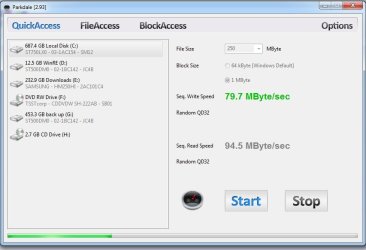
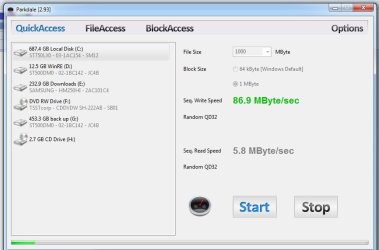
i recently reformatted my hard drive when i re-installed windows and ever since it's read speed went from 80mbps to 10mbps and i have no idea why? and ideas?
In parkdale, i saw that i would have 90mbps odd read speed for a second then it would drop to 10, but when i selected 1000mbps to move it started from 10mbps and remained slow?
im using a seagate momentus xt 750gb
Attachments
2.jpg
42.7 KB
· Views: 2
1.jpg
41.9 KB
· Views: 2
My Computer
Computer type
PC/Desktop
Computer Manufacturer/Model Number
Custom Build
OS
64 bit windows 7 home professional SP1
CPU
intel i5 3570k 3.4ghz quad core
Motherboard
ASUS P8-Z77-V LX
Memory
DDR3 16GB 1600MHZ
Graphics Card(s)
ASUS AMD R9 270X OC
Sound Card
SB Audigy
Monitor(s) Displays
Novatech
Screen Resolution
1920 - 1080 60HZ
Hard Drives
3 X 500G
seagate momentus xt 750
PSU
850w
Case
novatech
Cooling
1 blue led outtake + 1 blue led Intake 1 cpu 1 gpu 1 psu
Hello skrillek mate I have no hard and fast (no pun intended) answer for your problem.
What I can offer is that I have just installed two of these type drives (Seagate ST1000LM014 & a Seagate ST500LM000) drives but to laptops and having to muck a round a few times because the cloning went awry a few times and also I had to do wiping and reformatting these drives - never lost any speed.
I suppose it is an extra expense but not that much really to fit one of these - I would use one of those adaptor trays and just clone the original to the new drive.
One other Desktop (tester) and spare Toshba laptop both with SSD's
Running Kaspersky 2016 ISS on all machines config'd identically
Logitec audio stereo systems on each machine (x3)
Canon MG5250MFC
Router/modem TP-Link running WPA2SK
thank you i will do this, i really hated the thought of getting a new hdd as i never have enough money fml.
i have a few hdds that would hold my current cdrive. but im hoping if i reformat it some more it might works as good again. ill post back thanks
My Computer
Computer type
PC/Desktop
Computer Manufacturer/Model Number
Custom Build
OS
64 bit windows 7 home professional SP1
CPU
intel i5 3570k 3.4ghz quad core
Motherboard
ASUS P8-Z77-V LX
Memory
DDR3 16GB 1600MHZ
Graphics Card(s)
ASUS AMD R9 270X OC
Sound Card
SB Audigy
Monitor(s) Displays
Novatech
Screen Resolution
1920 - 1080 60HZ
Hard Drives
3 X 500G
seagate momentus xt 750
PSU
850w
Case
novatech
Cooling
1 blue led outtake + 1 blue led Intake 1 cpu 1 gpu 1 psu
Ok mate I was going to suggest updating the firmware but the closest I can get to that is this Laptop SSHD (Momentus XT) Support | Seagate
the disk wizard might be of some help and there are some product manuals too.
My Computer
Computer type
PC/Desktop
Computer Manufacturer/Model Number
Own build (new) Desk1 / Asus ROG Win 7 / Desk2 1st build
OS
Desk1 7 Home Prem / Desk2 10 Pro / Main lap Asus ROG 10 Pro 2 laptop Toshiba 7 Pro Asus P2520 7 & 10
One other Desktop (tester) and spare Toshba laptop both with SSD's
Running Kaspersky 2016 ISS on all machines config'd identically
Logitec audio stereo systems on each machine (x3)
Canon MG5250MFC
Router/modem TP-Link running WPA2SK
yeah i looked all through there, there is no firmware update for the 750g and i just cloned my c drive to another seagate drive 650gb and it does the same read speed drop as the other hdd
My Computer
Computer type
PC/Desktop
Computer Manufacturer/Model Number
Custom Build
OS
64 bit windows 7 home professional SP1
CPU
intel i5 3570k 3.4ghz quad core
Motherboard
ASUS P8-Z77-V LX
Memory
DDR3 16GB 1600MHZ
Graphics Card(s)
ASUS AMD R9 270X OC
Sound Card
SB Audigy
Monitor(s) Displays
Novatech
Screen Resolution
1920 - 1080 60HZ
Hard Drives
3 X 500G
seagate momentus xt 750
PSU
850w
Case
novatech
Cooling
1 blue led outtake + 1 blue led Intake 1 cpu 1 gpu 1 psu
Crikey now this sort of smacks of something awry in the transmission of data via the CPU or RAM or even the chipset
Suppose the first thing and easiest to check would be the CPU and RAM - personally I would start with the RAM
MEMTEST
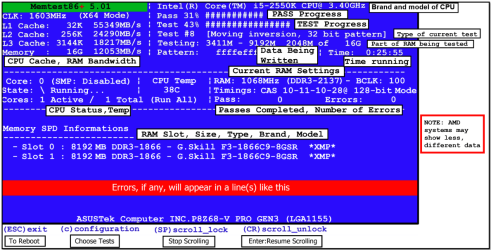
http://www.sevenforums.com/tutorials/105647-ram-test-memtest86.htmlthis one you will need to make a bootable disk set theBIOS to optical (or USB if preferred) boot the machine and let it run for at LEAST 8passes unless the errors come up straight away. Takes fair timeto complete and some leave it running overnight.
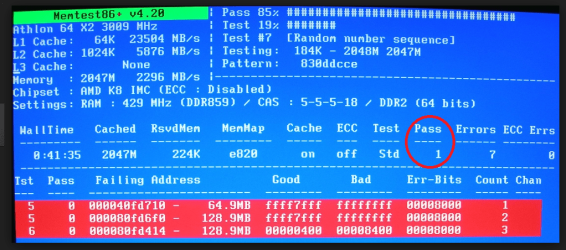
When yourun the memtest if the errors come up straight away as in my pic thenyou will need to test each stick if you have more than one and if it is onlyone then test again in another slot because it could also be a fault on theboard slot/s.
Attachments
MEMTEST INFO.PNG
108.1 KB
· Views: 1
MEMTESTERROR.PNG
237.1 KB
· Views: 1
My Computer
Computer type
PC/Desktop
Computer Manufacturer/Model Number
Own build (new) Desk1 / Asus ROG Win 7 / Desk2 1st build
OS
Desk1 7 Home Prem / Desk2 10 Pro / Main lap Asus ROG 10 Pro 2 laptop Toshiba 7 Pro Asus P2520 7 & 10
One other Desktop (tester) and spare Toshba laptop both with SSD's
Running Kaspersky 2016 ISS on all machines config'd identically
Logitec audio stereo systems on each machine (x3)
Canon MG5250MFC
Router/modem TP-Link running WPA2SK
One other Desktop (tester) and spare Toshba laptop both with SSD's
Running Kaspersky 2016 ISS on all machines config'd identically
Logitec audio stereo systems on each machine (x3)
Canon MG5250MFC
Router/modem TP-Link running WPA2SK
One other Desktop (tester) and spare Toshba laptop both with SSD's
Running Kaspersky 2016 ISS on all machines config'd identically
Logitec audio stereo systems on each machine (x3)
Canon MG5250MFC
Router/modem TP-Link running WPA2SK