HDD Image to SSD

tw33k

New member
Guru
Gold Member
VIP
Local time
12:31 AM
Messages
3,028
I was very weary about trying this as I had heard mixed reports and most people led me to believe it would cause more problems than it's worth. But me being me, I had to have a go and it worked!!
My new SSD (80GB) arrived today (a replacement for a dead one). I installed it as normal and ran Acronis TI 2010 and made a new image of c: (it was 150GB). Once complete, I installed Windows on the SSD (wow that was fast!) I then went into Computer Management, made the SSD active and deleted and formatted the old c: (now d:_)
I rebooted and got an error (which was expected) Ran startup repair twice and it booted into Windows. I installed Acronis and activated the Startup Recovery Manager. Rebooted and hit F11.
Restored the image I just made.
Rebooted. It booted up but hung so I had to hard restart.
Upon restart chkdsk wanted to run which was OK.
Rebooted.
Yes! Everything is just as I had left it but back on my SSD.

I wanted to write a tutorial but a) I don't know how and b) I don't know if anyone would be interested.
 

My Computer

Computer Manufacturer/Model Number
tw33k
OS
Windows 7 Ultimate (x64) SP1
CPU
Intel 3770k 4.6GHz
Motherboard
ASUS Maximus V Formula
Memory
8GB (2x 4GB) Crucial Ballistix
Graphics Card(s)
Sapphire 7950 (1060/1600)
Sound Card
On Board Realtek HD Audio
Monitor(s) Displays
27" Acer B273HU (via HDMI)
Screen Resolution
2048 x 1152
Hard Drives
Crucial M4 128GB
2TB WD Black
1TB Samsung F3 SATA
1TB WD Elite External
2TB WD USB 3.0
PSU
Corsair AX750 Gold
Case
Corsair Obsidian 800DW
Cooling
Corsair H100 (2x AP-121/2x UK-3000 push/pull)
Keyboard
Microsoft Wireless 5000
Mouse
Microsoft Wireless 5000
Internet Speed
5mb/s
Other Info
Logitech z-2300 2.1 speakers
Lamptron FC-5 v2
At least one person is interested ! Go for it ;)
 

My Computer

Computer type
PC/Desktop
Computer Manufacturer/Model Number
Self Assembled
OS
Microsoft Windows 10 Pro Insider Preview 64-bit
CPU
Intel(R) Core(TM) i3-4130 CPU @ 3.40GHz
Motherboard
Gigabyte Technology Co., Ltd. B85M-D3H
Memory
Corsair Vengence 4GB x2 (8.00GB Dual-Channel DDR3 @ 798MHz)
Graphics Card(s)
2047MB GeForce GTS 450 (ZOTAC International)
Sound Card
Onboard (Realtek High Definition Audio)
Monitor(s) Displays
LG Flatron E2040T
Screen Resolution
1600x900
Hard Drives
Western Digital 1 TB
Seagate 500 GB
PSU
Corsair VS550
Case
Cooler Master K380
Cooling
Cooler Master Seidon 120V Plus
Keyboard
Logitech MK260r
Mouse
Logitech MK260r
Internet Speed
PMPL Broadband
Antivirus
Windows Defender + MBAM
Browser
Firefox
Other Info
Dell Studio 15" Laptop
At least one person is interested ! Go for it ;)

lol...glad someone is. To me it's very interesting because the vast majority fail when attempting this exact thing. Like this guy and he's not the only one I've found saying the same thing.
 

My Computer

Computer Manufacturer/Model Number
tw33k
OS
Windows 7 Ultimate (x64) SP1
CPU
Intel 3770k 4.6GHz
Motherboard
ASUS Maximus V Formula
Memory
8GB (2x 4GB) Crucial Ballistix
Graphics Card(s)
Sapphire 7950 (1060/1600)
Sound Card
On Board Realtek HD Audio
Monitor(s) Displays
27" Acer B273HU (via HDMI)
Screen Resolution
2048 x 1152
Hard Drives
Crucial M4 128GB
2TB WD Black
1TB Samsung F3 SATA
1TB WD Elite External
2TB WD USB 3.0
PSU
Corsair AX750 Gold
Case
Corsair Obsidian 800DW
Cooling
Corsair H100 (2x AP-121/2x UK-3000 push/pull)
Keyboard
Microsoft Wireless 5000
Mouse
Microsoft Wireless 5000
Internet Speed
5mb/s
Other Info
Logitech z-2300 2.1 speakers
Lamptron FC-5 v2
At least one person is interested ! Go for it ;)

lol...glad someone is. To me it's very interesting because the vast majority fail when attempting this exact thing. Like this guy and he's not the only one I've found saying the same thing.

Just stop laughing and write down the tutorial . As it is completed, please let me know, I want a print out of that :D

Dont waste your time pal. You know, you should not to delay a great job :p
 

My Computer

Computer type
PC/Desktop
Computer Manufacturer/Model Number
Self Assembled
OS
Microsoft Windows 10 Pro Insider Preview 64-bit
CPU
Intel(R) Core(TM) i3-4130 CPU @ 3.40GHz
Motherboard
Gigabyte Technology Co., Ltd. B85M-D3H
Memory
Corsair Vengence 4GB x2 (8.00GB Dual-Channel DDR3 @ 798MHz)
Graphics Card(s)
2047MB GeForce GTS 450 (ZOTAC International)
Sound Card
Onboard (Realtek High Definition Audio)
Monitor(s) Displays
LG Flatron E2040T
Screen Resolution
1600x900
Hard Drives
Western Digital 1 TB
Seagate 500 GB
PSU
Corsair VS550
Case
Cooler Master K380
Cooling
Cooler Master Seidon 120V Plus
Keyboard
Logitech MK260r
Mouse
Logitech MK260r
Internet Speed
PMPL Broadband
Antivirus
Windows Defender + MBAM
Browser
Firefox
Other Info
Dell Studio 15" Laptop
This is certainly worth a tutorial and I am sure it would be very well received. There are more and more people installing SSDs that are faced with the same problem - especially on laptops.
I will be moving a Vista on one of my laptops (because of a heat problem) to an Intel 80GB G1 in a few weeks. The Intel came with the MigrateEasy 7.0 on a stick and a USB attached enclosure so you can move the OS whith the SSD attached via USB. I have never used it and am curious how it will work (does not work for Win7, they say).
 

My Computer

Computer Manufacturer/Model Number
HP, Dell, Gateway, Toshiba - 4 laptops and 2 desktops
OS
Vista, Windows7, Mint Mate, Zorin, Windows 8
CPU
from 1.6GHz Duo to i7
Monitor(s) Displays
2x HP w2207
Hard Drives
5x HDD, 7x SSD, 12x Externals
Keyboard
with trackball - no mices
Mouse
Trackball mice
Internet Speed
DSL 6000
I don't know how to write a tutorial. :confused: Is there a tutorial I could read? I agree that it would be good so if anyone can give me an idea I'd be more than happy to write it. Thanks for the feedback guys.
 

My Computer

Computer Manufacturer/Model Number
tw33k
OS
Windows 7 Ultimate (x64) SP1
CPU
Intel 3770k 4.6GHz
Motherboard
ASUS Maximus V Formula
Memory
8GB (2x 4GB) Crucial Ballistix
Graphics Card(s)
Sapphire 7950 (1060/1600)
Sound Card
On Board Realtek HD Audio
Monitor(s) Displays
27" Acer B273HU (via HDMI)
Screen Resolution
2048 x 1152
Hard Drives
Crucial M4 128GB
2TB WD Black
1TB Samsung F3 SATA
1TB WD Elite External
2TB WD USB 3.0
PSU
Corsair AX750 Gold
Case
Corsair Obsidian 800DW
Cooling
Corsair H100 (2x AP-121/2x UK-3000 push/pull)
Keyboard
Microsoft Wireless 5000
Mouse
Microsoft Wireless 5000
Internet Speed
5mb/s
Other Info
Logitech z-2300 2.1 speakers
Lamptron FC-5 v2
I don't know how to write a tutorial. :confused: Is there a tutorial I could read? I agree that it would be good so if anyone can give me an idea I'd be more than happy to write it. Thanks for the feedback guys.
You read a few tutorials .... and do as they did. Everybody do each thing once for the first time , pal ;)
 

My Computer

Computer type
PC/Desktop
Computer Manufacturer/Model Number
Self Assembled
OS
Microsoft Windows 10 Pro Insider Preview 64-bit
CPU
Intel(R) Core(TM) i3-4130 CPU @ 3.40GHz
Motherboard
Gigabyte Technology Co., Ltd. B85M-D3H
Memory
Corsair Vengence 4GB x2 (8.00GB Dual-Channel DDR3 @ 798MHz)
Graphics Card(s)
2047MB GeForce GTS 450 (ZOTAC International)
Sound Card
Onboard (Realtek High Definition Audio)
Monitor(s) Displays
LG Flatron E2040T
Screen Resolution
1600x900
Hard Drives
Western Digital 1 TB
Seagate 500 GB
PSU
Corsair VS550
Case
Cooler Master K380
Cooling
Cooler Master Seidon 120V Plus
Keyboard
Logitech MK260r
Mouse
Logitech MK260r
Internet Speed
PMPL Broadband
Antivirus
Windows Defender + MBAM
Browser
Firefox
Other Info
Dell Studio 15" Laptop
Go to the tutorial section and click on "New Tutorial". Then fill out the topic and a couple of sentences in the Synopsis ( forget the byline). Then set the Category and off you go to make your tutorial text. It is good practice to structure it into 1. 2. 3. etc, and bold the numbers. The more structure the better. Brink usually "enhances" it anyhow.
If you want the synopsis to also appear in the post (not only in the tutorial in the tutorial section), paste it in the front of your main body text like this (info)synopsis text[/info] - the brackets in front must be also square. If you have further questions, let me know.

This is how the synopsis will look in front of your text once all brackets are square
   Information
synopsis text
 

My Computer

Computer Manufacturer/Model Number
HP, Dell, Gateway, Toshiba - 4 laptops and 2 desktops
OS
Vista, Windows7, Mint Mate, Zorin, Windows 8
CPU
from 1.6GHz Duo to i7
Monitor(s) Displays
2x HP w2207
Hard Drives
5x HDD, 7x SSD, 12x Externals
Keyboard
with trackball - no mices
Mouse
Trackball mice
Internet Speed
DSL 6000
Go to the tutorial section and click on "New Tutorial". Then fill out the topic and a couple of sentences in the Synopsis ( forget the byline). Then set the Category and off you go to make your tutorial text. It is good practice to structure it into 1. 2. 3. etc, and bold the numbers. The more structure the better. Brink usually "enhances" it anyhow.
If you want the synopsis to also appear in the post (not only in the tutorial in the tutorial section), paste it in the front of your main body text like this (info)synopsis text[/info] - the brackets in front must be also square. If you have further questions, let me know.

This is how the synopsis will look in front of your text once all brackets are square
   Information
synopsis text

Can't get the synopsis to show at all! with or without the
   Information
...
Can't get screen shots where I want them (in the right place)
Can't get a red warning label etc...(I can get the warning box now)
Does anyone know how I can get this? I've done all the text, pretty much but it looks like crap!
 
Last edited:

My Computer

Computer Manufacturer/Model Number
tw33k
OS
Windows 7 Ultimate (x64) SP1
CPU
Intel 3770k 4.6GHz
Motherboard
ASUS Maximus V Formula
Memory
8GB (2x 4GB) Crucial Ballistix
Graphics Card(s)
Sapphire 7950 (1060/1600)
Sound Card
On Board Realtek HD Audio
Monitor(s) Displays
27" Acer B273HU (via HDMI)
Screen Resolution
2048 x 1152
Hard Drives
Crucial M4 128GB
2TB WD Black
1TB Samsung F3 SATA
1TB WD Elite External
2TB WD USB 3.0
PSU
Corsair AX750 Gold
Case
Corsair Obsidian 800DW
Cooling
Corsair H100 (2x AP-121/2x UK-3000 push/pull)
Keyboard
Microsoft Wireless 5000
Mouse
Microsoft Wireless 5000
Internet Speed
5mb/s
Other Info
Logitech z-2300 2.1 speakers
Lamptron FC-5 v2
1. Maybe you forgot the / (slash) in front of info in the rear bracket
2. No idea what the screenshot problem is. If you paste the IMG code where you want the screenshot, it should show at that place. But don't try to be fancy and try to place it to the right of a text. Just put it in-line.
3. I never used red warning labels because I usually do video tutorials. Maybe you want to send a PM to Brink and ask him.
 

My Computer

Computer Manufacturer/Model Number
HP, Dell, Gateway, Toshiba - 4 laptops and 2 desktops
OS
Vista, Windows7, Mint Mate, Zorin, Windows 8
CPU
from 1.6GHz Duo to i7
Monitor(s) Displays
2x HP w2207
Hard Drives
5x HDD, 7x SSD, 12x Externals
Keyboard
with trackball - no mices
Mouse
Trackball mice
Internet Speed
DSL 6000
Thank you both so much. It'll do for now. I'll fix it up tomorrow if I can. Very late now and got to go to work in the morning :sleepy: Check it out here
Not perfect but I really need sleep
 

My Computer

Computer Manufacturer/Model Number
tw33k
OS
Windows 7 Ultimate (x64) SP1
CPU
Intel 3770k 4.6GHz
Motherboard
ASUS Maximus V Formula
Memory
8GB (2x 4GB) Crucial Ballistix
Graphics Card(s)
Sapphire 7950 (1060/1600)
Sound Card
On Board Realtek HD Audio
Monitor(s) Displays
27" Acer B273HU (via HDMI)
Screen Resolution
2048 x 1152
Hard Drives
Crucial M4 128GB
2TB WD Black
1TB Samsung F3 SATA
1TB WD Elite External
2TB WD USB 3.0
PSU
Corsair AX750 Gold
Case
Corsair Obsidian 800DW
Cooling
Corsair H100 (2x AP-121/2x UK-3000 push/pull)
Keyboard
Microsoft Wireless 5000
Mouse
Microsoft Wireless 5000
Internet Speed
5mb/s
Other Info
Logitech z-2300 2.1 speakers
Lamptron FC-5 v2
   Information
Searching the Web on this topic showed me, time after time, pages and pages of negative results. I tried it anyway and it worked, 1st time! I used Acronis True Image Home 2010 so I am not sure if other programs will work.
 

My Computer

Computer Manufacturer/Model Number
HP, Dell, Gateway, Toshiba - 4 laptops and 2 desktops
OS
Vista, Windows7, Mint Mate, Zorin, Windows 8
CPU
from 1.6GHz Duo to i7
Monitor(s) Displays
2x HP w2207
Hard Drives
5x HDD, 7x SSD, 12x Externals
Keyboard
with trackball - no mices
Mouse
Trackball mice
Internet Speed
DSL 6000
Can't get screen shots where I want them (in the right place)

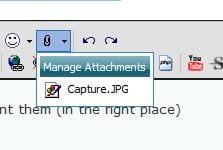
Upload an image using snipping tool and attach to the post using the paper clip icon , now browse and click on the upload button ... etc you know. Now, when a snapshot is uploaded, again click on the paper clip icon , it will look like this
Capture1.JPG
now click on the attached inage, so it will be in your post like
Capture2.JPG
Now move the
 

My Computer

Computer type
PC/Desktop
Computer Manufacturer/Model Number
Self Assembled
OS
Microsoft Windows 10 Pro Insider Preview 64-bit
CPU
Intel(R) Core(TM) i3-4130 CPU @ 3.40GHz
Motherboard
Gigabyte Technology Co., Ltd. B85M-D3H
Memory
Corsair Vengence 4GB x2 (8.00GB Dual-Channel DDR3 @ 798MHz)
Graphics Card(s)
2047MB GeForce GTS 450 (ZOTAC International)
Sound Card
Onboard (Realtek High Definition Audio)
Monitor(s) Displays
LG Flatron E2040T
Screen Resolution
1600x900
Hard Drives
Western Digital 1 TB
Seagate 500 GB
PSU
Corsair VS550
Case
Cooler Master K380
Cooling
Cooler Master Seidon 120V Plus
Keyboard
Logitech MK260r
Mouse
Logitech MK260r
Internet Speed
PMPL Broadband
Antivirus
Windows Defender + MBAM
Browser
Firefox
Other Info
Dell Studio 15" Laptop
Can't you just boot to the Acronis CD and make a backup and then reboot to it and recover the image to the new drive?

You could do the same thing with the Win 7 Backup and Restore, but the total partitioned space would have to be equal to or less than the new drive.

If there is something about the SSDs that take special procedures, then proceed with your idea.
 

My Computer

Computer Manufacturer/Model Number
Homebuilt
OS
Windows 7 x64
CPU
i7-2600K
Motherboard
Asus P8Z77-v Pro
Memory
8 G
Graphics Card(s)
GTX 480
Sound Card
Onboard
Monitor(s) Displays
LG W2753V
Screen Resolution
1920x1080
Hard Drives
Crucial M4 128 G SSD
Cloning as well as image backup and restore are no different with SSDs. The OCZ Forums are littered with different techniques, stories, tweaks, etc.

Vertex, Agility, Turbo, Solid V2, Summit, Colossus and Z-Drive with Microsoft OS.

I think the most critical part of cloning an existing partition or restoring an image backup to a SSD is to ensure the partition is aligned on the SSD. Performance can suffer considerably on misaligned partitions. Many of the imaging software products handle alignment differently. Some can be manipulated to align the partition and some cannot.
Tom
 

My Computer

Computer type
PC/Desktop
Computer Manufacturer/Model Number
Dell: XPS 420 (2), XPS M1330 (several), XPS 14z, Mini 9, Mini 10v
OS
W8 Pro, W7 Ultimate, XP Pro x64, Vista x64, Ubuntu
CPU
Q6600, Q6700, T7500, T7500, N270, N270
Motherboard
Dell
Memory
8GB, 8GB, 4GB, 4GB, 2GB, 2GB
Graphics Card(s)
ATI, nVidia, nVidia, nVidia, Intel, Intel
Monitor(s) Displays
Dell 2408WFP
Hard Drives
A drawer full. OCZ Vertex's in RAID 0. Vertex 3's, Vertex 4, Samsung 830's, Samsung 840's, Intel 330. Don't use dino drives any more except for servers.
Keyboard
Logitech Wave
Internet Speed
29 Mbps DL / .95 Mbps UL
Other Info
New project(2013)...Another low power server. Zotac H67ITX, i3-2100T, Windows Server 2012 Essentials on Samsung SSD.
Previous project...Low power (38-40 watts using Kill-a-Watt) Windows Home Server. Zotac ION (Atom 330, GeForce9400), 4GB RAM, 2x2TB WD Green, IN WIM miniITX Case. Fits on a shelf in laundry closet, practically silent.
Thank you both so much. It'll do for now. I'll fix it up tomorrow if I can. Very late now and got to go to work in the morning :sleepy: Check it out here
Not perfect but I really need sleep

Its nice ! If you think its a bit incomplete, give the final touch next morning. sweet dreams, pal !
 

My Computer

Computer type
PC/Desktop
Computer Manufacturer/Model Number
Self Assembled
OS
Microsoft Windows 10 Pro Insider Preview 64-bit
CPU
Intel(R) Core(TM) i3-4130 CPU @ 3.40GHz
Motherboard
Gigabyte Technology Co., Ltd. B85M-D3H
Memory
Corsair Vengence 4GB x2 (8.00GB Dual-Channel DDR3 @ 798MHz)
Graphics Card(s)
2047MB GeForce GTS 450 (ZOTAC International)
Sound Card
Onboard (Realtek High Definition Audio)
Monitor(s) Displays
LG Flatron E2040T
Screen Resolution
1600x900
Hard Drives
Western Digital 1 TB
Seagate 500 GB
PSU
Corsair VS550
Case
Cooler Master K380
Cooling
Cooler Master Seidon 120V Plus
Keyboard
Logitech MK260r
Mouse
Logitech MK260r
Internet Speed
PMPL Broadband
Antivirus
Windows Defender + MBAM
Browser
Firefox
Other Info
Dell Studio 15" Laptop
Can't you just boot to the Acronis CD and make a backup and then reboot to it and recover the image to the new drive?

You could do the same thing with the Win 7 Backup and Restore, but the total partitioned space would have to be equal to or less than the new drive.

If there is something about the SSDs that take special procedures, then proceed with your idea.

As I said, if you do a web search for this you will find that almost everyone says it can't be done. An example is this
Well, logically you would think that all your answers should be correct. However, I'm afraid you're all grossly mistaken about this. I just bought an OCZ SSD and have spent the last 5 nights trying every way possible to restore my acronis trueimage 10 backup from a standard SATA HDD to this new drive. It doesn't work. Period. From what I can make out during my 20 + attempts (thank God SATA to SATA imaging only takes about 2 minutes for my 6GB image) it's a problem with the MBR and the physical structure of a platter based HDD compared to a SSD. Every single time it fails while verifying the DMI pool information. If you think about this though, the HDD MBR is all composed of pointers referring to sectors and clusters (which actually tell the physical location of the data to the drive controller), this isn't the case with a memcell based SSD. I was reading on Acronis' website and it looks like they have a working solution but it appears you have to buy it as an addon pack (first time I've ever been disappointed with Acronis' attitude, since I think this should be a free enhancement since everyone is pushing SSD down our throats). Anyways, day 5 and I've broken out the old XP CDs and am reinstalling manually. I'm sure you could restore DATA to the drive just fine if you have BEX or something else that will allow you to create a backup in a non-image format. Sorry to be the bearer of bad news, but take it from an experienced engineer who's been down this road. Acronis+SataHDD+SSD=FAIL (unless you want to buy the fix).
more


Now, however, SevenForums is the first entry when searching this :)
 

My Computer

Computer Manufacturer/Model Number
tw33k
OS
Windows 7 Ultimate (x64) SP1
CPU
Intel 3770k 4.6GHz
Motherboard
ASUS Maximus V Formula
Memory
8GB (2x 4GB) Crucial Ballistix
Graphics Card(s)
Sapphire 7950 (1060/1600)
Sound Card
On Board Realtek HD Audio
Monitor(s) Displays
27" Acer B273HU (via HDMI)
Screen Resolution
2048 x 1152
Hard Drives
Crucial M4 128GB
2TB WD Black
1TB Samsung F3 SATA
1TB WD Elite External
2TB WD USB 3.0
PSU
Corsair AX750 Gold
Case
Corsair Obsidian 800DW
Cooling
Corsair H100 (2x AP-121/2x UK-3000 push/pull)
Keyboard
Microsoft Wireless 5000
Mouse
Microsoft Wireless 5000
Internet Speed
5mb/s
Other Info
Logitech z-2300 2.1 speakers
Lamptron FC-5 v2
zrtom touched on an interesting question though. How did you go about the alignment. Did you define the aligned partition first. And there are some other little nits that the Win7 installer does automatically (e.g. switch off defrag). That you should not forget.
 

My Computer

Computer Manufacturer/Model Number
HP, Dell, Gateway, Toshiba - 4 laptops and 2 desktops
OS
Vista, Windows7, Mint Mate, Zorin, Windows 8
CPU
from 1.6GHz Duo to i7
Monitor(s) Displays
2x HP w2207
Hard Drives
5x HDD, 7x SSD, 12x Externals
Keyboard
with trackball - no mices
Mouse
Trackball mice
Internet Speed
DSL 6000
tw33k,
Have you tried just a plain clone or backup/restore without any of the extra work? The OCZ Forums are one of the more active Forums for SSDs and people clone their OSs to SSDs regularly and with no problems (except getting the alignment correct). I've cloned several successfully and indeed, straight cloning was the only way for my hack to work to install Windows Home Server to a hard drive less than 75GB.

It appears some people may have a problem cloning due to either their motherboard (nVidia stands out) or whether the clone-donor OS was factory installed and the manufacturer uses a proprietary MBR.

Looking back at my notes from January of this year, I see where in some cases when an applied image or cloned partition will not boot, that I ran "Repair MBR" with Partition Wizard and that fixed the problem. This might be a key element of any cloning to an SSD where problems booting arise.

I think the post you quoted from serverfault.com was from someone who had issues other than simply cloning an OS to a SSD. Although he speaks with great authority, what he says goes against what appears on sited dedicated to SSDs, like the OCZ Forum.

I'm not saying your tutorial isn't a good idea, just suggesting that maybe you might add a blurb that says some people can clone directly and with no extra steps (except maybe running Repair MBR).
Tom
 

My Computer

Computer type
PC/Desktop
Computer Manufacturer/Model Number
Dell: XPS 420 (2), XPS M1330 (several), XPS 14z, Mini 9, Mini 10v
OS
W8 Pro, W7 Ultimate, XP Pro x64, Vista x64, Ubuntu
CPU
Q6600, Q6700, T7500, T7500, N270, N270
Motherboard
Dell
Memory
8GB, 8GB, 4GB, 4GB, 2GB, 2GB
Graphics Card(s)
ATI, nVidia, nVidia, nVidia, Intel, Intel
Monitor(s) Displays
Dell 2408WFP
Hard Drives
A drawer full. OCZ Vertex's in RAID 0. Vertex 3's, Vertex 4, Samsung 830's, Samsung 840's, Intel 330. Don't use dino drives any more except for servers.
Keyboard
Logitech Wave
Internet Speed
29 Mbps DL / .95 Mbps UL
Other Info
New project(2013)...Another low power server. Zotac H67ITX, i3-2100T, Windows Server 2012 Essentials on Samsung SSD.
Previous project...Low power (38-40 watts using Kill-a-Watt) Windows Home Server. Zotac ION (Atom 330, GeForce9400), 4GB RAM, 2x2TB WD Green, IN WIM miniITX Case. Fits on a shelf in laundry closet, practically silent.
Back
Top