
Solved HDD in device manager, not in My Computer

BringMeASunkist

New member
Local time
6:46 AM
Messages
9
Bios and my device manager are both showing my local hard drives but I cannot seem to access one of the hard drives. Anybody ever seen this problem before?
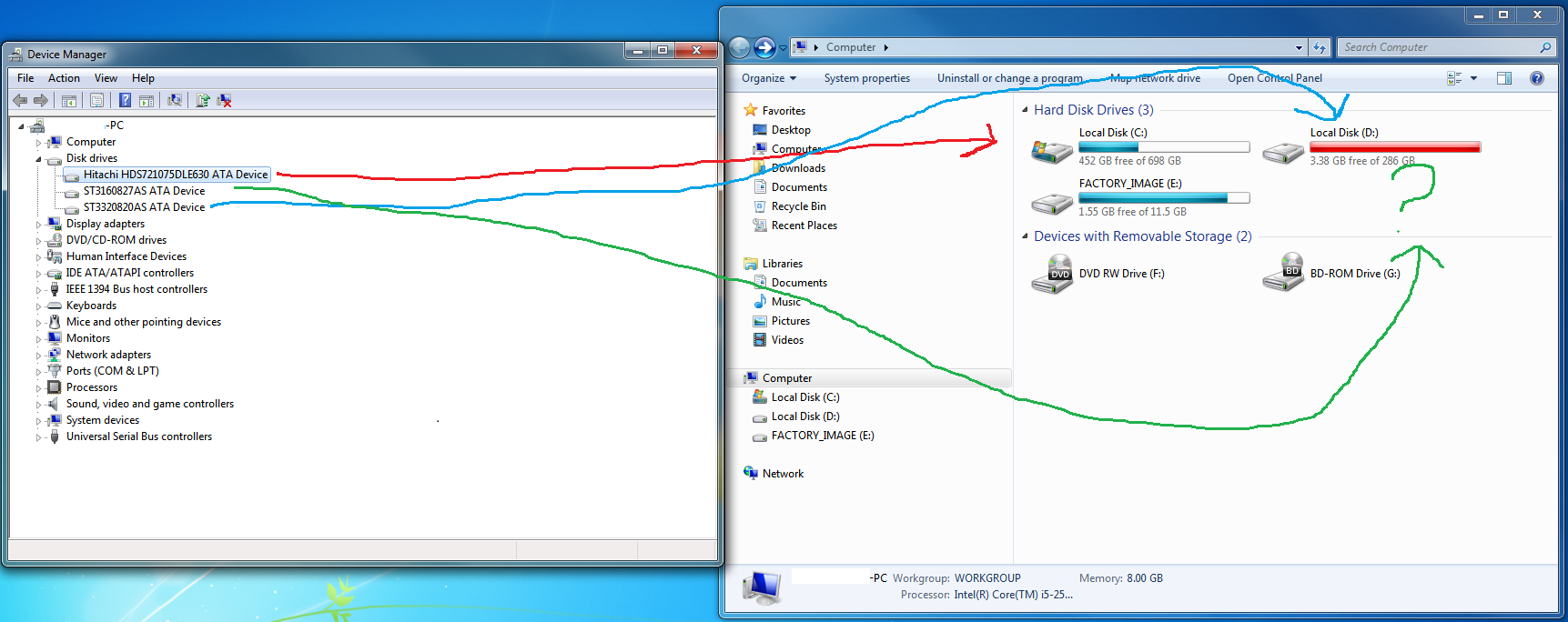
fp2mx.png
 

My Computer My Computer

OS
Windows 7 64bit
Open Disk Management and see what it says there. You should find it there if the drive is currently physically attached.
 

My Computer My Computer

OS
Windows 7 Ultimate x64
I never knew that window existed. Alas, no avail. The drive is visible in the disk management window but does not seem accessible, a problem exclusive to that drive alone.

nvzAU.png
 

My Computer My Computer

OS
Windows 7 64bit
Well now that you're there, all you have to do is give it a drive letter to be able to acces it normally.
 

My Computer My Computer

OS
Windows 7 Ultimate x64
My my what an easy fix. Thanks a lot for the walk through.
 

My Computer My Computer

OS
Windows 7 64bit
You're quite welcome! And welcome to the forum!
 

My Computer My Computer

OS
Windows 7 Ultimate x64
Back
Top