HDD Initialization Problem

John 99

New member
Local time
3:58 PM
Messages
5
A few threads on this but nothing seems to cover my problem. Briefly:

1. I'm using a so far trouble free home build, quad core, 8GB DDR2, desktop running W7 Pro 64 whos main function is editing photgraphic images. I have 4 WD internal HDDs (2x 150 GB, 1x25GB and 1x 1TB) and an external USB3 (via a card) linked 1TB WD External drive.
2. The System drive carries only the OS and Appl. software. All other files are on the 250GB drive which is running out of space. The remaining drives are used for back up, Photoshop scratch disk and archiving.
3. I have consequently bought and tried to install a 2.0TB WD Caviar Black (WD2002FAEX) to replace the 250GB.
4. On boot up, the system successfully installs the driver.
5. The drive is recognised in the BIOS set up, in "Disk Management" and the Device Manager confirms that it is functioning properly, ready for use and that I have the latest driver.
6. Despite all this the usual "needs to be initialised message" doesn't appear and right clicking the partition area for the disk in Disk Management doesn't offer an option to start the initialisation process (not for this drive or any drive for that matter).
7. I have tried de-installing and re-installing after a re-boot with the same result. I have also tried connecting the drive to another SATA port but to no effect.
8. If I reconnect the old drive, the system performs normally and so I don't think that there is a motherboard or connection problem.

I have reached the point of believing that it is the drive that is at fault but before I make the journey back to the supplier, I wondered whether I was missing something. Can anyone help please?
 

My Computer

Computer Manufacturer/Model Number
Home Build
OS
Windows 7 Pro
CPU
Intel Core 2 Quad 3.0Ghz
Motherboard
ASUS
Memory
8GB
Graphics Card(s)
ATI Radeon HD 4600 Series
Sound Card
On Board
Monitor(s) Displays
ASUS Pro Art 24"
Hard Drives
2 off WD 150 GB
1 off WD 250 GB
1 off WD 1 TB
PSU
600 Watt
Case
Tsunami Dream (Manufacturer ??)
Cooling
CPU plus 2 off Case fans(front and Back)
Welcome John 99 :D

Can you post a full size screen snip of your Disk Management of your HD's ?
 

Attachments

  • Disk_Management_New_2tbHD.JPG
    Disk_Management_New_2tbHD.JPG
    108.7 KB · Views: 41

My Computer

Computer type
PC/Desktop
Computer Manufacturer/Model Number
Built them myself, Science Experiments !
OS
Win7 Enterprise, Win7 x86 (Ult 7600), Win7 x64 Ult 7600, TechNet RTM on AMD x64 (2.8Ghz)
CPU
AMD fx8350 4ghz, AMD-32 2400mhz, AMD-64 3200mhz, AMDx64 2.8G
Motherboard
SIS 755, ECS-K8M890M-M (Ult 7600), GigaByte & others
Memory
2gb, 4gb on the Ult 7600, 4gb on Technet RTM, 32gb on FX8350
Graphics Card(s)
Draw my own Graphics, several nVidia cards
Sound Card
on motherboard
Monitor(s) Displays
19" flat scr, 28" I-Inc widescr,22" Emprex Widescr, 23" Acer
Screen Resolution
1280 x 1024, 1440 x 900, 1920 x 1080
Hard Drives
6 pata Ide HD's & 2 Sata HD's
added 80gb external on Ult 7600 computer,
numerous extra 1tb, 2TB, 3Tb SATA HD's
A collection of ext HD Docks w/ HDs
PSU
430w, 550w, 600w, 700, 800, etc
Case
All Generic Full Towers
Cooling
Open Air & a few fans, some w/ colored LEDs
Keyboard
Compaq & Dell recycled from GoodWill
Mouse
Made in China Optical Wired Mouse
Internet Speed
Fast Cable InterNet
Antivirus
AVG Free on 24 different Desktops, NO Problems!
Browser
IE 8 is preferred, but use FireFox sometimes
Other Info
Linksys Routers, switches, & Hubs
Too Many USB Flash Drives to count, Biggest is 64GB !
Eight computers in my home network.
Sixteen computers at my business network.
Linked via TeamViewer !
Lots of old used spare computer parts everywhere!
Thanks for the quick response Doc. Do you want it as it appears with the new drive connected or just as is? Need to reconnect the new drive if its the former (a lot of grovelling on the floor).
 

My Computer

Computer Manufacturer/Model Number
Home Build
OS
Windows 7 Pro
CPU
Intel Core 2 Quad 3.0Ghz
Motherboard
ASUS
Memory
8GB
Graphics Card(s)
ATI Radeon HD 4600 Series
Sound Card
On Board
Monitor(s) Displays
ASUS Pro Art 24"
Hard Drives
2 off WD 150 GB
1 off WD 250 GB
1 off WD 1 TB
PSU
600 Watt
Case
Tsunami Dream (Manufacturer ??)
Cooling
CPU plus 2 off Case fans(front and Back)
I guess, both ways would even be better.
 

My Computer

Computer type
PC/Desktop
Computer Manufacturer/Model Number
Built them myself, Science Experiments !
OS
Win7 Enterprise, Win7 x86 (Ult 7600), Win7 x64 Ult 7600, TechNet RTM on AMD x64 (2.8Ghz)
CPU
AMD fx8350 4ghz, AMD-32 2400mhz, AMD-64 3200mhz, AMDx64 2.8G
Motherboard
SIS 755, ECS-K8M890M-M (Ult 7600), GigaByte & others
Memory
2gb, 4gb on the Ult 7600, 4gb on Technet RTM, 32gb on FX8350
Graphics Card(s)
Draw my own Graphics, several nVidia cards
Sound Card
on motherboard
Monitor(s) Displays
19" flat scr, 28" I-Inc widescr,22" Emprex Widescr, 23" Acer
Screen Resolution
1280 x 1024, 1440 x 900, 1920 x 1080
Hard Drives
6 pata Ide HD's & 2 Sata HD's
added 80gb external on Ult 7600 computer,
numerous extra 1tb, 2TB, 3Tb SATA HD's
A collection of ext HD Docks w/ HDs
PSU
430w, 550w, 600w, 700, 800, etc
Case
All Generic Full Towers
Cooling
Open Air & a few fans, some w/ colored LEDs
Keyboard
Compaq & Dell recycled from GoodWill
Mouse
Made in China Optical Wired Mouse
Internet Speed
Fast Cable InterNet
Antivirus
AVG Free on 24 different Desktops, NO Problems!
Browser
IE 8 is preferred, but use FireFox sometimes
Other Info
Linksys Routers, switches, & Hubs
Too Many USB Flash Drives to count, Biggest is 64GB !
Eight computers in my home network.
Sixteen computers at my business network.
Linked via TeamViewer !
Lots of old used spare computer parts everywhere!
Do not right click on the partition area in Disk Management but in front of that where it says Disk0, Disk1, etc.
 

My Computer

Computer Manufacturer/Model Number
HP, Dell, Gateway, Toshiba - 4 laptops and 2 desktops
OS
Vista, Windows7, Mint Mate, Zorin, Windows 8
CPU
from 1.6GHz Duo to i7
Monitor(s) Displays
2x HP w2207
Hard Drives
5x HDD, 7x SSD, 12x Externals
Keyboard
with trackball - no mices
Mouse
Trackball mice
Internet Speed
DSL 6000
Will do Doc. WHS thanks for the suggestion but I have clicked every possible location. I will try again once I have the new drive re-connected.
 

My Computer

Computer Manufacturer/Model Number
Home Build
OS
Windows 7 Pro
CPU
Intel Core 2 Quad 3.0Ghz
Motherboard
ASUS
Memory
8GB
Graphics Card(s)
ATI Radeon HD 4600 Series
Sound Card
On Board
Monitor(s) Displays
ASUS Pro Art 24"
Hard Drives
2 off WD 150 GB
1 off WD 250 GB
1 off WD 1 TB
PSU
600 Watt
Case
Tsunami Dream (Manufacturer ??)
Cooling
CPU plus 2 off Case fans(front and Back)
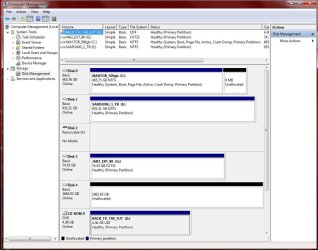
These two screen shots are both taken with the new disk connected but the second shot is identical to that with the old drive except that the old drive appears as Drive "D" including the drop down menu. If you need it I will re-connect the old disk and give you another screen shot.

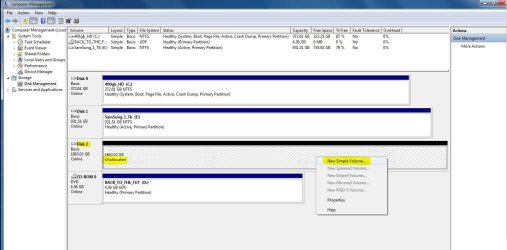
WHS, I have tried clicking every where once more. The location you suggest gives a different drop down menu but there is no option to inialise the disk.
 

Attachments

My Computer

Computer Manufacturer/Model Number
Home Build
OS
Windows 7 Pro
CPU
Intel Core 2 Quad 3.0Ghz
Motherboard
ASUS
Memory
8GB
Graphics Card(s)
ATI Radeon HD 4600 Series
Sound Card
On Board
Monitor(s) Displays
ASUS Pro Art 24"
Hard Drives
2 off WD 150 GB
1 off WD 250 GB
1 off WD 1 TB
PSU
600 Watt
Case
Tsunami Dream (Manufacturer ??)
Cooling
CPU plus 2 off Case fans(front and Back)
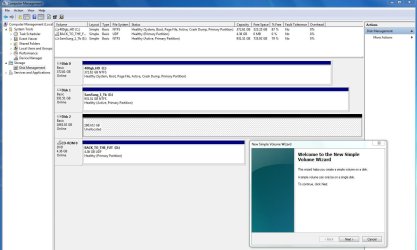
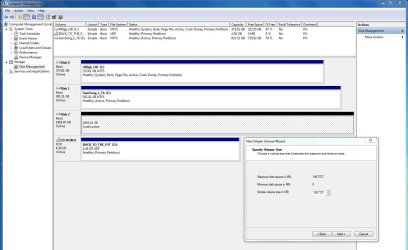
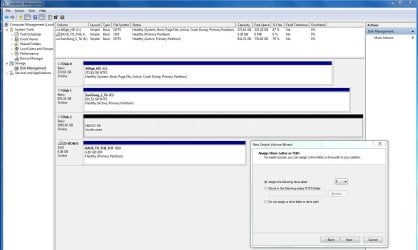
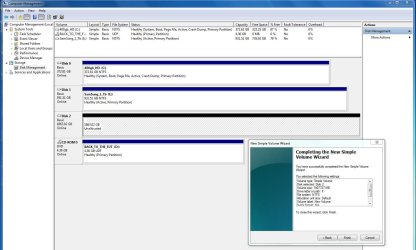
Looks like you just need to click on New Simple Volume & follow the steps.
 

Attachments

  • Disk_mgmt_New_HD_Simple_Vol.JPG
    Disk_mgmt_New_HD_Simple_Vol.JPG
    123 KB · Views: 54
  • Disk_mgmt_New_HD_Simple_Vol_02.JPG
    Disk_mgmt_New_HD_Simple_Vol_02.JPG
    136.7 KB · Views: 27
  • Disk_mgmt_New_HD_Simple_Vol_03.JPG
    Disk_mgmt_New_HD_Simple_Vol_03.JPG
    133.6 KB · Views: 21
  • Disk_mgmt_New_HD_Simple_Vol_04.JPG
    Disk_mgmt_New_HD_Simple_Vol_04.JPG
    132.5 KB · Views: 17
  • Disk_mgmt_New_HD_Simple_Vol_05.JPG
    Disk_mgmt_New_HD_Simple_Vol_05.JPG
    146.3 KB · Views: 18
  • Disk_mgmt_New_HD_Simple_Vol_06.JPG
    Disk_mgmt_New_HD_Simple_Vol_06.JPG
    151 KB · Views: 13

My Computer

Computer type
PC/Desktop
Computer Manufacturer/Model Number
Built them myself, Science Experiments !
OS
Win7 Enterprise, Win7 x86 (Ult 7600), Win7 x64 Ult 7600, TechNet RTM on AMD x64 (2.8Ghz)
CPU
AMD fx8350 4ghz, AMD-32 2400mhz, AMD-64 3200mhz, AMDx64 2.8G
Motherboard
SIS 755, ECS-K8M890M-M (Ult 7600), GigaByte & others
Memory
2gb, 4gb on the Ult 7600, 4gb on Technet RTM, 32gb on FX8350
Graphics Card(s)
Draw my own Graphics, several nVidia cards
Sound Card
on motherboard
Monitor(s) Displays
19" flat scr, 28" I-Inc widescr,22" Emprex Widescr, 23" Acer
Screen Resolution
1280 x 1024, 1440 x 900, 1920 x 1080
Hard Drives
6 pata Ide HD's & 2 Sata HD's
added 80gb external on Ult 7600 computer,
numerous extra 1tb, 2TB, 3Tb SATA HD's
A collection of ext HD Docks w/ HDs
PSU
430w, 550w, 600w, 700, 800, etc
Case
All Generic Full Towers
Cooling
Open Air & a few fans, some w/ colored LEDs
Keyboard
Compaq & Dell recycled from GoodWill
Mouse
Made in China Optical Wired Mouse
Internet Speed
Fast Cable InterNet
Antivirus
AVG Free on 24 different Desktops, NO Problems!
Browser
IE 8 is preferred, but use FireFox sometimes
Other Info
Linksys Routers, switches, & Hubs
Too Many USB Flash Drives to count, Biggest is 64GB !
Eight computers in my home network.
Sixteen computers at my business network.
Linked via TeamViewer !
Lots of old used spare computer parts everywhere!
Problem solved Doc. I've always come up against the initialisation request before and I was a bit cautious about trying some other option, not really knowing the implications. So you've not only provided the solution but you have added to my meagre knowledge. Thank you so very much.
 

My Computer

Computer Manufacturer/Model Number
Home Build
OS
Windows 7 Pro
CPU
Intel Core 2 Quad 3.0Ghz
Motherboard
ASUS
Memory
8GB
Graphics Card(s)
ATI Radeon HD 4600 Series
Sound Card
On Board
Monitor(s) Displays
ASUS Pro Art 24"
Hard Drives
2 off WD 150 GB
1 off WD 250 GB
1 off WD 1 TB
PSU
600 Watt
Case
Tsunami Dream (Manufacturer ??)
Cooling
CPU plus 2 off Case fans(front and Back)
Your Welcome John :)

Check out the tutorials section, there is guggaplex of info there ;)
 

My Computer

Computer type
PC/Desktop
Computer Manufacturer/Model Number
Built them myself, Science Experiments !
OS
Win7 Enterprise, Win7 x86 (Ult 7600), Win7 x64 Ult 7600, TechNet RTM on AMD x64 (2.8Ghz)
CPU
AMD fx8350 4ghz, AMD-32 2400mhz, AMD-64 3200mhz, AMDx64 2.8G
Motherboard
SIS 755, ECS-K8M890M-M (Ult 7600), GigaByte & others
Memory
2gb, 4gb on the Ult 7600, 4gb on Technet RTM, 32gb on FX8350
Graphics Card(s)
Draw my own Graphics, several nVidia cards
Sound Card
on motherboard
Monitor(s) Displays
19" flat scr, 28" I-Inc widescr,22" Emprex Widescr, 23" Acer
Screen Resolution
1280 x 1024, 1440 x 900, 1920 x 1080
Hard Drives
6 pata Ide HD's & 2 Sata HD's
added 80gb external on Ult 7600 computer,
numerous extra 1tb, 2TB, 3Tb SATA HD's
A collection of ext HD Docks w/ HDs
PSU
430w, 550w, 600w, 700, 800, etc
Case
All Generic Full Towers
Cooling
Open Air & a few fans, some w/ colored LEDs
Keyboard
Compaq & Dell recycled from GoodWill
Mouse
Made in China Optical Wired Mouse
Internet Speed
Fast Cable InterNet
Antivirus
AVG Free on 24 different Desktops, NO Problems!
Browser
IE 8 is preferred, but use FireFox sometimes
Other Info
Linksys Routers, switches, & Hubs
Too Many USB Flash Drives to count, Biggest is 64GB !
Eight computers in my home network.
Sixteen computers at my business network.
Linked via TeamViewer !
Lots of old used spare computer parts everywhere!
Back
Top