- Local time
- 11:11 PM
- Messages
- 70
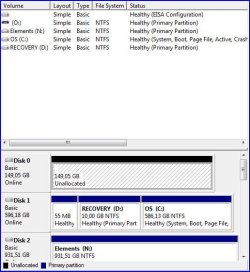
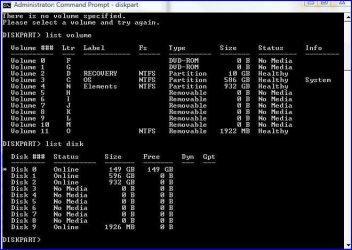
Finally installed my new SSD. I plan to install W7 64 bit on it for dual boot with Vista X86. First attached physically on SATA 4 (0 and 1 is running my two Raid disks and 2 & 3 are my DVD players), next went into BIOS and activated disk 5. Booted and went into Disk Mangement and was asked if I wanted to install the disk as MBR or a GPT, chose MBR. Well, it settled as Disk 0 (my Raid-0 Disks with Drive C and D are disk 1). It reports itself as Intel SS DSA2M160G2GC SCSI Disk Drive in the Device Manager. The disk is an Intel SSD X25-M G2 (160 GB). Not sure why is says SCSI.
I expected to be able to assign a drive letter and format, but those options were not available when I right clicked on the drive in disk management.
Have I done something wrong? What need I do?
Thanks for any help.
Edit: It reports itself correctly in BIOS.
I expected to be able to assign a drive letter and format, but those options were not available when I right clicked on the drive in disk management.
Have I done something wrong? What need I do?
Thanks for any help.
Edit: It reports itself correctly in BIOS.
Last edited:
My Computer
- Computer Manufacturer/Model Number
- Dell XPS720
- OS
- Windows Seven Ultimate 64bit + Vista Ultimate 32bit SP2 Dual Boot
- CPU
- Intel Quad Q6600 2.40GHz
- Motherboard
- Dell 0YU822, NVIDIA nForce 680i SLI SPP / SLI MCP
- Memory
- 4GB DDR2 800MHz
- Graphics Card(s)
- Gainward GeForce GTX 560 Ti, 1024 MB GDDR5
- Sound Card
- Creative SB X-Fi Xtreme Gamer
- Monitor(s) Displays
- Dell 2407WFP-HC
- Screen Resolution
- 1920 x 1200
- Hard Drives
- NVIDIA 640GB SATA Raid 0 (2x320GB) (7200 rpm) for Vista,
Intel X25-M G2 SSD 160 GB for W7,
Maxtor OT III External HDD,
WD Elements 1TB External HDD
- Keyboard
- Logitech MX 3200
- Mouse
- Logitech MX 3200 Laser
- Internet Speed
- 100/20 MB
- Other Info
- M779 PCIe PAL/SECAM/DVB-T Desktop TV Tuner. Broadcom NetXtreme 57xx Gigabit Controller. ASUS U3S6 SATA III/USB3 PSI Ex x4 Controller Card.