
Solved HDD Issue

jpolacko

Minion
Member
VIP
Local time
4:13 PM
Messages
38
Location
Beloit, Wisconsin
Hey everyone! I'm having issues with some unallocated space Windows won't let me extend C: with. I have tried Partition Wizard and all they will let me do is create a simple volume. Little confused on how to get Windows to let me extend C: using those two unallocated spaces.
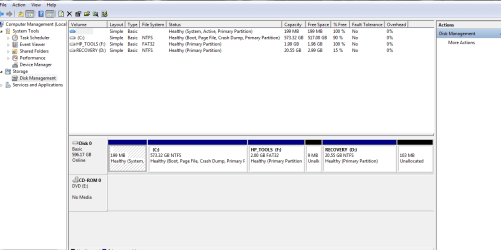
Disk Management.PNG
 

My Computer

Computer type
Laptop
Computer Manufacturer/Model Number
HP Pavillion DV6 WW146AC
OS
Opensuse 42.2 (Windows 7 Pro through Virtual box)
CPU
Intel Core i5 - M460 @ 2.53 GHz
Motherboard
Hp factory board
Memory
6 GB
Graphics Card(s)
Intel HD Graphics Card
Sound Card
IDT High Def sound card
Hard Drives
Toshiba 600 GB as well as Samsung 600 GB SSD
Keyboard
HP Backlit Keyboard
Mouse
USB Standard Mouse
Internet Speed
60 Mbps download 5 Mbps upload
Antivirus
None
Browser
IE 11 Metro and Firefox v48.0
Other Info
Custom Built Windows Server 2008 R2 used for storage server, DHCP server, Primary DNS server. Novell Suse Server running 2 custom built desktop that have Novell Netware installed.
Windows Disk Management should let you add the 9 mb unallocated to F only and the 103 mb unallocated to D only.

If you want to add those spaces to any other partition such as C, you would need Partition Wizard. Not sure where you are going wrong with it.

I think there are tutorials for it on this site and I know there are at Partition Wizard's web site.
 

My Computer

Computer type
PC/Desktop
Computer Manufacturer/Model Number
Ignatz Special; 4 speed manual gearbox; factory air conditioning; one of one
OS
Windows 7 Home Premium SP1, 64-bit
CPU
Intel Skylake i5-6600K, not overclocked
Motherboard
AsRock Z170M Extreme 4, micro ATX
Memory
8 GB HyperX DDR4-2666 (2 x 4 GB)
Graphics Card(s)
none; graphics are integrated on CPU
Sound Card
onboard: Realtek ALC1150; external: USB Behringer UF0-202
Monitor(s) Displays
Dell S2340M 23 inch IPS
Screen Resolution
1600 x 900
Hard Drives
System: Crucial MX100 series SSD, 128 GB;
Data: Samsung Spinpoint 103SJ, 1 TB;
Backup: WD Caviar Green WD30EZRX-00D8PB0, 3 TB
PSU
Rosewill SilentNight 500 watt fanless, semi-modular
Case
Antec Solo II
Cooling
Noctua NH-U12S; Noctua F12 intake, Noctua S12A exhaust
Keyboard
Microsoft 200 6JH-00001 USB
Mouse
Dell or Microsoft optical wired; USB
Antivirus
Microsoft Security Essentials and Malwarebytes Premium
Browser
Pale Moon
Other Info
All fans PWM; speeds at idle: CPU circa 500 rpm; intake circa 600 rpm; exhaust circa 600 rpm; CPU temps 27 idle and 47 C load in a warm room (27 C/81 F) when running Intel Extreme Tuning Utility stress test.
It is certainly possible but why bother. The disk space you would gain is totally insignificant, about .02%.
 

My Computer

Computer type
PC/Desktop
Computer Manufacturer/Model Number
HP
OS
Windows 7 Pro 64 bit
CPU
Xeon W3520
Memory
8 GB
Graphics Card(s)
Nvidia Geforce 210
It is certainly possible but why bother. The disk space you would gain is totally insignificant, about .02%.

Yea it would be insignificant. Thanks for the response guy's! I'll just leave it.. ;)
 

My Computer

Computer type
Laptop
Computer Manufacturer/Model Number
HP Pavillion DV6 WW146AC
OS
Opensuse 42.2 (Windows 7 Pro through Virtual box)
CPU
Intel Core i5 - M460 @ 2.53 GHz
Motherboard
Hp factory board
Memory
6 GB
Graphics Card(s)
Intel HD Graphics Card
Sound Card
IDT High Def sound card
Hard Drives
Toshiba 600 GB as well as Samsung 600 GB SSD
Keyboard
HP Backlit Keyboard
Mouse
USB Standard Mouse
Internet Speed
60 Mbps download 5 Mbps upload
Antivirus
None
Browser
IE 11 Metro and Firefox v48.0
Other Info
Custom Built Windows Server 2008 R2 used for storage server, DHCP server, Primary DNS server. Novell Suse Server running 2 custom built desktop that have Novell Netware installed.
I would do what Ignatz says - it's so simple. Cleans up the disk management picture.
 

My Computer

Computer Manufacturer/Model Number
HP, Dell, Gateway, Toshiba - 4 laptops and 2 desktops
OS
Vista, Windows7, Mint Mate, Zorin, Windows 8
CPU
from 1.6GHz Duo to i7
Monitor(s) Displays
2x HP w2207
Hard Drives
5x HDD, 7x SSD, 12x Externals
Keyboard
with trackball - no mices
Mouse
Trackball mice
Internet Speed
DSL 6000
Back
Top