HDD Not Responding

kbronski

New member
Power User
Local time
12:02 PM
Messages
287
I read through this thread already, but I'm curious if there's something else afoot here.

See, I am running two drives in my laptop; a 250GB SSD for my primary system/software drive, and my laptop's original 5400RPM 750GB HDD is mounted in the optical bay. The HDD has been having issues lately where it'll hang (stop responding). This happened when I'm editing videos, listening to music, or really doing anything in general. I'm not sure why it's doing this, either; I don't know if there's a power issue, where the mobo header that had previously gone to the ODD simply can't power the HDD (I know some ODDs run on ~5v where hdds tend to run on ~12v). I don't know the exact specs for that on mine. Laptop is what you see for system specs in signature. I wonder if maybe the HDD is just old and needs to be replaced outright. Maybe I could throw a 500GB one in there from work and run that for a few days to see if there are any hangups with it.

Thoughts? Ideas? Concerns? Witty comments?
 

My Computer

Computer type
PC/Desktop
Computer Manufacturer/Model Number
Custom
OS
Windows 7 Pro x64
CPU
Intel Core i7-5820k
Motherboard
ASUS X99-PRO
Memory
32GB Kingston HyperX FURY DDR4-2400
Graphics Card(s)
EVGA Geforce GTX970
Monitor(s) Displays
ASUS VC239h
Screen Resolution
1920x1080
Hard Drives
Samsung 850 EVO SSD 250GB x2
750 GB HDD
3TB HDD
PSU
Corsair RM750
Case
Fractal Design Define R5
Cooling
Noctua NH-D15
Keyboard
Corsair Strafe RGB
Mouse
Logitech G502
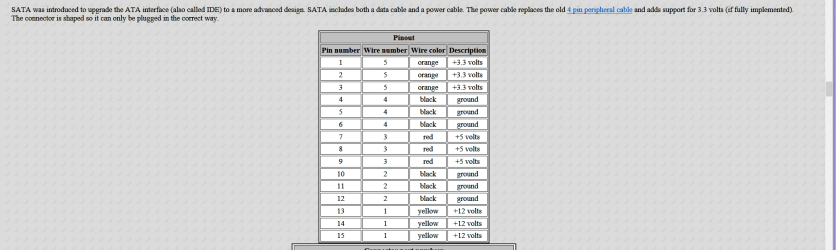
Hiyya K mate I am sure the power connectors for ODD's and HDD's should carry both voltages see here - scroll down to the pic of the pins arrangement (and see pic) All about the various PC power supply cables and connectors
What I would like you to do is read and run my ditty
Using HW Info
PART A:
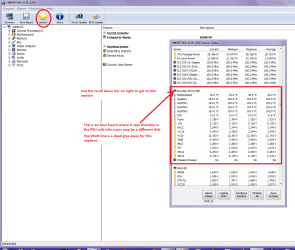
You can test the volts on the PSU with HW Info HWiNFO, HWiNFO32/64 - Download < download theright bit version and close the right hand window select Sensors and scrolldown to the power section where you will see what the volts are doing see mypic. Now the section you want will be labelled - fpr example Asus boardsusually have "Nuvoton" and Gigabyte boards "ITE" in anycase the section you want will have Vbatt or VBAT in it (dead give away)
The original right hand window shows the machine running and is handy for thatbut for looking at the components in some detail close it and use the main lefthand side panel
FOR OTHER COMPONENTS
PART B:
Open each small square with + in it on the section the components are in andthen click on the individual component/s (it will highlight in blue) - in theright hand side will appear all sorts of details including brands speeds andother essential info that particular device. See pic for example.
Use PART A: my pic shos the section of the Asus brand boards other can be different like Gigabyte is usually ITE anyway the Vbatt is the give a way

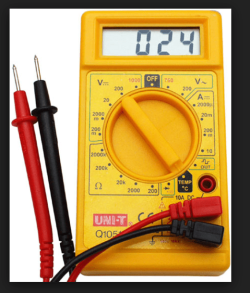
If this comes up ok you might be as well to check the cables mate with a digital multimeter to make sure the 12v is coming through - they are real cheap to buy and worth it for picking electrical problems.

The it might be onto HDD testing:(
 

Attachments

  • SATA POWER.PNG
    SATA POWER.PNG
    28 KB · Views: 1
  • HW INFO DESKTOP PSU.PNG
    HW INFO DESKTOP PSU.PNG
    49.8 KB · Views: 1
  • DIGITAL MULTIMETER.PNG
    DIGITAL MULTIMETER.PNG
    119.8 KB · Views: 25

My Computer

Computer type
PC/Desktop
Computer Manufacturer/Model Number
Own build (new) Desk1 / Asus ROG Win 7 / Desk2 1st build
OS
Desk1 7 Home Prem / Desk2 10 Pro / Main lap Asus ROG 10 Pro 2 laptop Toshiba 7 Pro Asus P2520 7 & 10
CPU
Desk1 i5 3750K / Laptop i7 GTX 860M / Desk2 i5 2500
Motherboard
Desk1 Asus P877-V / Desk2 Gigabyte H67 UD3H / Laptop ?
Memory
Desk1 8GB (1866) / Desk2 16GB (1333) / Laptop 8Gb DDR3
Graphics Card(s)
Desk 1& 2NVidia GTX 650 & Laptops on board Intel
Sound Card
Desk 1 & 2 -XONAR DG Realtek High Def audio Laptop
Monitor(s) Displays
Desk 1 Benq HD 2450 / Desk2 Philips 24" / Laptop 17.5"
Screen Resolution
1920x1080 D1 & D2 & Laptop 1
Hard Drives
Desk1 Samsung 120GB 830 SSD
Asus ROG 256GB 850 Pro SSD
Desk2 Samsung 840 256 SSD
Toshiba 120GB EVO
PSU
Desk 1 Corsair HX 1050/ Laptop ? / Desk 2 Corsair HX 650
Case
Desk 1 Cooler HAF XM ? Toshiba laptop / Desk2 Coolermaster
Cooling
Fans on all Desk1 -2 Desk2 - all Coolermasters 5 Laptop ?
Keyboard
Desk 1 MS Sidewinder X6 Desk 2 MS Sidewinder X 4
Mouse
Desk 1&2 - Gigabyte MS 900 gamer - laptop - Logitec wireless
Internet Speed
ADSL2+
Other Info
One other Desktop (tester) and spare Toshba laptop both with SSD's
Running Kaspersky 2016 ISS on all machines config'd identically
Logitec audio stereo systems on each machine (x3)
Canon MG5250MFC
Router/modem TP-Link running WPA2SK

My Computers

System One System Two

  • Computer type
    PC/Desktop
    Computer Manufacturer/Model Number
    ALWAYS UNDER CONSTRUCTION
    OS
    Windows 11 Pro
    CPU
    Ryzen 9 5900X
    Motherboard
    Asus X570 Crosshair Viii Hero
    Memory
    32GB G Skill DDR4-3600
    Graphics Card(s)
    EVGA RTX 3080 FTW 3 Ultra
    Sound Card
    On Board/Sennheiser PC37X Headset
    Monitor(s) Displays
    3 X Asus 27"
    Screen Resolution
    2560x1440
    Hard Drives
    2 X 1 TB NVME drives
    PSU
    EVGA 850
    Case
    Phanteks Eclipse P400A
    Cooling
    EVGA 280 AIO
    Keyboard
    Logitech G510s/ Logitech G13
    Mouse
    Logitech G502
    Internet Speed
    24/1
    Antivirus
    ESET/MBAM Pro/SAS Pro
    Browser
    Chrome/ Firefox/ Edge
  • Computer type
    Laptop
    System Manufacturer/Model Number
    Dell 16 Plus
    OS
    Windows 11 Pro
    CPU
    Intel Ultra 9 288V
    Memory
    32 GB LPDDR5X 8533
    Monitor(s) Displays
    16" Mini-LED HDR600 Touch 90 Hz
    Screen Resolution
    2560X1600
    Hard Drives
    1 TB NVME
Hey guys,

First of all, sorry for the misleading H/W info; it's a laptop, not a desktop. Secondly, I've been using it for over 4 years now. It's gone through a motherboard replacement, two fan replacements, and as of late hasn't been able to detect batteries. None of this bothered me until my drive started to go.

essenbe, thanks for your recommendation; I'm also thinking it's the drive, since it's old and has seen numerous installs, unspoken terabytes of data, and a lot of travel. I'll throw a different drive in today to test it out for a while and see if that makes much of a difference. I'll return with an update when I find out more.
 

My Computer

Computer type
PC/Desktop
Computer Manufacturer/Model Number
Custom
OS
Windows 7 Pro x64
CPU
Intel Core i7-5820k
Motherboard
ASUS X99-PRO
Memory
32GB Kingston HyperX FURY DDR4-2400
Graphics Card(s)
EVGA Geforce GTX970
Monitor(s) Displays
ASUS VC239h
Screen Resolution
1920x1080
Hard Drives
Samsung 850 EVO SSD 250GB x2
750 GB HDD
3TB HDD
PSU
Corsair RM750
Case
Fractal Design Define R5
Cooling
Noctua NH-D15
Keyboard
Corsair Strafe RGB
Mouse
Logitech G502
Great. Please let us know the results.
 

My Computers

System One System Two

  • Computer type
    PC/Desktop
    Computer Manufacturer/Model Number
    ALWAYS UNDER CONSTRUCTION
    OS
    Windows 11 Pro
    CPU
    Ryzen 9 5900X
    Motherboard
    Asus X570 Crosshair Viii Hero
    Memory
    32GB G Skill DDR4-3600
    Graphics Card(s)
    EVGA RTX 3080 FTW 3 Ultra
    Sound Card
    On Board/Sennheiser PC37X Headset
    Monitor(s) Displays
    3 X Asus 27"
    Screen Resolution
    2560x1440
    Hard Drives
    2 X 1 TB NVME drives
    PSU
    EVGA 850
    Case
    Phanteks Eclipse P400A
    Cooling
    EVGA 280 AIO
    Keyboard
    Logitech G510s/ Logitech G13
    Mouse
    Logitech G502
    Internet Speed
    24/1
    Antivirus
    ESET/MBAM Pro/SAS Pro
    Browser
    Chrome/ Firefox/ Edge
  • Computer type
    Laptop
    System Manufacturer/Model Number
    Dell 16 Plus
    OS
    Windows 11 Pro
    CPU
    Intel Ultra 9 288V
    Memory
    32 GB LPDDR5X 8533
    Monitor(s) Displays
    16" Mini-LED HDR600 Touch 90 Hz
    Screen Resolution
    2560X1600
    Hard Drives
    1 TB NVME

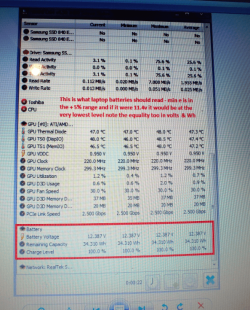
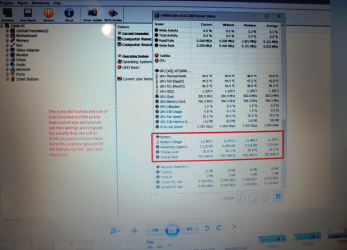
kbronski see my pics one is my five year old Toshiba battery at full chargeand one is fully discharged (because I stupidly knocked out the power lead) but if the machine is on power and fully charged - if you scroll to thebottom of that HW readout I asked for and your readouts for the battery are anything like the discharged one in the pic then it is also adding toyour woes because the cells will not be giving you the power you need for muchat all - if you use it in that condition on battery

'Having said that essenbe is probably right about the drive.

PS Sorry about the pic quality - having p[problems here myself
 

Attachments

  • BATT 1.PNG
    BATT 1.PNG
    323.1 KB · Views: 0
  • BATT 2.PNG
    BATT 2.PNG
    413.9 KB · Views: 1

My Computer

Computer type
PC/Desktop
Computer Manufacturer/Model Number
Own build (new) Desk1 / Asus ROG Win 7 / Desk2 1st build
OS
Desk1 7 Home Prem / Desk2 10 Pro / Main lap Asus ROG 10 Pro 2 laptop Toshiba 7 Pro Asus P2520 7 & 10
CPU
Desk1 i5 3750K / Laptop i7 GTX 860M / Desk2 i5 2500
Motherboard
Desk1 Asus P877-V / Desk2 Gigabyte H67 UD3H / Laptop ?
Memory
Desk1 8GB (1866) / Desk2 16GB (1333) / Laptop 8Gb DDR3
Graphics Card(s)
Desk 1& 2NVidia GTX 650 & Laptops on board Intel
Sound Card
Desk 1 & 2 -XONAR DG Realtek High Def audio Laptop
Monitor(s) Displays
Desk 1 Benq HD 2450 / Desk2 Philips 24" / Laptop 17.5"
Screen Resolution
1920x1080 D1 & D2 & Laptop 1
Hard Drives
Desk1 Samsung 120GB 830 SSD
Asus ROG 256GB 850 Pro SSD
Desk2 Samsung 840 256 SSD
Toshiba 120GB EVO
PSU
Desk 1 Corsair HX 1050/ Laptop ? / Desk 2 Corsair HX 650
Case
Desk 1 Cooler HAF XM ? Toshiba laptop / Desk2 Coolermaster
Cooling
Fans on all Desk1 -2 Desk2 - all Coolermasters 5 Laptop ?
Keyboard
Desk 1 MS Sidewinder X6 Desk 2 MS Sidewinder X 4
Mouse
Desk 1&2 - Gigabyte MS 900 gamer - laptop - Logitec wireless
Internet Speed
ADSL2+
Other Info
One other Desktop (tester) and spare Toshba laptop both with SSD's
Running Kaspersky 2016 ISS on all machines config'd identically
Logitec audio stereo systems on each machine (x3)
Canon MG5250MFC
Router/modem TP-Link running WPA2SK
kbronski see my pics one is my five year old Toshiba battery at full chargeand one is fully discharged (because I stupidly knocked out the power lead) but if the machine is on power and fully charged - if you scroll to thebottom of that HW readout I asked for and your readouts for the battery are anything like the discharged one in the pic then it is also adding toyour woes because the cells will not be giving you the power you need for muchat all - if you use it in that condition on battery

'Having said that essenbe is probably right about the drive.

PS Sorry about the pic quality - having p[problems here myself

I appreciate the battery post, but my computer is beyond that; it won't even detect a battery (any battery) anymore; it is, for all purposes, permanently tethered to an AC adapter. I suppose that's what I get for going all "Eh, this'll work" on it so many times.
 

My Computer

Computer type
PC/Desktop
Computer Manufacturer/Model Number
Custom
OS
Windows 7 Pro x64
CPU
Intel Core i7-5820k
Motherboard
ASUS X99-PRO
Memory
32GB Kingston HyperX FURY DDR4-2400
Graphics Card(s)
EVGA Geforce GTX970
Monitor(s) Displays
ASUS VC239h
Screen Resolution
1920x1080
Hard Drives
Samsung 850 EVO SSD 250GB x2
750 GB HDD
3TB HDD
PSU
Corsair RM750
Case
Fractal Design Define R5
Cooling
Noctua NH-D15
Keyboard
Corsair Strafe RGB
Mouse
Logitech G502
Hmm time for an update mate;) sounds like the power charging circuit has eaten the biscuit a long time ago.
 

My Computer

Computer type
PC/Desktop
Computer Manufacturer/Model Number
Own build (new) Desk1 / Asus ROG Win 7 / Desk2 1st build
OS
Desk1 7 Home Prem / Desk2 10 Pro / Main lap Asus ROG 10 Pro 2 laptop Toshiba 7 Pro Asus P2520 7 & 10
CPU
Desk1 i5 3750K / Laptop i7 GTX 860M / Desk2 i5 2500
Motherboard
Desk1 Asus P877-V / Desk2 Gigabyte H67 UD3H / Laptop ?
Memory
Desk1 8GB (1866) / Desk2 16GB (1333) / Laptop 8Gb DDR3
Graphics Card(s)
Desk 1& 2NVidia GTX 650 & Laptops on board Intel
Sound Card
Desk 1 & 2 -XONAR DG Realtek High Def audio Laptop
Monitor(s) Displays
Desk 1 Benq HD 2450 / Desk2 Philips 24" / Laptop 17.5"
Screen Resolution
1920x1080 D1 & D2 & Laptop 1
Hard Drives
Desk1 Samsung 120GB 830 SSD
Asus ROG 256GB 850 Pro SSD
Desk2 Samsung 840 256 SSD
Toshiba 120GB EVO
PSU
Desk 1 Corsair HX 1050/ Laptop ? / Desk 2 Corsair HX 650
Case
Desk 1 Cooler HAF XM ? Toshiba laptop / Desk2 Coolermaster
Cooling
Fans on all Desk1 -2 Desk2 - all Coolermasters 5 Laptop ?
Keyboard
Desk 1 MS Sidewinder X6 Desk 2 MS Sidewinder X 4
Mouse
Desk 1&2 - Gigabyte MS 900 gamer - laptop - Logitec wireless
Internet Speed
ADSL2+
Other Info
One other Desktop (tester) and spare Toshba laptop both with SSD's
Running Kaspersky 2016 ISS on all machines config'd identically
Logitec audio stereo systems on each machine (x3)
Canon MG5250MFC
Router/modem TP-Link running WPA2SK
Back
Top