HDD on DVD port giving me errors

wiejoyo

New member
Local time
11:41 PM
Messages
3
Location
Surabaya
I upgraded my laptop :
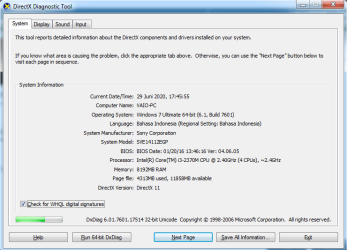
system.png

which has : 1 HDD port and 1 DVD slot
i changed the HDD into SSD
and moved the HDD into the DVD slot ( removed the DVD, using the hdd caddy )

and my pc keep giving me this error :
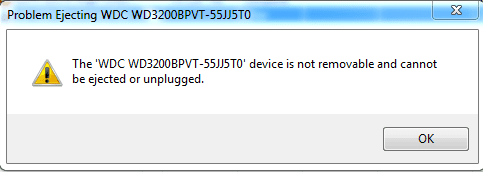
Untitled.png

it sounds like i tried to remove the drive. can anyone help me ?
 
Last edited:

My Computer My Computer

Computer type
Laptop
Computer Manufacturer/Model Number
Toshiba
OS
Windows 7 Ultimate x64
CPU
Intel(R) Core(TM) i3-2370M CPU @ 2.40GHz (4 CPUs), ~2,4GHz
Motherboard
SVE14112EGP
Memory
8192MB
Graphics Card(s)
Intel(R) HD Graphics 3000
Hard Drives
SSD-120GB ( Bulldozer )
HDD-320GB ( WD )
Antivirus
Kaspersky Internet Security
Browser
Google Chrome
Welcome to the forum. Are they sata ports are there any settings in the BIOS for the ports it's possible the dvd port isn't sata 3 and set to ide
 

My Computer My Computer

Computer type
PC/Desktop
OS
win 8 32 bit
Welcome to the forum. Are they sata ports are there any settings in the BIOS for the ports it's possible the dvd port isn't sata 3 and set to ide

I'm afraid, i dont have that much option to do that, there's nothing but "intelR virtualitation technology" at the "advanced" tab.

my bios version : american megatrends bios v2.14.1219
 

My Computer My Computer

Computer type
Laptop
Computer Manufacturer/Model Number
Toshiba
OS
Windows 7 Ultimate x64
CPU
Intel(R) Core(TM) i3-2370M CPU @ 2.40GHz (4 CPUs), ~2,4GHz
Motherboard
SVE14112EGP
Memory
8192MB
Graphics Card(s)
Intel(R) HD Graphics 3000
Hard Drives
SSD-120GB ( Bulldozer )
HDD-320GB ( WD )
Antivirus
Kaspersky Internet Security
Browser
Google Chrome
On my Sony Vaio laptop I did the same thing and never had any problems.
Did you do a clean install on the SSD?
 

My Computers My Computers

System One System Two

  • Computer type
    PC/Desktop
    Computer Manufacturer/Model Number
    custom build
    OS
    Windows 7 HP 64
    CPU
    i5 6600K - 800MHz to 4200MHz
    Motherboard
    GA-Z170-HD3P
    Memory
    4+4G GSkill DDR4 3000
    Graphics Card(s)
    IG - Intel 530
    Monitor(s) Displays
    Samsung 226BW
    Screen Resolution
    1680x1050
    Hard Drives
    (1) -1 SM951 – 128GB M.2 AHCI PCIe SSD drive for Windows 7 and Lubuntu
    (2) -1 WD SATA 3 - 1T for Data
    (3) -1 WD SATA 3 - 1T for backup
    PSU
    Thermaltake 450W TR2 gold
    Keyboard
    Old and good Chicony mechanical keyboard
    Mouse
    Logitech mX performance - 9 buttons (had to disable some)
    Internet Speed
    500Mb/s
    Browser
    Firefox 64
    Other Info
    TinyWall firewall
  • Computer type
    Laptop
    System Manufacturer/Model Number
    Asus Q550LF
    OS
    Windows 7 Pro
    CPU
    i7-4500U 800MHz to 3.0GHz
    Motherboard
    Asus Q550LF
    Memory
    (4+4)G DDR3 1600
    Graphics Card(s)
    IG intel 4400 + NVIDIA GeForce GT 745M
    Sound Card
    Realtek
    Monitor(s) Displays
    LG Display LP156WF4-SPH1
    Screen Resolution
    1920 x 1080
    Hard Drives
    BX500 120G SSD for Windows and programs +
    1T HDD for data
    Internet Speed
    500 Mb/s
    Browser
    Firefox
    Other Info
    TinyWall firewall
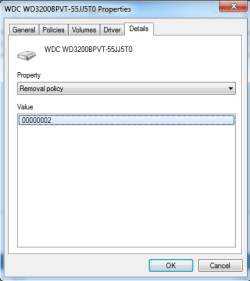
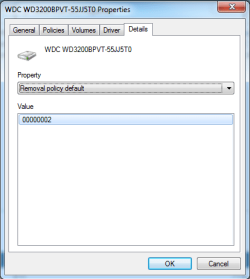
Go to My Computer, right click on any hard drive partition and select Properties. In Hardware tab, select the device that corresponds to your HDD (it will be called something like WDC WD3200BPVT...) and click Properties. In Details tab, look up what are the values for "Removal policy" and "Removal policy default".
 

My Computer My Computer

Computer type
PC/Desktop
OS
Windows 7 Ultimate x64 (single boot)
Antivirus
Cryptoprevent
Browser
Pale Moon
Go to My Computer, right click on any hard drive partition and select Properties. In Hardware tab, select the device that corresponds to your HDD (it will be called something like WDC WD3200BPVT...) and click Properties. In Details tab, look up what are the values for "Removal policy" and "Removal policy default".

both has the same value

removal policy :

Removal Policyy.png

removal policy default :

Removal Policy default.png
 

My Computer My Computer

Computer type
Laptop
Computer Manufacturer/Model Number
Toshiba
OS
Windows 7 Ultimate x64
CPU
Intel(R) Core(TM) i3-2370M CPU @ 2.40GHz (4 CPUs), ~2,4GHz
Motherboard
SVE14112EGP
Memory
8192MB
Graphics Card(s)
Intel(R) HD Graphics 3000
Hard Drives
SSD-120GB ( Bulldozer )
HDD-320GB ( WD )
Antivirus
Kaspersky Internet Security
Browser
Google Chrome
That's weird, I'm not sure what 00000002 means. On my system the removable drives are 00000003 while the fixed drives are 00000001.

Try going to drive properties again, but instead of Details tab, on the General tab, click "Change settings...". You'll get an extra tab called Policies. On that tab, if the options are "Quick removal" and "Better performance", set it on "Better performance". Additionally, if there is an option for write caching, turn on "Enable write caching on the device".
 

My Computer My Computer

Computer type
PC/Desktop
OS
Windows 7 Ultimate x64 (single boot)
Antivirus
Cryptoprevent
Browser
Pale Moon
You didn't answer my question: Did you do a clean install or did you cloned the HDD into the SSD?
You're booting from the SSD or the HDD?
What you have under drives in device manager? Under disk drives do you see the HDD and the SSD?
 

My Computers My Computers

System One System Two

  • Computer type
    PC/Desktop
    Computer Manufacturer/Model Number
    custom build
    OS
    Windows 7 HP 64
    CPU
    i5 6600K - 800MHz to 4200MHz
    Motherboard
    GA-Z170-HD3P
    Memory
    4+4G GSkill DDR4 3000
    Graphics Card(s)
    IG - Intel 530
    Monitor(s) Displays
    Samsung 226BW
    Screen Resolution
    1680x1050
    Hard Drives
    (1) -1 SM951 – 128GB M.2 AHCI PCIe SSD drive for Windows 7 and Lubuntu
    (2) -1 WD SATA 3 - 1T for Data
    (3) -1 WD SATA 3 - 1T for backup
    PSU
    Thermaltake 450W TR2 gold
    Keyboard
    Old and good Chicony mechanical keyboard
    Mouse
    Logitech mX performance - 9 buttons (had to disable some)
    Internet Speed
    500Mb/s
    Browser
    Firefox 64
    Other Info
    TinyWall firewall
  • Computer type
    Laptop
    System Manufacturer/Model Number
    Asus Q550LF
    OS
    Windows 7 Pro
    CPU
    i7-4500U 800MHz to 3.0GHz
    Motherboard
    Asus Q550LF
    Memory
    (4+4)G DDR3 1600
    Graphics Card(s)
    IG intel 4400 + NVIDIA GeForce GT 745M
    Sound Card
    Realtek
    Monitor(s) Displays
    LG Display LP156WF4-SPH1
    Screen Resolution
    1920 x 1080
    Hard Drives
    BX500 120G SSD for Windows and programs +
    1T HDD for data
    Internet Speed
    500 Mb/s
    Browser
    Firefox
    Other Info
    TinyWall firewall
Back
Top