HDD Partition Access is Denied

oli356

New member
Member
Local time
2:24 AM
Messages
86
So I just installed Windows to my SSD.

I then loaded up windows and then plugged in my other HDD which still had a partition for windows on. I deleted that partition.

Then of course I couldn't access the other 2 partitions on that drive. My G (storage and H games)

I've managed to access my Storage drive. Well I can open the root of the drive, every folder I click on though it says "you don't current have permission to access this folder, Click continue to permently get access" How do I fix this?

But more importantly how do I get permission/owner ship for the H partition? I tried the giveownership program, but when I right click I dont't see any option so.

ty
 

My Computer My Computer

OS
Windows 7 Home prem 64
CPU
AMD Phenom II X4 955 Black Edition 3.2 GHz Socket AM3
Motherboard
Asus M4A79XTD Evo AM3
Memory
G.Skill RipJaw 4GB (2x2GB) DDR3 PC3-10666C8 1333MHz
Graphics Card(s)
Asus GeForce GTX 560Ti DirectCU II
Sound Card
Asus Xonard)
Monitor(s) Displays
2* Samsung P2350
Screen Resolution
1920*1080
Hard Drives
Western Digital WD1001FALS 1TB Hard Drive SATAII 7200rpm 32MB Cache
PSU
Coolermaster RealPower 700W Modular PSU
Case
Cooler Master Storm Scout
Keyboard
Logitech G11
Mouse
Razer Deathadder 3500DPI
Internet Speed
50down 5up
In the advanced properties of the partition:

Security tab / Advanced Button / owner tab

Click Edit: Add Administrator or Your account.

Then in the permissions tab (once you have access) add the "Everyone" group with full control.
 

My Computer My Computer

OS
7 Pro
So I just installed Windows to my SSD.

I then loaded up windows and then plugged in my other HDD which still had a partition for windows on. I deleted that partition.

Then of course I couldn't access the other 2 partitions on that drive. My G (storage and H games)

I've managed to access my Storage drive. Well I can open the root of the drive, every folder I click on though it says "you don't current have permission to access this folder, Click continue to permently get access" How do I fix this?

But more importantly how do I get permission/owner ship for the H partition? I tried the giveownership program, but when I right click I dont't see any option so.

ty

Did you do as the prompt said "Click continue to permanently get access"?
 

My Computer My Computer

Computer type
PC/Desktop
Computer Manufacturer/Model Number
Custom Build
OS
Windows 7 Home Premium 32-Bit - Build 7600 SP1
CPU
Intel Core i3-2120 3.30Ghz
Motherboard
Asus P8Z68-V LX Intel Z68 Socket H2 ATX
Memory
Kingston 4 GB DDR3 1333 mhz
Graphics Card(s)
AMD Radeon HD6670
Sound Card
Sound Blaster Audigy SE 24-Bit
Monitor(s) Displays
Asus VE228
Screen Resolution
1440 X 900
Hard Drives
OCZ Vertex 3 120 GB Sata 3 SSD ==
Kingston SH103/S3 120 G Hyper X 120 GB SSD ==
Western Digital 500 GB Caviar Green 7200 RPM ==
PSU
Corsair CX600M == 600 Watt
Case
NZXT Apollo - Silver with Clear Side Panel
Cooling
Three 120 mm Fans
Keyboard
Microsoft Natural 4000
Mouse
Microsoft Custom Optical 3000
Internet Speed
AT&T Fiber Optic Wireless Network
Antivirus
Microsoft Security Essentials
Browser
Chrome
Other Info
120 mm Blue LED Fan -- Three Blue LED Lazer Light Sticks
In the advanced properties of the partition:

Security tab / Advanced Button / owner tab

Click Edit: Add Administrator or Your account.

Then in the permissions tab (once you have access) add the "Everyone" group with full control.
Not working =/
About to make another use with my name in as this one is just called Admin so rather confusing

So I just installed Windows to my SSD.

I then loaded up windows and then plugged in my other HDD which still had a partition for windows on. I deleted that partition.

Then of course I couldn't access the other 2 partitions on that drive. My G (storage and H games)

I've managed to access my Storage drive. Well I can open the root of the drive, every folder I click on though it says "you don't current have permission to access this folder, Click continue to permently get access" How do I fix this?

But more importantly how do I get permission/owner ship for the H partition? I tried the giveownership program, but when I right click I dont't see any option so.

ty

Did you do as the prompt said "Click continue to permanently get access"?
Yes, it then lets me in but I have to do it for every file/folder.
Chances are if you had clicked through the prompt it would have allowed or configured access if you set up the normal administrative-rights User account during install.

If you don't see Take Ownership on the rightclick context menu when right clicking on a restricted folder, reintsall it: http://www.sevenforums.com/tutorials/1911-take-ownership-shortcut.html
I have just noticed I can see it within the root of the partition I managed to get into. But I can't right click the locked paritition in 'My computer'
 

My Computer My Computer

OS
Windows 7 Home prem 64
CPU
AMD Phenom II X4 955 Black Edition 3.2 GHz Socket AM3
Motherboard
Asus M4A79XTD Evo AM3
Memory
G.Skill RipJaw 4GB (2x2GB) DDR3 PC3-10666C8 1333MHz
Graphics Card(s)
Asus GeForce GTX 560Ti DirectCU II
Sound Card
Asus Xonard)
Monitor(s) Displays
2* Samsung P2350
Screen Resolution
1920*1080
Hard Drives
Western Digital WD1001FALS 1TB Hard Drive SATAII 7200rpm 32MB Cache
PSU
Coolermaster RealPower 700W Modular PSU
Case
Cooler Master Storm Scout
Keyboard
Logitech G11
Mouse
Razer Deathadder 3500DPI
Internet Speed
50down 5up
Made the user called Oli and I think that has fixed it. I guess now I can remove all the other ownerships and permissions from the drive as there is sort of a few

I could open the partition. Got loads of cmd screens open doing the take ownership
 

My Computer My Computer

OS
Windows 7 Home prem 64
CPU
AMD Phenom II X4 955 Black Edition 3.2 GHz Socket AM3
Motherboard
Asus M4A79XTD Evo AM3
Memory
G.Skill RipJaw 4GB (2x2GB) DDR3 PC3-10666C8 1333MHz
Graphics Card(s)
Asus GeForce GTX 560Ti DirectCU II
Sound Card
Asus Xonard)
Monitor(s) Displays
2* Samsung P2350
Screen Resolution
1920*1080
Hard Drives
Western Digital WD1001FALS 1TB Hard Drive SATAII 7200rpm 32MB Cache
PSU
Coolermaster RealPower 700W Modular PSU
Case
Cooler Master Storm Scout
Keyboard
Logitech G11
Mouse
Razer Deathadder 3500DPI
Internet Speed
50down 5up
What account name did you set up during install?

I would not mess with permissions except to get permission yourself, as Windows Updates needs access (Trusted Installer and System).
 
I named the account admin on install, while I set user files to a different location etc.

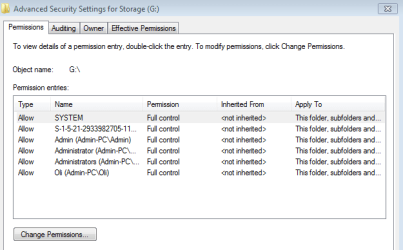
I'm currently on the account Oli. Oli has ownership of both of the old partitions.
Though this is the permissions.
 

Attachments

  • permissions.PNG
    permissions.PNG
    9 KB · Views: 57

My Computer My Computer

OS
Windows 7 Home prem 64
CPU
AMD Phenom II X4 955 Black Edition 3.2 GHz Socket AM3
Motherboard
Asus M4A79XTD Evo AM3
Memory
G.Skill RipJaw 4GB (2x2GB) DDR3 PC3-10666C8 1333MHz
Graphics Card(s)
Asus GeForce GTX 560Ti DirectCU II
Sound Card
Asus Xonard)
Monitor(s) Displays
2* Samsung P2350
Screen Resolution
1920*1080
Hard Drives
Western Digital WD1001FALS 1TB Hard Drive SATAII 7200rpm 32MB Cache
PSU
Coolermaster RealPower 700W Modular PSU
Case
Cooler Master Storm Scout
Keyboard
Logitech G11
Mouse
Razer Deathadder 3500DPI
Internet Speed
50down 5up
This can be confusing because there is a hidden Admin account which can be enabled with free reign, which is also available to sign into in Safe Mode.

Setting up your named Admin account during install has no effect that I know of on moving User files to another location later.

Did you make another User account so that you now have two User accounts: Admin and named? I would choose one and delete the other while saving its files to desktop in case you need to retrieve some later,.
 
I simply called it Admin -- well for no reason. Just because I wasn't going to call it Oli.

I do indeed have Oli and Admin as user accounts. I will delete Admin now. *nothing is on him*

Only using 7 GB up for windows on this new SSD :o I went and disabled hibernate etc
 

My Computer My Computer

OS
Windows 7 Home prem 64
CPU
AMD Phenom II X4 955 Black Edition 3.2 GHz Socket AM3
Motherboard
Asus M4A79XTD Evo AM3
Memory
G.Skill RipJaw 4GB (2x2GB) DDR3 PC3-10666C8 1333MHz
Graphics Card(s)
Asus GeForce GTX 560Ti DirectCU II
Sound Card
Asus Xonard)
Monitor(s) Displays
2* Samsung P2350
Screen Resolution
1920*1080
Hard Drives
Western Digital WD1001FALS 1TB Hard Drive SATAII 7200rpm 32MB Cache
PSU
Coolermaster RealPower 700W Modular PSU
Case
Cooler Master Storm Scout
Keyboard
Logitech G11
Mouse
Razer Deathadder 3500DPI
Internet Speed
50down 5up
Thanks for help

Haha, well it makes sense :O
 

My Computer My Computer

OS
Windows 7 Home prem 64
CPU
AMD Phenom II X4 955 Black Edition 3.2 GHz Socket AM3
Motherboard
Asus M4A79XTD Evo AM3
Memory
G.Skill RipJaw 4GB (2x2GB) DDR3 PC3-10666C8 1333MHz
Graphics Card(s)
Asus GeForce GTX 560Ti DirectCU II
Sound Card
Asus Xonard)
Monitor(s) Displays
2* Samsung P2350
Screen Resolution
1920*1080
Hard Drives
Western Digital WD1001FALS 1TB Hard Drive SATAII 7200rpm 32MB Cache
PSU
Coolermaster RealPower 700W Modular PSU
Case
Cooler Master Storm Scout
Keyboard
Logitech G11
Mouse
Razer Deathadder 3500DPI
Internet Speed
50down 5up
Just done that now :)
 

My Computer My Computer

OS
Windows 7 Home prem 64
CPU
AMD Phenom II X4 955 Black Edition 3.2 GHz Socket AM3
Motherboard
Asus M4A79XTD Evo AM3
Memory
G.Skill RipJaw 4GB (2x2GB) DDR3 PC3-10666C8 1333MHz
Graphics Card(s)
Asus GeForce GTX 560Ti DirectCU II
Sound Card
Asus Xonard)
Monitor(s) Displays
2* Samsung P2350
Screen Resolution
1920*1080
Hard Drives
Western Digital WD1001FALS 1TB Hard Drive SATAII 7200rpm 32MB Cache
PSU
Coolermaster RealPower 700W Modular PSU
Case
Cooler Master Storm Scout
Keyboard
Logitech G11
Mouse
Razer Deathadder 3500DPI
Internet Speed
50down 5up
Back
Top