HDD Re-Allocated Sectors error

Drakegui

New member
Local time
8:27 PM
Messages
17
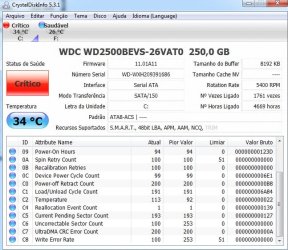
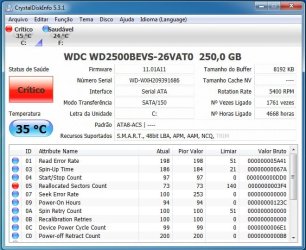
Windows is detecting a HDD error, and I decided to download Crystal Disk to check what the problem is... I placed two attachments there of Crystal Disk screenshots, and as you can see, Re-allocated Sectors Count is at a critical point, and this hard drive has almost 6 months only.. The error appeared after I installed "Game Fire" , and the possible cause I can only think of, is that this program closed some Services and Processes in the Task Manager, to help boost my PC's performance, and that kinda made some corrupt files, I will give as much details as I can.

PS: I already formated my hard drive once and nothing changed
 

Attachments
  • Sem Título.jpg
    Sem Título.jpg
    72.3 KB · Views: 4
  • Sem Título2 .jpg
    Sem Título2 .jpg
    72.4 KB · Views: 2

My Computer

OS
Windows 7 Ultimate x64 Laptop
When the HDD finds a sector that can no longer read/write data, it will mark this sector as "reallocated" and transfer the data to another sector in a special reserved area of the hard drive. This usually means that the sector was physically damaged in some way. Even brand new drives coming out of the factory can have reallocated sectors because of manufacturing defects. If the reallocated sector count remains constant and doesn't increase, you may not have any problems with the hard drive. But it would certainly be to your advantage to start backing up everything on that drive. This forum thread has some more info:

Reallocated Sectors Count: Should I be worried? - techPowerUp! Forums

Since the drive is 6 months old, it's probably still under warranty. You could also contact WD support to see what they recommend.

WD Support / Warranty & RMA Services

WD also has their own hard drive diagnostic tool called Data Lifeguard Diagnostic for Windows. You could run this to see if your hard drive shows any other problems. WARNING: Most of these diagnostic tests will stress the hard drive so if the drive is close to failing, the test could push it over the edge. Even more important to have your data backed up.

Data Lifeguard
 

My Computer

Computer type
Laptop
Computer Manufacturer/Model Number
Sony Vaio VPCEB47GM Laptop
OS
Win 7 Pro 64-bit
CPU
Intel i5 2.4 Ghz
Memory
8GB DDR3
Graphics Card(s)
Intel HD 3000
Sound Card
IDT High Definition
Monitor(s) Displays
15.6 WGXA Anti-Glare LED
Screen Resolution
1280x800
Hard Drives
640Gb 7200rpm
Antivirus
MSE
Browser
Opera (primary) with IE9 backup
Back
Top