Good day to all, just want to ask for help if there is still a chance to revive this hdisk of mine?
i already tried all the method for partition recovery (1 week already ) i had 2 partition for this
500gb hdd including the main which the windows 7 is installed.. it just happened out of nowhere..
Thank you in advance..
My Computer
At a glance
Windows 7 Ultimate x64AMDG.Skill Series 8gbAMD 7870
Hello and welcome hcaine18 mate have you tried testing the drive? if not try this SeaTools for Windows | Seagate if it is dead then there are ways of getting the data off of it
My Computer
At a glance
Desk1 7 Home Prem / Desk2 10 Pro / Main lap A...Desk1 i5 3750K / Laptop i7 GTX 860M / Desk2 i...Desk1 8GB (1866) / Desk2 16GB (1333) / Laptop...Desk 1& 2NVidia GTX 650 & Laptops on board Intel
Computer type
PC/Desktop
Computer Manufacturer/Model Number
Own build (new) Desk1 / Asus ROG Win 7 / Desk2 1st build
OS
Desk1 7 Home Prem / Desk2 10 Pro / Main lap Asus ROG 10 Pro 2 laptop Toshiba 7 Pro Asus P2520 7 & 10
One other Desktop (tester) and spare Toshba laptop both with SSD's
Running Kaspersky 2016 ISS on all machines config'd identically
Logitec audio stereo systems on each machine (x3)
Canon MG5250MFC
Router/modem TP-Link running WPA2SK
Ok now if it is data you want to save then see my little ditty it runs in a non Windows environment and is free as is the other link I am adding - all you need is a CD or stick for either the Mint link needs to be a reasonably sized stick though.
RETRIEVE DATA WITH A BOOTABLE UBUNTU OS
Make a bootable Ubuntu disk/stick Download Ubuntu Desktop | Download | Ubuntu
Set the BIOS to boot from the optical when the machine boots it will show you a screen with TRY or INSTALL > select TRY not INSTALL
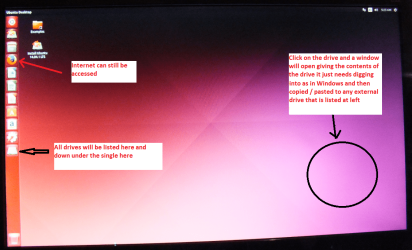
When it is finished - it takes very little time you will get a screen like in the pic .
Open the drive you want > User and dig down until you get to the data / settings you may be able to copy / paste the material you want to an external source or other installed drive doing this.
I am not sure if it will but I have recovered tons of data etc using this method both on "dead" or just plain drives that you cannot get data from using Windows. I like to use a CD as I am not keen on sticks but the second option will allow you to try out Linux if you so wish
and this http://www.sevenforums.com/tutorials/287439-emergency-kit-save-your-files-dead-os.html
Now I find the Ubuntu is slightly easier to set up and both run in a non Windows environment which does away with any conflicts anyway see my pic of what Ubuntu looks like
Attachments
UBUNTU SCREEN X2.PNG
272.7 KB
· Views: 0
My Computer
At a glance
Desk1 7 Home Prem / Desk2 10 Pro / Main lap A...Desk1 i5 3750K / Laptop i7 GTX 860M / Desk2 i...Desk1 8GB (1866) / Desk2 16GB (1333) / Laptop...Desk 1& 2NVidia GTX 650 & Laptops on board Intel
Computer type
PC/Desktop
Computer Manufacturer/Model Number
Own build (new) Desk1 / Asus ROG Win 7 / Desk2 1st build
OS
Desk1 7 Home Prem / Desk2 10 Pro / Main lap Asus ROG 10 Pro 2 laptop Toshiba 7 Pro Asus P2520 7 & 10
One other Desktop (tester) and spare Toshba laptop both with SSD's
Running Kaspersky 2016 ISS on all machines config'd identically
Logitec audio stereo systems on each machine (x3)
Canon MG5250MFC
Router/modem TP-Link running WPA2SK

 ) i had 2 partition for this