
HDD SMART Check alert

ish4d0w

New member
Member
VIP
Local time
11:48 PM
Messages
179
Hi

I have a question about my hard drive - Samsung HM250JI. That's SATA 2.5" 5400RPM. Several years old, fine so far.
Lately it started to behave strange. It still works, but sometimes it makes loud click noises (it's like knocking on the table) Like it hit something but that makes no sense. Other times, there's a quiet sound that's like a beep - is there a beep speaker inside the hard drive?? Or it could be the motor too...

So far the drive works. But I'm worried so I'm making regular backups like several times a week.

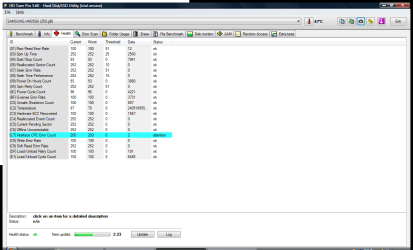
Check out this screenshot. Do you think it's serious?

(I hope this drive can hold out)
hdtune-smart-health-status-samsunghm250ji.png
 

My Computer

Computer type
Laptop
Computer Manufacturer/Model Number
HP Compaq 6720s
OS
Microsoft® Windows 7 Professional 64-bit
CPU
Intel(R) Pentium(R) Dual CPU T2310 @ 1.46GHz
Motherboard
Hewlett-Packard 30D8
Memory
4,00 GB
Graphics Card(s)
(1) Mobile Intel(R) 965 Express Chipset Family (2) Mobile
Sound Card
(1) Bluetooth Hands-free Audio (2) Bluetooth Stereo Audio
Screen Resolution
1280 x 800 x 32 bits (4294967296 colors) @ 59 Hz
Hard Drives
(1) Hitachi HTS542516K9SA00 ATA Device (2) Multi Flash Reader USB Device
It's not a question of will it fail, only a question of when.
 

My Computer

Computer type
Laptop
Computer Manufacturer/Model Number
Toshiba L755D-S5204 (32 bit) / Toshiba L70-ABT3N22 (64 bit)
OS
Windows 7 Professional 32 bit and 64 bit
CPU
AMD A-6 / Intel i7
Memory
4 gigs / 8 gigs
Graphics Card(s)
Raedon HD / NVIDIA GeForce 740M (Intel HD 4600 onboard)
Other Info
Intel NUC5i5RYH - 16 GB RAM, 250 GB Samsung m2 SSD, 7 Pro x64, Intel HD 6000 onboard graphics, Realtek onboard audio, integrated wireless. Running this and laptops through Toshiba Dynadock for external monitor and 5.1 speakers.

IntelNUC5i3RYH added.
But should I be worried now? Is it worse than an average HDD? What about that blue line in the HDD Tester program above? The one marked "attention"?
 

My Computer

Computer type
Laptop
Computer Manufacturer/Model Number
HP Compaq 6720s
OS
Microsoft® Windows 7 Professional 64-bit
CPU
Intel(R) Pentium(R) Dual CPU T2310 @ 1.46GHz
Motherboard
Hewlett-Packard 30D8
Memory
4,00 GB
Graphics Card(s)
(1) Mobile Intel(R) 965 Express Chipset Family (2) Mobile
Sound Card
(1) Bluetooth Hands-free Audio (2) Bluetooth Stereo Audio
Screen Resolution
1280 x 800 x 32 bits (4294967296 colors) @ 59 Hz
Hard Drives
(1) Hitachi HTS542516K9SA00 ATA Device (2) Multi Flash Reader USB Device
Hello ish4d0w!

It's a good call with the back ups, I would have advised you to make them otherwise.

The sounds you are hearing seem to be the sounds of a dying hard drive: high pitched beeping sounds, sharp clicks etc.

The CRC error on the SMART test screenshot means the count of errors during data transfer via the interface cable. Which would mean that too many errors have passed through and the drive endures damage. This could also be a case of the SATA cable going faulty.

The SMART is a very accurate test and shouldn't be ignored.

You could either RMA the drive if possible, or just find a replacement by yourself, or continue to use it but always have back ups, as it will sooner or later completely fail.

Good luck! :)

CK_WD
 

My Computer

Computer type
PC/Desktop
OS
Windows 7 Home Premium x64
Hello ish4d0w!

It's a good call with the back ups, I would have advised you to make them otherwise.

The sounds you are hearing seem to be the sounds of a dying hard drive: high pitched beeping sounds, sharp clicks etc.

The CRC error on the SMART test screenshot means the count of errors during data transfer via the interface cable. Which would mean that too many errors have passed through and the drive endures damage. This could also be a case of the SATA cable going faulty.

The SMART is a very accurate test and shouldn't be ignored.


You could either RMA the drive if possible, or just find a replacement by yourself, or continue to use it but always have back ups, as it will sooner or later completely fail.

Good luck! :)

CK_WD


Thank you very much for your reply! - Great answer!

The interface cable is tested to be OK, works fine with other drives. This is the only drive making these noises and producing this error.
How do I check if it's still under warranty?
 

My Computer

Computer type
Laptop
Computer Manufacturer/Model Number
HP Compaq 6720s
OS
Microsoft® Windows 7 Professional 64-bit
CPU
Intel(R) Pentium(R) Dual CPU T2310 @ 1.46GHz
Motherboard
Hewlett-Packard 30D8
Memory
4,00 GB
Graphics Card(s)
(1) Mobile Intel(R) 965 Express Chipset Family (2) Mobile
Sound Card
(1) Bluetooth Hands-free Audio (2) Bluetooth Stereo Audio
Screen Resolution
1280 x 800 x 32 bits (4294967296 colors) @ 59 Hz
Hard Drives
(1) Hitachi HTS542516K9SA00 ATA Device (2) Multi Flash Reader USB Device
Thank you, glad I could help! :)

It depends. Since I am a WD representative and this is not a WD drive, I could only advise you to check with the manufacturer, online or on the phone. :)

CK_WD
 

My Computer

Computer type
PC/Desktop
OS
Windows 7 Home Premium x64
A hard drive making unusual clicking sounds is always bad news. The drive is dying and needs to be replaced. Consider yourself lucky to have received such a warning. Many are not so fortunate.

The SMART warning is a secondary indication of trouble. Warnings here need to be considered but never rely on them. A SMART warning is like the check engine light in a car. They are a sign of potential trouble but the lack of such warnings does not mean all is well.
 

My Computer

Computer type
PC/Desktop
Computer Manufacturer/Model Number
HP
OS
Windows 7 Pro 64 bit
CPU
Xeon W3520
Memory
8 GB
Graphics Card(s)
Nvidia Geforce 210
You were smart (pardon the pun) to start keeping backups when your drive started throwing SMART errors. However, a drive can suddenly fail without any notice at all so it is wise to always maintain backups from the word go.
 

My Computer

Computer type
PC/Desktop
Computer Manufacturer/Model Number
Custom Build
OS
Win 7 Ultimate 64 bit
CPU
Intel i7-3930K
Motherboard
ASUS P9X79 WS
Memory
Kingston HyperX Genesis 32GB Kit (8x4GB Modules) 1600MHz DDR
Graphics Card(s)
MSI R7850 Twin Frozr 2GD5/OC Radeon HD 7850 2GB 256-bit GDDR
Sound Card
Asus Xonar Essence STX
Monitor(s) Displays
3x Asus VG248QE 24", Vizio 32" TV
Screen Resolution
1920 x 1080, ?
Hard Drives
Samsung 128GB 840 Pro SSD (1),
Samsung 4TB 850 EVO SSDs (4)
Samsung 4TB 850 EVO SSDs (16) external backup drives used in 2.5" hot swap bays in the computer.
PSU
Corsair HX750w
Case
Antec Two Hundred v2 (modified)
Cooling
Cooler Master GeminII S524 120mm (fan replaced with a 140mm)
Keyboard
Logitech G510s
Mouse
Logitech M525 (two in use)
Internet Speed
=< 32Mbps down, 8Mbps up
Antivirus
AVAST!, MBAM, SAS, Spybot S&D (all but MBAM free) Glary Util
Browser
IE11
Other Info
LSI 9211-8i HBA card (8 SATA III ports), 2.5" & 3.5" Hot Swap Bays, HooToo HT-CR001 PCI-E to USB 3.0 Internal Hub + 6 Slot Card Reader, and LG Model CH12LS28 BD-ROM Optical Drive. Also, ScanSnap S1500 ADF duplexing scanner, Canon 9000F flat bed scanner, Corsair SP2500 2.1 speakers, Samsung CLP 415nw laser color printer, Cyberpower PP2200SW UPS
Thank you everybody for your help :)
 

My Computer

Computer type
Laptop
Computer Manufacturer/Model Number
HP Compaq 6720s
OS
Microsoft® Windows 7 Professional 64-bit
CPU
Intel(R) Pentium(R) Dual CPU T2310 @ 1.46GHz
Motherboard
Hewlett-Packard 30D8
Memory
4,00 GB
Graphics Card(s)
(1) Mobile Intel(R) 965 Express Chipset Family (2) Mobile
Sound Card
(1) Bluetooth Hands-free Audio (2) Bluetooth Stereo Audio
Screen Resolution
1280 x 800 x 32 bits (4294967296 colors) @ 59 Hz
Hard Drives
(1) Hitachi HTS542516K9SA00 ATA Device (2) Multi Flash Reader USB Device
Back
Top