HDD Thrashing, Looked everywhere for solution, Have found none

AndrewSteve7

New member
Local time
9:23 PM
Messages
9
Location
In a house
Hello All,
My Computer's HDD is thrashing, not for the entire usage time, but at random times. It lasts from 5-10 minutes, in that time I can do pretty much nothing. I have disabled ReadyBoost, SuperFetch, Indexing, everything in the startup. I almost always have Resource Monitor open, just in case. I have used ProcMon and found nothing. I have also turned off Skype unless i need it, I also turned off Steam when i'm not playing. In Chrome, I have disabled Phishing and Malware and it has decreased thrashing when using it, but it still thrashes. If anyone can help me I would be so grateful because this has been happening for a long time now. If you need to know anything else, just tell me.
Thanks, :)
Andrew
 

My Computer My Computer

At a glance

Windows 7 Home Premium X64AMD Phenom II x6 1090T8GBAMD Radeon HD 6800
Computer type
PC/Desktop
Computer Manufacturer/Model Number
Custom Build
OS
Windows 7 Home Premium X64
CPU
AMD Phenom II x6 1090T
Motherboard
Crosshair IV Formula
Memory
8GB
Graphics Card(s)
AMD Radeon HD 6800
Monitor(s) Displays
Acer X203H
Screen Resolution
1600 X 900
Case
Cooler Master HAF 912
Antivirus
Microsoft Security Essentials
Browser
Chrome
I would go to the manufactures website for the hard drive and get a diagnostic program to check out the drive .... Post back what the program says ..
 

My Computer My Computer

At a glance

Windows 10 Pro - 64 bitIntel i7 2600K8 Gig ddr3 1600 mhz - viper extreme (Patriot)EVGA 980 TI
Computer type
PC/Desktop
Computer Manufacturer/Model Number
Custom Build
OS
Windows 10 Pro - 64 bit
CPU
Intel i7 2600K
Motherboard
Asus P8P67
Memory
8 Gig ddr3 1600 mhz - viper extreme (Patriot)
Graphics Card(s)
EVGA 980 TI
Monitor(s) Displays
2 - Lg 21" LED , sony 48 " bravia LED
Hard Drives
one - samsung 840 series 465.76 GB SSD
two - wd 2 tB black
one - wd 1.5 tb black
one - wb 1 tb black
PSU
1000 Watt Coolmaster : Silent Pro Gold
Case
antec 1200
Cooling
watercooled
Mouse
logitech wireless
Antivirus
Norton Security 2015
Other Info
powerware 3.1 KVA FERRUPS with 4 - 1000 Amp Deep cycle batteries ...
Dear Total,
I used the manufactures Diagnostics program and it reported that the drive Passed
From,
Andrew
 

My Computer My Computer

At a glance

Windows 7 Home Premium X64AMD Phenom II x6 1090T8GBAMD Radeon HD 6800
Computer type
PC/Desktop
Computer Manufacturer/Model Number
Custom Build
OS
Windows 7 Home Premium X64
CPU
AMD Phenom II x6 1090T
Motherboard
Crosshair IV Formula
Memory
8GB
Graphics Card(s)
AMD Radeon HD 6800
Monitor(s) Displays
Acer X203H
Screen Resolution
1600 X 900
Case
Cooler Master HAF 912
Antivirus
Microsoft Security Essentials
Browser
Chrome
Is all of the RAM being detected? Could you tell us the brand and model number of the hard drive in this build?
Try running a FULL SCAN with Malwarebytes Anti-Malware which can be downloaded here: Malwarebytes | Free Anti-Malware & Internet Security Software
Be sure to uncheck the options for the free trial in the installer.
 

My Computer My Computer

At a glance

Windows 7 Professional x64 Service Pack 1AMD Athlon X4 6456GB DDR3 1066Sapphire Radeon HD 5670 512MB GDDR5
Computer type
PC/Desktop
Computer Manufacturer/Model Number
HP Pavilion P7-1010
OS
Windows 7 Professional x64 Service Pack 1
CPU
AMD Athlon X4 645
Motherboard
Foxxcon N-Alvorix RS880
Memory
6GB DDR3 1066
Graphics Card(s)
Sapphire Radeon HD 5670 512MB GDDR5
Sound Card
Realtek Integrated Audio
Monitor(s) Displays
HP 2011x
Screen Resolution
1600x900
Hard Drives
1. Crucial M4 128GB SSD
2. 1TB Seagate Barracuda 7200.12 RPM
3. 1TB Western Digital Caviar Green 5400RPM
PSU
Seasonic S12 II Bronze 380 Watt
Case
HP OEM
Cooling
Coolermaster Heatsink, AVC Case Fan
Keyboard
HP OEM- Made by Chicony
Mouse
HP OEM- Made by Logitech
Internet Speed
20MBit Down/4 Up
Antivirus
Microsoft Security Essentials
Browser
Internet Explorer 10
Dear WinDude99,
The Brand is Western Digital, The model number is WD1500HLFS-01G6U1. I have run a full scan and it has found nothing.
From,
Andrew
 

My Computer My Computer

At a glance

Windows 7 Home Premium X64AMD Phenom II x6 1090T8GBAMD Radeon HD 6800
Computer type
PC/Desktop
Computer Manufacturer/Model Number
Custom Build
OS
Windows 7 Home Premium X64
CPU
AMD Phenom II x6 1090T
Motherboard
Crosshair IV Formula
Memory
8GB
Graphics Card(s)
AMD Radeon HD 6800
Monitor(s) Displays
Acer X203H
Screen Resolution
1600 X 900
Case
Cooler Master HAF 912
Antivirus
Microsoft Security Essentials
Browser
Chrome

My Computer My Computer

At a glance

Windows 7 Professional x64 Service Pack 1AMD Athlon X4 6456GB DDR3 1066Sapphire Radeon HD 5670 512MB GDDR5
Computer type
PC/Desktop
Computer Manufacturer/Model Number
HP Pavilion P7-1010
OS
Windows 7 Professional x64 Service Pack 1
CPU
AMD Athlon X4 645
Motherboard
Foxxcon N-Alvorix RS880
Memory
6GB DDR3 1066
Graphics Card(s)
Sapphire Radeon HD 5670 512MB GDDR5
Sound Card
Realtek Integrated Audio
Monitor(s) Displays
HP 2011x
Screen Resolution
1600x900
Hard Drives
1. Crucial M4 128GB SSD
2. 1TB Seagate Barracuda 7200.12 RPM
3. 1TB Western Digital Caviar Green 5400RPM
PSU
Seasonic S12 II Bronze 380 Watt
Case
HP OEM
Cooling
Coolermaster Heatsink, AVC Case Fan
Keyboard
HP OEM- Made by Chicony
Mouse
HP OEM- Made by Logitech
Internet Speed
20MBit Down/4 Up
Antivirus
Microsoft Security Essentials
Browser
Internet Explorer 10
Dear windude99,
I have run a defragmentation on all my disks and partitons. I have also ran CHKDSK.
From,
Andrew
 

My Computer My Computer

At a glance

Windows 7 Home Premium X64AMD Phenom II x6 1090T8GBAMD Radeon HD 6800
Computer type
PC/Desktop
Computer Manufacturer/Model Number
Custom Build
OS
Windows 7 Home Premium X64
CPU
AMD Phenom II x6 1090T
Motherboard
Crosshair IV Formula
Memory
8GB
Graphics Card(s)
AMD Radeon HD 6800
Monitor(s) Displays
Acer X203H
Screen Resolution
1600 X 900
Case
Cooler Master HAF 912
Antivirus
Microsoft Security Essentials
Browser
Chrome
OK. I would like for you to run Disk Cleanup. Run it without cleaning system files first. Then, run it and click on the option that says "Clean Up System Files." Here are instructions for Disk Cleanup. Also, could you post a screenshot of task manager when this thrashing is occurring? Make sure it is on the Performance tab. When you use Resource Monitor, do you have the Disk tab open? Do you sort it by the field titled "Total?" Also, sort it by the Read and Write fields individually.
 

My Computer My Computer

At a glance

Windows 7 Professional x64 Service Pack 1AMD Athlon X4 6456GB DDR3 1066Sapphire Radeon HD 5670 512MB GDDR5
Computer type
PC/Desktop
Computer Manufacturer/Model Number
HP Pavilion P7-1010
OS
Windows 7 Professional x64 Service Pack 1
CPU
AMD Athlon X4 645
Motherboard
Foxxcon N-Alvorix RS880
Memory
6GB DDR3 1066
Graphics Card(s)
Sapphire Radeon HD 5670 512MB GDDR5
Sound Card
Realtek Integrated Audio
Monitor(s) Displays
HP 2011x
Screen Resolution
1600x900
Hard Drives
1. Crucial M4 128GB SSD
2. 1TB Seagate Barracuda 7200.12 RPM
3. 1TB Western Digital Caviar Green 5400RPM
PSU
Seasonic S12 II Bronze 380 Watt
Case
HP OEM
Cooling
Coolermaster Heatsink, AVC Case Fan
Keyboard
HP OEM- Made by Chicony
Mouse
HP OEM- Made by Logitech
Internet Speed
20MBit Down/4 Up
Antivirus
Microsoft Security Essentials
Browser
Internet Explorer 10
Dear windude99,
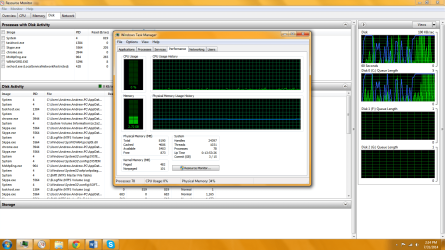
Here is the screenshot of task manager. In resource Monitor, the disk tab is open and it is sorted by the "Total" field
From,
Andrew
 

Attachments

  • thrash.png
    thrash.png
    95.1 KB · Views: 9

My Computer My Computer

At a glance

Windows 7 Home Premium X64AMD Phenom II x6 1090T8GBAMD Radeon HD 6800
Computer type
PC/Desktop
Computer Manufacturer/Model Number
Custom Build
OS
Windows 7 Home Premium X64
CPU
AMD Phenom II x6 1090T
Motherboard
Crosshair IV Formula
Memory
8GB
Graphics Card(s)
AMD Radeon HD 6800
Monitor(s) Displays
Acer X203H
Screen Resolution
1600 X 900
Case
Cooler Master HAF 912
Antivirus
Microsoft Security Essentials
Browser
Chrome
Could you give me screenshots with it sorted by the Read column and write column? I don't need to see task manager this time. Be sure you take these screenshots when the thrashing is occurring.
 

My Computer My Computer

At a glance

Windows 7 Professional x64 Service Pack 1AMD Athlon X4 6456GB DDR3 1066Sapphire Radeon HD 5670 512MB GDDR5
Computer type
PC/Desktop
Computer Manufacturer/Model Number
HP Pavilion P7-1010
OS
Windows 7 Professional x64 Service Pack 1
CPU
AMD Athlon X4 645
Motherboard
Foxxcon N-Alvorix RS880
Memory
6GB DDR3 1066
Graphics Card(s)
Sapphire Radeon HD 5670 512MB GDDR5
Sound Card
Realtek Integrated Audio
Monitor(s) Displays
HP 2011x
Screen Resolution
1600x900
Hard Drives
1. Crucial M4 128GB SSD
2. 1TB Seagate Barracuda 7200.12 RPM
3. 1TB Western Digital Caviar Green 5400RPM
PSU
Seasonic S12 II Bronze 380 Watt
Case
HP OEM
Cooling
Coolermaster Heatsink, AVC Case Fan
Keyboard
HP OEM- Made by Chicony
Mouse
HP OEM- Made by Logitech
Internet Speed
20MBit Down/4 Up
Antivirus
Microsoft Security Essentials
Browser
Internet Explorer 10
Dear windude99,
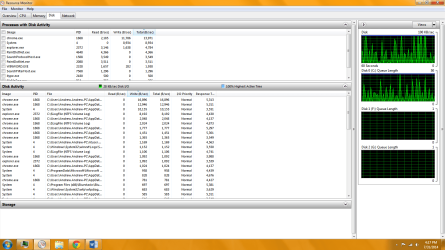
Here is the write when thrashing. I could only get the write, will get read next time.
From,
Andrew
 

Attachments

  • write.png
    write.png
    60.9 KB · Views: 5

My Computer My Computer

At a glance

Windows 7 Home Premium X64AMD Phenom II x6 1090T8GBAMD Radeon HD 6800
Computer type
PC/Desktop
Computer Manufacturer/Model Number
Custom Build
OS
Windows 7 Home Premium X64
CPU
AMD Phenom II x6 1090T
Motherboard
Crosshair IV Formula
Memory
8GB
Graphics Card(s)
AMD Radeon HD 6800
Monitor(s) Displays
Acer X203H
Screen Resolution
1600 X 900
Case
Cooler Master HAF 912
Antivirus
Microsoft Security Essentials
Browser
Chrome
Dear windude99,
Here is the write during thrashing, couldn't get read. will get read if it thrashes again
From,
Andrew
 

Attachments

  • write.png
    write.png
    60.9 KB · Views: 6

My Computer My Computer

At a glance

Windows 7 Home Premium X64AMD Phenom II x6 1090T8GBAMD Radeon HD 6800
Computer type
PC/Desktop
Computer Manufacturer/Model Number
Custom Build
OS
Windows 7 Home Premium X64
CPU
AMD Phenom II x6 1090T
Motherboard
Crosshair IV Formula
Memory
8GB
Graphics Card(s)
AMD Radeon HD 6800
Monitor(s) Displays
Acer X203H
Screen Resolution
1600 X 900
Case
Cooler Master HAF 912
Antivirus
Microsoft Security Essentials
Browser
Chrome
When it thrashes, is there any kind of performance degradation while using your PC? I will need to see the read section in Resource Monitor when the thrashing occurs. Also, are you running the latest BIOS version? Have you tried updating your SATA and chipset drivers?
 

My Computer My Computer

At a glance

Windows 7 Professional x64 Service Pack 1AMD Athlon X4 6456GB DDR3 1066Sapphire Radeon HD 5670 512MB GDDR5
Computer type
PC/Desktop
Computer Manufacturer/Model Number
HP Pavilion P7-1010
OS
Windows 7 Professional x64 Service Pack 1
CPU
AMD Athlon X4 645
Motherboard
Foxxcon N-Alvorix RS880
Memory
6GB DDR3 1066
Graphics Card(s)
Sapphire Radeon HD 5670 512MB GDDR5
Sound Card
Realtek Integrated Audio
Monitor(s) Displays
HP 2011x
Screen Resolution
1600x900
Hard Drives
1. Crucial M4 128GB SSD
2. 1TB Seagate Barracuda 7200.12 RPM
3. 1TB Western Digital Caviar Green 5400RPM
PSU
Seasonic S12 II Bronze 380 Watt
Case
HP OEM
Cooling
Coolermaster Heatsink, AVC Case Fan
Keyboard
HP OEM- Made by Chicony
Mouse
HP OEM- Made by Logitech
Internet Speed
20MBit Down/4 Up
Antivirus
Microsoft Security Essentials
Browser
Internet Explorer 10
Dear windude99,
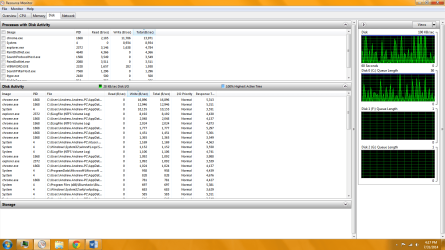
here is the read.
 

Attachments

  • read.png
    read.png
    55.1 KB · Views: 7

My Computer My Computer

At a glance

Windows 7 Home Premium X64AMD Phenom II x6 1090T8GBAMD Radeon HD 6800
Computer type
PC/Desktop
Computer Manufacturer/Model Number
Custom Build
OS
Windows 7 Home Premium X64
CPU
AMD Phenom II x6 1090T
Motherboard
Crosshair IV Formula
Memory
8GB
Graphics Card(s)
AMD Radeon HD 6800
Monitor(s) Displays
Acer X203H
Screen Resolution
1600 X 900
Case
Cooler Master HAF 912
Antivirus
Microsoft Security Essentials
Browser
Chrome
Have you gotten the latest BIOS update for your motherboard? Also, download the latest chipset and AHCI drivers from your motherboard manufacturer's website.
 

My Computer My Computer

At a glance

Windows 7 Professional x64 Service Pack 1AMD Athlon X4 6456GB DDR3 1066Sapphire Radeon HD 5670 512MB GDDR5
Computer type
PC/Desktop
Computer Manufacturer/Model Number
HP Pavilion P7-1010
OS
Windows 7 Professional x64 Service Pack 1
CPU
AMD Athlon X4 645
Motherboard
Foxxcon N-Alvorix RS880
Memory
6GB DDR3 1066
Graphics Card(s)
Sapphire Radeon HD 5670 512MB GDDR5
Sound Card
Realtek Integrated Audio
Monitor(s) Displays
HP 2011x
Screen Resolution
1600x900
Hard Drives
1. Crucial M4 128GB SSD
2. 1TB Seagate Barracuda 7200.12 RPM
3. 1TB Western Digital Caviar Green 5400RPM
PSU
Seasonic S12 II Bronze 380 Watt
Case
HP OEM
Cooling
Coolermaster Heatsink, AVC Case Fan
Keyboard
HP OEM- Made by Chicony
Mouse
HP OEM- Made by Logitech
Internet Speed
20MBit Down/4 Up
Antivirus
Microsoft Security Essentials
Browser
Internet Explorer 10
Dear windude99,
Sorry about waiting so long, haven't been able to use it.
I updated all the drivers and it still thrashes, I am also using the right BIOS version
From,
Andrew
 

My Computer My Computer

At a glance

Windows 7 Home Premium X64AMD Phenom II x6 1090T8GBAMD Radeon HD 6800
Computer type
PC/Desktop
Computer Manufacturer/Model Number
Custom Build
OS
Windows 7 Home Premium X64
CPU
AMD Phenom II x6 1090T
Motherboard
Crosshair IV Formula
Memory
8GB
Graphics Card(s)
AMD Radeon HD 6800
Monitor(s) Displays
Acer X203H
Screen Resolution
1600 X 900
Case
Cooler Master HAF 912
Antivirus
Microsoft Security Essentials
Browser
Chrome
These arrogant responses really annoy me. AndrewSteve7 I can say exactly what the problem is. It's service pack 1. Installed on three seperate machines and has crippled all of them. All the computers in my local library are also slow and laggy and these are very high spec machines. Windows 7 has always been fine for me before the service pack 1. Fast, stable. Now it chokes on everything I try to do.

 

My Computer My Computer

At a glance

windows 7 home premium 64 bit
Computer type
PC/Desktop
Computer Manufacturer/Model Number
acer dell
OS
windows 7 home premium 64 bit
Welcome to our forum jonguitarist.

From your post #17.
These arrogant responses really annoy me.
Please be polite.

Try to remember that over a billion people run Windows 7 with SP-1 installed and don't have the problems that your local library is having.

I have two of such systems running Windows 7-SP1 with no problems.
 

My Computer My Computer

At a glance

Windows 10 Pro. 64/ version 1709 Windows 7 Pr...Intel i7-6800K @ 4.3Corsair Platinum 16 gig @2400EVGA GTX 1070 OC
Computer type
PC/Desktop
Computer Manufacturer/Model Number
Home made Desktop
OS
Windows 10 Pro. 64/ version 1709 Windows 7 Pro/64
CPU
Intel i7-6800K @ 4.3
Motherboard
ASUS X-99 Deluxe II
Memory
Corsair Platinum 16 gig @2400
Graphics Card(s)
EVGA GTX 1070 OC
Monitor(s) Displays
Asus 27" LED LCD/VE278Q
Screen Resolution
1920-1080 or 1280-720 HDMI
Hard Drives
INTEL SSD 730-240 Gb Sata 3.0/
PSU
EVGA Platium 1200W
Case
Phanteks Luxe Tempered Glass 8 fans/ one radiator
Cooling
XSPC/ Water Cooled CPU
Keyboard
Das 4 Professional
Mouse
Logitech M705/MX Anywhere 2-S
Internet Speed
100 mbits
Antivirus
Microsoft Security Essentials/ Malwarebytes Premium 3.0/ SAS
Browser
I.E. 11 default/Firefox/ ISP Time Warner Cable/Spectrum
Other Info
LG BluRay Burner/
Sound system-KLipsch-THX/
Icy Dock ssd Hot Swap bays.
Back
Top