Solved HDD was seen by my PC, but after 3rd party format it is not visible

Pooky1959

New member
Local time
2:56 PM
Messages
29
I have a 500GB Iomega External USB HDD that I had been unable to format thru disk manager for other wise. After reading various recommendations I used the "Hard Disk Low Level Format Tool" program. When the format was finally complete a window popped up saying I need to make it a GPT disc or Master Boot. I want it for back-ups and disc imaging. In Computer Management it shows as Unallocated, but in Explorer it does not show up. Did I do something wrong or is there more to be done?
 

My Computer My Computer

At a glance

Windows Pro 7 32bit
Computer type
PC/Desktop
Computer Manufacturer/Model Number
eMachine
OS
Windows Pro 7 32bit
Hard Drives
Internal?
External - Iomega 2TB
Antivirus
AVG Free, Zone Alarm
Browser
Mozilla Firefox
A low level format writes zeros to all sectors.

After successful low level format, you have to do a regular format.

So go ahead and format it as an MBR disk.( You got the right message. Just select MBR and go ahead to format it.)
 

My Computer My Computer

At a glance

Windows 7 Home Premium 32 bit
OS
Windows 7 Home Premium 32 bit
I'd love to do that, BUT...
The only shows as "Disk 2" in Disk Management, on the lower half of the right side. It does not appear in the upper half where my C: drive is.
It is also visible under Device Manager
I thought maybe I could format it from Command Prompt, but with no drive name, that won't work.
So what do I do now?
 

My Computer My Computer

At a glance

Windows Pro 7 32bit
Computer type
PC/Desktop
Computer Manufacturer/Model Number
eMachine
OS
Windows Pro 7 32bit
Hard Drives
Internal?
External - Iomega 2TB
Antivirus
AVG Free, Zone Alarm
Browser
Mozilla Firefox
Hi,

Shut down your computer.

Please plug out all external USB drives/pen drives.

Reboot your computer and plug-in only the external drive which you have low level formatted.

View your disks in Disk Management

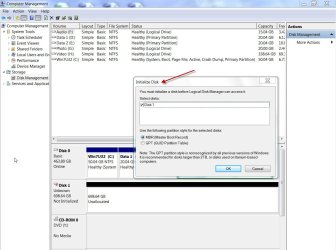
If you get an Initialise Disk screen as in the following screenshot, choose MBR and click on OK.

That will write the MBR to the first sector and that disk which was " Unknown, Not Initialised, unallocated" will turn into "Basic, Online and Unallocated". Right click on where it says Unallocated and create a Simple volume and format it.

D1Initilise.jpg

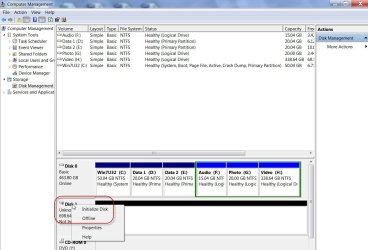
If you do not get an initialise screen, rightclick on the Disk icon with a downward red arrow, click on Initialise Disk and follow what is stated above.

InitialiseD!.jpg
 

My Computer My Computer

At a glance

Windows 7 Home Premium 32 bit
OS
Windows 7 Home Premium 32 bit
Usually I am able to figure this stuff out for myself, but this one has me frustrated.
I followed the previous instructions and I now have a Drive E:, Simple layout, Basic type, but Windows would not format it, and despite that fact that it is "Healthy (Primary Partition)"; it's file system is listed as raw.
 

My Computer My Computer

At a glance

Windows Pro 7 32bit
Computer type
PC/Desktop
Computer Manufacturer/Model Number
eMachine
OS
Windows Pro 7 32bit
Hard Drives
Internal?
External - Iomega 2TB
Antivirus
AVG Free, Zone Alarm
Browser
Mozilla Firefox
Which program did you use to low level format the drive?(If need be I may ask you to LLF with a program of my choice and start afresh.)

Now try formatting it with HP USB Disk Storage Format Tool 2.2.3 HP USB Disk Storage Format Tool Free Download

Right click on the .exe file and run it as administrator. ( Ensure that you select the correct drive)

Report the results.
 

My Computer My Computer

At a glance

Windows 7 Home Premium 32 bit
OS
Windows 7 Home Premium 32 bit
Well, I wish I could say it worked. Even though it's Status is Healthy it refuses to be formatted. Could I totally wipe it clean and start again? In the beginning of all this the drive showed up as blank, so I thought the "HDD Low Level Format Tool" would do the trick.
 

My Computer My Computer

At a glance

Windows Pro 7 32bit
Computer type
PC/Desktop
Computer Manufacturer/Model Number
eMachine
OS
Windows Pro 7 32bit
Hard Drives
Internal?
External - Iomega 2TB
Antivirus
AVG Free, Zone Alarm
Browser
Mozilla Firefox
Well, I wish I could say it worked. Even though it's Status is Healthy it refuses to be formatted. Could I totally wipe it clean and start again? In the beginning of all this the drive showed up as blank, so I thought the "HDD Low Level Format Tool" would do the trick.

Please answer the questions to the point.

1. Did you run the HP formatting Tool as an administrator? yes/no

2. What exactly is the error message you get if it is refusing to format? ( Just saying it refuses to format does not give us any clue). Please take a screenshot of the error message and post, if you cannot note it down and post it verbatim.

3. Take a screenshot of how your Iomega External HDD looks in Windows Disk Management. ( Not to confuse, remove all other external HDDs/pen drives)

http://www.sevenforums.com/tutorials/274797-disk-management-post-screen-capture-image.html
 

My Computer My Computer

At a glance

Windows 7 Home Premium 32 bit
OS
Windows 7 Home Premium 32 bit

My Computer My Computer

At a glance

Windows 7 Ultimate X64 SP1Intel i5-2550K, Differing ~4.4-4.8GHz No buil...16GB G.Skill Sniper 1866MHz @ 2133MHz 2x8GBASUS GTX650TIB-DC2OC-2GD5, (650TI Boost)
Computer type
PC/Desktop
Computer Manufacturer/Model Number
Home Built Desktop By DataTech
OS
Windows 7 Ultimate X64 SP1
CPU
Intel i5-2550K, Differing ~4.4-4.8GHz No built in GPU
Motherboard
ASUS P8Z68-V PRO/GEN3
Memory
16GB G.Skill Sniper 1866MHz @ 2133MHz 2x8GB
Graphics Card(s)
ASUS GTX650TIB-DC2OC-2GD5, (650TI Boost)
Sound Card
Onboard Realtek 5-1
Monitor(s) Displays
Samsung P2570HD
Screen Resolution
1920x1080
Hard Drives
Samsung 840 Pro 256GB SSD for OS, 500GB Seagate Constellation (Enterprise drive) for Data
PSU
Corsair HX650W
Case
Inwin Dragon Rider
Cooling
Hyper 212 EVO w/two Noctua fans, push-pull, @1300 RPM
Keyboard
E-Z Eyes, bright yellow keys with large characters
Mouse
steelseries SENSEI Laser Pro Gaming
Internet Speed
48-51Mbs Mbs down, 11 Mbs up Xfinity Cable
Antivirus
Norton Internet Security 2013
Browser
IE 10, Opera, Pale Moon if needed
Other Info
4 case fans, LG BluRay-RE, ASUS DVD-RW, Mr. Fusion power supply, 1.21 gigawatts.
1. Yes, to running it as admin
2. The message said "Failed to format the device"
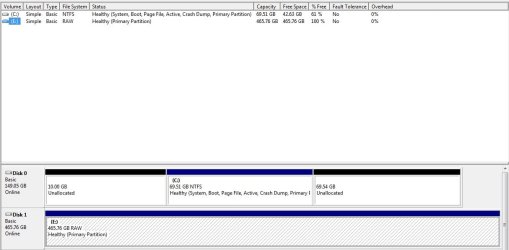
Disk Management.jpg

Device Manager.jpg
 

My Computer My Computer

At a glance

Windows Pro 7 32bit
Computer type
PC/Desktop
Computer Manufacturer/Model Number
eMachine
OS
Windows Pro 7 32bit
Hard Drives
Internal?
External - Iomega 2TB
Antivirus
AVG Free, Zone Alarm
Browser
Mozilla Firefox
OK, if the HP Tool is unable to format, your HDD is most probably a goner.

We shall make another attempt to format it with Windows Disk Management.

Right click on where it says RAW and click on Format.

17-03-2014 08-36-11.jpg

If you still cannot format the drive, you have to check your drive with Seagate Seatools for Windows.

SeaTools for Windows | Seagate

Run the Short Test and if it fails, the Long Test. If it cannot repair the drive as a last ditch attempt try to write zeros (equivalent of LLF Tool and Diskpart Clean all) with it and then try to format it. (Make sure that you select the correct drive)

If all these fail, RMA and get a replacement if your HDD is still under warranty.

If not, you can take out the HDD, hook it up as a second drive and see whether you can access and format it. ( Sometimes, it may only be the interface card inside the enclosure that could have failed and the HDD itself may be OK.)

One thing I had missed: Did you try the external HDD with another USB cable? Try it if you hadn't.
 
Last edited:

My Computer My Computer

At a glance

Windows 7 Home Premium 32 bit
OS
Windows 7 Home Premium 32 bit
Did you try THIS?

Do only Clean first and try to format per the instructions. Otherwise do Clean All, which will take some hours to run.
 

My Computer My Computer

At a glance

Windows 7 Ultimate X64 SP1Intel i5-2550K, Differing ~4.4-4.8GHz No buil...16GB G.Skill Sniper 1866MHz @ 2133MHz 2x8GBASUS GTX650TIB-DC2OC-2GD5, (650TI Boost)
Computer type
PC/Desktop
Computer Manufacturer/Model Number
Home Built Desktop By DataTech
OS
Windows 7 Ultimate X64 SP1
CPU
Intel i5-2550K, Differing ~4.4-4.8GHz No built in GPU
Motherboard
ASUS P8Z68-V PRO/GEN3
Memory
16GB G.Skill Sniper 1866MHz @ 2133MHz 2x8GB
Graphics Card(s)
ASUS GTX650TIB-DC2OC-2GD5, (650TI Boost)
Sound Card
Onboard Realtek 5-1
Monitor(s) Displays
Samsung P2570HD
Screen Resolution
1920x1080
Hard Drives
Samsung 840 Pro 256GB SSD for OS, 500GB Seagate Constellation (Enterprise drive) for Data
PSU
Corsair HX650W
Case
Inwin Dragon Rider
Cooling
Hyper 212 EVO w/two Noctua fans, push-pull, @1300 RPM
Keyboard
E-Z Eyes, bright yellow keys with large characters
Mouse
steelseries SENSEI Laser Pro Gaming
Internet Speed
48-51Mbs Mbs down, 11 Mbs up Xfinity Cable
Antivirus
Norton Internet Security 2013
Browser
IE 10, Opera, Pale Moon if needed
Other Info
4 case fans, LG BluRay-RE, ASUS DVD-RW, Mr. Fusion power supply, 1.21 gigawatts.
I loaded Sea Tools for Windows and ran a short generic and it passed. So I ran the long generic and it failed.
So I ran an Elevated Command Prompt and ran just the "Clean".
And it is 38% into formatting.
If it finishes, which should be hours from now, I will come back and update, as well as mark this solved. :cool:
 

My Computer My Computer

At a glance

Windows Pro 7 32bit
Computer type
PC/Desktop
Computer Manufacturer/Model Number
eMachine
OS
Windows Pro 7 32bit
Hard Drives
Internal?
External - Iomega 2TB
Antivirus
AVG Free, Zone Alarm
Browser
Mozilla Firefox
...... So I ran the long generic and it failed........

Unfortunately, there is nothing to rejoice here, if what you have stated is true.

The IOmega external HDD uses a Seagate ST350041 8AS HDD and if the long generic test failed I wouldn't put even a cent on it.

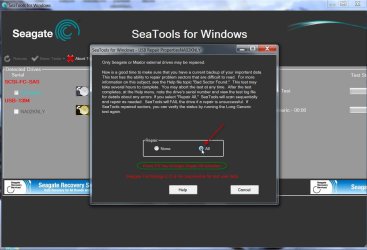
Do run the long generic test again with Repair All selected, press the F8 Key and let the test complete. It is going to take a long time and so start & leave it alone.:)

If it fails to repair and stops dead that is the end of the story.(as far as I am concerned. :))

17-03-2014 22-29-29.jpg
 
Last edited:

My Computer My Computer

At a glance

Windows 7 Home Premium 32 bit
OS
Windows 7 Home Premium 32 bit
I did not complete the format.
(As you predicted)
But it did "Pass" the Long with the Repair enabled.
So again, I have a RAW, Healthy (Primary Partition) with a drive letter.
So rather than waste time jumping the gun...
Format? Clean? Low Level Format?
 

My Computer My Computer

At a glance

Windows Pro 7 32bit
Computer type
PC/Desktop
Computer Manufacturer/Model Number
eMachine
OS
Windows Pro 7 32bit
Hard Drives
Internal?
External - Iomega 2TB
Antivirus
AVG Free, Zone Alarm
Browser
Mozilla Firefox

My Computer My Computer

At a glance

Windows 7 Ultimate X64 SP1Intel i5-2550K, Differing ~4.4-4.8GHz No buil...16GB G.Skill Sniper 1866MHz @ 2133MHz 2x8GBASUS GTX650TIB-DC2OC-2GD5, (650TI Boost)
Computer type
PC/Desktop
Computer Manufacturer/Model Number
Home Built Desktop By DataTech
OS
Windows 7 Ultimate X64 SP1
CPU
Intel i5-2550K, Differing ~4.4-4.8GHz No built in GPU
Motherboard
ASUS P8Z68-V PRO/GEN3
Memory
16GB G.Skill Sniper 1866MHz @ 2133MHz 2x8GB
Graphics Card(s)
ASUS GTX650TIB-DC2OC-2GD5, (650TI Boost)
Sound Card
Onboard Realtek 5-1
Monitor(s) Displays
Samsung P2570HD
Screen Resolution
1920x1080
Hard Drives
Samsung 840 Pro 256GB SSD for OS, 500GB Seagate Constellation (Enterprise drive) for Data
PSU
Corsair HX650W
Case
Inwin Dragon Rider
Cooling
Hyper 212 EVO w/two Noctua fans, push-pull, @1300 RPM
Keyboard
E-Z Eyes, bright yellow keys with large characters
Mouse
steelseries SENSEI Laser Pro Gaming
Internet Speed
48-51Mbs Mbs down, 11 Mbs up Xfinity Cable
Antivirus
Norton Internet Security 2013
Browser
IE 10, Opera, Pale Moon if needed
Other Info
4 case fans, LG BluRay-RE, ASUS DVD-RW, Mr. Fusion power supply, 1.21 gigawatts.
.......But it did "Pass" the Long with the Repair enabled.
So again, I have a RAW, Healthy (Primary Partition) with a drive letter.
So rather than waste time jumping the gun...
Format? Clean? Low Level Format?

I shall write a detailed post on my thoughts later in the day or later after you post the results of this post.

For the time being, I shall draw some lessons from an old SevenForums thread.:)

http://www.sevenforums.com/hardware-devices/22720-help-can-t-format-raw-hdd.html

So you can try to format the drive with Gparted. ( I have never tried Gparted and so I may not be able to guide you on that.)

Gparted is available even in Lucid Puppy. So you may download Lucid Puppy (Ubuntu-Compatible Build) lupu-528.005.iso I have chosen this because it is only a 132.6 MB download. http://puppylinux.org/main/Download%20Latest%20Release.htm Create your bootable pen drive with this ISO using Rufus 1.4.6 (58KB) Rufus - Create bootable USB drives the easy way

Boot from this USB pen drive with your external HDD already connected and run Gparted. ( This much I have done :D.) Exercise caution in selecting the correct drive.

If your external HDD shows all your old partitions, I think you should try to delete them all, create a new volume before formatting.

Format and let us know if that has been successful.
 
Last edited:

My Computer My Computer

At a glance

Windows 7 Home Premium 32 bit
OS
Windows 7 Home Premium 32 bit
So you can try to format the drive with Gparted. ( I have never tried Gparted and so I may not be able to guide you on that.)
I use GParted at work almost on a daily basis, and I can assure you that it is quality software. Great suggestion. ;)

You can also get a copy of GParted by downloading and burning the Ultimate Boot CD - Download the UBCD

That boot disc is the only one you will ever need.
 

My Computer My Computer

At a glance

Windows 7 Enterprise SP1 x64AMD Athlon 64x2 4200+ Dual Core Windsor 2.2GHz4Gb: PNY PC2-6400 Dual Channel 2x2GbPNY NVIDIA GeForce 9800 GT
Computer type
PC/Desktop
Computer Manufacturer/Model Number
HP Pavillion
OS
Windows 7 Enterprise SP1 x64
CPU
AMD Athlon 64x2 4200+ Dual Core Windsor 2.2GHz
Motherboard
Socket AM2: ECS MCP61PM-HM
Memory
4Gb: PNY PC2-6400 Dual Channel 2x2Gb
Graphics Card(s)
PNY NVIDIA GeForce 9800 GT
Sound Card
Creative Sound Blaster Audigy 24Bit @96000Hz
Monitor(s) Displays
HP w1907 Wide LCD 19"
Screen Resolution
1440x900
Hard Drives
1.) OS Drive: 500Gb Seagate Barracuda ST35004-18AS


2.) Storage: 1Tb Seagate Barracuda ST310005-28AS
PSU
OCZ StealthXStream OCZ500SXS 500W
Case
Hp Pavillion
Cooling
Thermaltake
Keyboard
HP
Mouse
Microsoft Wireless
Internet Speed
300Mb
Antivirus
Norton Internet Security 2014
Browser
Internet Explorer 11
Other Info
Custom Build
Hi Torah Lishmah,

You are welcome to share your experience with Gparted if need be and any help is required by the OP.We are never alone :).

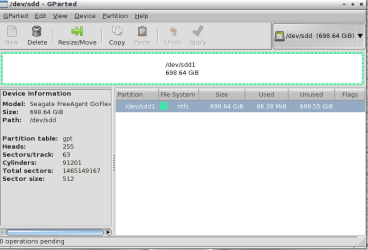
I was just playing around with the Gparted Partition Manager in Lucid Puppy booted from my pen drive. And here is a question.:)

I have this Disk 1, a 750GB USB HDD which is RAW. Refer to the screenshot in post #11. Yep, I created it as RAW for this thread. It was initialised as an MBR disk and a simple volume was created encompassing the whole drive but was not formatted. That is why it is RAW. No file system.

OK. Now I formatted it as an NTFS volume with Gparted Partition Manager.( deleted the volume, created a new volume and formatted.)

What I found was that it was formatted as a GPT disk. That surprised me.

image-1.png

So the question is does Gparted always initialise the disk as a GPT disk? Is it not possible to initialise the disk as an MBR disk? Also in my limited exploration, I could not find anyway to convert a GPT to MBR or vice versa as I could do in Windows Disk Management or most other partitioning/formatting software. Or am I missing something?
 

My Computer My Computer

At a glance

Windows 7 Home Premium 32 bit
OS
Windows 7 Home Premium 32 bit
Right now I am using Rufus to install lupu on a USB Flash drive. It is on Pass 2 with zero errors.
Then, I will wait for the above question to be answered.
 

My Computer My Computer

At a glance

Windows Pro 7 32bit
Computer type
PC/Desktop
Computer Manufacturer/Model Number
eMachine
OS
Windows Pro 7 32bit
Hard Drives
Internal?
External - Iomega 2TB
Antivirus
AVG Free, Zone Alarm
Browser
Mozilla Firefox
Back
Top