HDDs seems to freeze/hang while requesting data!

regfish00

New member
Local time
2:13 AM
Messages
6
Hello!

Im having a problem when i try to import videos into AE or Premiere Pro. It freezes for 30-60secs and then continues and freezes again and so on until the file transfer is done, dependig how big the videos are. Also it is making hard to run RAM previews and this makes editing impossible. I know this problem has nothing to do with editing software, because when i try to transfer media from one HDD to another, it keeps happening.
It also happened when i were watching a movie, couple of times this month.

I have 128gb ssd for system, 60gb ssd for scratch disk, 2x 1TB HDD for media. Since i have 3 more 1TB HDDs ive been testing and transfering files and the problem remains. I have Chieftec 750W max psu. All HDDs are Samsung HD103SJ 7200rpm.

These 2 HDDs also seems to sleep while im not using any data from them and when i try to open a video i hear a click and a spinning sound and the video opens. Is it ok?

Im using W7 enterprise 64bit
Specs:
MOBO: Gigabyte P67A-UD4
CPU: Intel Core i5 2500K 3.30GHz
Graphics: nVidia GTX 570
RAM: 16gb
Kingston 128gb SSDNOW V+100 for system
2x 1TB Samsung HD103SJ internal hdds for data storage

I would really appreciate any of your help!
 

My Computer

OS
Windows 7 Enterprise x64
Hello regfish00. Welcome to the forum.

By default Windows power settings puts the drives to sleep after x minutes of inactivity. You can change this to never put the drives to sleep.

  • Go Start > Control Panel > Hardware & Sound > Power Options
  • Find the power plan that is selected (usually Balanced) and click "Change Plan Settings"
  • Then click on "Change Advanced Power Settings"
  • Click the + sign next to Hard Disk > and "Turn Off Hard Disk After"
  • And change the default setting to Never.
See if that helps
 

My Computer

Computer type
PC/Desktop
Computer Manufacturer/Model Number
Home Built - Jan 2013
OS
Windows 7 64 Bit Home Premium SP1
CPU
i7-3820
Motherboard
Asus P9X79-PRO - Bios 4608
Memory
GSkill F3-14900CL9Q - 16GB
Graphics Card(s)
EVGA GeForce GTX660 - Driver 352.86
Sound Card
On board Realtek ALC898
Monitor(s) Displays
Acer S271HL
Screen Resolution
1920 x 1080
Hard Drives
#1- Samsung 840 Pro Series
#2- Western Digital WD1002FAEX Sata3 Black
#3- Western Digital WD1002FAEX Sata3 Black
PSU
Corsair CMPSU-850TX-V2 - 850 watt (by Seasonic)
Case
Corsair Obsidian 550D
Cooling
Standard 3 120mm case fans, Cooler Master Hyper 212 EVO
Keyboard
MS KC-0405
Mouse
Intellimouse 5-button
Internet Speed
56 Mbits/Sec (on a good day)
Antivirus
Avast & Malwarebytes
Browser
Firefox
Other Info
Asus DVD - DRW-24B1ST 24X
Thanks for answering!

I tried that yesterday and it didnt help.

Also i got to add that when i turn on my PC, then sometimes it hangs when "Windows is starting" screen is on and after couple of minutes it loads and im able to log in. But when i unplug all the HDDs(only the system drive is connected), then it loads normally.

Also i looked into the Event Log and theres always an error "The driver detected a controller error on \Device\Ide\IdePort3" depending into which port those drives are plugged. I suspected that only one of the drives give me that error, but when i tested with other HDDs the error remained and appeared in every SATA 2.0 port.

And i gotta add one more thing about the Event Log. Theres another error "Session "Microsoft Security Client OOBE" stopped due to the following error: 0xC000000D" by Kernel Event tracing. And this appears always when i start my computer.
 

My Computer

OS
Windows 7 Enterprise x64
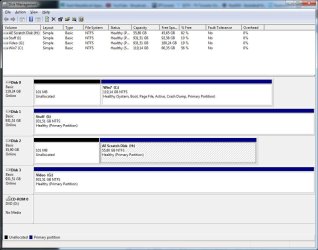
Can you post a screenshot of your Disk Management window, with all the hard drives connected, and maximized so we can see them all?
 

My Computer

Computer type
PC/Desktop
Computer Manufacturer/Model Number
Home Built - Jan 2013
OS
Windows 7 64 Bit Home Premium SP1
CPU
i7-3820
Motherboard
Asus P9X79-PRO - Bios 4608
Memory
GSkill F3-14900CL9Q - 16GB
Graphics Card(s)
EVGA GeForce GTX660 - Driver 352.86
Sound Card
On board Realtek ALC898
Monitor(s) Displays
Acer S271HL
Screen Resolution
1920 x 1080
Hard Drives
#1- Samsung 840 Pro Series
#2- Western Digital WD1002FAEX Sata3 Black
#3- Western Digital WD1002FAEX Sata3 Black
PSU
Corsair CMPSU-850TX-V2 - 850 watt (by Seasonic)
Case
Corsair Obsidian 550D
Cooling
Standard 3 120mm case fans, Cooler Master Hyper 212 EVO
Keyboard
MS KC-0405
Mouse
Intellimouse 5-button
Internet Speed
56 Mbits/Sec (on a good day)
Antivirus
Avast & Malwarebytes
Browser
Firefox
Other Info
Asus DVD - DRW-24B1ST 24X
dskmng_screen.jpg

I just finished major dust cleaning which took 3 hours. PSU had lots of dust inside, but i dont know if it affects anything...
Also transfered a few files from "I:" drive to "G:" and backwards. At the moment seems to work fine and no IdePort errors also.

Edit: Rushed a little to say everything seems fine. That same IdePort3 error is back. Port3= drive G:
Probably after some time i get IdePort2 error and both will freeze again.
Edit: All the problems are back including IdePort2(I: drive) error. Had to disconnect all HDdrives to be able to use windows. Couldnt even access Disk Management. Ctrl+alt+del didnt work and had to shut down by the power button.

Noticed that while i transfered files from G: to I:, the speed was going down until it hung.
 
Last edited:

My Computer

OS
Windows 7 Enterprise x64
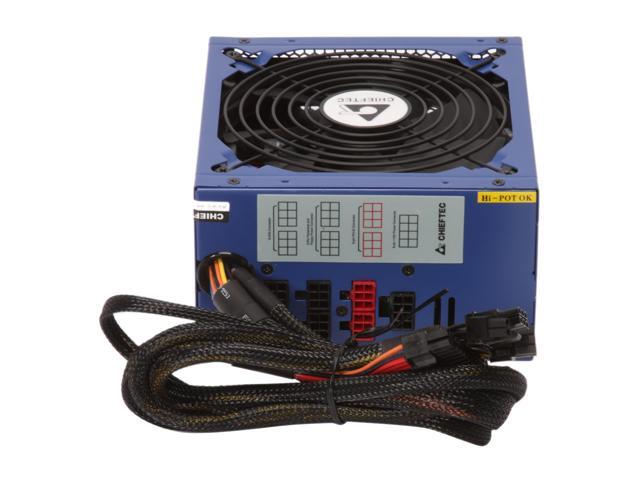
How big is your power supply? Power problems could account for the behavior. If the additional drives push the system over the top of the capacity.
 

My Computer

Computer type
PC/Desktop
Computer Manufacturer/Model Number
Home Built - Jan 2013
OS
Windows 7 64 Bit Home Premium SP1
CPU
i7-3820
Motherboard
Asus P9X79-PRO - Bios 4608
Memory
GSkill F3-14900CL9Q - 16GB
Graphics Card(s)
EVGA GeForce GTX660 - Driver 352.86
Sound Card
On board Realtek ALC898
Monitor(s) Displays
Acer S271HL
Screen Resolution
1920 x 1080
Hard Drives
#1- Samsung 840 Pro Series
#2- Western Digital WD1002FAEX Sata3 Black
#3- Western Digital WD1002FAEX Sata3 Black
PSU
Corsair CMPSU-850TX-V2 - 850 watt (by Seasonic)
Case
Corsair Obsidian 550D
Cooling
Standard 3 120mm case fans, Cooler Master Hyper 212 EVO
Keyboard
MS KC-0405
Mouse
Intellimouse 5-button
Internet Speed
56 Mbits/Sec (on a good day)
Antivirus
Avast & Malwarebytes
Browser
Firefox
Other Info
Asus DVD - DRW-24B1ST 24X
750W max Chieftec PSU
17-202-008-06.jpg
 

My Computer

OS
Windows 7 Enterprise x64
Mmmm. Plenty big enough.
Check to be sure that the modular cables are firmly plugged into their sockets on the power supply.
If you have or can borrow a multimeter you could test to be sure you are getting a steady 12v and 5v feed on the lines that connect to the hard drives.

Also, if yours is the CFT-750-14C, then it has four 12v rails. You might want to use all 4 rails to spread out the total load so that it is not just on one or two rails. So even if there are 2 SATA power connectors on a single modular connection, just use one of them per hard drive - that sort of thing. Each 12v rail will supply only 18A of power, even though the power supply has a total amperage much higher. So too many 12v devices on one rail could produce the same problems as if you had a too small a power supply.
 

My Computer

Computer type
PC/Desktop
Computer Manufacturer/Model Number
Home Built - Jan 2013
OS
Windows 7 64 Bit Home Premium SP1
CPU
i7-3820
Motherboard
Asus P9X79-PRO - Bios 4608
Memory
GSkill F3-14900CL9Q - 16GB
Graphics Card(s)
EVGA GeForce GTX660 - Driver 352.86
Sound Card
On board Realtek ALC898
Monitor(s) Displays
Acer S271HL
Screen Resolution
1920 x 1080
Hard Drives
#1- Samsung 840 Pro Series
#2- Western Digital WD1002FAEX Sata3 Black
#3- Western Digital WD1002FAEX Sata3 Black
PSU
Corsair CMPSU-850TX-V2 - 850 watt (by Seasonic)
Case
Corsair Obsidian 550D
Cooling
Standard 3 120mm case fans, Cooler Master Hyper 212 EVO
Keyboard
MS KC-0405
Mouse
Intellimouse 5-button
Internet Speed
56 Mbits/Sec (on a good day)
Antivirus
Avast & Malwarebytes
Browser
Firefox
Other Info
Asus DVD - DRW-24B1ST 24X
After some testing, i found out that the SATA 2 ports aint working anymore and i plugged them into SATA 3 port where they all worked fine. So i googled and the 1st post i found: http://forums.whirlpool.net.au/archive/1946653
Theres nothing to add, exactly the same problem and all the HDDs are working in SATA 3 port.
 

My Computer

OS
Windows 7 Enterprise x64
That certainly sounds like the case.

You might try resetting the BIOS defaults and then reinstalling the chipset drivers just as a last resort, but if it is a bad motherboard then there is not more to be done but replace it.

Is that board still under warranty?
 

My Computer

Computer type
PC/Desktop
Computer Manufacturer/Model Number
Home Built - Jan 2013
OS
Windows 7 64 Bit Home Premium SP1
CPU
i7-3820
Motherboard
Asus P9X79-PRO - Bios 4608
Memory
GSkill F3-14900CL9Q - 16GB
Graphics Card(s)
EVGA GeForce GTX660 - Driver 352.86
Sound Card
On board Realtek ALC898
Monitor(s) Displays
Acer S271HL
Screen Resolution
1920 x 1080
Hard Drives
#1- Samsung 840 Pro Series
#2- Western Digital WD1002FAEX Sata3 Black
#3- Western Digital WD1002FAEX Sata3 Black
PSU
Corsair CMPSU-850TX-V2 - 850 watt (by Seasonic)
Case
Corsair Obsidian 550D
Cooling
Standard 3 120mm case fans, Cooler Master Hyper 212 EVO
Keyboard
MS KC-0405
Mouse
Intellimouse 5-button
Internet Speed
56 Mbits/Sec (on a good day)
Antivirus
Avast & Malwarebytes
Browser
Firefox
Other Info
Asus DVD - DRW-24B1ST 24X
I dont know yet because i didnt purchase it, but i believe it is. Until getting a new mobo, i try using eSata ports on the back of the board and those 2 Sata3 ports. I hope eSata ports aint controlled by the same controller as Sata 2.
 

My Computer

OS
Windows 7 Enterprise x64
Back
Top