HDMI audio out problem

dgud

New member
Local time
8:52 PM
Messages
3
Hey!

I'm trying to hook up my pc to the tv through a hdmi cable. The image is just fine, but there is no sound coming out from the tv (the sound is always coming from the notebook)

Some things:
I updated the video drivers and the audio drivers
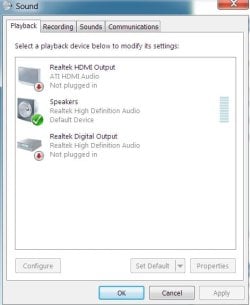
In the sound configuration, it says that the hdmi audio is not plugged in (but it is!)
It used to work, but I recently cleaned up my PC, and now, no deal!
Video card: ATI 5870
notebook: MSI gx660
Some time it appears some weird message on my notebook saying something about DVI and HDMI (I can't remember)

any ideas?
 

My Computer

OS
Windows 7 Ultimate x64
I plugged the audio connector on my Mobo to the Audio in on the Vid card (I asume you have done the same). Then, in BIOS, I had an audio option to redirect one of my SPDIF to HDMI.
Maybe yours has a similar option?
 

My Computer

Computer Manufacturer/Model Number
Personal build
OS
Windows 7 Ultimate x64 (Retail)
CPU
Intel I7-860
Motherboard
Asus Maximus III Formula
Memory
G.Skill RipJaw DDR3-1333 16GB (4x4GB)
Graphics Card(s)
Nvidia GTS-250 1GB
Sound Card
SupremeFX X-Fi 7.1 HD sound system.
Monitor(s) Displays
VisionQuest VQL-22WSHD LCD Monitor
Screen Resolution
1680x1050
Hard Drives
1x Seagate ST3500418AS 500G SATA2 HDD
1x Western Digital Caviar SE16 500G SATA2 HDD
1x Western Digital Caviar SE16 750G SATA2 HDD
2x Western Digital Caviar Green 2TB SATA2 HDD, configured RAID1
PSU
OCZ EliteXtream OCZ1000EXS 1000W ATX12V 20/24 Pin Active PFC
Case
Antec 1200
Cooling
Swifteck H2O-220 Ultima XT Liquid Cooling w/ 320 Radiator
Keyboard
Logitech G11 Keyboard
Mouse
Logitech MX518 Optical Mouse
Internet Speed
Cable Modem
Other Info
Visiontek TV Wonder 650 Theater PCI-E TV Tuner Card
Logitech 9000 Pro Web Camera
Logitech Cordless RumblePad 2 game controller
LG 18x SuperMulti SATA2 DVD Writer
NmediaPC CR98 Multi Card reader
Nmedia Pro-LCD
Corsair Dominator Memory Fan
Coolermaster R4-L2R-20ac 120mm Case Fan x2
My ATI HD4850 has built in audio, for the HDMI connection. In many cases you must manually set the HDMI as the default audio playback device in order to have audio in the HDMI signal.
 

My Computer

Computer type
PC/Desktop
Computer Manufacturer/Model Number
My Own Build
OS
Windows 10 64 bit
CPU
Intel i7 6700K
Motherboard
ASUS ROG Maximus VIII Hero
Memory
16GB Corsair Dominator
Graphics Card(s)
Intel CPU Graphics
Sound Card
RealTek
Monitor(s) Displays
27" Dell S2719dgf
Screen Resolution
2560X1440
Hard Drives
1 TB Samsung 850 EVO SSD for Win 10 Pro
500GB Samsung 850 EVO SSD for Win 10 Insider
2 TB drive for backup
PSU
EVGA Supernova 750G2
Case
BeQuiet Silent Base 600
Cooling
Deepcool Captain 120EX
Keyboard
Microsoft Wireless 2000
Mouse
Microsoft wireless
Internet Speed
100 MB/sec (Cable)
Antivirus
Microsoft Defender and Malwarebytes
Browser
Edge/Firefox
Other Info
Cakewalk (Sonar) by BandLab and Studio One 4.1 Pro recording studio software. MOTU 896Mk3 Hybrid recording interface, Frontier Tranzport wireless control unit, Behringer X-Touch Control Surface.
Five USB connected optical drives for CD Audio production using Nero BurningROM
I plugged the audio connector on my Mobo to the Audio in on the Vid card (I asume you have done the same). Then, in BIOS, I had an audio option to redirect one of my SPDIF to HDMI.
Maybe yours has a similar option?

Not quite sure what you meant... I plugged the HDMI port from my notebook to the HDMI port of my TV

My ATI HD4850 has built in audio, for the HDMI connection. In many cases you must manually set the HDMI as the default audio playback device in order to have audio in the HDMI signal.

I can't do that, it says that the HDMI audio is not plugged in and it does not allow me to set it as the default
 

My Computer

OS
Windows 7 Ultimate x64

My Computer

Computer type
PC/Desktop
Computer Manufacturer/Model Number
Custom Build
OS
Windows 7 Home Premium 64 bit
CPU
Intel Core i7-4790
Motherboard
GA-Z87X-D3H
Memory
G.SKILL 8GB (2 x 4GB) DDR3 F3-10666CL9D-8GBNT
Graphics Card(s)
AMD Radeon R7 250
Sound Card
Realtek ALC892
Monitor(s) Displays
Samsung UN32EH5000, Dell 1703FPT
Screen Resolution
1920 x 1080, 1280 x 1024
Hard Drives
WD5003AZEX
WD10EZEX
Samsung HD103SJ
Samsung 128 GB 840 PRO
PSU
SeaSonic M12II SS-500GM
Case
Fractal Design Define R4
Cooling
Zalman CNPS9900ALED
Keyboard
Logitech K800
Mouse
Logitech M705
Internet Speed
16 Mbps
Antivirus
Avast
Browser
Firefox
Other Info
Bose Companion 2 Multimedia Speakers
I plugged the audio connector on my Mobo to the Audio in on the Vid card (I asume you have done the same). Then, in BIOS, I had an audio option to redirect one of my SPDIF to HDMI.
Maybe yours has a similar option?

Not quite sure what you meant... I plugged the HDMI port from my notebook to the HDMI port of my TV

My ATI HD4850 has built in audio, for the HDMI connection. In many cases you must manually set the HDMI as the default audio playback device in order to have audio in the HDMI signal.

I can't do that, it says that the HDMI audio is not plugged in and it does not allow me to set it as the default

You should be able to enable HDMI playback in Control Panel=>Sound, if it does not swap directly when the hdmi cable is plugged in.
 

Attachments

  • Capture.PNG
    Capture.PNG
    18.2 KB · Views: 82

My Computer

Computer type
PC/Desktop
Computer Manufacturer/Model Number
Custom Build
OS
Windows 7 Professional SP1 - x64 [Non-UEFI Boot]
CPU
Ivy Bridge Core i5 3570K (Delidded)
Motherboard
Asus P8Z77-V LE PLUS
Memory
G.Skill "Ares" DDR3 PC3-12800 - 1600MHz (16Gb)
Graphics Card(s)
Asus Dual-RX480-O4G
Sound Card
Creative Sound Blaster Z w/5.1 sound system
Monitor(s) Displays
Asus IPS 23"
Screen Resolution
16/9
Hard Drives
Internal:
500Go Sata 6Gb/s (x2)
500Go Sata 3Gb/s (x2)
SSD 60Go Sata 6Gb/s
PSU
In Win C 900W Series 80+ Platinum
Case
Thermaltake Chaser A71
Cooling
Custom Water Cooling Loop
Keyboard
Cooler Master QuickFire XTi
Mouse
Razer Imperator 2012 (4G)
Antivirus
MSE
Browser
IE 11.0.xxx Rtm
Other Info
"Raid0" with Intel Smart Response Technology (HDD/SSD)
Hey!

sorry for taking so long (carnaval here)

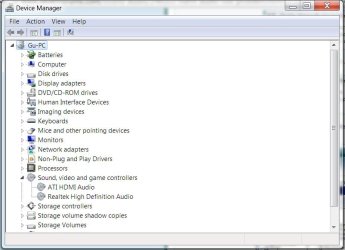
so here it is the screens

(both taken while the cable is plugged in)
 

Attachments

  • test.jpg
    test.jpg
    45.4 KB · Views: 132
  • test1.jpg
    test1.jpg
    27.2 KB · Views: 104

My Computer

OS
Windows 7 Ultimate x64

My Computer

Computer type
PC/Desktop
Computer Manufacturer/Model Number
Custom Build
OS
Windows 7 Professional SP1 - x64 [Non-UEFI Boot]
CPU
Ivy Bridge Core i5 3570K (Delidded)
Motherboard
Asus P8Z77-V LE PLUS
Memory
G.Skill "Ares" DDR3 PC3-12800 - 1600MHz (16Gb)
Graphics Card(s)
Asus Dual-RX480-O4G
Sound Card
Creative Sound Blaster Z w/5.1 sound system
Monitor(s) Displays
Asus IPS 23"
Screen Resolution
16/9
Hard Drives
Internal:
500Go Sata 6Gb/s (x2)
500Go Sata 3Gb/s (x2)
SSD 60Go Sata 6Gb/s
PSU
In Win C 900W Series 80+ Platinum
Case
Thermaltake Chaser A71
Cooling
Custom Water Cooling Loop
Keyboard
Cooler Master QuickFire XTi
Mouse
Razer Imperator 2012 (4G)
Antivirus
MSE
Browser
IE 11.0.xxx Rtm
Other Info
"Raid0" with Intel Smart Response Technology (HDD/SSD)
I have this problem, but I assumed it could be that my TV is old and the firmware is not telling the comp it is capable of receiving an HDMI signal? because in my nvidia control panel my TV just comes up as "Digital Display'... like generic, when it should be giving the brand name etc., right? It's an Olevia 32"... 232-T11. IT also said that my 'Digital display' does not support HDCP. I tried rigorous detection with no luck, and for some reason Force Detection is grayed out...???

and in response to NoN ^ when it says not connected or device unplugged (even though it is plugged in), you cannot set it as default, it won't let you
 

My Computer

Computer Manufacturer/Model Number
Homemade
OS
Windows 7 Ultimate x64
CPU
Intel Core i7-950 Bloomfield 3.06GHz
Motherboard
GIGABYTE X58A-UD3R
Memory
CORSAIR XMS 6GB DDR3 2000Mhz
Graphics Card(s)
PNY GTX 470
Sound Card
onboard Realtek ACL889
Monitor(s) Displays
SCEPTRE X270W-1080P
Screen Resolution
1920x1080
Hard Drives
Crucial RealSSD C300 128gb SSD
Seagate Barracuda 7200.11 1TB HDD
PSU
Corsair 850TX
Case
Antec Three Hundred
Cooling
Air, 3 Scythe Ultra Kaze, Scythe fan speed controller
Keyboard
Rosewill RK-V1TP
Mouse
Logitech M505
Internet Speed
25mbps up and down
Hey!

sorry for taking so long (carnaval here)

so here it is the screens

(both taken while the cable is plugged in)

Did you load the video driver from the AMD site?

The AMD HDMI driver is installed as part of the CCC driver package.
It looks like you don't have the right driver installed.
Download it from here.....AMD Graphics Drivers & Software
 

My Computer

Computer type
PC/Desktop
Computer Manufacturer/Model Number
Custom Build
OS
Windows 7 Home Premium 64 bit
CPU
Intel Core i7-4790
Motherboard
GA-Z87X-D3H
Memory
G.SKILL 8GB (2 x 4GB) DDR3 F3-10666CL9D-8GBNT
Graphics Card(s)
AMD Radeon R7 250
Sound Card
Realtek ALC892
Monitor(s) Displays
Samsung UN32EH5000, Dell 1703FPT
Screen Resolution
1920 x 1080, 1280 x 1024
Hard Drives
WD5003AZEX
WD10EZEX
Samsung HD103SJ
Samsung 128 GB 840 PRO
PSU
SeaSonic M12II SS-500GM
Case
Fractal Design Define R4
Cooling
Zalman CNPS9900ALED
Keyboard
Logitech K800
Mouse
Logitech M705
Internet Speed
16 Mbps
Antivirus
Avast
Browser
Firefox
Other Info
Bose Companion 2 Multimedia Speakers
I know this is old, but I have/had this problem. All my drivers are up to date, so I know that's not the problem. At first, I thought it had something to do with a recent driver update (which it might be, but I doubt it), but I noticed something weird today. As I was trying to fix this problem, Windows was installing some updates to my computer which temporarily made my TV screen flicker. After it was done updating, my "Not plugged in" problem went away. I say have/had this problem because it worked earlier today and I had to turn off my computer. When I turned it back on, no sound and no I have sound again. Just a thought
 

My Computer

Computer Manufacturer/Model Number
Gigabyte Technology Co., Ltd/Z68A-D3H-B3
OS
Windows 7 Professional x64
CPU
[Intel(R) Core(TM) i5-2400 CPU @ 3.10GHz, 3301 Mhz
Motherboard
Gigabyte Technology Co., Ltd/Z68A-D3H-B3
Memory
16.0 GB
Graphics Card(s)
AMD Radeon HD 6800 Series
Sound Card
AMD High Definition Audio Device
Monitor(s) Displays
Phillips FTV
Hey!

sorry for taking so long (carnaval here)

so here it is the screens

(both taken while the cable is plugged in)

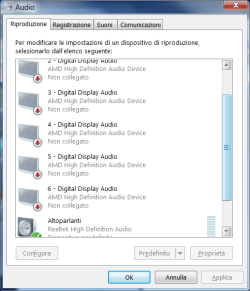
I have the same problem. And the Sound panel looks the same with Digital Output + HDMI disconnected. They are both Properties > Enabled but they simply appear disconnected when I plug-in the HDMI-HDMI connector cable and I can see the image but can't hear audio on the LCD TV... :confused:
This happens also with latest Catalyst 12.8 installed + Realtek ATI HDMI Audio Device R2.70.
My MSI GX660 laptop has an AMD discrete gfx card + chipset Realtek ALC888s on the mobo.

EDIT:

SOLVED!
Have had to install 'AMD High Definition Audio Device' (version 7.12.0.7706) from Catalyst 12.4 Mobility in addition to (=with) Catalyst 12.8 video drivers. They replaced Realtek ATI HDMI Audio Device. Now audio works fine out of TV speakers automatically when I connect the HDMI cable!

Weird 6 HDMI audio device are now available, but this is ok I guess since I've read AMD 7970M supports Eyefinity with up to 6 independent and configurable screens (!).
 

Attachments

  • Immagine2.png
    Immagine2.png
    25 KB · Views: 60
Last edited:

My Computer

Computer type
Laptop
Computer Manufacturer/Model Number
MSI GX660-262it
OS
Windows 7 Home Premium x64 SP1
CPU
Intel Core i7 840QM
Memory
8GB DDR3 1333MHz
Graphics Card(s)
ATI Mobility HD 7970M 2GB DDR5
Screen Resolution
1920x1080
Hard Drives
Intel SSDSA2CT040G3
Hybrid ST750LX0ST750LX003
Antivirus
360 Internet Security
Browser
IE10
Back
Top