Solved HDMI Audio Quit

SamMacA

New member
Local time
9:24 AM
Messages
4
I have a Dell i3847 desktop with Windows 7 Pro - 64bit. Some time during the night my power went off shutting down my computer. When I started it this morning there was no sound with my HDMI cable that runs to my Samsung display. Last night it worked fine. The video is still fine.

I have checked to make sure that all disconnected and disabled devices are shown. They are. I uninstalled the audio driver in Device Manager, rebooted, and Windows reinstalled the driver. No help.
I tried a new HDMI cable. No help.

For whatever reason my computer can no longer see the Samsung display. When I check for playback devices it is no longer visible.

I pushed F12 on boot up and ran the diagnostics. Nothing found.

Anybody have any suggestions?

Sam
 

My Computer

Computer type
PC/Desktop
Computer Manufacturer/Model Number
Dell
OS
Windows & Pro 64 bit
The HDMI audio is generated (usually) in the Video card and does not use the regular PC audio.
Uninstall the Video in the Device Manager (DO NOT uninstall the driver). Restart the PC and when Windows starts it will detect and reinstall the Video. See if this helps with the problem.
 

My Computer

Computer type
PC/Desktop
Computer Manufacturer/Model Number
My Own Build
OS
Windows 10 64 bit
CPU
Intel i7 6700K
Motherboard
ASUS ROG Maximus VIII Hero
Memory
16GB Corsair Dominator
Graphics Card(s)
Intel CPU Graphics
Sound Card
RealTek
Monitor(s) Displays
27" Dell S2719dgf
Screen Resolution
2560X1440
Hard Drives
1 TB Samsung 850 EVO SSD for Win 10 Pro
500GB Samsung 850 EVO SSD for Win 10 Insider
2 TB drive for backup
PSU
EVGA Supernova 750G2
Case
BeQuiet Silent Base 600
Cooling
Deepcool Captain 120EX
Keyboard
Microsoft Wireless 2000
Mouse
Microsoft wireless
Internet Speed
100 MB/sec (Cable)
Antivirus
Microsoft Defender and Malwarebytes
Browser
Edge/Firefox
Other Info
Cakewalk (Sonar) by BandLab and Studio One 4.1 Pro recording studio software. MOTU 896Mk3 Hybrid recording interface, Frontier Tranzport wireless control unit, Behringer X-Touch Control Surface.
Five USB connected optical drives for CD Audio production using Nero BurningROM
No HDMI Audio

Thanks for the reply. I don't see the video in the Device Manager. What would it be called in WIN 7?

Sam
 

My Computer

Computer type
PC/Desktop
Computer Manufacturer/Model Number
Dell
OS
Windows & Pro 64 bit
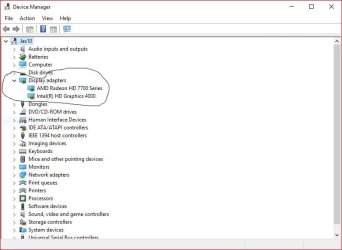
Display Adapters.

See mine
 

Attachments

  • Capture.JPG
    Capture.JPG
    43.4 KB · Views: 1

My Computer

Computer type
PC/Desktop
Computer Manufacturer/Model Number
My Own Build
OS
Windows 10 64 bit
CPU
Intel i7 6700K
Motherboard
ASUS ROG Maximus VIII Hero
Memory
16GB Corsair Dominator
Graphics Card(s)
Intel CPU Graphics
Sound Card
RealTek
Monitor(s) Displays
27" Dell S2719dgf
Screen Resolution
2560X1440
Hard Drives
1 TB Samsung 850 EVO SSD for Win 10 Pro
500GB Samsung 850 EVO SSD for Win 10 Insider
2 TB drive for backup
PSU
EVGA Supernova 750G2
Case
BeQuiet Silent Base 600
Cooling
Deepcool Captain 120EX
Keyboard
Microsoft Wireless 2000
Mouse
Microsoft wireless
Internet Speed
100 MB/sec (Cable)
Antivirus
Microsoft Defender and Malwarebytes
Browser
Edge/Firefox
Other Info
Cakewalk (Sonar) by BandLab and Studio One 4.1 Pro recording studio software. MOTU 896Mk3 Hybrid recording interface, Frontier Tranzport wireless control unit, Behringer X-Touch Control Surface.
Five USB connected optical drives for CD Audio production using Nero BurningROM
No HDMI Sound

Good morning.

I uninstalled the following devices:

1) High Definition Audio Device (It had a yellow triangle next to it.)

2) Standard VGA Graphics adapter (No yellow triangle.)

3) Universal Serial Bus Controller (It had a yellow triangle next to it.)

When I rebooted, I got the following message:

Device Drive Software not Successfully Installed

High Definition Audio Device - failed

Universal Serial Bus Controller - no driver found

Standard VGA Graphics adapter - ready for use

I also went to the Realtek web site. I think that is the brand of my HD audio device. I download a new driver from their site. It took awhile. It cycled through two reboots and I was optimistic. No luck. I still have a red X on the Audio Icon on the task bar and no sound.

Sam
 

My Computer

Computer type
PC/Desktop
Computer Manufacturer/Model Number
Dell
OS
Windows & Pro 64 bit
Can you verify the Dell laptop model you have. I looked at the Inspiron's, on the Dell support site, and no 3847 is listed.
 

My Computer

Computer type
PC/Desktop
Computer Manufacturer/Model Number
My Own Build
OS
Windows 10 64 bit
CPU
Intel i7 6700K
Motherboard
ASUS ROG Maximus VIII Hero
Memory
16GB Corsair Dominator
Graphics Card(s)
Intel CPU Graphics
Sound Card
RealTek
Monitor(s) Displays
27" Dell S2719dgf
Screen Resolution
2560X1440
Hard Drives
1 TB Samsung 850 EVO SSD for Win 10 Pro
500GB Samsung 850 EVO SSD for Win 10 Insider
2 TB drive for backup
PSU
EVGA Supernova 750G2
Case
BeQuiet Silent Base 600
Cooling
Deepcool Captain 120EX
Keyboard
Microsoft Wireless 2000
Mouse
Microsoft wireless
Internet Speed
100 MB/sec (Cable)
Antivirus
Microsoft Defender and Malwarebytes
Browser
Edge/Firefox
Other Info
Cakewalk (Sonar) by BandLab and Studio One 4.1 Pro recording studio software. MOTU 896Mk3 Hybrid recording interface, Frontier Tranzport wireless control unit, Behringer X-Touch Control Surface.
Five USB connected optical drives for CD Audio production using Nero BurningROM
No HDMI Sound

Yes, I have a Dell Inspiron 3847. I used Dell's software to find my model and service tag number just to be sure.

No matter. I fixed it. I went to the Intel driver site and downloaded their latest audio and video drivers. I'm back in business.

Thanks for your support during a very frustrating time.

Sam
 

My Computer

Computer type
PC/Desktop
Computer Manufacturer/Model Number
Dell
OS
Windows & Pro 64 bit
Cool. I was going to suggest Intel and let it auto scan your system to see what drivers were needed.

I just checked the Dell support site again and no 3847 listed. They missed that one.
 

My Computer

Computer type
PC/Desktop
Computer Manufacturer/Model Number
My Own Build
OS
Windows 10 64 bit
CPU
Intel i7 6700K
Motherboard
ASUS ROG Maximus VIII Hero
Memory
16GB Corsair Dominator
Graphics Card(s)
Intel CPU Graphics
Sound Card
RealTek
Monitor(s) Displays
27" Dell S2719dgf
Screen Resolution
2560X1440
Hard Drives
1 TB Samsung 850 EVO SSD for Win 10 Pro
500GB Samsung 850 EVO SSD for Win 10 Insider
2 TB drive for backup
PSU
EVGA Supernova 750G2
Case
BeQuiet Silent Base 600
Cooling
Deepcool Captain 120EX
Keyboard
Microsoft Wireless 2000
Mouse
Microsoft wireless
Internet Speed
100 MB/sec (Cable)
Antivirus
Microsoft Defender and Malwarebytes
Browser
Edge/Firefox
Other Info
Cakewalk (Sonar) by BandLab and Studio One 4.1 Pro recording studio software. MOTU 896Mk3 Hybrid recording interface, Frontier Tranzport wireless control unit, Behringer X-Touch Control Surface.
Five USB connected optical drives for CD Audio production using Nero BurningROM
Back
Top