
HDMI "not plugged in"

boneyarsebogman

New member
Local time
7:23 PM
Messages
2
I wonder if people can help me here; I've been googling this question and searching through this forum but cannot find anything that could even come close to helping me.

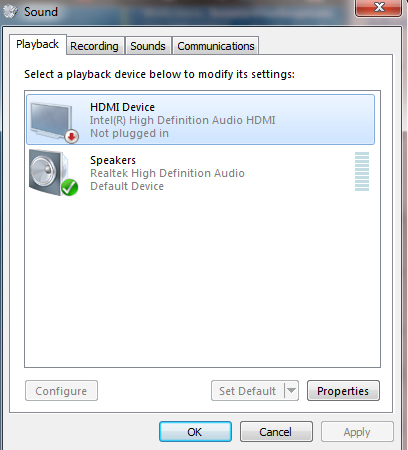
I have a Samsung R530 running Windows 7 32bit. When I hook it up to my Philips Cineos TV via the HDMI cable, the video comes through perfectly but audio only plays through the laptop speakers. When I went into sound in control panel, this is why I see:
Sound.jpg


When I click on Intel HDMI device, it is greyed out so I can neither set as default or configure. I'm not entirely sure what it means by "not plugged in".

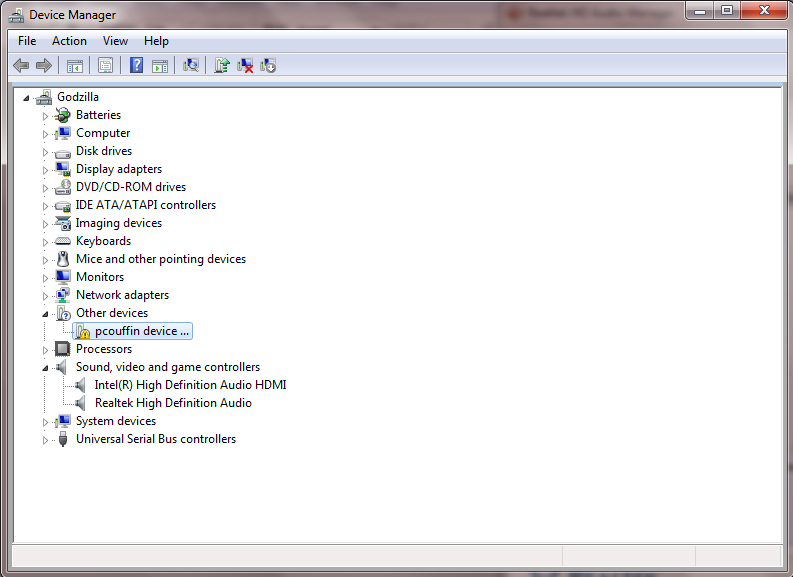
This is what comes up under device manager:
Device_Manager.jpg


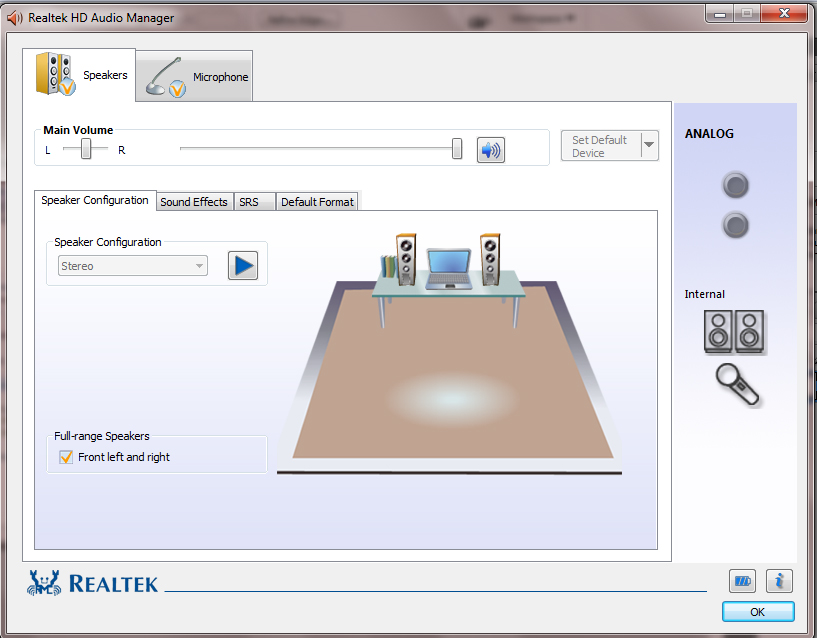
And this is what I see with the Realtek audio:
Realtek.jpg


Any ideas because this is something that is increasingly hurting my head? Is it something to do with my audio card, my video card or.. what?

Thank you.
 

My Computer

OS
Windows 7 Home Premium 32bit
I have my HDTV set up in a similar fashion. In order to get the sound coming from the HDTV I need to right click on HDMI device (mine says V0320-E1 for a Vizio HDTV) and click enable. I also have to right click on speaker and disable. Once I'm no longer using the HDTV, I need to reverse those steps to get sound from my desktop speakers.

That yours says not plugged in, doesn't quite make sense it it obviously knows there's a cable attached. Perhaps it's a faulty cable.

Also, if I remember correctly when I first attached my TV, I needed to unplug the TV and computer, attach the HDMI cable, power on the TV, power on the computer.
 

My Computer

Computer type
PC/Desktop
Computer Manufacturer/Model Number
Dell Vostro 3558 (Laptop)
OS
Windows 7 Professional 64bit
Motherboard
Dell
Memory
8GB
Graphics Card(s)
Intel HD Graphics, NVIDIA GeForce
Screen Resolution
1366 x 768
Antivirus
Avira Free, MalwareBytes AntiMalware Pro
Browser
Chrome
We have HDMI cable going from the Sky HD box to the TV. I'll try and take it out from the HD box and putting it from my laptop and then disabling the "realtek audio" and will post up what happens.
 

My Computer

OS
Windows 7 Home Premium 32bit
We have HDMI cable going from the Sky HD box to the TV. I'll try and take it out from the HD box and putting it from my laptop and then disabling the "realtek audio" and will post up what happens.

Also try and power down both, and unplug both TV and Computer before attaching. Plug in, and power on TV and computer in that order
 

My Computer

Computer type
PC/Desktop
Computer Manufacturer/Model Number
Dell Vostro 3558 (Laptop)
OS
Windows 7 Professional 64bit
Motherboard
Dell
Memory
8GB
Graphics Card(s)
Intel HD Graphics, NVIDIA GeForce
Screen Resolution
1366 x 768
Antivirus
Avira Free, MalwareBytes AntiMalware Pro
Browser
Chrome
Might not be the same, but that was one of the symptons I was experiencing when rebooting my machine. I found there was a conflict between the Realtek HDMI drivers and ATI drivers (I know you dont seem to have an ATI card, but it mgiht be similar). Does the sound o mue wn going to sleep? (another sympton that it might be a similar problem).
Look here:
http://www.sevenforums.com/sound-audio/99854-volume-muted-after-wake-sleep.html
 

My Computer

Computer Manufacturer/Model Number
Home Build - Media Center PC
OS
Windows 7 64-bit
CPU
AMD Athlon II X4 630
Motherboard
Gigabyte GA-MA785GMT-UD2H
Memory
4 GB RAM
Graphics Card(s)
Integrated ATI Radeon HD 4200
Sound Card
Currently using HDMI port (ATI)
Monitor(s) Displays
LED TV 55 inch
Hard Drives
2 X 1TB Western Digital
PSU
Antec 600W
Case
Antec Fusion Remote Black
Cooling
Regular Fans from case and CPU
Audio Driver Update worked for me (Here is how)

Hello

I had intermittent detection of the HDMI in "Control Panel/Sound", and eventually no detection (the following solution may also work for those who were never able to obtain a signal at all). For me updating the audio driver fixed the problem. You can update the audio and video drivers by following the steps below (found these steps at Microsoft website). My computer is only 6 months old, but still needed the drivers updated. No special system setting are required as written in previous posts, if the driver is the problem. I was also extremely frustrated with the ongoing problem and hope the driver updates work for you. Good luck!

  1. Open Device Manager by clicking the Start button
    4f6cbd09-148c-4dd8-b1f2-48f232a2fd33.png
    , clicking Control Panel, clicking System and Maintenance, and then clicking Device Manager.*
    18abb370-ac1e-4b6b-b663-e028a75bf05b.png
    If you are prompted for an administrator password or confirmation, type the password or provide confirmation.
  2. In Device Manager, locate the device you want to update, and then double-click the device name.
  3. Click sound video and gaming controller
  4. Open each audio controller in sound video and gaming (one at a time) and update by Clicking the Driver tab, and then click Update Driver and follow the instructions.
 

My Computer

OS
Windows 7 64bit
HDMI Audio not connected

Hi
I see that this was an old post but I'm curious how boneyarsebogman resolved this. I have the same problem where my computer displays the HDMI video signal but at the same time say the cable is not connected for the audio. Funny enough I took my computer upstairs to my Samsung 40" and after doing every update available for both the operating system and for NVIDIA the sound came through. Then I brought the computer downstairs to my 47" Philips it still didn't work. The fact that boneyarsebogman had also tried it on his Philips leads me to believe that the type of tv might be the problem.
 

My Computer

Computer Manufacturer/Model Number
Giada
OS
Windows 7 64 bit Ultimate
CPU
Atom
Motherboard
not sure
Memory
4GB
Graphics Card(s)
NVDIA graphic card
Sound Card
not sure
Monitor(s) Displays
Philips 47"
Hard Drives
1TB
Case
Giada
Similar to another thread on this page, just to clarify you are using the correct input on the tv? I recently changed my desktop from vga connection to hdmi on my LG tv and found that it showed it wasn't connected unless the hdmi input was selected.
 

My Computer

OS
Windows 7 Ultimate x64
CPU
Intel i3
Motherboard
Gigabyte H55-UD2H
Memory
Patriot Signature 1333mhz 2 x 2GB
Graphics Card(s)
PowerColour RADEON HD5450 1GB DDR3
Sound Card
C-Media 8738
Monitor(s) Displays
Currently using LG 37'' TV
Hard Drives
Western Digital Caviar Blue 250GB PATA Primary
Western Digital Scorpio Blue 250GB SATA
Western Digital Caviar Green 1.5TB SATA
Case
Stock Compaq Presario
Cooling
Stock
Keyboard
PC Line Wireless
Mouse
PC Line Wireless
Fixed

I thought I did all the Windows updates but it looks like I didn't, apparently Microsoft had a Realteck (or something like that) update that I had missed. Anyways the screen fit exactly to the size of the TV and then I started hearing the sound again.
 

My Computer

Computer Manufacturer/Model Number
Giada
OS
Windows 7 64 bit Ultimate
CPU
Atom
Motherboard
not sure
Memory
4GB
Graphics Card(s)
NVDIA graphic card
Sound Card
not sure
Monitor(s) Displays
Philips 47"
Hard Drives
1TB
Case
Giada
please clarify is there a solution? hdmi audio not plugged in...

I haven't had HD anything until recently.

The ONE time I tried using HD was last year. I was visiting a friend - tech genius. I let him play with my dell xps with my shiny new vertex solid-state. By fiddling with some intel interface, he managed to send the audio along with the video through to his LCD monitor (although my built-in JBL sub woofer sounds better) and.... played minecraft.

A few days later, when I got home and rebooted, the solid-state was goosed. I got a replacement (still haven't installed)...

Back to the present, and there's an LCD in front of me with some crappy speaker, and a huge Samsung smart tv with loads of everything, hooked up via optical to a soundbar with a sub...

Tried to watch the Ramones End of the century.avi off a USB stick...subtitles codec problem, can't even push from upnp (MediaMonkey best software ever? :) server... PLAN G! Time to use extended display. It worked, but still Realktek Digital Output is "not plugged in".
I've read I should update the chipset driver (Intel?), or to get a windows update to fix a realtek issue..but I have updates on, and I thought I had all the latest drivers (and my OS seems to agree)...

Bit lost, craving high definition audio!!
 

My Computer

Computer type
Laptop
Computer Manufacturer/Model Number
Dell
OS
Windows 7 Ultimate 64bit
CPU
2.2
Memory
8Gb
Graphics Card(s)
NVIDIA
Screen Resolution
1280/762
Mouse
built in pad || iphone || MS wireless
Internet Speed
100MB
Antivirus
Avast
Browser
Chrome, Chrome portable
trying this (#20)
 

My Computer

Computer type
Laptop
Computer Manufacturer/Model Number
Dell
OS
Windows 7 Ultimate 64bit
CPU
2.2
Memory
8Gb
Graphics Card(s)
NVIDIA
Screen Resolution
1280/762
Mouse
built in pad || iphone || MS wireless
Internet Speed
100MB
Antivirus
Avast
Browser
Chrome, Chrome portable
Doh! Resolution = Audio Enabled

From the nvidea control panel, go to the change resolution screen. There you can pick if audio is enabled or disabled. Go figure.
 

My Computer

Computer type
PC/Desktop
OS
Windows 7 Professional 64bit
it appears that simply momentarily starting nvsvc is enough to refresh the playback devices list.

What I don't get is why there appears to be so many unplugged devices!

I have two 3.5 mm jacks. One says S/P Dif. Is this another crazy hybrid port, allowing for "normal analog"(3.5mmjack) AND digitalaudio (again, via 3.5mm)?
 

My Computer

Computer type
Laptop
Computer Manufacturer/Model Number
Dell
OS
Windows 7 Ultimate 64bit
CPU
2.2
Memory
8Gb
Graphics Card(s)
NVIDIA
Screen Resolution
1280/762
Mouse
built in pad || iphone || MS wireless
Internet Speed
100MB
Antivirus
Avast
Browser
Chrome, Chrome portable
I had the same problem: ATI HDMI audio not working (i.e. when I connected the HDTV to the laptop via HDMI cable, even though I connected with video I wasn't doing it with audio). I was running a Dell Studio 1749 with Windows 7 64-bit and ATI video card. After reading the forums, I finally found the solution to the problem (hope it works for you as well): I was missing was an audio codec from Realtek (which I did not have installed). Go to this link is to the Realtek website where they have their HD audio codecs:

Realtek

Install the ATI HDMI Audio Device codec (I installed v R2.7, file name HDMI_R270), restart computer, and after you connect your laptop to the TV via HDMI cable, right click the Sound icon on the lower left of the screen/desktop, select Playback devices, set Realtek HDMI Output as default and now your sound should get out on the TV. Good luck!
 

Attachments

  • Realtek audio codec.png
    Realtek audio codec.png
    53 KB · Views: 3
  • Sound - Realtek HDMI Output.png
    Sound - Realtek HDMI Output.png
    15.1 KB · Views: 9

My Computer

Computer type
Laptop
Computer Manufacturer/Model Number
Dell
OS
Windows 7 Ultimate x64
CPU
Intel I5-520
Back
Top