Solved HDMI not recognized on Asus mobo

wftomlin

New member
Local time
3:21 PM
Messages
3
Hello all,

I've built a PC using an Asus P5G41T-M mobo w/ an HDMI connector. I'm currently using an nVidia GT220 hooked to a Dell monitor at 1920x1080 (VGA). I can't seem to get the PC to recognize the HDMI port. The manual is pretty slim and only mentions that an HDMI port exists. On the Asus web site (after filling out lots of extraneous info) I was able to register and check out their 'support' forum. Not much help there. There was a small article about the HDMI working only if there was nothing plugged into the (onboard) VGA or DVI. I'm not using any onboard video, I'm using the nVidia. Is there some setting in Win7 that I need to check? I generally use Linux, but this is a PC I will be using for video editing (converting old VHS tapes to DVD).

TIA.
 

My Computer My Computer

OS
Windows 7 Home Premium 64bit
CPU
Intel Q8300
Motherboard
Asus P5G41T-M
Memory
8GB
Graphics Card(s)
nVidia GT220
Sound Card
On board
Monitor(s) Displays
Dell S2409W
Hard Drives
WD 500GB
WD 1TB
wftomlin, welcome to the Seven Forums.

There is nothing you can do in Windows (or Linux for that matter) to get around what you are trying to do, it is entirely a hardware/bios issue. Not sure what is in the paper manual but the PDF version from here,

ASUSTeK Computer Inc. - Motherboards- ASUS P5G41T-M

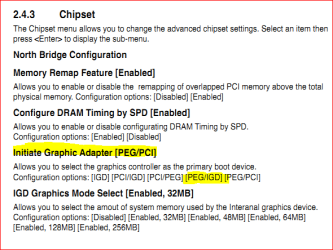
has enough to go on for the most part. The problem is that in a lot of cases the onboard video gets disabled when a video card is detected, and usually not much that can be done about it. In the case of your motherboard it may be possible if you go into the bios to the Chipset section and set the "Initiate Graphic Adapter" to [PEG/IGD],

hdmi.PNG

No promises but that should allow for the onboard video to be used at the same time as the video card.

P.S. Does your GT 200 not have a HDMI port as well? If it does and you only have one monitor connected to the card, you can use it instead of trying to get the one for the onboard video to work.
 

My Computer My Computer

Computer type
PC/Desktop
Computer Manufacturer/Model Number
Me
OS
Win 7 Ultimate x64
CPU
FX-8350 @ 4.6 GHz so far
Motherboard
Asus M5A97 EVO
Memory
ADATA XPG V1 Series Black 8GB DDR3 1600
Graphics Card(s)
Sapphire R9 270x Dual-X
Sound Card
Xonar DGX w/ Corsair Vengence 1300
Monitor(s) Displays
Acer S232HL Abid
Screen Resolution
1920x1080
Hard Drives
120 GB OCZ Vertex 3
500 GB Seagate 7200.12
PSU
Antec Earthwatts 650W Green
Case
Antec Three Hundred
Cooling
Cooler Master 212 EVO
Keyboard
Logitech G510
Mouse
Logitech G500s
Internet Speed
35000/3000
Thanks for the quick reply stormy.

Yes, the GT220 has an HDMI out, but when I use it, the sound comes out thru my PC speakers and not the TV. I was hoping to get video AND audio thru the TV. Eventually, I'll be getting an A/V receiver and using the PC as a DVR - I have a Hauppauge dual tuner that I'm using with WMC to record HD local stations.

Thanks again.
 

My Computer My Computer

OS
Windows 7 Home Premium 64bit
CPU
Intel Q8300
Motherboard
Asus P5G41T-M
Memory
8GB
Graphics Card(s)
nVidia GT220
Sound Card
On board
Monitor(s) Displays
Dell S2409W
Hard Drives
WD 500GB
WD 1TB
When connected to the card, did you check that the HDMI audio was set as the default playback device in the Windows audio properties? As far as I know all GT 220's have built in audio for HDMI use, and just takes installing the video driver which also includes the necessary video driver and then setting it as the default device to use it.
 

My Computer My Computer

Computer type
PC/Desktop
Computer Manufacturer/Model Number
Me
OS
Win 7 Ultimate x64
CPU
FX-8350 @ 4.6 GHz so far
Motherboard
Asus M5A97 EVO
Memory
ADATA XPG V1 Series Black 8GB DDR3 1600
Graphics Card(s)
Sapphire R9 270x Dual-X
Sound Card
Xonar DGX w/ Corsair Vengence 1300
Monitor(s) Displays
Acer S232HL Abid
Screen Resolution
1920x1080
Hard Drives
120 GB OCZ Vertex 3
500 GB Seagate 7200.12
PSU
Antec Earthwatts 650W Green
Case
Antec Three Hundred
Cooling
Cooler Master 212 EVO
Keyboard
Logitech G510
Mouse
Logitech G500s
Internet Speed
35000/3000
Solved

BINGO!!

Thanks so much.

On another note. I'm using this PC and another running Linux with a KVM switch. If the Win7 PC is connected to the TV (HDMI2) and I switch to Linux, then back to Win7 with the KVM, I lose the video signal on the Win7 PC. I can use the TV remote to switch to HDMI1, then BACK to HDMI2 and I get the video back. Is there anything I should look for in Control Panel or is this a KVM thing?

Right now I'm using the Win7 machine as a video editor, but my monitor is capable of 1920 x 1080, so I can use that to get an idea of what it's going to look like. So, if the answer isn't real apparent, no need to reply. I can live with how it's working now.

Thanks again. Have a good weekend!!
 

My Computer My Computer

OS
Windows 7 Home Premium 64bit
CPU
Intel Q8300
Motherboard
Asus P5G41T-M
Memory
8GB
Graphics Card(s)
nVidia GT220
Sound Card
On board
Monitor(s) Displays
Dell S2409W
Hard Drives
WD 500GB
WD 1TB
You should be able to get audio and video from the graphic card's HDMI output to the TV's HDMI input, as a direct connection. The KVM switch probably is causing the lost of video. You may want to test the direct graphic card to TV connection to confirm that it's solid.
 

My Computer My Computer

Computer type
PC/Desktop
Computer Manufacturer/Model Number
Custom Build
OS
Windows 7 Home Premium 64 bit
CPU
Intel Core i7-4790
Motherboard
GA-Z87X-D3H
Memory
G.SKILL 8GB (2 x 4GB) DDR3 F3-10666CL9D-8GBNT
Graphics Card(s)
AMD Radeon R7 250
Sound Card
Realtek ALC892
Monitor(s) Displays
Samsung UN32EH5000, Dell 1703FPT
Screen Resolution
1920 x 1080, 1280 x 1024
Hard Drives
WD5003AZEX
WD10EZEX
Samsung HD103SJ
Samsung 128 GB 840 PRO
PSU
SeaSonic M12II SS-500GM
Case
Fractal Design Define R4
Cooling
Zalman CNPS9900ALED
Keyboard
Logitech K800
Mouse
Logitech M705
Internet Speed
16 Mbps
Antivirus
Avast
Browser
Firefox
Other Info
Bose Companion 2 Multimedia Speakers
It sounds like a KVM thing. I haven't had much experience with HDMI through KVM, but it might even be your TV
 

My Computer My Computer

Computer Manufacturer/Model Number
Pugh Technologies
OS
W7 Professional x64
CPU
AMD Athlon II X3 445 Rana 3.10 GHz
Motherboard
MSI 870A-G54
Memory
PNY XLR DDR3 1600 4x2GB
Graphics Card(s)
NVIDIA GeForce GTS 450 (fermi) 1GB GDDR5
Sound Card
Realtek ALC892 onboard
Monitor(s) Displays
ASUS VE205t, Viewsonic VX2035WM
Screen Resolution
1600x900, 1600x1050
Hard Drives
977GB Hitachi Hitachi HDS721010CLA332
244GB Western Digital WDC WD2500AAJS-65B4A0
488GB Western Digital WDC WD5000AAJS-00A8B0
488GB Western Digital WDC WD5000AAKS-00UU3A0
PSU
Antec EarthWatts EA650 650W
Case
ThermalTake Armor A90 Mid Tower
Cooling
3x 120mm in, 1x 120mm & 200mm out, self built hydro-cooler
Keyboard
Logitec 55
Mouse
Razer Deathadder
Internet Speed
20 Mbps D/L, 9 Mbps U/L
Back
Top