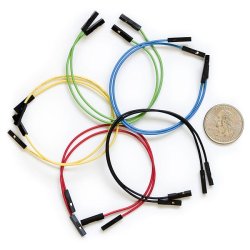
Thanks Stormy13 sounds easy enough. Simply use a 2pin or 2 single female jumper wires from the header labeled: SPDIF I/O on the mobo to the header on the graphics card.
Yep, any two of those will do. About the only thing you might run into is having them reversed on one end. Not much of a problem though, just switch them on one end from 1-2 to 2-1.
Thanks for that reminder!
I had a problem today trying to find some jumper wires.
Seems no one would sell me any?
Once they knew what i wanted to do, they said they either didn't have any or it wouldn't work.
I even tried MGD and Future Shop.
If you have 4 unused front panel wires with the single connection like you pictured (or an old case lying around you can cannibalize), those and a little electrical tap to splice them together with you can make your own. Won't be as pretty looking as those above but will get the job done.
I was able to get a service tech at Summit Direct Computers to give me a couple of HDD LEDS (FREE) that i was able to splice together. TV now has sound!
I had a wicked echo and thought DAMN!
I had to change the Control Panel to: Sounds//Enhancements/none (was set to ARENA)
that fixed the problem.
Thanks a lot. I installed the spdif cable from my NVDIA 9500GT video card to my GIGABYTE H55M S2H motherboard. Now, my LCDTV has sound. It took me a year before it finally got fixed. No thanks to the dealer who sold and assembled my computer.. I came back to them twice with my CPU and wasnt' able to fix it last year..