
Solved HDMI Output "Not Plugged In"

Treebie

New member
Local time
8:20 PM
Messages
15
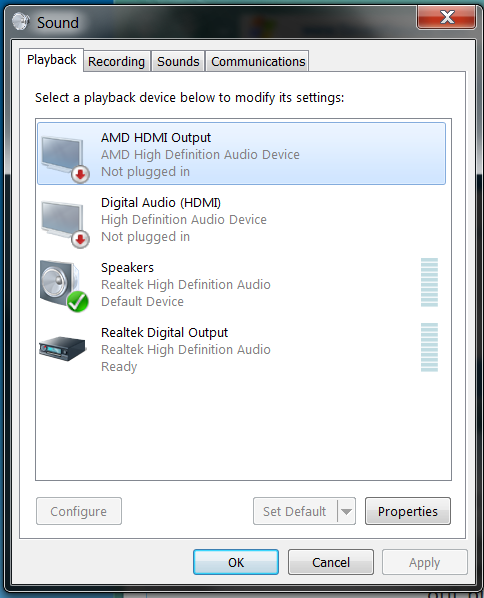
Hi, I have an amd raedon HD 5700series graphics card and i have updated all of my drivers to the current drivers but when i turn my tv off (has never done this before until recently) and then turn it back on the audio out puts say they are unplugged. It still detects them but says they are not plugged in. Also when i restart my computer the sound works until i turn my tv off. I think it has something to do with the hdmi because my headphones work regardless. Any help would be much appreciated!

Here's a picture
ZC6BK.png
 

My Computer

Computer type
PC/Desktop
Computer Manufacturer/Model Number
Dell
OS
Windows 7 Home Premium 64-Bit
CPU
intel i7 2.93ghz quad core
Memory
8gb
Graphics Card(s)
Radeon HD 5770
I started having exactly the same problem (audios fine until monitor is turned off/goes off via idle) and it also started happening 3 days ago.

I believe it has to be a driver issue of some sort as CCC updated for me via steam and thats when i started having the issue. I'm using a HDMI to HDMI cable direct from PC to TV, obviously the cable is fine since it works properly up till the TV is turned off.

*edit*
just as a sidenote i tried uninstalling CCC, about halfway through the process audio was reinabled so pretty sure its to do with that. I can now turn the TV on/off and audio is intact, yay! someone who knows more about this stuff than i do could help identify the exact issue?
 
Last edited:

My Computer

OS
Windows 7 x64
Its a ATI driver problem. I have had the problem with my 4980 since i got it over a year ago. All you have to do is unplug the HDMI cable. plug it back in and all is fine. restating your computer or restarting your tv does the same thing. I hate it but then i do not always use my TVs speakers since half the time i use headphones so i don't really care.
 

My Computer

OS
Windows 7 Pro 64bit
CPU
2600k 4.6ghz 1.28v
Motherboard
MSI P67A-GD65 B3 Latest Bios
Memory
CORSAIR Vengeance (2 x 4GB) DDR3 1600
Graphics Card(s)
XFX 4890 1ghz OC
Sound Card
Auzentech x-fi Prelude 7.1
Monitor(s) Displays
Samsung 55" LED HDTV UN55ES8000F
Screen Resolution
1920x1080
Hard Drives
Corsair Force GT SSD 120gb SATA 3 OS Drive /
2x1tb WD SATA 3 7200rpm RAID 1
PSU
thermaltake toughpower 1200w
Cooling
Custom Swiftech 3x120m Rad x2
Keyboard
Logitech Wave Wireless
Mouse
Logitech MX1100
Internet Speed
Comcast 50/20
Is there any solution for it because all of my drivers are up to date
 

My Computer

Computer type
PC/Desktop
Computer Manufacturer/Model Number
Dell
OS
Windows 7 Home Premium 64-Bit
CPU
intel i7 2.93ghz quad core
Memory
8gb
Graphics Card(s)
Radeon HD 5770
Is there any solution for it because all of my drivers are up to date

Only solution that I have found is that when you want to use the speakers on your TV, you have to unplug your HDMI cable and re plug it in. Takes less then 5 secs to do that it shows that it is plunged in. I have been doing that for over 2 years. It sucks but that is only one of the many reasons why i will not go with another AMD card after i am done with my 4890.
 

My Computer

OS
Windows 7 Pro 64bit
CPU
2600k 4.6ghz 1.28v
Motherboard
MSI P67A-GD65 B3 Latest Bios
Memory
CORSAIR Vengeance (2 x 4GB) DDR3 1600
Graphics Card(s)
XFX 4890 1ghz OC
Sound Card
Auzentech x-fi Prelude 7.1
Monitor(s) Displays
Samsung 55" LED HDTV UN55ES8000F
Screen Resolution
1920x1080
Hard Drives
Corsair Force GT SSD 120gb SATA 3 OS Drive /
2x1tb WD SATA 3 7200rpm RAID 1
PSU
thermaltake toughpower 1200w
Cooling
Custom Swiftech 3x120m Rad x2
Keyboard
Logitech Wave Wireless
Mouse
Logitech MX1100
Internet Speed
Comcast 50/20
Only solution that I have found is that when you want to use the speakers on your TV, you have to unplug your HDMI cable and re plug it in. Takes less then 5 secs to do that it shows that it is plunged in. I have been doing that for over 2 years. It sucks but that is only one of the many reasons why i will not go with another AMD card after i am done with my 4890.

Well this sucks AMD should get their act together cause i have a newer one than you and it still has the same problem
 

My Computer

Computer type
PC/Desktop
Computer Manufacturer/Model Number
Dell
OS
Windows 7 Home Premium 64-Bit
CPU
intel i7 2.93ghz quad core
Memory
8gb
Graphics Card(s)
Radeon HD 5770
Is there any solution for it because all of my drivers are up to date

I had no issues until i updated to the newest driver, so maybe uninstalling/reinstalling the previous driver would fix the issue, at least till the fix the latest driver.
 

My Computer

OS
Windows 7 x64
Are you using a HDMI port or the adapter? i have to use the adapter maybe thats the problem. I do not have a HDMI port on my card.
 

My Computer

OS
Windows 7 Pro 64bit
CPU
2600k 4.6ghz 1.28v
Motherboard
MSI P67A-GD65 B3 Latest Bios
Memory
CORSAIR Vengeance (2 x 4GB) DDR3 1600
Graphics Card(s)
XFX 4890 1ghz OC
Sound Card
Auzentech x-fi Prelude 7.1
Monitor(s) Displays
Samsung 55" LED HDTV UN55ES8000F
Screen Resolution
1920x1080
Hard Drives
Corsair Force GT SSD 120gb SATA 3 OS Drive /
2x1tb WD SATA 3 7200rpm RAID 1
PSU
thermaltake toughpower 1200w
Cooling
Custom Swiftech 3x120m Rad x2
Keyboard
Logitech Wave Wireless
Mouse
Logitech MX1100
Internet Speed
Comcast 50/20
Damnit. Came here looking for answers and all I get is what I feared.
Oh well. Maybe another day I'll get back to scouring the internet looking for ghost bug fixes *sigh*.
Thx anyway everyone
 

My Computer

OS
Windows 7 Ultimate 64 bit
I had similar issue. Yestarday the HDMI output to my TV just stopped working. No driver was installed, no software changed, I have not touched any hardware, cables etc. TV worked fine, the video output from my HD 5670 worked fine on a TV, just the audio stopped working (the HDMI output device was present, but "not connected", as on the screenshot at the top of the thread).
Resetting the PC did not help.
Replugging the HDMI cable did not work.
But installing newest drivers DID help.
I think ATI has some serious bug in their HDMI driver code, it's been there for a long time and have not beedn fixed uet. I used HDMI on HD 3xxx on Windows XP few years ago and the problem sometimes occured even then. I hope they will find it and fix it someday, but for now it seems they are denying the issue exists :(
 

My Computer

OS
Windows 7 Proffesional x64
Finally

For anyone who shared the same annoying problem as me ATI has finally updated their drivers to work properly. For a simple painless update just use the auto updater to get the new drivers!
AMD Driver Autodetect
 

My Computer

Computer type
PC/Desktop
Computer Manufacturer/Model Number
Dell
OS
Windows 7 Home Premium 64-Bit
CPU
intel i7 2.93ghz quad core
Memory
8gb
Graphics Card(s)
Radeon HD 5770
Solved

GD Gents

Had same problem only my htp with ATI 5770 was connected to receiver and then to TV.
Solved this problem by downloading and installing latest BETA driver pack from AMD web site. Good luck
Heres the link
ATI Radeon
 

My Computer

OS
Windows 7 Ultimate x 64
Similar problem

Hello
I have a similar problem with a nVIDIA GeForce 210 video card. When I hook the HDMI cable to my tv I get audio, but the video only shows my desktop not the movie I'm playing on my computer.
 

My Computer

Computer Manufacturer/Model Number
MSI
OS
Windows 7 Ultimate x32
CPU
AMD 64 X2
Motherboard
MSI 7369
Memory
2 gb
Graphics Card(s)
nVIDIA geforce 210
Sound Card
on board Realtex
Monitor(s) Displays
HP
Hard Drives
3 Seagate SATA HDD
Resha1981 said:
Solved
GD Gents

Had same problem only my htp with ATI 5770 was connected to receiver and then to TV.
Solved this problem by downloading and installing latest BETA driver pack from AMD web site. Good luck
Heres the link
ATI Radeon

Thank-you very much for the link to the AMD Catalyst ™ 12.7 Beta Driver
I had been searching Google for a long time and no-one had an easy answer for this annoying problem.
But after installing the AMD Catalyst 12.7 Beta Driver for Windows ® 7 and Windows Vista ®
everything is hunky-dory!
Much obliged.:)
 

My Computer

OS
Windows 7 Home Premium x64
Back
Top