HDMI output not working (just sound)

MAcer

New member
Local time
2:55 PM
Messages
1
My playback device for my HDMI output is an AMD HDMI Output. I just got a new Bush Smart TV after cracking my old LG. HDMI output sound worked perfectly fine on my old tv and it works fine on my other Samsung TV. However the soud only refuses to work on my new Bush TV.

The picture works fine and I can see everything perfectly on the tv screen, but the sound just wont work and only works on the laptop.

Whenever I test my AMD HDMI Output with this TV, I get the error message saying - This Device is being used by another application. Please close any devices that are playing audio to this device and try again.

I don't get this error message when connected to my other TV(s). Sound and Picture works perfectly fine, yet the sound doesn't work on my new TV.

Does anyone know how I can fix this problem? I tried to update my sound driver, but it's up to date, and I've made sure that it is the correct playback device selected. Nothing seems to work though.
 

My Computer My Computer

At a glance

Windows 7 64bitAcer Aspire 5942G320 GB HDD | 4GB MemoryATI Mobility Radeon HD 5650 Graphics 1GB
Computer type
PC/Desktop
Computer Manufacturer/Model Number
Acer
OS
Windows 7 64bit
CPU
Acer Aspire 5942G
Motherboard
Intel Core i3
Memory
320 GB HDD | 4GB Memory
Graphics Card(s)
ATI Mobility Radeon HD 5650 Graphics 1GB
Browser
Google Chrome
I've got the exact same problem with a different type of bush tv, I get the same error and I cant play any test sounds
I've updated all my amd drivers,tried different cables, the tv works fine with my playstation but no sound at all from the pc.

Have you had any luck in fixing your problem?
 

My Computer My Computer

At a glance

Windows 7 64 bit
Computer type
PC/Desktop
OS
Windows 7 64 bit
Also if you go to your playback devices and click on the properties of your hdmi device you should see an option under the advanced tab for exclusive mode make sure those boxes are unticked, It didnt fix it for me, but you might be lucky.
 

My Computer My Computer

At a glance

Windows 7 64 bit
Computer type
PC/Desktop
OS
Windows 7 64 bit
Did anyone figure this problem out? My hard drive died about a week ago and I just reinstalled windows 7 and all the updates. Before I started installing all the updates my Panasonic TV would play sound when I made it the default device.

Yesterday I set the TV as default device and no sound came out. I can still use my desktop speakers no problem. When I hit test under the Playback devices for AMD HDMI Output it would give me the same error message the OP got. As suggested, I would check what applications where running on my AMD HDMI Output there would be none.


I think it has something to do with AMD and/or Windows Updates. Am I really going to have to system restore to have a chance at fixing this?
 

My Computer My Computer

At a glance

Windows 7 Home Premium 64bitGigabyteAMD
Computer type
PC/Desktop
Computer Manufacturer/Model Number
Cybertron (Custom)
OS
Windows 7 Home Premium 64bit
CPU
Gigabyte
Graphics Card(s)
AMD
Hard Drives
Western Digital
Antivirus
Norton
Browser
Chrome, IE
I'm getting this problem too.

Yesterday, I realized I couldn't use the HDMI out for audio anymore. Windows kept saying the device was in use, even after I restarted my computer.

I had remembered updating my display drivers a week ago. I had updated my AMD Radeon HD 6800.

I rolled back my HDMI audio driver to a 2010 one.

Then, it turns out that the audio wasn't being sent in stereo. I could only hear audio from the right side of my TV (which is where the HDMI out was connected to).

Which HDMI audio driver can I use, so that the HDMI port works, and works in stereo?
 

My Computer My Computer

At a glance

Windows 7 Professional 64 bit.
Computer type
PC/Desktop
Computer Manufacturer/Model Number
Custom
OS
Windows 7 Professional 64 bit.
the solution for HDMI output not working

dear friends after many time to try i found the solution :-
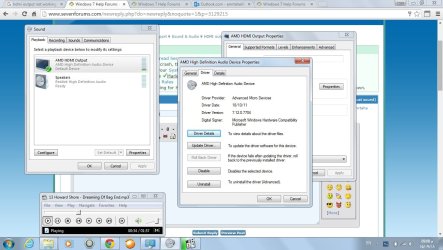
R click on sound baton ( playback device ) --- R click on AMD HDMI output ( Properties ) --- L click on Properties at ( controller Information ) --- Go to Driver Tap --- L click on ( Roll Back Driver ) --- Then OK
The sound will back after Restart windows .:D:D:D:D:D:D:D
see the attach
 

Attachments

  • HDMI output solution.jpg
    HDMI output solution.jpg
    119.3 KB · Views: 2

My Computer My Computer

At a glance

win 7 home basic 64bit
Computer type
PC/Desktop
Computer Manufacturer/Model Number
Tshiba
OS
win 7 home basic 64bit
Back
Top