HDTV Picked up a VGA on HDMI

Petersgc

New member
Local time
12:01 PM
Messages
20
Hello,

I have just installed Win7 64 and noticed that both my 17'' TFT monitor and Sony HDTV are picked up in device manager as "Generic PnP Monitor"
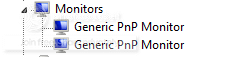
GenericPnPMonitors.png


This seems to effect the Nvidia control panel as it detected the HDTV as being connected via VGA.....


The only thing I can think of would be to acquire the monitor profile for the Sony HDTV but obviously Sony don't have monitor drivers on their website.
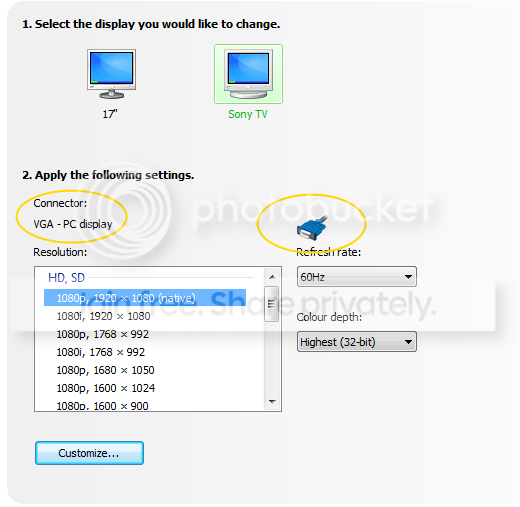
VGA-HDMI-TV.png


Has anyone seen anything like this before?!
 

My Computer My Computer

At a glance

Win 7Core 2 Duo L73003GBIntel GMA
Computer Manufacturer/Model Number
Lenovo X61T
OS
Win 7
CPU
Core 2 Duo L7300
Motherboard
Lenovo X61t
Memory
3GB
Graphics Card(s)
Intel GMA
Sound Card
SoundMax
Hi,

Have you looked at the various options available under 'Setup multiple displays'?

Capture.PNG

There are several options there that you might want to look at if you haven't already.


OS
 

My Computer My Computer

At a glance

Windows 7 Ultimate x64AMD Sempron Dual Core3GBNVIDIA GeForce 6150SE nForce 430
Computer Manufacturer/Model Number
Compaq Desktop
OS
Windows 7 Ultimate x64
CPU
AMD Sempron Dual Core
Memory
3GB
Graphics Card(s)
NVIDIA GeForce 6150SE nForce 430
Screen Resolution
1024x768
Hard Drives
150GB Sata
Hey OS,

Unfortuantly none of those options detect the HDTV correctly...

See the attached HDCP Snapin.

HDCP.png
 

My Computer My Computer

At a glance

Win 7Core 2 Duo L73003GBIntel GMA
Computer Manufacturer/Model Number
Lenovo X61T
OS
Win 7
CPU
Core 2 Duo L7300
Motherboard
Lenovo X61t
Memory
3GB
Graphics Card(s)
Intel GMA
Sound Card
SoundMax
Sony's usually have multiple inputs available.
PC input 15 pin dsub for vga input, analog.
RGB input, digital
DVI input, digital.
s-Video, digital
HDMI, digital
I use a Sony Bravia.
Video cards have DVI outputs and S-video outs, there are DVI to vga adapters, there are DVI to HDMI adapters.
So exactly how are you connecting hardware?

The TV menu itself might have choices to make.
Where it says 1080p xxxxxx native res is a read on an HDTV.
 

My Computer My Computer

At a glance

W7 Ulti/64, XP Pro/32INTEL i7 920 DO, Core2 Duo 6400KINGSTON DDR3 1333MHz, CORSAIR DDR2 800MHzEVGA GTX 260 x2, 8800 GTX
Computer Manufacturer/Model Number
DIY #3, #2
OS
W7 Ulti/64, XP Pro/32
CPU
INTEL i7 920 DO, Core2 Duo 6400
Motherboard
GIGABYTE EX58 UD3R-SLI, EP45-UD3R
Memory
KINGSTON DDR3 1333MHz, CORSAIR DDR2 800MHz
Graphics Card(s)
EVGA GTX 260 x2, 8800 GTX
Sound Card
REALTEK HD onboard, ditto
Monitor(s) Displays
SONY 40" BRAVIA LCD
Screen Resolution
1360 X 768
Hard Drives
OCZ VERTEX/RAID0 -3, Vertex 30GB
PSU
COOLERMASTER 900W, ENERMAX 850W
Case
COOLERMASTER HAF 932 x2
Cooling
stock
Keyboard
MS
Mouse
MS
Internet Speed
ADSL 3MB/768KBs
Other Info
amateur enthusiast
It is connected via HDMI,

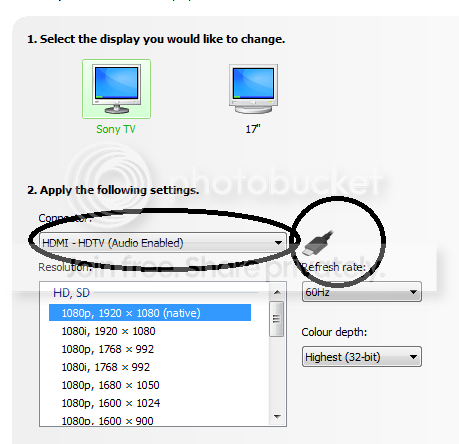
But as you can see from the screen shot in my first post the Nvidia control pannel shows it connected via VGA.

There is nothing wrong with the TV as it works perfectly in Windows XP
 

My Computer My Computer

At a glance

Win 7Core 2 Duo L73003GBIntel GMA
Computer Manufacturer/Model Number
Lenovo X61T
OS
Win 7
CPU
Core 2 Duo L7300
Motherboard
Lenovo X61t
Memory
3GB
Graphics Card(s)
Intel GMA
Sound Card
SoundMax
Hmmm!
I could be wrong but I think you are interpreting the information incorrectly. I have not seen that screen with my setups. I have used my SONY with W7 and XP Pro.
2 systems, both using the same SONY simultaneously.
The PC input is a VGA connect with a native res.
The digital inputs all use 1080i or 720p progressive scans. Totally different process's, totally different native res's. I could not clone two different inputs because of the differences. Altho earlier nVidia drivers were better at this than the latest drivers.
If you were connected VGA, the SONY would come up with a native res, not i or p scan format.

But this does not really answer your question.

????????????????????????????????????????
 

My Computer My Computer

At a glance

W7 Ulti/64, XP Pro/32INTEL i7 920 DO, Core2 Duo 6400KINGSTON DDR3 1333MHz, CORSAIR DDR2 800MHzEVGA GTX 260 x2, 8800 GTX
Computer Manufacturer/Model Number
DIY #3, #2
OS
W7 Ulti/64, XP Pro/32
CPU
INTEL i7 920 DO, Core2 Duo 6400
Motherboard
GIGABYTE EX58 UD3R-SLI, EP45-UD3R
Memory
KINGSTON DDR3 1333MHz, CORSAIR DDR2 800MHz
Graphics Card(s)
EVGA GTX 260 x2, 8800 GTX
Sound Card
REALTEK HD onboard, ditto
Monitor(s) Displays
SONY 40" BRAVIA LCD
Screen Resolution
1360 X 768
Hard Drives
OCZ VERTEX/RAID0 -3, Vertex 30GB
PSU
COOLERMASTER 900W, ENERMAX 850W
Case
COOLERMASTER HAF 932 x2
Cooling
stock
Keyboard
MS
Mouse
MS
Internet Speed
ADSL 3MB/768KBs
Other Info
amateur enthusiast
spyknee,

I think you dont understand the issue correctly.
I have a non HD Monitor connected via VGA and an HDTV connected via HDMI.

In windows XP in the nvidia control pannel that screen i posted shows "Conected Via HDMI"
in Windows 7 it shows connected via "VGA".

I understand the differences between HDMI and VGA and Interlaced and Progresive etc.. etc..
I know the HDTV is connected via HDMI as that is the only cable attched to any of the inputs.

The issue is not with the connections or with the tv or with the other monitor. It would seem to be the software not dectecting the monitor correctly.

This is what is shown in Windows XP.
HDMI-XP.png
 

My Computer My Computer

At a glance

Win 7Core 2 Duo L73003GBIntel GMA
Computer Manufacturer/Model Number
Lenovo X61T
OS
Win 7
CPU
Core 2 Duo L7300
Motherboard
Lenovo X61t
Memory
3GB
Graphics Card(s)
Intel GMA
Sound Card
SoundMax
Back
Top