Solved Headset microphone problems

willsk

New member
Member
Local time
7:51 PM
Messages
35
Hi guys, been having a real problem lately. I bought a nice new corsair vengeance 1300 headset to go with my 600t case. However when i plug them in to the front jack the mic doesn't work. I know the mic works because i have tested in the back panel. Also when i plug them into the front panel i get the message for mic and the message for heasdset in.
any idea what the problem could be?

cheers
 

My Computer

OS
Windows 7 64 bit
CPU
2500K
Motherboard
GA-Z68XP-UD3P
Memory
8gb corsair vengeance
Graphics Card(s)
560 ti hawk
Monitor(s) Displays
iiyama prolite x2377hds
Hard Drives
seagate baracuda 1tb
corsair 120gb ssd
PSU
750w corsair HX
Case
corsair 600t
Cooling
darkrock advanced
Double check the wiring to the front panel connector on the motherboard for a start. Almost sounds like it could be a crossed wire there. Also make sure if you used the HD audio connection that the (I assume) onboard audio is set to HD audio in the bios. Same applies if you used the AC'97 connector, seeing as the case has both from the front panel.
 

My Computer

Computer type
PC/Desktop
Computer Manufacturer/Model Number
Me
OS
Win 7 Ultimate x64
CPU
FX-8350 @ 4.6 GHz so far
Motherboard
Asus M5A97 EVO
Memory
ADATA XPG V1 Series Black 8GB DDR3 1600
Graphics Card(s)
Sapphire R9 270x Dual-X
Sound Card
Xonar DGX w/ Corsair Vengence 1300
Monitor(s) Displays
Acer S232HL Abid
Screen Resolution
1920x1080
Hard Drives
120 GB OCZ Vertex 3
500 GB Seagate 7200.12
PSU
Antec Earthwatts 650W Green
Case
Antec Three Hundred
Cooling
Cooler Master 212 EVO
Keyboard
Logitech G510
Mouse
Logitech G500s
Internet Speed
35000/3000
there doesn't appear to be any option regarding HD/AC97 audio in the bios. only thing i could find relating to sound was Azalia codec which was set to auto. I will check the wiring.

only thing that confuses me is if the wire is connected incorrectly why does it still read a mic input when i plug it in
 

My Computer

OS
Windows 7 64 bit
CPU
2500K
Motherboard
GA-Z68XP-UD3P
Memory
8gb corsair vengeance
Graphics Card(s)
560 ti hawk
Monitor(s) Displays
iiyama prolite x2377hds
Hard Drives
seagate baracuda 1tb
corsair 120gb ssd
PSU
750w corsair HX
Case
corsair 600t
Cooling
darkrock advanced

My Computer

OS
Windows 7 64 bit
CPU
2500K
Motherboard
GA-Z68XP-UD3P
Memory
8gb corsair vengeance
Graphics Card(s)
560 ti hawk
Monitor(s) Displays
iiyama prolite x2377hds
Hard Drives
seagate baracuda 1tb
corsair 120gb ssd
PSU
750w corsair HX
Case
corsair 600t
Cooling
darkrock advanced
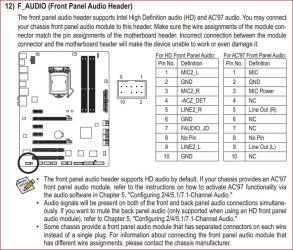
From the manual for that motherboard,

frontpanelheader.JPG

double check which of the two connectors from the case you used, then check here,

ac97.JPG

that it is configured the right way for the connector used.

only thing that confuses me is if the wire is connected incorrectly why does it still read a mic input when i plug it in

Because each is wired just a little differently. There are some similarities, but they don't function the same.
 

My Computer

Computer type
PC/Desktop
Computer Manufacturer/Model Number
Me
OS
Win 7 Ultimate x64
CPU
FX-8350 @ 4.6 GHz so far
Motherboard
Asus M5A97 EVO
Memory
ADATA XPG V1 Series Black 8GB DDR3 1600
Graphics Card(s)
Sapphire R9 270x Dual-X
Sound Card
Xonar DGX w/ Corsair Vengence 1300
Monitor(s) Displays
Acer S232HL Abid
Screen Resolution
1920x1080
Hard Drives
120 GB OCZ Vertex 3
500 GB Seagate 7200.12
PSU
Antec Earthwatts 650W Green
Case
Antec Three Hundred
Cooling
Cooler Master 212 EVO
Keyboard
Logitech G510
Mouse
Logitech G500s
Internet Speed
35000/3000
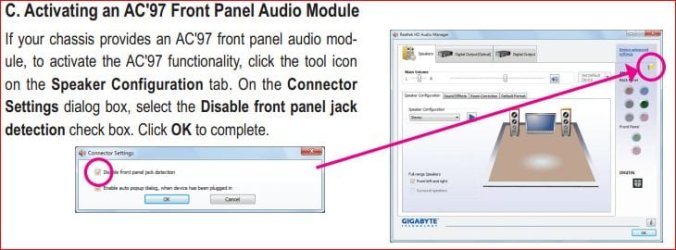
Okhave double checked. its definitely the HD audio that's in. tried disabling front panel detection still nothing :( . Am i supposed to use the AC97 connector instead of the HD??

Edit: gave the jack a twist after taking off detect mic and it seems to be working! THANKYOU FOR YOUR HELP!!! +rep
 

My Computer

OS
Windows 7 64 bit
CPU
2500K
Motherboard
GA-Z68XP-UD3P
Memory
8gb corsair vengeance
Graphics Card(s)
560 ti hawk
Monitor(s) Displays
iiyama prolite x2377hds
Hard Drives
seagate baracuda 1tb
corsair 120gb ssd
PSU
750w corsair HX
Case
corsair 600t
Cooling
darkrock advanced
You're welcome and enjoy the new headphones.

P.S. I picked up the same Corsair's about a month ago and thoroughly enjoy them so far. Might also want to consider a sound card so you can get the most out of them. Onboard is OK (barely in my opinion), but they will sound much better on a sound card.
 

My Computer

Computer type
PC/Desktop
Computer Manufacturer/Model Number
Me
OS
Win 7 Ultimate x64
CPU
FX-8350 @ 4.6 GHz so far
Motherboard
Asus M5A97 EVO
Memory
ADATA XPG V1 Series Black 8GB DDR3 1600
Graphics Card(s)
Sapphire R9 270x Dual-X
Sound Card
Xonar DGX w/ Corsair Vengence 1300
Monitor(s) Displays
Acer S232HL Abid
Screen Resolution
1920x1080
Hard Drives
120 GB OCZ Vertex 3
500 GB Seagate 7200.12
PSU
Antec Earthwatts 650W Green
Case
Antec Three Hundred
Cooling
Cooler Master 212 EVO
Keyboard
Logitech G510
Mouse
Logitech G500s
Internet Speed
35000/3000
Yeah there is one thing i've noticed. I don't know why but when i remove the headphones and turn my speakers back on i have to put enable detection again or my sound goes all tinny and distant.

If i bought a sound card how would i set it up? leave the speakers in the MoBo and headsrt into the soundcard or what? I've never had a sound card before so not quite sure how to go abou it. Are there any that you recommend for a decent price??
 

My Computer

OS
Windows 7 64 bit
CPU
2500K
Motherboard
GA-Z68XP-UD3P
Memory
8gb corsair vengeance
Graphics Card(s)
560 ti hawk
Monitor(s) Displays
iiyama prolite x2377hds
Hard Drives
seagate baracuda 1tb
corsair 120gb ssd
PSU
750w corsair HX
Case
corsair 600t
Cooling
darkrock advanced
My headset mic wouldn't work after installing Win7. I have a SB X-Fi Xtreme sound card. I opened up the Creative audio control panel, opened the FlexJack tab and checked microphone option. Line-in had been set as default.

 

My Computer

OS
Windows 7 Ultimate x64
Back
Top