Heavy CPU usage then a shutdown on a fresh install of Win 7.

rcoop

New member
Local time
10:12 AM
Messages
7
I've been trying to fix my brothers computer for a while now. Basically his CPU uses most of its power and ends up speeding up all the fans etc, then just shuts down. It used 70% of its power just opening internet explorer and when opening file explorer it went up to 100% and just shut down.

I decided to do a complete reinstall of Windows 7 on his PC (Win 7 PRO x64) and it's up to 100% right away just on internet explorer, disk clean up, and basically anything.

His specs are :
CPU: AMD Athlon 64 x2 Dual Core Processor 5400+ 2.80 GHz
RAM: 3GB
He's running a DELL Motherboard with current BIOS of DELL Inc 1.0.7
---

I'm stuck here and have no idea what to do other than say get a new processor. Any help would be appreciated thanks.
 

My Computer My Computer

At a glance

Windows 7 64
Computer type
PC/Desktop
OS
Windows 7 64
What are you using to measure the CPU usage?
 

My Computer My Computer

At a glance

Win 7 Pro x64/Win 10 Pro x64 dual bootAMD FX 8350 Vishera @ 420016 GB Mushkin Blackline DDR3-2400 @ 1866 (9-1...XFX Radeon R9 280 Double D Black Edition
Computer type
PC/Desktop
Computer Manufacturer/Model Number
Mellon Labs (custom build)
OS
Win 7 Pro x64/Win 10 Pro x64 dual boot
CPU
AMD FX 8350 Vishera @ 4200
Motherboard
ASUS M5A97 R2.0
Memory
16 GB Mushkin Blackline DDR3-2400 @ 1866 (9-10-10-10-31)
Graphics Card(s)
XFX Radeon R9 280 Double D Black Edition
Sound Card
Realtek HD Audio on MB. Sounds great.
Monitor(s) Displays
Acer 24", Acer 22"
Screen Resolution
3840 x 1080
Hard Drives
1 x Mushkin Chronos 120 GB SSD (Win 10)
1 x Samsung 850 EVO 250 GB SSD (Win 7)
1 x WD 1TB SATA Blue
1 x WD 1TB SATA Green
PSU
Corsair TX-750
Case
CoolerMaster HAF 912+
Cooling
Coolermaster Seidon 240M Liquid AIO. 6 case fans
Keyboard
Logitech G710+
Mouse
Logitech G500s
Internet Speed
Much better since I got fiber, but still way overpriced.
Antivirus
MSE, Malware Bytes for scanning
Browser
Firefox
Other Info
Corsair VOID USB headphones.

A Mellon Labs X-1 - LCD Smartie driven system status display.

Brought to you by the letter E
Hardware wise, the computer needs to be cleaned. Get a can of compressed air and be sure to hold the can UPRIGHT when cleaning. Also, spray some of it into an open area before using to ensure there isn't any liquid that is going to come out when you clean the pc. Alternatively, you could use an air compressor if you have one.

Software wise, there could be resource hogging programs running at startup or a virus. Follow this tutorial to optimize Windows 7: http://www.sevenforums.com/tutorials/11728-optimize-windows-7-a.html

It also mentions running Malwarebytes to scan your computer. I highly recommend you do this. Also, what antivirus is he using?
Also, be sure you run Windows Update and check ALL updates (except for Bing Desktop), especially drivers. This sounds like it could be a driver issue.
 

My Computer My Computer

At a glance

Windows 7 Professional x64 Service Pack 1AMD Athlon X4 6456GB DDR3 1066Sapphire Radeon HD 5670 512MB GDDR5
Computer type
PC/Desktop
Computer Manufacturer/Model Number
HP Pavilion P7-1010
OS
Windows 7 Professional x64 Service Pack 1
CPU
AMD Athlon X4 645
Motherboard
Foxxcon N-Alvorix RS880
Memory
6GB DDR3 1066
Graphics Card(s)
Sapphire Radeon HD 5670 512MB GDDR5
Sound Card
Realtek Integrated Audio
Monitor(s) Displays
HP 2011x
Screen Resolution
1600x900
Hard Drives
1. Crucial M4 128GB SSD
2. 1TB Seagate Barracuda 7200.12 RPM
3. 1TB Western Digital Caviar Green 5400RPM
PSU
Seasonic S12 II Bronze 380 Watt
Case
HP OEM
Cooling
Coolermaster Heatsink, AVC Case Fan
Keyboard
HP OEM- Made by Chicony
Mouse
HP OEM- Made by Logitech
Internet Speed
20MBit Down/4 Up
Antivirus
Microsoft Security Essentials
Browser
Internet Explorer 10
Hardware wise, the computer needs to be cleaned. Get a can of compressed air and be sure to hold the can UPRIGHT when cleaning. Also, spray some of it into an open area before using to ensure there isn't any liquid that is going to come out when you clean the pc. Alternatively, you could use an air compressor if you have one.

Software wise, there could be resource hogging programs running at startup or a virus. Follow this tutorial to optimize Windows 7: http://www.sevenforums.com/tutorials/11728-optimize-windows-7-a.html

It also mentions running Malwarebytes to scan your computer. I highly recommend you do this. Also, what antivirus is he using?
Also, be sure you run Windows Update and check ALL updates (except for Bing Desktop), especially drivers. This sounds like it could be a driver issue.

Cleaned out the PC and ran updates and did the optimize and the processor is still using up to 70+% just on desktop at random times
 

My Computer My Computer

At a glance

Windows 7 64
Computer type
PC/Desktop
OS
Windows 7 64
Hardware wise, the computer needs to be cleaned. Get a can of compressed air and be sure to hold the can UPRIGHT when cleaning. Also, spray some of it into an open area before using to ensure there isn't any liquid that is going to come out when you clean the pc. Alternatively, you could use an air compressor if you have one.

Software wise, there could be resource hogging programs running at startup or a virus. Follow this tutorial to optimize Windows 7: http://www.sevenforums.com/tutorials/11728-optimize-windows-7-a.html

It also mentions running Malwarebytes to scan your computer. I highly recommend you do this. Also, what antivirus is he using?
Also, be sure you run Windows Update and check ALL updates (except for Bing Desktop), especially drivers. This sounds like it could be a driver issue.

Cleaned out the PC and ran updates and did the optimize and the processor is still using up to 70+% just on desktop at random times
Go into the Processes tab and sort by CPU usage. which process is using the most CPU usage? Be sure to processes from all users. Also, did you run a virus scan? What antivirus is on there? Was this computer restored from a factory restore partition/dvds or did you do a clean reinstall with no extra software?
 

My Computer My Computer

At a glance

Windows 7 Professional x64 Service Pack 1AMD Athlon X4 6456GB DDR3 1066Sapphire Radeon HD 5670 512MB GDDR5
Computer type
PC/Desktop
Computer Manufacturer/Model Number
HP Pavilion P7-1010
OS
Windows 7 Professional x64 Service Pack 1
CPU
AMD Athlon X4 645
Motherboard
Foxxcon N-Alvorix RS880
Memory
6GB DDR3 1066
Graphics Card(s)
Sapphire Radeon HD 5670 512MB GDDR5
Sound Card
Realtek Integrated Audio
Monitor(s) Displays
HP 2011x
Screen Resolution
1600x900
Hard Drives
1. Crucial M4 128GB SSD
2. 1TB Seagate Barracuda 7200.12 RPM
3. 1TB Western Digital Caviar Green 5400RPM
PSU
Seasonic S12 II Bronze 380 Watt
Case
HP OEM
Cooling
Coolermaster Heatsink, AVC Case Fan
Keyboard
HP OEM- Made by Chicony
Mouse
HP OEM- Made by Logitech
Internet Speed
20MBit Down/4 Up
Antivirus
Microsoft Security Essentials
Browser
Internet Explorer 10
Hardware wise, the computer needs to be cleaned. Get a can of compressed air and be sure to hold the can UPRIGHT when cleaning. Also, spray some of it into an open area before using to ensure there isn't any liquid that is going to come out when you clean the pc. Alternatively, you could use an air compressor if you have one.

Software wise, there could be resource hogging programs running at startup or a virus. Follow this tutorial to optimize Windows 7: http://www.sevenforums.com/tutorials/11728-optimize-windows-7-a.html

It also mentions running Malwarebytes to scan your computer. I highly recommend you do this. Also, what antivirus is he using?
Also, be sure you run Windows Update and check ALL updates (except for Bing Desktop), especially drivers. This sounds like it could be a driver issue.

Cleaned out the PC and ran updates and did the optimize and the processor is still using up to 70+% just on desktop at random times
Go into the Processes tab and sort by CPU usage. which process is using the most CPU usage? Be sure to processes from all users. Also, did you run a virus scan? What antivirus is on there? Was this computer restored from a factory restore partition/dvds or did you do a clean reinstall with no extra software?

This is a fresh install from disc, no extra software. The thing that takes up the CPU usage is system idle. It's always 50-100% which is good for system idle isn't it? I don't understand what could be taking up the resource making his cpu run up to 100%
 
Last edited:

My Computer My Computer

At a glance

Windows 7 64
Computer type
PC/Desktop
OS
Windows 7 64
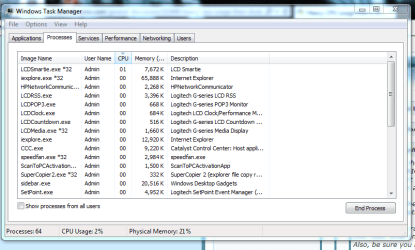
This is what you're looking at right?

Capture98.PNG

My machine is at idle and it's only showing 1 - 2%. IIRC Windows used to show the idle percentage in the processes around 98% when it was idling. Maybe I'm wrong or an update made it so it doesn't show that anymore.

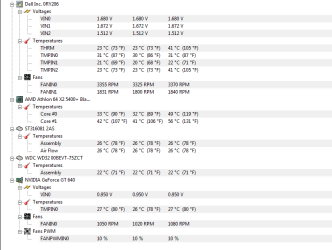
Never the less, your machine shouldn't show much more than 2% at idle. Maybe it's a temperature problem. What are you using to monitor temperatures? HWMonitor is good for AMD machines:

HWMonitor CPUID - System & hardware benchmark, monitoring, reporting

Try downloading that and checking the temps. If you can, post a screen shot of the results.

http://www.sevenforums.com/tutorials/9733-screenshots-files-upload-post-seven-forums.html
 

My Computer My Computer

At a glance

Win 7 Pro x64/Win 10 Pro x64 dual bootAMD FX 8350 Vishera @ 420016 GB Mushkin Blackline DDR3-2400 @ 1866 (9-1...XFX Radeon R9 280 Double D Black Edition
Computer type
PC/Desktop
Computer Manufacturer/Model Number
Mellon Labs (custom build)
OS
Win 7 Pro x64/Win 10 Pro x64 dual boot
CPU
AMD FX 8350 Vishera @ 4200
Motherboard
ASUS M5A97 R2.0
Memory
16 GB Mushkin Blackline DDR3-2400 @ 1866 (9-10-10-10-31)
Graphics Card(s)
XFX Radeon R9 280 Double D Black Edition
Sound Card
Realtek HD Audio on MB. Sounds great.
Monitor(s) Displays
Acer 24", Acer 22"
Screen Resolution
3840 x 1080
Hard Drives
1 x Mushkin Chronos 120 GB SSD (Win 10)
1 x Samsung 850 EVO 250 GB SSD (Win 7)
1 x WD 1TB SATA Blue
1 x WD 1TB SATA Green
PSU
Corsair TX-750
Case
CoolerMaster HAF 912+
Cooling
Coolermaster Seidon 240M Liquid AIO. 6 case fans
Keyboard
Logitech G710+
Mouse
Logitech G500s
Internet Speed
Much better since I got fiber, but still way overpriced.
Antivirus
MSE, Malware Bytes for scanning
Browser
Firefox
Other Info
Corsair VOID USB headphones.

A Mellon Labs X-1 - LCD Smartie driven system status display.

Brought to you by the letter E
Capture.PNG

heres the temp
 

My Computer My Computer

At a glance

Windows 7 64
Computer type
PC/Desktop
OS
Windows 7 64
System Idle Processes is not running up the processor. It is the amount of time the processor is not being used.

Is there some performance reason why you think this is a problem? Does Win7 hang or bog, which should never happen on adequate hardware with a perfect install?

Look over the steps for getting and keeping a perfect Clean Reinstall - Factory OEM Windows 7 - Windows 7 Help Forums to see how close you came. Particularly look at how drivers are handled in Win7 because this can be messed up.
 
Last edited:
This is what you're looking at right?

View attachment 307844

My machine is at idle and it's only showing 1 - 2%. IIRC Windows used to show the idle percentage in the processes around 98% when it was idling. Maybe I'm wrong or an update made it so it doesn't show that anymore.

Click "Show processes from all users"
You should then see System Idle Process in the list.
 

My Computer My Computer

At a glance

Multi-Boot W7_Pro_x64 W8.1_Pro_x64 W10_Pro_x6...AMD Athlon II x4 6206GB GSkill DDR2 800AMD 4670 GPU + AMD 4200 IGP
Computer type
PC/Desktop
Computer Manufacturer/Model Number
home built
OS
Multi-Boot W7_Pro_x64 W8.1_Pro_x64 W10_Pro_x64 +Linux_VMs +Chromium_VM
CPU
AMD Athlon II x4 620
Motherboard
Gigabyte GA-MA785G-UD3H
Memory
6GB GSkill DDR2 800
Graphics Card(s)
AMD 4670 GPU + AMD 4200 IGP
Sound Card
on board Realtek ALC889A
Monitor(s) Displays
RCA 40" LCD TV, Insignia 32" LCD TV, HP 15" LCD monitor
Screen Resolution
1680 x 1050
Hard Drives
OCZ Vertex 3 120GB,
Samsung F3 1TB (3),
Several others - WD, Seagate, Hitachi, ...
PSU
Corsair 500 W
Case
Rosewill mid tower
Cooling
CM 90mm rifle
Keyboard
Gyration wireless, Logitech wireless, Dell USB wired
Mouse
Gyration wireless, Logitech wireless, V7 USB wired
Internet Speed
Spectrum - 100Mbps D / 10Mbps U
Antivirus
Avast, MBAM3, EMET, WinPatrol
Browser
Pale Moon, Firefox, IE
Other Info
2 multi-boot PC's
Mainly HTPC/Office/Gen purpose (no gaming).
Trendnet USB KVM.
LG DVD burner/Blue Ray Player.
Tray system for removable SATA backup drives.

Not currently OCd, under-volted.
I use Hybrid sleep, rarely re-boot or shutdown.

Hauppauge HD-PVR, Avermedia PCIe TV Tuner, Hauppauge PCI TV Tuner.
This is what you're looking at right?

View attachment 307844

My machine is at idle and it's only showing 1 - 2%. IIRC Windows used to show the idle percentage in the processes around 98% when it was idling. Maybe I'm wrong or an update made it so it doesn't show that anymore.

Click "Show processes from all users"
You should then see System Idle Process in the list.
Duh! Of course! I totally forgot that. Thank you. I was wondering why I couldn't see it. Now I feel really silly...
 

My Computer My Computer

At a glance

Win 7 Pro x64/Win 10 Pro x64 dual bootAMD FX 8350 Vishera @ 420016 GB Mushkin Blackline DDR3-2400 @ 1866 (9-1...XFX Radeon R9 280 Double D Black Edition
Computer type
PC/Desktop
Computer Manufacturer/Model Number
Mellon Labs (custom build)
OS
Win 7 Pro x64/Win 10 Pro x64 dual boot
CPU
AMD FX 8350 Vishera @ 4200
Motherboard
ASUS M5A97 R2.0
Memory
16 GB Mushkin Blackline DDR3-2400 @ 1866 (9-10-10-10-31)
Graphics Card(s)
XFX Radeon R9 280 Double D Black Edition
Sound Card
Realtek HD Audio on MB. Sounds great.
Monitor(s) Displays
Acer 24", Acer 22"
Screen Resolution
3840 x 1080
Hard Drives
1 x Mushkin Chronos 120 GB SSD (Win 10)
1 x Samsung 850 EVO 250 GB SSD (Win 7)
1 x WD 1TB SATA Blue
1 x WD 1TB SATA Green
PSU
Corsair TX-750
Case
CoolerMaster HAF 912+
Cooling
Coolermaster Seidon 240M Liquid AIO. 6 case fans
Keyboard
Logitech G710+
Mouse
Logitech G500s
Internet Speed
Much better since I got fiber, but still way overpriced.
Antivirus
MSE, Malware Bytes for scanning
Browser
Firefox
Other Info
Corsair VOID USB headphones.

A Mellon Labs X-1 - LCD Smartie driven system status display.

Brought to you by the letter E
I know that feeling :p
 

My Computer My Computer

At a glance

Multi-Boot W7_Pro_x64 W8.1_Pro_x64 W10_Pro_x6...AMD Athlon II x4 6206GB GSkill DDR2 800AMD 4670 GPU + AMD 4200 IGP
Computer type
PC/Desktop
Computer Manufacturer/Model Number
home built
OS
Multi-Boot W7_Pro_x64 W8.1_Pro_x64 W10_Pro_x64 +Linux_VMs +Chromium_VM
CPU
AMD Athlon II x4 620
Motherboard
Gigabyte GA-MA785G-UD3H
Memory
6GB GSkill DDR2 800
Graphics Card(s)
AMD 4670 GPU + AMD 4200 IGP
Sound Card
on board Realtek ALC889A
Monitor(s) Displays
RCA 40" LCD TV, Insignia 32" LCD TV, HP 15" LCD monitor
Screen Resolution
1680 x 1050
Hard Drives
OCZ Vertex 3 120GB,
Samsung F3 1TB (3),
Several others - WD, Seagate, Hitachi, ...
PSU
Corsair 500 W
Case
Rosewill mid tower
Cooling
CM 90mm rifle
Keyboard
Gyration wireless, Logitech wireless, Dell USB wired
Mouse
Gyration wireless, Logitech wireless, V7 USB wired
Internet Speed
Spectrum - 100Mbps D / 10Mbps U
Antivirus
Avast, MBAM3, EMET, WinPatrol
Browser
Pale Moon, Firefox, IE
Other Info
2 multi-boot PC's
Mainly HTPC/Office/Gen purpose (no gaming).
Trendnet USB KVM.
LG DVD burner/Blue Ray Player.
Tray system for removable SATA backup drives.

Not currently OCd, under-volted.
I use Hybrid sleep, rarely re-boot or shutdown.

Hauppauge HD-PVR, Avermedia PCIe TV Tuner, Hauppauge PCI TV Tuner.
On a system like that, you need to just let Windows catch up on updates, indexing and any other configured processes like Prefetch and/or SuperFetch. This can take up to 4-5 hours (and more) on a new Windows install on a stressed system. Best to let it run and not try to install applications or use the system for a while.
 

My Computer My Computer

At a glance

Windows 7 Pro-x64i7-2600 3.4GHz - 3.8GHz Turbo8Gb - 2x4GB, Muskin 991770 PC3-1333Integrated Intel HD 2000
Computer type
PC/Desktop
Computer Manufacturer/Model Number
Built 2/11/2011
OS
Windows 7 Pro-x64
CPU
i7-2600 3.4GHz - 3.8GHz Turbo
Motherboard
Intel DH67BL-B3
Memory
8Gb - 2x4GB, Muskin 991770 PC3-1333
Graphics Card(s)
Integrated Intel HD 2000
Sound Card
Integrated Intel 10.1 HD, RealTek ALC892
Monitor(s) Displays
Asus LCD VH222H, Haier HL24XSL2a
Screen Resolution
1920x1080, 1920x1080
Hard Drives
Crucial SSD C300-128Gb,
Western Digital WD5002AALX - 500Gb,
Western Digital WD7501AALS - 750Gb
PSU
Seasonic 650W 80+ Gold Modular
Case
Rosewill Defender
Cooling
Stock CPU, Four 120mm case fans, PCH fan added
Keyboard
Logitech EX100 Y-RBH94 Wireless
Mouse
Logitech EX100 M-RCE95 Wireless
Internet Speed
3.0/1.5 Mbs
Antivirus
Microsoft Security Essentials
Browser
Microsoft Internet Explorer 11
Other Info
Antec Veris Premier-Multimedia IR Station,
Cyber Accoustics-3602 Speakers,
AFT XM-5U Card Reader,
Hauppauge TV-HVR-2250,
Sony LX300 USB Turntable
@rcoop
Can you post the screen print for the info windude99 asked for in post #6 or answer Greg's post #10 questions?

Where did you you get the Windows install disc from?
Maybe there's a problem with that disc?

I have an OLD TEST/Backup PC system very similar to the specs you are working with.
I don't see the issue you do, so I doubt a new CPU will help.

This Test PC has:
- AMD Athlon 64 X2 5600+
- 4 GB DDR2 800 RAM
- AMD 4670 GPU
- WD SATA I 500 GB HD
It's a triple-boot with W7 64bit, W7 32bit, and XP 32bit.
All OSs were installed 4+ years ago.
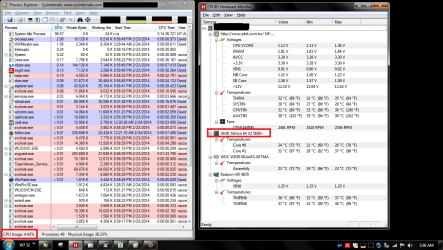
The screen print is for W7 32bit (I use Process Explorer rather than Task Mananger) ...

DTSP01.PNG
 

My Computer My Computer

At a glance

Multi-Boot W7_Pro_x64 W8.1_Pro_x64 W10_Pro_x6...AMD Athlon II x4 6206GB GSkill DDR2 800AMD 4670 GPU + AMD 4200 IGP
Computer type
PC/Desktop
Computer Manufacturer/Model Number
home built
OS
Multi-Boot W7_Pro_x64 W8.1_Pro_x64 W10_Pro_x64 +Linux_VMs +Chromium_VM
CPU
AMD Athlon II x4 620
Motherboard
Gigabyte GA-MA785G-UD3H
Memory
6GB GSkill DDR2 800
Graphics Card(s)
AMD 4670 GPU + AMD 4200 IGP
Sound Card
on board Realtek ALC889A
Monitor(s) Displays
RCA 40" LCD TV, Insignia 32" LCD TV, HP 15" LCD monitor
Screen Resolution
1680 x 1050
Hard Drives
OCZ Vertex 3 120GB,
Samsung F3 1TB (3),
Several others - WD, Seagate, Hitachi, ...
PSU
Corsair 500 W
Case
Rosewill mid tower
Cooling
CM 90mm rifle
Keyboard
Gyration wireless, Logitech wireless, Dell USB wired
Mouse
Gyration wireless, Logitech wireless, V7 USB wired
Internet Speed
Spectrum - 100Mbps D / 10Mbps U
Antivirus
Avast, MBAM3, EMET, WinPatrol
Browser
Pale Moon, Firefox, IE
Other Info
2 multi-boot PC's
Mainly HTPC/Office/Gen purpose (no gaming).
Trendnet USB KVM.
LG DVD burner/Blue Ray Player.
Tray system for removable SATA backup drives.

Not currently OCd, under-volted.
I use Hybrid sleep, rarely re-boot or shutdown.

Hauppauge HD-PVR, Avermedia PCIe TV Tuner, Hauppauge PCI TV Tuner.
System Idle Processes is not running up the processor. It is the amount of time the processor is not being used.

Is there some performance reason why you think this is a problem? Does Win7 hang or bog, which should never happen on adequate hardware with a perfect install?

Look over the steps for getting and keeping a perfect Clean Reinstall - Factory OEM Windows 7 - Windows 7 Help Forums to see how close you came. Particularly look at how drivers are handled in Win7 because this can be messed up.

This is no help either. A clean reinstall has been done twice now and the processor is still going crazy because all the fans go nuts in speed then the pc shuts down. Starting to think for sure the processor has just taken a massive turn for the worst.
 

My Computer My Computer

At a glance

Windows 7 64
Computer type
PC/Desktop
OS
Windows 7 64
@rcoop
Can you post the screen print for the info windude99 asked for in post #6 or answer Greg's post #10 questions?

Where did you you get the Windows install disc from?
Maybe there's a problem with that disc?

I have an OLD TEST/Backup PC system very similar to the specs you are working with.
I don't see the issue you do, so I doubt a new CPU will help.

This Test PC has:
- AMD Athlon 64 X2 5600+
- 4 GB DDR2 800 RAM
- AMD 4670 GPU
- WD SATA I 500 GB HD
It's a triple-boot with W7 64bit, W7 32bit, and XP 32bit.
All OSs were installed 4+ years ago.
The screen print is for W7 32bit (I use Process Explorer rather than Task Mananger) ...

View attachment 307884

I'll get to this asap, thanks.
 

My Computer My Computer

At a glance

Windows 7 64
Computer type
PC/Desktop
OS
Windows 7 64
System Idle Processes is not running up the processor. It is the amount of time the processor is not being used.

Is there some performance reason why you think this is a problem? Does Win7 hang or bog, which should never happen on adequate hardware with a perfect install?

Look over the steps for getting and keeping a perfect Clean Reinstall - Factory OEM Windows 7 - Windows 7 Help Forums to see how close you came. Particularly look at how drivers are handled in Win7 because this can be messed up.

This is no help either. A clean reinstall has been done twice now and the processor is still going crazy because all the fans go nuts in speed then the pc shuts down. Starting to think for sure the processor has just taken a massive turn for the worst.

You said that System Idle Processes was high as proof that the CPU was pegging. I replied that high System Idle Processes not only doesn't mean that, it means the exact opposite. What exactly is your proof that the CPU is being run up? It isn't System Idle Processes or fans. :rolleyes:

I also asked you to look over the specific steps for a perfect Clean Reinstall which is a specialty of these forums and completely different than the install you likely did. Did you even compare the steps given with the ones you did? Where did your drivers come from?

Run the Dell full bootable hardware diagnostics by rebooting and tapping the F12 keys, choosing Diagnostics and/or Utility Partition to get the full suite, test all hardware, report back results. If these fail because you wiped the Dell OEM partition (which could have been avoided by following tutorial) or are not definitive then run the hardware tests from Troubleshooting Steps for Windows 7. If the hardware is good the other steps will also almost always nail the issue.
 
Almost sounds like the CPU heatsink is loose or has too much compound. The fans race in an attempt to cool the CPU. When that doesn't happen, the CPU just shuts down. AMD CPUs don't throttle. They run until the good smoke gets out or the cache quits. This can happen in a matter of seconds.
 

My Computer My Computer

At a glance

Windows 7 Pro-x64i7-2600 3.4GHz - 3.8GHz Turbo8Gb - 2x4GB, Muskin 991770 PC3-1333Integrated Intel HD 2000
Computer type
PC/Desktop
Computer Manufacturer/Model Number
Built 2/11/2011
OS
Windows 7 Pro-x64
CPU
i7-2600 3.4GHz - 3.8GHz Turbo
Motherboard
Intel DH67BL-B3
Memory
8Gb - 2x4GB, Muskin 991770 PC3-1333
Graphics Card(s)
Integrated Intel HD 2000
Sound Card
Integrated Intel 10.1 HD, RealTek ALC892
Monitor(s) Displays
Asus LCD VH222H, Haier HL24XSL2a
Screen Resolution
1920x1080, 1920x1080
Hard Drives
Crucial SSD C300-128Gb,
Western Digital WD5002AALX - 500Gb,
Western Digital WD7501AALS - 750Gb
PSU
Seasonic 650W 80+ Gold Modular
Case
Rosewill Defender
Cooling
Stock CPU, Four 120mm case fans, PCH fan added
Keyboard
Logitech EX100 Y-RBH94 Wireless
Mouse
Logitech EX100 M-RCE95 Wireless
Internet Speed
3.0/1.5 Mbs
Antivirus
Microsoft Security Essentials
Browser
Microsoft Internet Explorer 11
Other Info
Antec Veris Premier-Multimedia IR Station,
Cyber Accoustics-3602 Speakers,
AFT XM-5U Card Reader,
Hauppauge TV-HVR-2250,
Sony LX300 USB Turntable
It would be very helpful if the machine specs were filled out.
From post# 1:
Windows 7 PRO x64
CPU: AMD Athlon 64 x2 Dual Core Processor 5400+ 2.80 GHz
RAM: 3GB
DELL Motherboard
BIOS of DELL Inc 1.0.7

If you can connect to the Internet on your brother's machine, it's very easy. As a matter of fact, it's probably better if you work on that machine while trying to resolve the issue.

Please add your SF Systems Specs by following this tutorial: http://www.sevenforums.com/tutorials/180324-system-info-see-your-system-specs.html
  • In the System Manufacturer/Model Number field, manually type Desktop or Laptop adding it to the information already in the field.
  • Specify Custom Build as the manufacturer if it is not an OEM machine.
  • The tool does not fill in this information but it is very important if someone has to research drivers or hardware for your machine.
Log on to Sevenforums (SF) and let the tool fill in you System specs on your SF profile.

Full instructions are in the tutorial. It's a simple process and it makes that information readily available on your posts. You don't have to retype the information in any thread.

Click here to view your system specs on SevenForums.

Click on My System Specs in the lower left of any post by any member to see what is presented about their machine.


Not having that information but going on DavidW7ncus' test machine, I'm guessing that the machine isn't the newest generation.

Why Pro and is this a retail version (how did you come by the disc) ?

With only 3 GB of memory, you might be better off with a 32 bit install.

Thanks,

Bill
.
 

My Computer My Computer

At a glance

x64 (6.3.9600) Win8.1 Pro & soon dual boot x6...AMD A6-3420M APU with Radeon(tm) HD Graphics6.00 GBAMD Radeon(TM) HD 6520G
Computer type
Laptop
Computer Manufacturer/Model Number
HP Pavilion dv6-6c10us
OS
x64 (6.3.9600) Win8.1 Pro & soon dual boot x64 (6.1.7601) Win7_SP1 HomePrem
CPU
AMD A6-3420M APU with Radeon(tm) HD Graphics
Motherboard
Hewlett-Packard 1805
Memory
6.00 GB
Graphics Card(s)
AMD Radeon(TM) HD 6520G
Sound Card
(1) AMD High Definition Audio Device (2) IDT High Definiti
Monitor(s) Displays
HP W2072a 20" LCD (1600 x 900) @ 60 Hz
Screen Resolution
1366 x 768 x 32 bits (4294967296 colors) @ 60 Hz
Hard Drives
ST640LM0 00 HM641JI SATA Disk Device
Keyboard
Logitech k520 wireless KB
Mouse
Logitech m320 wireless mouse (bundled with KB)
Internet Speed
15/5 | 54 MB Wireless 'n'
Antivirus
Realtime: Defender or Avast | On-demand: Malwarebytes, ESET
Browser
IE 11 on Win8, IE 10 on win 7
Other Info
Media: [Gimp, Audacity, VLC] || Comm: [WEmail 2012, Skype] || Productivity: [OpenOffice,| Textpad] || Utils: [Sysinternals, cCleaner, Speccy, Defraggler]
Back
Top