Hello, forgive me! LOL

JannE

New member
Local time
10:52 PM
Messages
8
Location
Missouri
This isn't a Win7 problem but I am thinking the problem would be the same from XP to 7. Just for clarity XP Pro is my problem child. I did a search for *.zip files. (I am trying to get all my pictures edited and on an external hdd) Made a folder for them. At the search menu, I 'selected all', cut, then clicked on my new folder. Got an error msg 'can't read from source file' then ALLLLLLL 68 files went into hdd hell. I cannot find them! Where did they go? :cry: I can put them all back on with my backup CDs since that's how they all got there, but that is a long process (I have many backup CDs).

Any clue? I don't want to shut down in case they are somewhere.

Winter is on the way!!

Jann
 

My Computer

Computer Manufacturer/Model Number
HP
OS
Windows 7 Home Premium 32 bit
Asking to make sure of info.
You put them in a folder and then zipped the folder?

I have a feeling when you hit cut you deleted them. Should have been copy and paste.

I'm going to switch to my XP. See if they are in the Recycle Bin while I'm switching over.
 

My Computer

Computer Manufacturer/Model Number
Hopalong/ Godzilla
OS
Windows7 Pro 64bit SP-1; Windows XP Pro 32bit
CPU
Intel Core i7-870 Lynnfield 2.93GHz LGA 1156 95W Quad-Core
Motherboard
ASUS P7P55D-E PRO
Memory
8GB@1400MHz Crucial Ballistix DDR3-1600 4x2GB
Graphics Card(s)
ASUS ENGTX460 DirectCU/2DI/1GD5 1GB 256-bit GDDR5
Sound Card
VIA Onboard
Monitor(s) Displays
Asus VS248H-P 24"; Samsung SyncMaster 941BW 19"ws
Screen Resolution
1920x1080; 1440x900
Hard Drives
Samsung 830 120GB SSD
Intel 320 120GB SSD
Western Digital Caviar Black WD7501AALS 750GB 7200 RPM SATA 3.0Gb/s
Western Digital Caviar Black WD6401AALS 640GB 7200 RPM SATA 3.0Gb/s
PSU
COOLER MASTER Silent Pro RS850-AMBAJ3-US 850W Modular
Case
COOLER MASTER HAF 932 RC-932-KKN5-GP Black
Cooling
Scythe "Mugen-2 Rev.B" (2 ScytheKaze-Jyuni PWM fans)
Keyboard
Logitech K-320
Mouse
Kensington
Antivirus
Avast Inernet Suite
Browser
IE 9 ; Chrome
This isn't a Win7 problem but I am thinking the problem would be the same from XP to 7. Just for clarity XP Pro is my problem child. I did a search for *.zip files. (I am trying to get all my pictures edited and on an external hdd) Made a folder for them. At the search menu, I 'selected all', cut, then clicked on my new folder. Got an error msg 'can't read from source file' then ALLLLLLL 68 files went into hdd hell. I cannot find them! Where did they go? :cry: I can put them all back on with my backup CDs since that's how they all got there, but that is a long process (I have many backup CDs).

Any clue? I don't want to shut down in case they are somewhere.

Winter is on the way!!

Jann

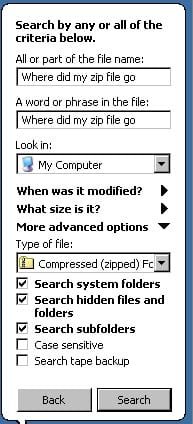
You could try an Advanced search in XP searching your whole computer and all files including hidden ones. (see snip below)

2010-10-27_161924.jpg
 

My Computer

Computer type
PC/Desktop
Computer Manufacturer/Model Number
My own abomination, I call it the Money Pit
OS
Windows 10 Pro x 2/Windows 11 Home
CPU
Intel i7 2600K @ 3.40 GHz
Motherboard
ASUS Sabertooth P67
Memory
Corsair Vengeance 16GB DDR3 1600MHz CL8 Dual Channel Kit
Graphics Card(s)
EVGA GeForce RTX 3080 XC3 ULTRA GAMING 10GB GDDR6X
Sound Card
Onboard Realtek or Nvidia High Definition Audio (HDMI)
Monitor(s) Displays
Samsung JS7000 50" SUHD TV or Samsung 27" FHD 60Hz 8ms GTG V
Screen Resolution
1920 x 1080
Hard Drives
1 x Samsung 870 EVO 250 GB SSD (Windows 10 Pro), 1 x Samsung 850 EVO 250 GB SSD (Windows 10 Pro)
PSU
Corsair AX860 - 860W Modular Power Supply
Case
Phanteks Enthoo Luxe Full Tower Case - Black
Cooling
CORSAIR Hydro Series H150i PRO RGB 360mm Liquid CPU Cooler
Keyboard
Logitech K830 Illuminated Living-Room Keyboard
Mouse
Logitech MX Anywhere 2S Wireless Mouse
Internet Speed
100 Mbps
Antivirus
ESET Internet Security
Browser
Latest Version Of Firefox & Microsoft Edge Chromium Stable
Other Info
LG Super Multi Blue Internal Blu-ray Disk Rewriter - BH10LS30
6x2 HDMI Switcher (6 inputs, 2 outputs) so I can send the output of my Cable Box, Roku, or any my 4 computers to either my TV or Monitor separately or simultaneously.
No. I made a folder I named ZipRar. THEN I searched for *.zip. I NEVER moved them there. I selected them all from Edit, Cut them (you are right, should have C&P), then I highlighted the ZipRar folder, clicked on Paste and GONE! The error msg said: Cannot read from source file. I DO know or think I know that there was one zipped file that was corrupt, but would that effect all of them? I do look into hidden files. SO, if they are deleted, I know what I need to do! LOL Time consuming but right now that is all I have. I would like to find them and can't understand how they can be deleted without me saying: Delete these files. I have sooooo many pictures!!

Let me know what you find out!! I am thinking Win 7 on this mac mini for Christmas. Actually, MacOS the latest one, is on the other partition. I would like to get rid of it because I hardly ever use it.

Jann
 

My Computer

Computer Manufacturer/Model Number
HP
OS
Windows 7 Home Premium 32 bit
They should still have the original file extensions on them if they never made it to the zip folder.

So the wherever you were taking them from say 'My Pictures" as individual pictures they should still be jpegs if that is what they were before.
I'm on Win 7 at the moment.

My guess is if they were jpeg open the old Search the one with the dogie in XP not the new junk one.
Just type jpeg if that was what they were. No dot. Select the XP drive letter. C or D etc. not "files and folders" to search.
That should find every "jpeg" on that partition.

Mike
 

My Computer

Computer Manufacturer/Model Number
Hopalong/ Godzilla
OS
Windows7 Pro 64bit SP-1; Windows XP Pro 32bit
CPU
Intel Core i7-870 Lynnfield 2.93GHz LGA 1156 95W Quad-Core
Motherboard
ASUS P7P55D-E PRO
Memory
8GB@1400MHz Crucial Ballistix DDR3-1600 4x2GB
Graphics Card(s)
ASUS ENGTX460 DirectCU/2DI/1GD5 1GB 256-bit GDDR5
Sound Card
VIA Onboard
Monitor(s) Displays
Asus VS248H-P 24"; Samsung SyncMaster 941BW 19"ws
Screen Resolution
1920x1080; 1440x900
Hard Drives
Samsung 830 120GB SSD
Intel 320 120GB SSD
Western Digital Caviar Black WD7501AALS 750GB 7200 RPM SATA 3.0Gb/s
Western Digital Caviar Black WD6401AALS 640GB 7200 RPM SATA 3.0Gb/s
PSU
COOLER MASTER Silent Pro RS850-AMBAJ3-US 850W Modular
Case
COOLER MASTER HAF 932 RC-932-KKN5-GP Black
Cooling
Scythe "Mugen-2 Rev.B" (2 ScytheKaze-Jyuni PWM fans)
Keyboard
Logitech K-320
Mouse
Kensington
Antivirus
Avast Inernet Suite
Browser
IE 9 ; Chrome
Just to add on...if you want a great "Search Tool" try the free FileLocator Lite. Works great for finding files and IMHO much better than WinXP's search. I use this on all my PC's at home and at work.
FileLocator Lite - Free File Searching Utility
 

My Computer

Computer Manufacturer/Model Number
Dell Optiplex GX620
OS
Windows 7 Ultimate
CPU
Pentium D 2.80GHz
Memory
4.00 GB
Graphics Card(s)
1.00 GB nVidia GeForce 9500GT
Monitor(s) Displays
Dual - 23" Samsung P2370 & 22" Samsung 2232GW
Hard Drives
c: 250 GB
d: 320 GB
USB External 1.0 TB
Keyboard
Logitech Illuminated \ Logitech DiNovo Edge
Mouse
Logitech Trackman
Internet Speed
DSL
Well, you can close this one. Go figure. I tried to search for them again to no avail. So I did some other stuff online, went back to search after about an hour and VOILA! There they were. No clue. Thanks for you help!! I know I will be back!!!

Have a wonderful rest of the week!

Jann :D
 

My Computer

Computer Manufacturer/Model Number
HP
OS
Windows 7 Home Premium 32 bit
Glad you found them.

Mike
 

My Computer

Computer Manufacturer/Model Number
Hopalong/ Godzilla
OS
Windows7 Pro 64bit SP-1; Windows XP Pro 32bit
CPU
Intel Core i7-870 Lynnfield 2.93GHz LGA 1156 95W Quad-Core
Motherboard
ASUS P7P55D-E PRO
Memory
8GB@1400MHz Crucial Ballistix DDR3-1600 4x2GB
Graphics Card(s)
ASUS ENGTX460 DirectCU/2DI/1GD5 1GB 256-bit GDDR5
Sound Card
VIA Onboard
Monitor(s) Displays
Asus VS248H-P 24"; Samsung SyncMaster 941BW 19"ws
Screen Resolution
1920x1080; 1440x900
Hard Drives
Samsung 830 120GB SSD
Intel 320 120GB SSD
Western Digital Caviar Black WD7501AALS 750GB 7200 RPM SATA 3.0Gb/s
Western Digital Caviar Black WD6401AALS 640GB 7200 RPM SATA 3.0Gb/s
PSU
COOLER MASTER Silent Pro RS850-AMBAJ3-US 850W Modular
Case
COOLER MASTER HAF 932 RC-932-KKN5-GP Black
Cooling
Scythe "Mugen-2 Rev.B" (2 ScytheKaze-Jyuni PWM fans)
Keyboard
Logitech K-320
Mouse
Kensington
Antivirus
Avast Inernet Suite
Browser
IE 9 ; Chrome
Well, you can close this one. Go figure. I tried to search for them again to no avail. So I did some other stuff online, went back to search after about an hour and VOILA! There they were. No clue. Thanks for you help!! I know I will be back!!!

Have a wonderful rest of the week!

Jann :D

Glad your AWOL pictures have returned and Welcome.
 

My Computer

Computer type
PC/Desktop
Computer Manufacturer/Model Number
My own abomination, I call it the Money Pit
OS
Windows 10 Pro x 2/Windows 11 Home
CPU
Intel i7 2600K @ 3.40 GHz
Motherboard
ASUS Sabertooth P67
Memory
Corsair Vengeance 16GB DDR3 1600MHz CL8 Dual Channel Kit
Graphics Card(s)
EVGA GeForce RTX 3080 XC3 ULTRA GAMING 10GB GDDR6X
Sound Card
Onboard Realtek or Nvidia High Definition Audio (HDMI)
Monitor(s) Displays
Samsung JS7000 50" SUHD TV or Samsung 27" FHD 60Hz 8ms GTG V
Screen Resolution
1920 x 1080
Hard Drives
1 x Samsung 870 EVO 250 GB SSD (Windows 10 Pro), 1 x Samsung 850 EVO 250 GB SSD (Windows 10 Pro)
PSU
Corsair AX860 - 860W Modular Power Supply
Case
Phanteks Enthoo Luxe Full Tower Case - Black
Cooling
CORSAIR Hydro Series H150i PRO RGB 360mm Liquid CPU Cooler
Keyboard
Logitech K830 Illuminated Living-Room Keyboard
Mouse
Logitech MX Anywhere 2S Wireless Mouse
Internet Speed
100 Mbps
Antivirus
ESET Internet Security
Browser
Latest Version Of Firefox & Microsoft Edge Chromium Stable
Other Info
LG Super Multi Blue Internal Blu-ray Disk Rewriter - BH10LS30
6x2 HDMI Switcher (6 inputs, 2 outputs) so I can send the output of my Cable Box, Roku, or any my 4 computers to either my TV or Monitor separately or simultaneously.
Back
Top