Hello guys need some help here as well....

amayankrao

New member
Local time
7:06 AM
Messages
6
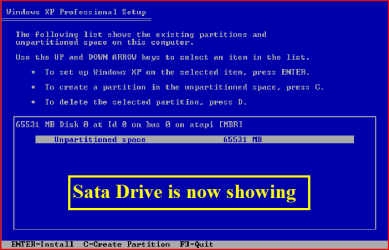
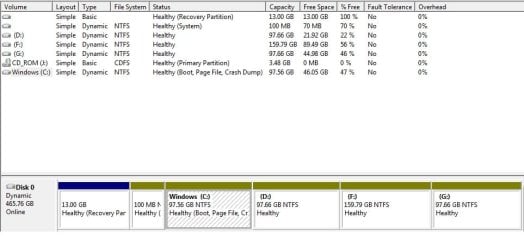
I have four partitions already on my laptop which is currently running On windows 7 64bit system, However If I use Xp Cd it does not show any partitions,rather it shows the drive as a whole, I took an sample image from a forum(right image).

I get three options at the bottom
Enter: Install
C: create partition
F3: Quit

I am afraid that choosing any of those options might ruin my windows 7.


So what should be my next step??
 

Attachments
  • 1.jpg
    1.jpg
    47.8 KB · Views: 18
  • 19.PNG
    19.PNG
    6.6 KB · Views: 5

My Computer My Computer

Computer Manufacturer/Model Number
Acer
OS
Windows 7 x64
CPU
Core i5- 430M
Motherboard
???
Memory
500 Gb
Graphics Card(s)
Nvidia Gt420m-1Gb
Sound Card
Inbuilt
If that is your Disk Mgmt screenshot then you have converted your HD to a Dynamic disk which is only meant to be done to span partitions across several disks. You need to convert it back now before it stops booting.

The tool to use is free Partition Wizard bootable CD, however you must use version 4.2 which is the last one which included this function for free. Download and unzip pw422.zip ISO - Windows Live , burn the iSO to CD using WIndows Image Burner or ImgBurn .

Follow this video tutorial to convert your disk back to Basic after deleting the last two partitions which tipped it to warn you it was about to convert to Dynamic. You can only have four Primary partitions, or three Primary and as many Logical as you want.
How to convert dynamic disk to basic disk with Partition Wizard?

After conversion I would next convert D to Logical and add Logical subpartitions after deleting F and G. You will need to move your data off before shutting down or it may not restart. How to set partition as Primary or Logical.
 
Thanks a lot for replying!!

Will try that and let you know....thanks again!!!
 

My Computer My Computer

Computer Manufacturer/Model Number
Acer
OS
Windows 7 x64
CPU
Core i5- 430M
Motherboard
???
Memory
500 Gb
Graphics Card(s)
Nvidia Gt420m-1Gb
Sound Card
Inbuilt
Okey...so here's what I am going to do....

1) Backup G & F partition.
2) Delete G & F using computer management.
3) Extend D drive using computer management.
4) Burn the .iso image which you provided.
5) Convert D drive from dynamic to basic.

Do you want me to back backup D drive as well?!
 
Last edited:

My Computer My Computer

Computer Manufacturer/Model Number
Acer
OS
Windows 7 x64
CPU
Core i5- 430M
Motherboard
???
Memory
500 Gb
Graphics Card(s)
Nvidia Gt420m-1Gb
Sound Card
Inbuilt
Okey...so here's what I am going to do....

1) Backup G & F partition.
2) Delete G & F using computer management.
3) Extend D drive using computer management.
4) Burn the .iso image which you provided.
5) Convert D drive from dynamic to basic.

Do you want me to back backup D drive as well?!

You should always have all of your data backed up externally.

You need to delete F and G before the disk will convert to Basic. Wait to extend D until after the conversion.

In step 5 you are converting the Disk and not the partition. Look at the video tutorial provided.

After conversion if you want to add more partitions then convert D to Logical following the video tutorial also provided for that procedure. Then you can create additional Logical partitions in the adjacent space as desired as long as they remain contiguous.
 
Thanks a million Gregrocker!!!!!! The whole thing worked like a charm!!! Was able to install Xp! Everything's working in order....Now I have Xp & 7 on my laptop!!! :D
 

My Computer My Computer

Computer Manufacturer/Model Number
Acer
OS
Windows 7 x64
CPU
Core i5- 430M
Motherboard
???
Memory
500 Gb
Graphics Card(s)
Nvidia Gt420m-1Gb
Sound Card
Inbuilt
Sounds good.

If you want to post back a screenshot of maximized Disk mgmt drive map and listings, we can look it over for you to be sure.

When ready you can mark thread Solved at top.
 
Back
Top