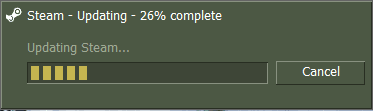
Hello i got a Steam bug.

Tobias Lidegaar

New member
Local time
10:59 PM
Messages
8
Location
Denmark
I had buyed Windows 7 Home Premium To my new computer
But i haven't seen any good thing abaute it i have only seen bugs and thing that does the computer more bad things.

I have not had a feeling that Windows 7 is good,
When i open steam i got the problem that it opens the loading option
it goes up to 99% Installed and then it just keeps being there i have waited abaute 3 hour and it haven't moved please help

That Bug is over now but now i got a new one
In steam i got a game could "Garrys Mod"
Windows Xp Runs it perfect bun when i am playing it on Windows 7
It Crashes abaute 50 times a day the windows 7 says when it crashes
In English
"Hl2.exe has stopped functioning windows searching for a solution to the problem"
In Danish
"Hl2.exe er stoppet med at fungere windows søger efter en løsning på problemmet"

On my old computer i used Windows Xp Home Premium
and it runned great i could use steam and play games

Thanks in advance
 
Last edited by a moderator:

My Computer

Computer Manufacturer/Model Number
Windows 7 Home Premium
OS
Windows 7 Home Premium
CPU
Intel Core i7-860 4x2,80GHz
Motherboard
Gigabyte P55-USB3 motherboard
Memory
Kingston 8GB DDR3-1333 DualChannel RAM
Graphics Card(s)
nVidia GeForce GTX480 1536MB
Sound Card
HD Audio RealTek
Hi Tobias

Welcome to Seven Forums:)
Have a look here
Keep us posted on your progress

Regards
 

My Computer

Computer Manufacturer/Model Number
Custom
OS
Win7 HP (x64)/Win7 Ultimate (x64)
CPU
Core i7 920
Motherboard
Intel X58
Memory
6 x 2GB Corsair XMS3
Graphics Card(s)
CF HD4890
Sound Card
Asus Xonar
Monitor(s) Displays
Dell 2408WFP
Screen Resolution
1920 x 1200
Hard Drives
2 x 150GB WDC Velociraptors (Raid 0)
1 x 1TB Seagate
1 x 1.5TB Seagate
PSU
Corsair HX1000W
Case
Antec 1200
Keyboard
Razer Lycosa/N52te
Mouse
Razer Lachesis
it dont work i have taked a pic


and here is a link to the pic you can download to see the problem and it didnt help that you sent me
MEGAUPLOAD - The leading online storage and file delivery service

thanks for trying
 

My Computer

Computer Manufacturer/Model Number
Windows 7 Home Premium
OS
Windows 7 Home Premium
CPU
Intel Core i7-860 4x2,80GHz
Motherboard
Gigabyte P55-USB3 motherboard
Memory
Kingston 8GB DDR3-1333 DualChannel RAM
Graphics Card(s)
nVidia GeForce GTX480 1536MB
Sound Card
HD Audio RealTek
Hi tobias

Appears that there is an issue with the latest update - more info here and here

One of the posters posted this solution on the first link above:

ok guys i think i got it worked out

make a file in your garrysmod folder named "steam.inf"
put this info in

PatchVersion=1.0.0.76
ProductName=garrysmod
appID=4000

save it and put the steam.inf on your server AND in your clientside

this worked for me

it seems that garrysmod team or valve team left out this info maybe by accident.

Also it seems someone thought it was funny to over-ride the ulx motd with a counterstrike.com spam. so you guys may want to look at your motd's a lso


hope things work out

Regards
 

My Computer

Computer Manufacturer/Model Number
Custom
OS
Win7 HP (x64)/Win7 Ultimate (x64)
CPU
Core i7 920
Motherboard
Intel X58
Memory
6 x 2GB Corsair XMS3
Graphics Card(s)
CF HD4890
Sound Card
Asus Xonar
Monitor(s) Displays
Dell 2408WFP
Screen Resolution
1920 x 1200
Hard Drives
2 x 150GB WDC Velociraptors (Raid 0)
1 x 1TB Seagate
1 x 1.5TB Seagate
PSU
Corsair HX1000W
Case
Antec 1200
Keyboard
Razer Lycosa/N52te
Mouse
Razer Lachesis
Ohhh God
now it really wrong
i cant even start gmod with out it crashes

i deleted that info you told me to set in now
but it still dont work

WTF is wrong with windows 7 ?
 

My Computer

Computer Manufacturer/Model Number
Windows 7 Home Premium
OS
Windows 7 Home Premium
CPU
Intel Core i7-860 4x2,80GHz
Motherboard
Gigabyte P55-USB3 motherboard
Memory
Kingston 8GB DDR3-1333 DualChannel RAM
Graphics Card(s)
nVidia GeForce GTX480 1536MB
Sound Card
HD Audio RealTek
hi Tobias

You could restoring to an earlier date.:o
 

My Computer

Computer Manufacturer/Model Number
Custom
OS
Win7 HP (x64)/Win7 Ultimate (x64)
CPU
Core i7 920
Motherboard
Intel X58
Memory
6 x 2GB Corsair XMS3
Graphics Card(s)
CF HD4890
Sound Card
Asus Xonar
Monitor(s) Displays
Dell 2408WFP
Screen Resolution
1920 x 1200
Hard Drives
2 x 150GB WDC Velociraptors (Raid 0)
1 x 1TB Seagate
1 x 1.5TB Seagate
PSU
Corsair HX1000W
Case
Antec 1200
Keyboard
Razer Lycosa/N52te
Mouse
Razer Lachesis
yea i tryed to but nothing helps ;(

i tryed alot of defrend things but nothing helps thats why i tryed this forum
 

My Computer

Computer Manufacturer/Model Number
Windows 7 Home Premium
OS
Windows 7 Home Premium
CPU
Intel Core i7-860 4x2,80GHz
Motherboard
Gigabyte P55-USB3 motherboard
Memory
Kingston 8GB DDR3-1333 DualChannel RAM
Graphics Card(s)
nVidia GeForce GTX480 1536MB
Sound Card
HD Audio RealTek
steambug.png


And it keeps staying still there i tryed to install other versions but it dont work.
hope this forum can help me .
 

My Computer

Computer Manufacturer/Model Number
Windows 7 Home Premium
OS
Windows 7 Home Premium
CPU
Intel Core i7-860 4x2,80GHz
Motherboard
Gigabyte P55-USB3 motherboard
Memory
Kingston 8GB DDR3-1333 DualChannel RAM
Graphics Card(s)
nVidia GeForce GTX480 1536MB
Sound Card
HD Audio RealTek
Do you have Steam installed at its default location? In Program Files?

If so, have you tried Backing up your games, uninstalling Steam and re-install to a different location?

Such as making a new folder for it on another hard Drive or on the C drive?

For example: C:/Steam

Then manualy choose the install location when re-installing?
 

My Computer

Computer Manufacturer/Model Number
Custom (Self Build)
OS
Windows 7 Home Premium 64bit
CPU
Intel Core i7 2700k
Motherboard
eVGA P67 SLI
Memory
8GB Mushkin Redline Ridgebacks @1866
Graphics Card(s)
EVGA GTX570 SC
Sound Card
XiFi Titanium HD
Monitor(s) Displays
LG W2453V
Screen Resolution
1920x1080
Hard Drives
Intel 320 80GB -- Intel X25-V 40GB --WD Black 1TB x2 -- WD Blue 640GB
PSU
Seasonic x750
Case
Corsair 600T SE White
Cooling
eVGA Superclocked CPU Cooler
Keyboard
Saitek Cyborg
Antivirus
Kaspersky
Browser
IE
Other Info
LG BD/DVD
You could try going into the steam folder and deleting a file called clientregistry.blob while steam is not running and try again.
 

My Computer

Computer Manufacturer/Model Number
self built
OS
Windows 7 Professional 64-bit
CPU
Intel E8400 3GHz
Motherboard
Intel DX48BT2
Memory
Kingston PC3-10700H 4Gb
Graphics Card(s)
XFX Radeon HD 5850 BlackEd.
Sound Card
Asus Xonar DG
Monitor(s) Displays
2x Samsung SM-T220HD 22"
Screen Resolution
1680x1050 on two monitors
Hard Drives
OCZ Vertex 2 120gb 3.5" (OS)
Seagate Momentus XT 500gb
Samsung F3 1Tb (games)
2x Samsung F1 1Tb
PSU
Thermaltake ToughPower 850w
Case
Thermaltake Armor
Cooling
Scythe Mugen II
Keyboard
Microsoft Comfort Curve USB
Mouse
Razer Diamondback 3G
Internet Speed
8128/443
i tryed all that but it didnt help i allready tryed to delete clientregistry.blob and tryed to reinstall it and alot of other things.
 

My Computer

Computer Manufacturer/Model Number
Windows 7 Home Premium
OS
Windows 7 Home Premium
CPU
Intel Core i7-860 4x2,80GHz
Motherboard
Gigabyte P55-USB3 motherboard
Memory
Kingston 8GB DDR3-1333 DualChannel RAM
Graphics Card(s)
nVidia GeForce GTX480 1536MB
Sound Card
HD Audio RealTek
i tryed to delete clientregistry.blob and it didnt work itryed reinstall it and it didnt help to.
 

My Computer

Computer Manufacturer/Model Number
Windows 7 Home Premium
OS
Windows 7 Home Premium
CPU
Intel Core i7-860 4x2,80GHz
Motherboard
Gigabyte P55-USB3 motherboard
Memory
Kingston 8GB DDR3-1333 DualChannel RAM
Graphics Card(s)
nVidia GeForce GTX480 1536MB
Sound Card
HD Audio RealTek
Have you tried installing Steam with Admin rights turned on? Sometimes this makes a program work right.
 

My Computer

Computer Manufacturer/Model Number
Custom
OS
Windows 7 Ultimate 32-Bit
CPU
Intel(R) Core(TM) i7 CPU 920 @ 2.67GHz
Motherboard
Gigabyte Technology Co., Ltd. EX58-UD3R
Memory
Corsair DDR3 4Gb
Graphics Card(s)
Nvidia Ge-Force GTS250
Sound Card
High Definition Audio Device
Monitor(s) Displays
Envision 19 inch
Screen Resolution
1280x1024
Hard Drives
2 physical hard drives (4 letter drives) that equal up to 626.3 gigs of space all together. I think both are Maxtors, but primary is a SATA drive, secondary is a SATA, too.
Case
"Elite" style case
Cooling
"Cooler Master"
Mouse
Microsoft Optical USB Mouse.
Internet Speed
Verizon DSL Internet
I have a same problem than you Tobias. Every time Steam updates itself I have to reboot in safemode and then update steam.
 

My Computer

OS
Windows7 Ultimate
Back
Top