Solved Hello. Simple email client, plx!

  • Thread starter Thread starter MisterActorMan
  • Start date Start date
M

MisterActorMan

Guest
So I happily installed Windows 7 Pro on my laptop and desktop. I have used GMail for about two years now and its nice, but I'd like to utilize Outlook and Office and GMail doesn't interface well (AT ALL!) with Outlook.

What I'm looking for is a simple, clean, small, but reliable and safe email client to switch to from GMail. I'll still use GMail, probably, and can go back to it if I don't like it anymore.

I'm reluctant to get a Windows Live Mail account (what is the domain name, anyway? @msn, @live, or what?) since I don't want to install redundant (Windows Live Essentials) software on my computers.

What do people recommend? Someone suggested GMX, which seems okay, but if there's something in-house, meaning Microsoft, I think I'd prefer that.
 
if you go to Windows essentials, they allow you to download just the email. That is what I did.
 

My Computer

Computer type
PC/Desktop
Computer Manufacturer/Model Number
Dell XPS 420
OS
Windows 10, Home Clean Install
CPU
Intel Core2 processsor Q8200(2.33Ghz 1333FSB) Quad Core Tech
Motherboard
Dell
Memory
6 gb
Graphics Card(s)
ATI Radeon 256MB HD3650
Sound Card
Intergrated 7.1 Channel Audio
Monitor(s) Displays
Dell SP2009W 20"
Hard Drives
640 GB Serial ATA Hard drive
Cooling
Fan
Keyboard
Dell USB Keyboard
Mouse
Dell Premium Optical USB
Internet Speed
DSL 2.85
Aha! Really? That sounds great. Hopefully I don't have to get the Live Mail app, just the client access...I hope so. This is really what I would prefer. Thanks so much!

(I guess worst case scenario is my systems get too redundant for my taste, having Live Essentials and Office and Google)
 
Before trying to download, set a system restore point. If you do not like what they give you, just use the restore point.

Yes, you can uninstall, but with the restore point, you know all of the remanants are gone

When you download read the entire page carefully, they give an option to choose, but they want you to have it all.
 

My Computer

Computer type
PC/Desktop
Computer Manufacturer/Model Number
Dell XPS 420
OS
Windows 10, Home Clean Install
CPU
Intel Core2 processsor Q8200(2.33Ghz 1333FSB) Quad Core Tech
Motherboard
Dell
Memory
6 gb
Graphics Card(s)
ATI Radeon 256MB HD3650
Sound Card
Intergrated 7.1 Channel Audio
Monitor(s) Displays
Dell SP2009W 20"
Hard Drives
640 GB Serial ATA Hard drive
Cooling
Fan
Keyboard
Dell USB Keyboard
Mouse
Dell Premium Optical USB
Internet Speed
DSL 2.85
Thanks for the courtesy of giving a rep point. They really are appreciated.
 

My Computer

Computer type
PC/Desktop
Computer Manufacturer/Model Number
Dell XPS 420
OS
Windows 10, Home Clean Install
CPU
Intel Core2 processsor Q8200(2.33Ghz 1333FSB) Quad Core Tech
Motherboard
Dell
Memory
6 gb
Graphics Card(s)
ATI Radeon 256MB HD3650
Sound Card
Intergrated 7.1 Channel Audio
Monitor(s) Displays
Dell SP2009W 20"
Hard Drives
640 GB Serial ATA Hard drive
Cooling
Fan
Keyboard
Dell USB Keyboard
Mouse
Dell Premium Optical USB
Internet Speed
DSL 2.85
Np.
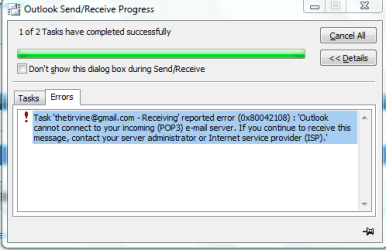
While I've got you on this topic, want to gimme a guess on what's with my GMail / Outlook 2010 issue?

I've setup POP in GMail. Tried it in Outlook as POP, tried enabling IMAP in GMail and setting it up as IMAP in Outlook. Nothing works. Same stupid error.

I repeatedly get this error:outlook error.PNG
 
Did you set it up per Gmail instructions? Everything has to be set up properly, ports, address etc.

Enabling POP - Gmail Help

Go to the Gmail site. Check out the correct account setting for your email client.
 

My Computer

Computer type
PC/Desktop
Computer Manufacturer/Model Number
Dell XPS 420
OS
Windows 10, Home Clean Install
CPU
Intel Core2 processsor Q8200(2.33Ghz 1333FSB) Quad Core Tech
Motherboard
Dell
Memory
6 gb
Graphics Card(s)
ATI Radeon 256MB HD3650
Sound Card
Intergrated 7.1 Channel Audio
Monitor(s) Displays
Dell SP2009W 20"
Hard Drives
640 GB Serial ATA Hard drive
Cooling
Fan
Keyboard
Dell USB Keyboard
Mouse
Dell Premium Optical USB
Internet Speed
DSL 2.85

My Computer

Computer type
PC/Desktop
Computer Manufacturer/Model Number
Dell XPS 420
OS
Windows 10, Home Clean Install
CPU
Intel Core2 processsor Q8200(2.33Ghz 1333FSB) Quad Core Tech
Motherboard
Dell
Memory
6 gb
Graphics Card(s)
ATI Radeon 256MB HD3650
Sound Card
Intergrated 7.1 Channel Audio
Monitor(s) Displays
Dell SP2009W 20"
Hard Drives
640 GB Serial ATA Hard drive
Cooling
Fan
Keyboard
Dell USB Keyboard
Mouse
Dell Premium Optical USB
Internet Speed
DSL 2.85
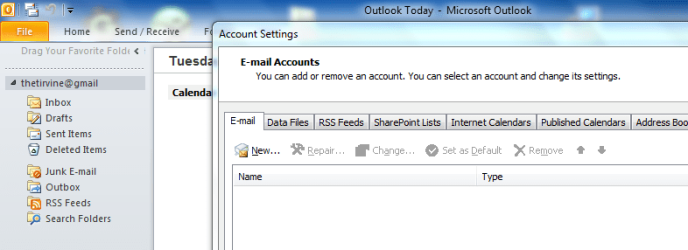
Uhhh. Yeah. Additionally, now I seem to not be able to get rid of my current email in my Outlook. It's not recognized when I'm trying to remove an account, but it still appears in my mail window.

Uhhh...what? How do I get rid of that one so I can try and set it up again. There's not an option to modify that one, since it doesn't appear under the account I have. It just sits there in the window and....is there, doing nothing.

SN: outlook old.PNG
 

My Computer

Computer type
PC/Desktop
Computer Manufacturer/Model Number
Dell XPS 420
OS
Windows 10, Home Clean Install
CPU
Intel Core2 processsor Q8200(2.33Ghz 1333FSB) Quad Core Tech
Motherboard
Dell
Memory
6 gb
Graphics Card(s)
ATI Radeon 256MB HD3650
Sound Card
Intergrated 7.1 Channel Audio
Monitor(s) Displays
Dell SP2009W 20"
Hard Drives
640 GB Serial ATA Hard drive
Cooling
Fan
Keyboard
Dell USB Keyboard
Mouse
Dell Premium Optical USB
Internet Speed
DSL 2.85
Yeah, my conclusion. Going to reinstall and start over. If GMail fails (again) after manually putting in port numbers, ****it and I'll go to Windows Live. If that fails...or is just really cluttered/not useful....I may return from my adventures in Microsoft land for Google. We'll see.

Thanks so much!
 

My Computer

Computer type
PC/Desktop
Computer Manufacturer/Model Number
Dell XPS 420
OS
Windows 10, Home Clean Install
CPU
Intel Core2 processsor Q8200(2.33Ghz 1333FSB) Quad Core Tech
Motherboard
Dell
Memory
6 gb
Graphics Card(s)
ATI Radeon 256MB HD3650
Sound Card
Intergrated 7.1 Channel Audio
Monitor(s) Displays
Dell SP2009W 20"
Hard Drives
640 GB Serial ATA Hard drive
Cooling
Fan
Keyboard
Dell USB Keyboard
Mouse
Dell Premium Optical USB
Internet Speed
DSL 2.85
Uninstalled on laptop. Setup manually on desktop and seems to work okay for now. Issue now is sorting of mail and folders. Also, I just want ONE outlook data file, one that reads as my email, not as "Outlook Data File." Any idea how to change that? I've fiddled in Data File settings but can't seem to get down to just one file.

I'm assuming reinstalling and manually inputting settings on laptop will yield same successful results.

Again, this is successful insofar as GMail and Outlook are now connected--still expecting issues with folders/sorting.
 
Nvm, it was an issue with resetting after I set my email as default. I just hadn't reset it yet. Thanks for your help, so much. I think this problem's about solved. I might end up with Microsoft Live mail yet, we'll see in a while.
 
Whatever you choose, I hope that your mail only brings good news.
 

My Computer

Computer type
PC/Desktop
Computer Manufacturer/Model Number
Dell XPS 420
OS
Windows 10, Home Clean Install
CPU
Intel Core2 processsor Q8200(2.33Ghz 1333FSB) Quad Core Tech
Motherboard
Dell
Memory
6 gb
Graphics Card(s)
ATI Radeon 256MB HD3650
Sound Card
Intergrated 7.1 Channel Audio
Monitor(s) Displays
Dell SP2009W 20"
Hard Drives
640 GB Serial ATA Hard drive
Cooling
Fan
Keyboard
Dell USB Keyboard
Mouse
Dell Premium Optical USB
Internet Speed
DSL 2.85
Back
Top