
Solved Help after clickng save image as on browser no navigation on left side

drew261920

New member
Local time
9:11 PM
Messages
4
i have win7 home premium x64

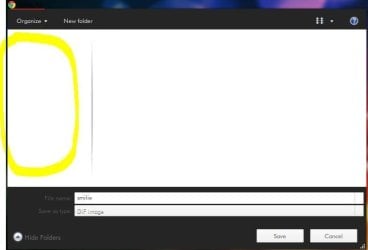
i replace the startorb with startorb changer and i also replace the explorerframe.dll both in system32 and syswow64 then after that i notice that after i right click an image on browser and save image as there is no navi on left side.what's the problem causing that?tnx
 

Attachments
  • Capture.JPG
    Capture.JPG
    21.6 KB · Views: 6

My Computer My Computer

At a glance

windows 7 home premium x64
OS
windows 7 home premium x64

My Computer My Computer

At a glance

Win 7 Pro 64-bitIntel i5 2.4 Ghz8GB DDR3Intel HD 3000
Computer type
Laptop
Computer Manufacturer/Model Number
Sony Vaio VPCEB47GM Laptop
OS
Win 7 Pro 64-bit
CPU
Intel i5 2.4 Ghz
Memory
8GB DDR3
Graphics Card(s)
Intel HD 3000
Sound Card
IDT High Definition
Monitor(s) Displays
15.6 WGXA Anti-Glare LED
Screen Resolution
1280x800
Hard Drives
640Gb 7200rpm
Antivirus
MSE
Browser
Opera (primary) with IE9 backup
ok i'll try it. so how to replace those files correctly? i want to change my start button and explorerframe. it looks like the start orb and back/forward button is ok its just that save image as problem :( tnx for reply.
 

My Computer My Computer

At a glance

windows 7 home premium x64
OS
windows 7 home premium x64
Sometimes a third party program or application just doesn't play nice with an operating system (whether the OS is Windows 7, XP, Linux, or something else.) Sometimes it's a compatibility issue (it was originally made to work on XP, for example, and was never updated to run on windows 7) or it could just be bad coding and no matter what you do it will never work right.

If you get your machine restored to an earlier restore point and everything is working the way it should, I'd suggest doing just one tweak or modification at a time instead of several all at once. I'd do the following:

1. Run a full scan with the antimalware program of your choice to make sure no viruses or other malware was installed on your machine during the failed "start orb changer" installation. As a secondary scan you could also run Malwarebytes Free. It seems to find a lot of stuff other antimalware programs miss. Update the data base before running the full scan.

Malwarebytes : Malwarebytes Anti-Malware PRO removes malware including viruses, spyware, worms and trojans, plus it protects your computer

2. Create a new restore point and maybe call it "start orb changer". That way you'll be sure to have a way to restore your machine if "start orb changer" messes things up again.

http://www.sevenforums.com/tutorials/697-system-restore-point-create.html

3. If "start orb changer" still doesn't work right, I'd try running it in Compatibility Mode.

http://www.sevenforums.com/tutorials/316-compatibility-mode.html

4. If compatibility mode works I'd make another restore point and try the next tweak or modification. But if compatibility mode doesn't help I'd look for a different program to change my start orb.
 

My Computer My Computer

At a glance

Win 7 Pro 64-bitIntel i5 2.4 Ghz8GB DDR3Intel HD 3000
Computer type
Laptop
Computer Manufacturer/Model Number
Sony Vaio VPCEB47GM Laptop
OS
Win 7 Pro 64-bit
CPU
Intel i5 2.4 Ghz
Memory
8GB DDR3
Graphics Card(s)
Intel HD 3000
Sound Card
IDT High Definition
Monitor(s) Displays
15.6 WGXA Anti-Glare LED
Screen Resolution
1280x800
Hard Drives
640Gb 7200rpm
Antivirus
MSE
Browser
Opera (primary) with IE9 backup
tnx marsmimar i'll do what you said :D
 

My Computer My Computer

At a glance

windows 7 home premium x64
OS
windows 7 home premium x64
ow i already know what's the problem. the problem is the explorerframe.dll i just restore my explorerframe.dll backup then its now ok :D tnx
 

My Computer My Computer

At a glance

windows 7 home premium x64
OS
windows 7 home premium x64
Thanks for posting back. Glad to hear you got it sorted out! :thumbsup:
 

My Computer My Computer

At a glance

Win 7 Pro 64-bitIntel i5 2.4 Ghz8GB DDR3Intel HD 3000
Computer type
Laptop
Computer Manufacturer/Model Number
Sony Vaio VPCEB47GM Laptop
OS
Win 7 Pro 64-bit
CPU
Intel i5 2.4 Ghz
Memory
8GB DDR3
Graphics Card(s)
Intel HD 3000
Sound Card
IDT High Definition
Monitor(s) Displays
15.6 WGXA Anti-Glare LED
Screen Resolution
1280x800
Hard Drives
640Gb 7200rpm
Antivirus
MSE
Browser
Opera (primary) with IE9 backup
Back
Top