Help an AMD guy figure out what Intel build to put together for Win7

what would be a recommendation for an mITX motherboard that would support an 7th gen or 8th gen Win 7 build? Still not sure what chipset I should be looking for, for 7th Gen would be a z270 chipset, correct?
 

My Computer My Computer

At a glance

Windows 7 Pro 32 & 64 bit
Computer type
PC/Desktop
OS
Windows 7 Pro 32 & 64 bit

My Computers My Computers

  • At a glance

    7 X64i5 84002x8gb 3200mhz
    Computer type
    PC/Desktop
    OS
    7 X64
    CPU
    i5 8400
    Motherboard
    gigabyte b365m ds3h
    Memory
    2x8gb 3200mhz
    Hard Drives
    various
    PSU
    pure power 11 400w cm
    Case
    Coolermaster
    Cooling
    cryorig m9i
  • At a glance

    7x64g54008gb ddr4 2400
    Computer type
    PC/Desktop
    OS
    7x64
    CPU
    g5400
    Motherboard
    ga b365m ds3h
    Memory
    8gb ddr4 2400
    PSU
    xfx pro 450w
What chipsets support 8th gen CPU's and have Win7 drivers?

For Gigabyte motherboards. Chipsets Z370, B365 (9th Gen capable), H310 (9th Gen capable). Probably true for ASUS and others.
 

My Computer My Computer

At a glance

Windows 7 Ultimate x64
Computer type
PC/Desktop
OS
Windows 7 Ultimate x64
For Gigabyte motherboards. Chipsets Z370, B365 (9th Gen capable), H310 (9th Gen capable). Probably true for ASUS and others.


So for those chipsets I could go 9th gen Intel and still use Win 7?

I guess I can always find the motherboard support page and see if they offer Win7 downloads.
 

My Computer My Computer

At a glance

Windows 7 Pro 32 & 64 bit
Computer type
PC/Desktop
OS
Windows 7 Pro 32 & 64 bit
Should be ok if you use a separate graphics card that has win7 drivers.

There is a modded driver for 9th gen cpu graphics, but I havent tried it.

I guess I can always find the motherboard support page and see if they offer Win7 downloads

Most of them dont. Many people use the io drivers I posted plus the biostar graphic drivers plus there are win7 drivers listed at gigabyte 310 motherboards. It is also easier if the mobo has realtek lan.
 
Last edited:

My Computers My Computers

  • At a glance

    7 X64i5 84002x8gb 3200mhz
    Computer type
    PC/Desktop
    OS
    7 X64
    CPU
    i5 8400
    Motherboard
    gigabyte b365m ds3h
    Memory
    2x8gb 3200mhz
    Hard Drives
    various
    PSU
    pure power 11 400w cm
    Case
    Coolermaster
    Cooling
    cryorig m9i
  • At a glance

    7x64g54008gb ddr4 2400
    Computer type
    PC/Desktop
    OS
    7x64
    CPU
    g5400
    Motherboard
    ga b365m ds3h
    Memory
    8gb ddr4 2400
    PSU
    xfx pro 450w
Should be ok if you use a separate graphics card that has win7 drivers.

I got that covered, I have a video card I plan on keeping and it has Win 7 drivers, so that should be good. I guess it's just a matter of finding the latest motherboard I can that offer Win7 drivers, and then matching that up with whatever the highest gen CPU that motherboard supports?
 

My Computer My Computer

At a glance

Windows 7 Pro 32 & 64 bit
Computer type
PC/Desktop
OS
Windows 7 Pro 32 & 64 bit

Attachments

My Computers My Computers

  • At a glance

    7 X64i5 84002x8gb 3200mhz
    Computer type
    PC/Desktop
    OS
    7 X64
    CPU
    i5 8400
    Motherboard
    gigabyte b365m ds3h
    Memory
    2x8gb 3200mhz
    Hard Drives
    various
    PSU
    pure power 11 400w cm
    Case
    Coolermaster
    Cooling
    cryorig m9i
  • At a glance

    7x64g54008gb ddr4 2400
    Computer type
    PC/Desktop
    OS
    7x64
    CPU
    g5400
    Motherboard
    ga b365m ds3h
    Memory
    8gb ddr4 2400
    PSU
    xfx pro 450w
I was looking at 8th Gen mATX board and saw this one: ASRock B365M PRO4 LGA1151. The download page for this board from the manufacturer is here (ASRock > B365M Pro4) and it lists drivers for Win7 64 bit, so that means it should work for Win7, correct? I would pair it with an i7-8700.

I despise having onboard video but it looks like if you go Intel there's just no way to avoid it. I would be disabling it and using my own video card.

Edit: According to the the Asrock webpage that board supports 9th Gen Intel, since they have Win7 x64 driver downloads, could I go 9th Gen with that setup?

- - - Updated - - -

So I checked PCPartpicker for every mATX motherboard that supports an i7-9700 CPU that was under $100, then checked the manufacturer website for the existence of Win7 x64 drivers, and got this list:


  • ASRock H310CM-DVS
  • ASRock B365M Pro4
  • Asus PRIME H310M-K R2.0
  • Asus PRIME H310M-K

Each of those motherboards is available from Amazon for sub $100 and all have Windows 7 x64 listed in their driver download section, so I should be good with any of those and an i7-9700, correct? The sites did warn that I would need an external GPU since the onboard GPU would not work, but I am using an external one and will be disabling the onboard graphics anyway so that is a non issue.

Any recommendation from that list? The B365M Pro4 has the best ratings, but I have had good luck with ASUS boards in the past. On advantage of the AsRock is it is the only one on that list that supports 64 gigs of RAM, and seeing as I use Virtual Machines extensively, having more RAM is always a good thing.
 

My Computer My Computer

At a glance

Windows 7 Pro 32 & 64 bit
Computer type
PC/Desktop
OS
Windows 7 Pro 32 & 64 bit
The 310 chipset is very basic and doesn't include for example pcie3

I am using gigabyte b365m ds3h. Works great. It supports 9th gen, though I have an 8th gen at the moment. I got a good deal on the mobo about £40, they are usually £60-70

B365M DS3H (rev. 1.0) Specification | Motherboard - GIGABYTE Global

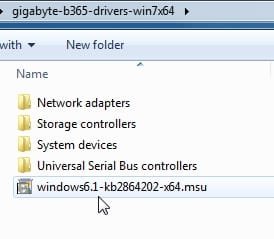
Motherboard Drivers here: View attachment gigabyte-b365-drivers-win7x64.zip

for the usb3 drivers to work, this update needs to be installed first

View attachment windows6.1-kb2864202-x64.zip

win7-driverframe-update.jpg


I don't know how well the 9th gen igpu drivers work as I havent tried them.

The igpu doesnt matter if you are using a separate graphics card .

igpu drivers for intel 8th gen win7x64

igpu drivers for intel 9th gen win7x64
password: xiaofengmod
 
Last edited:

My Computers My Computers

  • At a glance

    7 X64i5 84002x8gb 3200mhz
    Computer type
    PC/Desktop
    OS
    7 X64
    CPU
    i5 8400
    Motherboard
    gigabyte b365m ds3h
    Memory
    2x8gb 3200mhz
    Hard Drives
    various
    PSU
    pure power 11 400w cm
    Case
    Coolermaster
    Cooling
    cryorig m9i
  • At a glance

    7x64g54008gb ddr4 2400
    Computer type
    PC/Desktop
    OS
    7x64
    CPU
    g5400
    Motherboard
    ga b365m ds3h
    Memory
    8gb ddr4 2400
    PSU
    xfx pro 450w
The 310 chipset is very basic and doesn't include for example pcie3

OK, so that leaves just the Asrock board I was looking at anyway

I am using gigabyte b365m ds3h

Amazon has that for $140, the AsRock is $97. I am leary about buying off eBay, given my experience most people who sell computer parts on eBay are just using it as a dumping ground for faulty/returned products. Looks like that board runs around $100 on eBay and I'd rather deal with Amazon in case I want to return it
 

My Computer My Computer

At a glance

Windows 7 Pro 32 & 64 bit
Computer type
PC/Desktop
OS
Windows 7 Pro 32 & 64 bit
They are quite a few win7 drivers for that asrock 365 mobo, so presumably it should be fine.
 

My Computers My Computers

  • At a glance

    7 X64i5 84002x8gb 3200mhz
    Computer type
    PC/Desktop
    OS
    7 X64
    CPU
    i5 8400
    Motherboard
    gigabyte b365m ds3h
    Memory
    2x8gb 3200mhz
    Hard Drives
    various
    PSU
    pure power 11 400w cm
    Case
    Coolermaster
    Cooling
    cryorig m9i
  • At a glance

    7x64g54008gb ddr4 2400
    Computer type
    PC/Desktop
    OS
    7x64
    CPU
    g5400
    Motherboard
    ga b365m ds3h
    Memory
    8gb ddr4 2400
    PSU
    xfx pro 450w
They are quite a few win7 drivers for that asrock 365 mobo, so presumably it should be fine.

Thanks. Since I am not going to use the onboard graphics, is there any downside to getting an i7-9700F CPU? Browsing eBay It looks like it can save me around $20. Also since the Asrock is on Amazon, I could buy it, try it out, and if it has problems I can easily return it and then get the Gigabyte you suggested. The Noctua CPU cooler I have comes with brackets for the LGA-1151 socket so that should be able to swap over from the AMD build, as well as the case, power supply, video card, and storage. Unfortunately I will need new RAM as the AMD build used DDR3, so I will need to buy some DDR4

Looking at UserBenchmark: AMD FX-8310 vs Intel Core i7-9700, the i7-9700 should be over twice as fast as the FX8310. That coupled with 64GB of RAM should keep me on Win7 for a long while. I'd like to get at least 10-15 years out of this build.
 

My Computer My Computer

At a glance

Windows 7 Pro 32 & 64 bit
Computer type
PC/Desktop
OS
Windows 7 Pro 32 & 64 bit
is there any downside to getting an i7-9700F CPU?

The non F version will probably have a higher second hand value when you sell it on a couple or three years.

As an example, cex currently sell second hand i7-9700 for £150, and i7-9700F for £125
https://uk.webuy.com/product-detail...-i7-9700-(3.0ghz)-lga1151&referredFrom=search

In a couple of years both those second hand prices will be lower, but there will still be a difference.

The F version also means you cant change your mind later on and use the graphics card elsewhere while keeping this pc functional.

Up to you to decide how likely that is
 

My Computers My Computers

  • At a glance

    7 X64i5 84002x8gb 3200mhz
    Computer type
    PC/Desktop
    OS
    7 X64
    CPU
    i5 8400
    Motherboard
    gigabyte b365m ds3h
    Memory
    2x8gb 3200mhz
    Hard Drives
    various
    PSU
    pure power 11 400w cm
    Case
    Coolermaster
    Cooling
    cryorig m9i
  • At a glance

    7x64g54008gb ddr4 2400
    Computer type
    PC/Desktop
    OS
    7x64
    CPU
    g5400
    Motherboard
    ga b365m ds3h
    Memory
    8gb ddr4 2400
    PSU
    xfx pro 450w
The non F version will probably have a higher second hand value when you sell it on a couple or three years.

Three years :-). My last PC lasted me for 15 years. I intend to use my next build for at least that long at a minimum.

The F version also means you cant change your mind later on and use the graphics card elsewhere while keeping this pc functional.

I suffer from a visual disability and therefore need to use a specialized video card and drivers that I take with me from build to build. I could test the onboard graphics and see if they do not trigger my disability, but even then it looks like they weren't designed for Windows 7 so it could be a hassle to try and get them working. If I don't get an F the first thing I will be doing is disabling the onboard graphics anyway, so I figure, why not save $20 on something I am 98% certain I will never use.
I just didn't know if the F has worse performance, worse reliability, or introduced any other problems.
 

My Computer My Computer

At a glance

Windows 7 Pro 32 & 64 bit
Computer type
PC/Desktop
OS
Windows 7 Pro 32 & 64 bit
why not save $20 on something I am 98% certain I will never use

The on board graphics is the only difference. Gaming fanatics will often use the F versions so they can put the extra few bucks towards ta fancy graphics card.
 

My Computers My Computers

  • At a glance

    7 X64i5 84002x8gb 3200mhz
    Computer type
    PC/Desktop
    OS
    7 X64
    CPU
    i5 8400
    Motherboard
    gigabyte b365m ds3h
    Memory
    2x8gb 3200mhz
    Hard Drives
    various
    PSU
    pure power 11 400w cm
    Case
    Coolermaster
    Cooling
    cryorig m9i
  • At a glance

    7x64g54008gb ddr4 2400
    Computer type
    PC/Desktop
    OS
    7x64
    CPU
    g5400
    Motherboard
    ga b365m ds3h
    Memory
    8gb ddr4 2400
    PSU
    xfx pro 450w
The on board graphics is the only difference. Gaming fanatics will often use the F versions so they can put the extra few bucks towards the graphics card.

Cool, thanks for all the help! I may be taking the plunge next week and buying the new mobo, CPU, and RAM
 

My Computer My Computer

At a glance

Windows 7 Pro 32 & 64 bit
Computer type
PC/Desktop
OS
Windows 7 Pro 32 & 64 bit
That will be exciting. It is fun getting new stuff

Presumably your existng case, power supply and storage will do.

If you are doing a fresh win7 installation, you can run simplix pack to do the updates for you. I suggest placing the net framework add-on next to the pack before you run it, so that will also be included.
 

My Computers My Computers

  • At a glance

    7 X64i5 84002x8gb 3200mhz
    Computer type
    PC/Desktop
    OS
    7 X64
    CPU
    i5 8400
    Motherboard
    gigabyte b365m ds3h
    Memory
    2x8gb 3200mhz
    Hard Drives
    various
    PSU
    pure power 11 400w cm
    Case
    Coolermaster
    Cooling
    cryorig m9i
  • At a glance

    7x64g54008gb ddr4 2400
    Computer type
    PC/Desktop
    OS
    7x64
    CPU
    g5400
    Motherboard
    ga b365m ds3h
    Memory
    8gb ddr4 2400
    PSU
    xfx pro 450w
Sorry if I am late to the party...I meant to ask this 4 weeks ago after your first post but forgot. Since you had been running computers with AMD CPUs is there a reason you didn't stick with that and build a Windows 7 computer with a more modern AMD CPU? You could have built a computer with a modern Ryzen CPU with a motherboard that supports Windows 7.

I have a number of computers with AMD CPUs. My newest computer has a Ryzen 7 3700X. It currently has Windows 10. Its motherboard has drivers for Windows 7 64-bit so I could always run that if I wanted. I also have a computer with an AMD FX-8350. It is dual boot with both Windows 7 and Windows 10.

BTW, even though the AMD Ryzen 7 3700X is much faster than the AMD FX-8350 I still have use for both of them.
So I just put together a new Win7 build, with an AMD FX-8310 in an Asrock 970M Pro 3 mobo. I didn't realize at the time the overheating issues that motherboard has.

I have always built AMD systems, I know nothing about Intel. According to my Googling, if I wanted tp put together an Intel system, I am looking at the Skylake family of processors. I looked at Skylake (microarchitecture) - Wikipedia. I would assume I would want to get something in the Core i7 category, probably a 6700? It seems that is close to what I was getting performance wise from the AMD FX-8310, which I was fine with

My real confusion is the motherboard, I have no idea what chipset I am looking for. I need a mATX motherboard, with 4 DDR3 RAM slots, because I want to re-use the RAM and Case I already have. I also really hate onboard video and have my own video, but according to that wikipedia page, the Intel chip has build in graphics? So onboard video in unavoidable?

What would be a reccomended mATX motherboard that supports the i7 6700 and has 4 RAM slots? Any advice is appreciated

 

My Computers My Computers

  • At a glance

    Windows 7 Professional 64bit / Windows 10 Hom...AMD FX-8350GSKILL Ripjaw-X PC3 12800 12GB (2x4GB, 2x2GB)ASUS ENGTX560 DCII OC/2DI/1GD5 1GB
    Computer type
    PC/Desktop
    Computer Manufacturer/Model Number
    Custom build
    OS
    Windows 7 Professional 64bit / Windows 10 Home 64bit
    CPU
    AMD FX-8350
    Motherboard
    Gigabyte GA-990FXA-UD3 (AM3+) Rev. 4.0
    Memory
    GSKILL Ripjaw-X PC3 12800 12GB (2x4GB, 2x2GB)
    Graphics Card(s)
    ASUS ENGTX560 DCII OC/2DI/1GD5 1GB
    Sound Card
    Integrated
    Monitor(s) Displays
    Asus VE228H (21.5-in)
    Screen Resolution
    1920x1080 60Hz
    Hard Drives
    SAMSUNG 870 EVO 1TB (2.5" SATA SSD)
    SAMSUNG 870 EVO 500GB (2.5" SATA SSD)
    PSU
    Antec TruePower (new) TP-650 (650 watts)
    Case
    Antec Three Hundred
    Cooling
    AMD stock (plan to upgrade to Cooler Master Hyper 212 EVO)
    Keyboard
    Logitech K540 (wireless)
    Mouse
    Logitech M310 (wireless)
    Internet Speed
    Comcast Gigabit X2 Internet (2100Mbps down / 300Mbps up)
    Browser
    Firefox, Edge, Chrome
    Other Info
    Optical drive: ASUS DRW-24B3ST/BLK/G (Black) (24X)
    External hard drives: 2TB & 6TB
    Internet Gateway: Comcast XB8
  • Computer type
    PC/Desktop
You could, but it is more fiddly using a lot of modified drivers. And there are things to look out for example the nic card on the mobo might not be supported by win7, which might involve changing it or using a usb dongle instead.

Windows 7 on B550 With Ryzen 5 CPU
 

My Computers My Computers

  • At a glance

    7 X64i5 84002x8gb 3200mhz
    Computer type
    PC/Desktop
    OS
    7 X64
    CPU
    i5 8400
    Motherboard
    gigabyte b365m ds3h
    Memory
    2x8gb 3200mhz
    Hard Drives
    various
    PSU
    pure power 11 400w cm
    Case
    Coolermaster
    Cooling
    cryorig m9i
  • At a glance

    7x64g54008gb ddr4 2400
    Computer type
    PC/Desktop
    OS
    7x64
    CPU
    g5400
    Motherboard
    ga b365m ds3h
    Memory
    8gb ddr4 2400
    PSU
    xfx pro 450w
Presumably your existng case, power supply and storage will do.

Yes, I will be re-using my case, my power supply, my HDD's, my video card, and all my peripherals. Unfortunately it looks like the DDR3 RAM will not be usable ad I will have to upgrade to DDR4

If you are doing a fresh win7 installation, you can run simplix pack to do the updates for you.

Actually Simplix installs a lot of un-needed updates (24 in fact) , one of which changes Windows 7 in a way that triggers my disability, so I cannot use it. I run the ESU Bypass and manually run Windows Update to get patched.

Since you had been running computers with AMD CPUs is there a reason you didn't stick with that and build a Windows 7 computer with a more modern AMD CPU? You could have built a computer with a modern Ryzen CPU with a motherboard that supports Windows 7.

Well, at the time of the start of this thread, I didn't know it was possible to run Window 7 on "unsupported" CPU's if the mobo had Win7 drivers. Now that I have learned this, I guess I could look at specc'ing out a Ryzen build $$ with a mobo that had Win7 drivers and see which is the better bang for the buck. Do you happen to know the latest gen Ryzen CPU chipset that has Win7 driver support available for an mATX mobo? I had heard you need to use a lot of unofficial drivers to get a Ryzen CPU working with Win 7.
 
Last edited:

My Computer My Computer

At a glance

Windows 7 Pro 32 & 64 bit
Computer type
PC/Desktop
OS
Windows 7 Pro 32 & 64 bit
Back
Top