Help and Support error with blank white display

booky

New member
Local time
7:06 AM
Messages
5
my laptop is a toshiba running a windows 7 ultimate black edition, and all of its help and support button is displaying a white blank box and there's no any word on it. is there any settings that i have to change or this is an installation problem?
 

My Computer

OS
windows 7 ultimate 32-bit
my laptop is a toshiba running a windows 7 ultimate black edition, and all of its help and support button is displaying a white blank box and there's no any word on it. is there any settings that i have to change or this is an installation problem?


First I am fairly sure MS doesnt have a windows 7 version called "ultimate black edition". Where did you purchase it?

We can only support legit software according to site rules.
 

My Computer

Computer Manufacturer/Model Number
HP Pavillion dv-7 1005 Tx
OS
Win 8 Release candidate 8400
CPU
[email protected]
Memory
4 gigs
Graphics Card(s)
Nvidia 9600M
Sound Card
HD built-in
Monitor(s) Displays
17" Wxga
Screen Resolution
1440x900
Cooling
none
Internet Speed
45Mb down 5Mb up
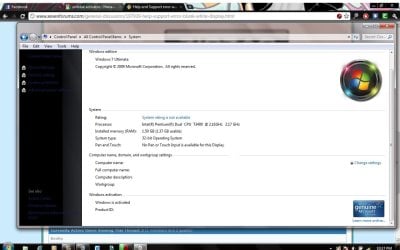
sorry Its a Windows 7 , and im using black theme edition, here's the SC
 

Attachments

  • Untitled.jpg
    Untitled.jpg
    93.1 KB · Views: 19

My Computer

OS
windows 7 ultimate 32-bit
sorry Its a Windows 7 , and im using black theme edition, here's the SC

Black theme edition? did you download a theme or skin from it separately?


If you type winver in search what does it return?
 

My Computer

Computer Manufacturer/Model Number
HP Pavillion dv-7 1005 Tx
OS
Win 8 Release candidate 8400
CPU
[email protected]
Memory
4 gigs
Graphics Card(s)
Nvidia 9600M
Sound Card
HD built-in
Monitor(s) Displays
17" Wxga
Screen Resolution
1440x900
Cooling
none
Internet Speed
45Mb down 5Mb up
To the best of my knowledge that info is only there if you install windows from branded (custom) OEM install media supplied by the manufacturer of your PC. Or you modify the registry and add your own. It looks like you just did a fresh install as you haven't run your WEI and service pack 1 isn't installed yet. That or your black theme messed things up?

EDIT: As mentioned above there is no official Black Theme Edition. If your Windows 7 install media has that theme integrated into it, its been modified. It that is true I personally wouldn't trust it as you have no way of knowing what else has been altered or added to it. How did you activate it? Did you use your code from your COA sticker?
 

My Computer

Computer type
PC/Desktop
Computer Manufacturer/Model Number
Home Built
OS
Windows 10 Education 64 bit
CPU
AMD Phenom II X4 980 Black Edition Deneb 3.7GHz
Motherboard
Asus M4N68T-M V2 µATX Motherboard
Memory
8GB 4GBx2 Kingston PC10600 DDR3 1333 Memory
Graphics Card(s)
Zotac NVIDIA Geforce GT640 2 Gig DDR3 PCIe
Sound Card
VIA VT1708s High Definition Audio 8-channel Onboard
Monitor(s) Displays
22" LG E2242 1080p and 2 19" I-INC AG191D
Screen Resolution
1280x1024 - 1920x1080 - 1280x1024
Hard Drives
Crucial M100 256 GB SSD and 500 GB WD Blue SATA
PSU
Thermaltake TR 620
Case
Power Up Black ATX Mid-Tower Case
Cooling
Stock heatsink and fan
Keyboard
Logitech Wireless K350 Wave
Mouse
Logitech Wireless M570 Trackman Wheel
Internet Speed
80 Mbps Down 30 Mbps Up
Antivirus
Windows Defender
Browser
Internet Explorer 11
Other Info
HP DVD1040e Lightscribe - External USB2
Back
Top