
help - AsIO.sys problem

kev s148

New member
Member
Local time
7:42 AM
Messages
40
hi
ive just installed windows 7 ive got to say it looks and feels better than vista

BUT every time i start up i get these 2 messages
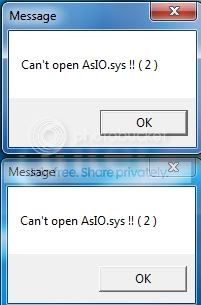
error.jpg


does any body have a clue how to get rid of them

thank you
 

My Computer

Computer Manufacturer/Model Number
dell 15r laptop
OS
windows 7 home premium 64 bit
CPU
Intel Core i3 2310m 2.1GHz
Motherboard
dell
Memory
8gb 1333 mhz ddr3
Graphics Card(s)
intel HD 3000
Sound Card
on board
Monitor(s) Displays
dell 15.6
Screen Resolution
1366 x 768 @ 60HZ
Hard Drives
500gb sata 2
PSU
in built
Case
dell
Keyboard
in built
Mouse
in built + microsoft bluetooth mouse
Internet Speed
10mb down / 1mb up
Other Info
HP photosmart c5180 All-in-one Printer/Scanner/Copier (network conected) netgear GS608 8 port switch & GS605 5 port switch, WEI Score: 4.7
That's a file associated with Asus Probe, or one of a couple of other Asus diagnostics. If it were me, I would uninstall the Probe and install SpeedFan in it's place.
 

My Computer

Computer Manufacturer/Model Number
DIY
OS
W7x64 Pro, SuSe 12.1/** W7 x64 Pro, XP MCE
CPU
Phenom II 1090T w/Noctua NH-D14 /**4400+ X2 w/CM Hyper TX 3
Motherboard
ASRock 890FX Deluxe 4/**A8N-SLI
Memory
2 x 2GB Patriot PGS34g1600LLKA/**4x1GB Corsair VS
Graphics Card(s)
EVGA GTX460 SC/**EVGA 8800GTS
Sound Card
Asus Xonar D2X/**Xonar D1
Monitor(s) Displays
Acer X233H, Dell E152FPc /**LG M237-WD
Screen Resolution
1920x1080 & 1024x768/**1980x1080
Hard Drives
WDC 2TB, 1.5TB, 1TB, 500GB,Seagate 500GB , Maxtor 80GB /**500GB Seagate & WDC 1TB Black
PSU
CM RS600 w/ APC BX1000G/**Antec 500 TP w/ APC BX1000
Case
HAF922/**Antec 1040IIB
Cooling
3x200mm, 1x140 and 1x120mm/**5x80mm fans
Keyboard
Logitech Media USB/**Saitek Eclipse
Mouse
Cordless Trackman Wheel/**Ditto
Internet Speed
3.3Mbps
Other Info
SB 560 5.1 w/ Sennheiser RS140/**Creative T20 speakers, Dvico FusionHDTV7 Gold RT, Cisco E3000, HP 5510V AIO, Linksys E3000, Belkin F5U237 hub and **F5D8055 adapter
(** = 2nd rig)
That's a file associated with Asus Probe, or one of a couple of other Asus diagnostics. If it were me, I would uninstall the Probe and install SpeedFan in it's place.

you sir are a star
 

My Computer

Computer Manufacturer/Model Number
dell 15r laptop
OS
windows 7 home premium 64 bit
CPU
Intel Core i3 2310m 2.1GHz
Motherboard
dell
Memory
8gb 1333 mhz ddr3
Graphics Card(s)
intel HD 3000
Sound Card
on board
Monitor(s) Displays
dell 15.6
Screen Resolution
1366 x 768 @ 60HZ
Hard Drives
500gb sata 2
PSU
in built
Case
dell
Keyboard
in built
Mouse
in built + microsoft bluetooth mouse
Internet Speed
10mb down / 1mb up
Other Info
HP photosmart c5180 All-in-one Printer/Scanner/Copier (network conected) netgear GS608 8 port switch & GS605 5 port switch, WEI Score: 4.7
i think i spoke 2 soon ive got rid of one but the other one still keeps poping up on start up

any ideas
 

My Computer

Computer Manufacturer/Model Number
dell 15r laptop
OS
windows 7 home premium 64 bit
CPU
Intel Core i3 2310m 2.1GHz
Motherboard
dell
Memory
8gb 1333 mhz ddr3
Graphics Card(s)
intel HD 3000
Sound Card
on board
Monitor(s) Displays
dell 15.6
Screen Resolution
1366 x 768 @ 60HZ
Hard Drives
500gb sata 2
PSU
in built
Case
dell
Keyboard
in built
Mouse
in built + microsoft bluetooth mouse
Internet Speed
10mb down / 1mb up
Other Info
HP photosmart c5180 All-in-one Printer/Scanner/Copier (network conected) netgear GS608 8 port switch & GS605 5 port switch, WEI Score: 4.7
From what I see, they are both the same file, thus having the same source. Since one remains, something must be left of the source, or there is something trying to start something that doesn't exist. Check you Startup folder and the Startup tab in msconfig and see if there is something in one of them that shouldn't be.
 

My Computer

Computer Manufacturer/Model Number
DIY
OS
W7x64 Pro, SuSe 12.1/** W7 x64 Pro, XP MCE
CPU
Phenom II 1090T w/Noctua NH-D14 /**4400+ X2 w/CM Hyper TX 3
Motherboard
ASRock 890FX Deluxe 4/**A8N-SLI
Memory
2 x 2GB Patriot PGS34g1600LLKA/**4x1GB Corsair VS
Graphics Card(s)
EVGA GTX460 SC/**EVGA 8800GTS
Sound Card
Asus Xonar D2X/**Xonar D1
Monitor(s) Displays
Acer X233H, Dell E152FPc /**LG M237-WD
Screen Resolution
1920x1080 & 1024x768/**1980x1080
Hard Drives
WDC 2TB, 1.5TB, 1TB, 500GB,Seagate 500GB , Maxtor 80GB /**500GB Seagate & WDC 1TB Black
PSU
CM RS600 w/ APC BX1000G/**Antec 500 TP w/ APC BX1000
Case
HAF922/**Antec 1040IIB
Cooling
3x200mm, 1x140 and 1x120mm/**5x80mm fans
Keyboard
Logitech Media USB/**Saitek Eclipse
Mouse
Cordless Trackman Wheel/**Ditto
Internet Speed
3.3Mbps
Other Info
SB 560 5.1 w/ Sennheiser RS140/**Creative T20 speakers, Dvico FusionHDTV7 Gold RT, Cisco E3000, HP 5510V AIO, Linksys E3000, Belkin F5U237 hub and **F5D8055 adapter
(** = 2nd rig)
Had this on the beta of Win7 - came from using the disk that came with the mobo.
Either download the latest Win7 version of the system from Asus or don't install the Asus apps - either way the error message will go away.

PS - in my case it was the AACenter.exe process that spawned these little buggers (I've got a P6T Deluxe mobo).

Beware the outdated ASACPI.SYS (usually from Windows Update - but can come from the Asus AISuite or PCProbe) - the 2005 version will cause BSOD's
 

My Computer

Computer Manufacturer/Model Number
Home built (x64), Lenovo x61s Tablet, Samsung Netbook
OS
Win7 x64 + x86
CPU
Intel i7 920, other Intel chips, and the Atom in the netbook
Motherboard
Asus P6T Deluxe
Memory
12 gB; 4 gB Lenovo; 1 gB Samsung netbook
Graphics Card(s)
ATI 4870
Sound Card
Yes, I have one of these
Monitor(s) Displays
32" Sharp Aquos TV
Screen Resolution
800x600 - I have vision issues
Hard Drives
4 - 150 gB Velociraptors in RAID 5
Promise controller
PSU
1000 watt (can't recall the brand)
Case
Antec 300
Cooling
Big honking cooler that was rated highly at Toms Hardware
Keyboard
Microsoft Natural
Mouse
Logitech Trackman
Internet Speed
Cable
Other Info
GeekSquad UPS
CyberPower UPS
DLink DNS-323 NAS (2 tB)
Netgear wireless router as an access point
Netgear wired router FSV-318
Home network consists of
4 desktop computers (2 Vista, 2 Win7)
1 netbook (Win7)
4 laptop computers (XP, 2-Vista, Win7)
Wii and XBox 360
i think what iam going to do when ive got my new graphics card is do a clean install
that should sort the problem
 

My Computer

Computer Manufacturer/Model Number
dell 15r laptop
OS
windows 7 home premium 64 bit
CPU
Intel Core i3 2310m 2.1GHz
Motherboard
dell
Memory
8gb 1333 mhz ddr3
Graphics Card(s)
intel HD 3000
Sound Card
on board
Monitor(s) Displays
dell 15.6
Screen Resolution
1366 x 768 @ 60HZ
Hard Drives
500gb sata 2
PSU
in built
Case
dell
Keyboard
in built
Mouse
in built + microsoft bluetooth mouse
Internet Speed
10mb down / 1mb up
Other Info
HP photosmart c5180 All-in-one Printer/Scanner/Copier (network conected) netgear GS608 8 port switch & GS605 5 port switch, WEI Score: 4.7
Don't uninstall anything. The problem is just a missplaced file by the Asus Update installer.

Go to Asustek.com, support area, download the newest version of Asus Update, extract it but don't install it, and in the freshly extracted folder labeled "IO", copy all of the files that have "IOsys" in their names (mine had 4) to your hard drive's "AsusUpdate" folder. One of the files will be replaced, which is fine. This works like a charm.
 

My Computer

Computer Manufacturer/Model Number
Homebuild
OS
Win 7 Ultimate 64 bit
CPU
Athalon II x225
Back
Top