Help ATI Radeon 3100

deathcore2duo

New member
Local time
10:11 AM
Messages
6
Guys, please help me... I have a notebook, Toshiba Satellite L500d-00f with a radeon 3100 video card. I noticed that some of my games even videos doesn't adjust to fit screen automatically, I've maxed the screen resolution 1366X768. What I want to happen is that whenever I will run a Game or a video it will fit to screen automatically without further adjusting game and video settings, would that be possible? I've been trying to figure out how to do that for almost a week. I've got the new Catalyst installed. please have mercy on me.
 

My Computer

OS
Windows 7 Home Premium
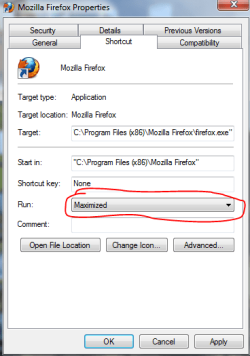
You can try clicking on Properties of your game and tell it to run Maximized.

Capture.PNG
 

My Computer

Computer Manufacturer/Model Number
Custom
OS
Windows 7 Professional x64
CPU
Intel i7 2600K OC'd @ 4620 MHz
Motherboard
Asus P8Z68-V Pro
Memory
16GB GSkill Sniper 2133 Mhz (4x4GB)
Graphics Card(s)
EVGA GeForce GTX 480 SuperClocked+
Sound Card
Realtek High Definition Audio
Monitor(s) Displays
2x Acer S273HLbmii 27"
Screen Resolution
2 x 1920x1080
Hard Drives
64GB Crucial M4 SSD

Storage: Hitachi 1TB 5400RPM, Samsung 1.5TB 5400RPM
PSU
Corsair HW Series 750w (modular)
Case
Cooler Master HAF 932 Advanced Blue Edition
Cooling
CM Hyper 212+ CPU cooler, 3x 230mm + 1x 140mm case fans
Keyboard
Logitech MK320 (wireless)
Mouse
Logitech MK320 (wireless)
Internet Speed
30 Mb/s : 2 Mb/s
@JK
I think he means that the game doesn't scale to the full LCD panel. ie if your LCD has a res of 1366x768 and you run a game at 800x600 to make it playable, the game displays with black borders instead of scaling up to fit the full screen.

@deathcore2duo
Laptop screens unlike Monitors, don't have built in scaling. That is handled by the drivers on the GPU.
What drivers do you have installed. Is it Toshibas latest or yesterdays Mobility Cat10.3a.
Anyway, try opening CCC - Desktop & Displays - Right Click small laptop at bottom - Configure. You should now be on the LCD Screen Attributes page. Drop down to the resolution you want to scale and tick Enable GPU scaling - Scale image to full panel size and Apply.
This feature works well with DX9 and earlier games/Media Players, but may still have scaling issues with DX10/10.1/11.
 

My Computer

OS
Windows 7 Home Premium (64-bit) SP1 RTM
CPU
Intel Core2Duo [email protected]
Motherboard
ASUS P5Q (BIOS 2208)
Memory
2x2Gb GEIL DDR2 800 4-4-4-12 @ 1.8v
Graphics Card(s)
ASUS HD4850 512Mb @700/1100
Sound Card
Realtek ALC1200 @ Intel 82801JB ICH10
Monitor(s) Displays
Samsung Syncmaster T220
Screen Resolution
1680x1050x32@60Hz
Hard Drives
Seagate ST3500410AS SATA300 500Gb
Hitachi HDS721032CLA362 SATA300 320Gb
PSU
Antec NeoPower 650W 3.3v@24A/5v@24A/12v@19A/12v@19A/12v@19A
Internet Speed
3Mbps
Back
Top