Help. Audio is much quieter in right speaker/headphone.

yellowninja

New member
Local time
11:03 PM
Messages
1
Hello, I am running windows 7 home premium 64 bit on a new Dell Inspiron 14z -5432 laptop with built-in skull candy speakers and Maxx audio. the Audio in the right speaker is much quieter than the left speaker. I checked the drivers and the L/R balance and all were OK. The problem continues when I plug in my headphones to the headphone jack. The audio balance doesn't help or fix the problem. My sound card is IDT High Definition Audio CODEC. When I open my IDT audio control panel and test the speakers or headphones, the sound is stronger on the left and gets some sound 'leaking' from the right speaker. But when I test the right speaker, It is quieter and gets no sound 'leakage' from the left speaker. I don't know how to fix this problem. Any help?
 

My Computer My Computer

At a glance

Windows 7 home premium 64bit
Computer Manufacturer/Model Number
dell inspiron 14z- 5423
OS
Windows 7 home premium 64bit
Sound Card
IDT high definition audio CODEC
This sounds more like a hardware problem than something in the driver or applications software.

You can post on the Dell users form, Laptop section, and maybe someone can offer something there, but contacting Dell support is the best option.

Laptop Audio Forum - Laptop Audio Forum - Laptop - Dell Community

If this is a new PC, bought directly from Dell, you have 21 days from the date on the Dell invoice to call them and request a return if you are not happy with the PC. Many times they will offer to replace it with another new one rather than issue a refund.
 

My Computer My Computer

At a glance

Windows 10 64 bitIntel i7 6700K16GB Corsair DominatorIntel CPU Graphics
Computer type
PC/Desktop
Computer Manufacturer/Model Number
My Own Build
OS
Windows 10 64 bit
CPU
Intel i7 6700K
Motherboard
ASUS ROG Maximus VIII Hero
Memory
16GB Corsair Dominator
Graphics Card(s)
Intel CPU Graphics
Sound Card
RealTek
Monitor(s) Displays
27" Dell S2719dgf
Screen Resolution
2560X1440
Hard Drives
1 TB Samsung 850 EVO SSD for Win 10 Pro
500GB Samsung 850 EVO SSD for Win 10 Insider
2 TB drive for backup
PSU
EVGA Supernova 750G2
Case
BeQuiet Silent Base 600
Cooling
Deepcool Captain 120EX
Keyboard
Microsoft Wireless 2000
Mouse
Microsoft wireless
Internet Speed
100 MB/sec (Cable)
Antivirus
Microsoft Defender and Malwarebytes
Browser
Edge/Firefox
Other Info
Cakewalk (Sonar) by BandLab and Studio One 4.1 Pro recording studio software. MOTU 896Mk3 Hybrid recording interface, Frontier Tranzport wireless control unit, Behringer X-Touch Control Surface.
Five USB connected optical drives for CD Audio production using Nero BurningROM
Hi,


I would suggest you to follow the below mentioned steps:

Run the “Microsoft Fix it” step-by-step troubleshooter for common audio problems. Click on the URL mentioned which will guide you in running the troubleshooter:
http://windows.microsoft.com/en-US/windows/help/no-sound-in-windows

If the issue still persists try running the audio test in Dell Diagnostics. To run Diagnostics restart the computer and as soon as it starts to boot up tap “F12”. Select 'Diagnostic' from the boot menu. The computer will run its Enhanced pre-boot assessment tests (ePSA) before the Dell Diagnostic starts.

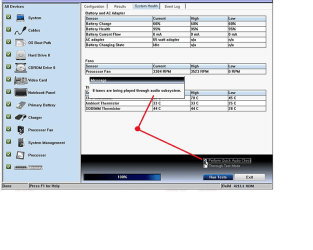
You can execute Audible 8-Tone Beep test by clicking on a check box labeled "Perform Quick Audio Check" (Below Right hand corner) - you can refer to the image mentioned below:

EPSA.png


Clicking on the radio button will start a series of eight tones through the system speakers. Please check whether the volume of tone is same on both speakers or not?

If the volume of the tone is same on both the speakers, then the problem would be with the software or the applications. But if the volume of the tone is not the same then it’s a hardware failure.

Please reply with results.
 

My Computer My Computer

At a glance

Windows 7 Enterprise x64
OS
Windows 7 Enterprise x64
Back
Top