Help !! Battery Icon is missing .

nagasaikumar

New member
Local time
7:56 AM
Messages
2
Hi.. i did all the methods in online like editing reg. files etc. even though my batter icon is not showing . it was gray out. some one pls help me to get out of it.:cry::cry::cry:
 

My Computer

Computer type
PC/Desktop
Computer Manufacturer/Model Number
lenova
OS
32 bit windows professional
Browser
chrome
Did this just happen, did it do it on it`s own, did it use to display normally when you got the PC etc ???

Does the laptop have battery software ? Uninstall it and reinstall it again.
 

My Computer

Computer type
PC/Desktop
Computer Manufacturer/Model Number
Skylake Special #666
OS
Windows 10 Pro x64
CPU
Intel Core i7 6700K
Motherboard
Asus Sabertooth Z170 Mark 1
Memory
GSkill TridentZ RGB 16GB 3600 16-16-16-36
Graphics Card(s)
EVGA GTX 980 Ti SC x2
Sound Card
Realtek High Definition
Monitor(s) Displays
AOC G2460PG
Screen Resolution
1920 x 1080 144Hz
Hard Drives
Samsung 860 Pro 256GB, Seagate Barracuda 4TB x2
PSU
EVGA 1000 P2, EVGA White Custom Braided Cables
Case
Corsair Vengeance C70 Gunmetal Black
Cooling
Corsair H100i v2, Corsair ML120 x2, Thermal Grizzly Kryonaut
Keyboard
Logitech G910 Orion Spectrum
Mouse
Logitech G700s
Internet Speed
Verizon Fios Quantum Gateway 75/75
Antivirus
Windows Defender, Malwarebytes Free 3.8.3
Browser
Chrome
Other Info
Corsair SP120 x4, LG Blu-ray Drive, Durabrand HT-395 100 Watt Dolby Digital Amp, Corsair H2100 Wireless 7.1 Headset
just two days back. on its own.
 

My Computer

Computer type
PC/Desktop
Computer Manufacturer/Model Number
lenova
OS
32 bit windows professional
Browser
chrome
Hi Nagas,
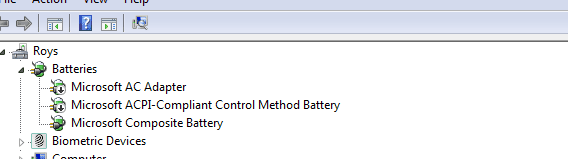
what is showing here, see screenshot of device manager.

Note mine is showing those 2 down arrows deliberately(dissabled) as my bat is dead.


Roy
 

Attachments

  • badbat.PNG
    badbat.PNG
    11.6 KB · Views: 6

My Computer

Computer type
PC/Desktop
Computer Manufacturer/Model Number
medionl/Aspire 6930G/acer x55a
OS
W7 home premium 32bit/W7HP 64bit/w10 tp insider ring
CPU
E5300 dual core
Motherboard
medion MS7366
Memory
3gb
Graphics Card(s)
Nvidia Geforce 7100 Nforce 630i
Monitor(s) Displays
avixc
Internet Speed
n (isp resticted to 72)
Antivirus
mse/pands
Browser
palemoon
Other Info
Belkin Fd7050 n USB using Railink RT2870 drivers, more upto date
Welcome to the forums nagasaikumar!

First..... editing reg files?!? Hope you didn't screw something up doing THAT. Registry hacks/editing should be a LAST resort but .... onward.

Have you installed any new programs right before this started?

We have many excellent tutorials here at the forums, have you tried these? You may have to try them all :

System Icons - Enable or Disable

System Icons - Turn On or Off

If these don't solve it then try this : Open Task Manager > go to the Processes tab > look for "explorer.exe" > choose that then go to the bottom and click "end process" (your taskbar will disappear but don't worry) > Back to Task Manager > pick the Applications tab this time > choose "New Task" and type explorer.exe and enter. The icons should appear. Reboot.

Remember to reboot after each try!
 

My Computer

Computer type
Laptop
Computer Manufacturer/Model Number
MSI GE72VR Apache Pro-416
OS
Windows 10x64 Build 1709
CPU
Intel i7 7700HQ Kaby Lake
Motherboard
Micro-Star Intl. MS-179B (U3C1)
Memory
16 GB DDR4 @2400
Graphics Card(s)
Nvidia Geforce GTX 1060
Screen Resolution
1920x1080 120Hz
Hard Drives
256 GB Nvme M.2 SSD

1TB HDD@7200
Cooling
Cooler Blast 4
Keyboard
Steel Series
Antivirus
Bit Defender Free
Browser
Edge
Back
Top