Solved Help.Black screen before Login Menu. Minor annoyance but needs fixing.

Mugsy

New member
Member
Local time
11:57 PM
Messages
46
(And before you ask, yes, I scoured Google. Plenty of hits, but different problem.)

When I start Windows, I get this black screen showing nothing but the mouse pointer for exactly 81 seconds before the Login Menu appears. Not a huge problem, just very annoying.

I can log in just fine after that. The problem does NOT occur when I start up in Safe Mode, and I've tried disabling all Startup Apps & Services using Msconfig but the problem remained.

In my experience, when something like this happens, it's because Windows is looking for something but can't find it, like an app or another computer on the network.

The Event Viewer logs are no help. How can I figure out what's causing the delay? Thanks.
 

My Computer My Computer

At a glance

Win7 Home Premium x64AMD Phenom II x4 9208gbRadeon 5850
Computer Manufacturer/Model Number
homebrew
OS
Win7 Home Premium x64
CPU
AMD Phenom II x4 920
Motherboard
Gigabyte MA790gs-ds4h
Memory
8gb
Graphics Card(s)
Radeon 5850
Sound Card
Realtek
Monitor(s) Displays
Asus 26" lcd
Screen Resolution
1920x1200
Hard Drives
120gb Corsair Force GT SSD
1TB C:
500GB D:
various external drives
PSU
CoolerMax 750watt
Case
Antec
Cooling
Fans (5)
Keyboard
standard-101
Mouse
MS Optical trackball
Internet Speed
DSL 1.5gbit
Mugsy now I am assuming you have tried these?
SFC /SCANNOW Command - System File Checker
Disk Check < if necessary include the /f switch and if this does not make any improvement then just run this switch instead /r in the command line as per Option2
Run these in safe mode and the sfc often best run for two to three runs – you can leave out the /r switch in ckdsk if you feel it not necessary

Have you also checked the temps on the machine?? particularly the GPU??
 

My Computer My Computer

At a glance

Desk1 7 Home Prem / Desk2 10 Pro / Main lap A...Desk1 i5 3750K / Laptop i7 GTX 860M / Desk2 i...Desk1 8GB (1866) / Desk2 16GB (1333) / Laptop...Desk 1& 2NVidia GTX 650 & Laptops on board Intel
Computer type
PC/Desktop
Computer Manufacturer/Model Number
Own build (new) Desk1 / Asus ROG Win 7 / Desk2 1st build
OS
Desk1 7 Home Prem / Desk2 10 Pro / Main lap Asus ROG 10 Pro 2 laptop Toshiba 7 Pro Asus P2520 7 & 10
CPU
Desk1 i5 3750K / Laptop i7 GTX 860M / Desk2 i5 2500
Motherboard
Desk1 Asus P877-V / Desk2 Gigabyte H67 UD3H / Laptop ?
Memory
Desk1 8GB (1866) / Desk2 16GB (1333) / Laptop 8Gb DDR3
Graphics Card(s)
Desk 1& 2NVidia GTX 650 & Laptops on board Intel
Sound Card
Desk 1 & 2 -XONAR DG Realtek High Def audio Laptop
Monitor(s) Displays
Desk 1 Benq HD 2450 / Desk2 Philips 24" / Laptop 17.5"
Screen Resolution
1920x1080 D1 & D2 & Laptop 1
Hard Drives
Desk1 Samsung 120GB 830 SSD
Asus ROG 256GB 850 Pro SSD
Desk2 Samsung 840 256 SSD
Toshiba 120GB EVO
PSU
Desk 1 Corsair HX 1050/ Laptop ? / Desk 2 Corsair HX 650
Case
Desk 1 Cooler HAF XM ? Toshiba laptop / Desk2 Coolermaster
Cooling
Fans on all Desk1 -2 Desk2 - all Coolermasters 5 Laptop ?
Keyboard
Desk 1 MS Sidewinder X6 Desk 2 MS Sidewinder X 4
Mouse
Desk 1&2 - Gigabyte MS 900 gamer - laptop - Logitec wireless
Internet Speed
ADSL2+
Other Info
One other Desktop (tester) and spare Toshba laptop both with SSD's
Running Kaspersky 2016 ISS on all machines config'd identically
Logitec audio stereo systems on each machine (x3)
Canon MG5250MFC
Router/modem TP-Link running WPA2SK
Hi Icit. Yes. Been there, done that, bought the T-Shirt.

Finally gave up and restored the 8 month old backup after trying to fix things today took a nasty turn for the worse. :(

The backup has a few issues being so old, but nothing major (I think.) Thx.
 

My Computer My Computer

At a glance

Win7 Home Premium x64AMD Phenom II x4 9208gbRadeon 5850
Computer Manufacturer/Model Number
homebrew
OS
Win7 Home Premium x64
CPU
AMD Phenom II x4 920
Motherboard
Gigabyte MA790gs-ds4h
Memory
8gb
Graphics Card(s)
Radeon 5850
Sound Card
Realtek
Monitor(s) Displays
Asus 26" lcd
Screen Resolution
1920x1200
Hard Drives
120gb Corsair Force GT SSD
1TB C:
500GB D:
various external drives
PSU
CoolerMax 750watt
Case
Antec
Cooling
Fans (5)
Keyboard
standard-101
Mouse
MS Optical trackball
Internet Speed
DSL 1.5gbit
Ok well if there is something you get stuck on post back:)
 

My Computer My Computer

At a glance

Desk1 7 Home Prem / Desk2 10 Pro / Main lap A...Desk1 i5 3750K / Laptop i7 GTX 860M / Desk2 i...Desk1 8GB (1866) / Desk2 16GB (1333) / Laptop...Desk 1& 2NVidia GTX 650 & Laptops on board Intel
Computer type
PC/Desktop
Computer Manufacturer/Model Number
Own build (new) Desk1 / Asus ROG Win 7 / Desk2 1st build
OS
Desk1 7 Home Prem / Desk2 10 Pro / Main lap Asus ROG 10 Pro 2 laptop Toshiba 7 Pro Asus P2520 7 & 10
CPU
Desk1 i5 3750K / Laptop i7 GTX 860M / Desk2 i5 2500
Motherboard
Desk1 Asus P877-V / Desk2 Gigabyte H67 UD3H / Laptop ?
Memory
Desk1 8GB (1866) / Desk2 16GB (1333) / Laptop 8Gb DDR3
Graphics Card(s)
Desk 1& 2NVidia GTX 650 & Laptops on board Intel
Sound Card
Desk 1 & 2 -XONAR DG Realtek High Def audio Laptop
Monitor(s) Displays
Desk 1 Benq HD 2450 / Desk2 Philips 24" / Laptop 17.5"
Screen Resolution
1920x1080 D1 & D2 & Laptop 1
Hard Drives
Desk1 Samsung 120GB 830 SSD
Asus ROG 256GB 850 Pro SSD
Desk2 Samsung 840 256 SSD
Toshiba 120GB EVO
PSU
Desk 1 Corsair HX 1050/ Laptop ? / Desk 2 Corsair HX 650
Case
Desk 1 Cooler HAF XM ? Toshiba laptop / Desk2 Coolermaster
Cooling
Fans on all Desk1 -2 Desk2 - all Coolermasters 5 Laptop ?
Keyboard
Desk 1 MS Sidewinder X6 Desk 2 MS Sidewinder X 4
Mouse
Desk 1&2 - Gigabyte MS 900 gamer - laptop - Logitec wireless
Internet Speed
ADSL2+
Other Info
One other Desktop (tester) and spare Toshba laptop both with SSD's
Running Kaspersky 2016 ISS on all machines config'd identically
Logitec audio stereo systems on each machine (x3)
Canon MG5250MFC
Router/modem TP-Link running WPA2SK
Oops.

Ok well if there is something you get stuck on post back:)

Crud, sorry Icit. Replied to wrong post. This new problem is the RESULT of restoring the backup (after an agonizing two months trying to fix another problem that refused explanation). :p

An SFC scan finds nothing wrong. Temps are fine. Disk checks are clean.

The HDD activity light shows minimal activty during the "blackout" period, so it's not like the computer is furiously doing anything to account for the pause. And the pause is always 81 seconds long. Even if I disable every startup app/service, the length of the pause doesn't change.

I've seen similar "black screen" pauses when the computer can't find something, like a missing app or a missing computer on the network, but neither of those appears to be the case this time.

Or at least I think that's the case now. Not sure how to figure out what the computer is doing during that pause.

Thx.
 

My Computer My Computer

At a glance

Win7 Home Premium x64AMD Phenom II x4 9208gbRadeon 5850
Computer Manufacturer/Model Number
homebrew
OS
Win7 Home Premium x64
CPU
AMD Phenom II x4 920
Motherboard
Gigabyte MA790gs-ds4h
Memory
8gb
Graphics Card(s)
Radeon 5850
Sound Card
Realtek
Monitor(s) Displays
Asus 26" lcd
Screen Resolution
1920x1200
Hard Drives
120gb Corsair Force GT SSD
1TB C:
500GB D:
various external drives
PSU
CoolerMax 750watt
Case
Antec
Cooling
Fans (5)
Keyboard
standard-101
Mouse
MS Optical trackball
Internet Speed
DSL 1.5gbit
Ok well going back to post #1 and the difference in safe and "normal" mode is maybe another hint being that some software (or whatever) is loading before the system is up and running.

Now this could be possibly your AV for example though I should think the system should boot before it is loaded up. Now I am thinking maybe it is a malware issue or a RAM one. The 81 second pause is in itself odd.

Now I would do if it were my machine be running this http://support.kaspersky.com/viruses/rescuedisk you need to make a bootable disk or stick I prefer a disk but the choice is yours, set the BIOS to boot from that particualr source and let it run the scan. It runs in a non Windows environment and will check just about everything on the machine. Doesn't take long and I think a worth while try.

The next is to run a memtest - much longer as you may know but see this ditty of mine.
Now to make absolutely we are on the same page the memtest linked here is the only*one we recommend and it MUST be run for at least 8 passes or you may as well not bother. It is rather lengthy and best left for a downtime for that machine - overnight is good. Having said that you can stop the test if errors show up while you are around and then it is a matter of tracking down the bad stick of RAM.* RAM - Test with Memtest86+
(This is pretyped to save time)

I am suggesting this in the event it is the RAM stopping the loading of Windows as it should but the first suggestion would be my choice to go first.
 

My Computer My Computer

At a glance

Desk1 7 Home Prem / Desk2 10 Pro / Main lap A...Desk1 i5 3750K / Laptop i7 GTX 860M / Desk2 i...Desk1 8GB (1866) / Desk2 16GB (1333) / Laptop...Desk 1& 2NVidia GTX 650 & Laptops on board Intel
Computer type
PC/Desktop
Computer Manufacturer/Model Number
Own build (new) Desk1 / Asus ROG Win 7 / Desk2 1st build
OS
Desk1 7 Home Prem / Desk2 10 Pro / Main lap Asus ROG 10 Pro 2 laptop Toshiba 7 Pro Asus P2520 7 & 10
CPU
Desk1 i5 3750K / Laptop i7 GTX 860M / Desk2 i5 2500
Motherboard
Desk1 Asus P877-V / Desk2 Gigabyte H67 UD3H / Laptop ?
Memory
Desk1 8GB (1866) / Desk2 16GB (1333) / Laptop 8Gb DDR3
Graphics Card(s)
Desk 1& 2NVidia GTX 650 & Laptops on board Intel
Sound Card
Desk 1 & 2 -XONAR DG Realtek High Def audio Laptop
Monitor(s) Displays
Desk 1 Benq HD 2450 / Desk2 Philips 24" / Laptop 17.5"
Screen Resolution
1920x1080 D1 & D2 & Laptop 1
Hard Drives
Desk1 Samsung 120GB 830 SSD
Asus ROG 256GB 850 Pro SSD
Desk2 Samsung 840 256 SSD
Toshiba 120GB EVO
PSU
Desk 1 Corsair HX 1050/ Laptop ? / Desk 2 Corsair HX 650
Case
Desk 1 Cooler HAF XM ? Toshiba laptop / Desk2 Coolermaster
Cooling
Fans on all Desk1 -2 Desk2 - all Coolermasters 5 Laptop ?
Keyboard
Desk 1 MS Sidewinder X6 Desk 2 MS Sidewinder X 4
Mouse
Desk 1&2 - Gigabyte MS 900 gamer - laptop - Logitec wireless
Internet Speed
ADSL2+
Other Info
One other Desktop (tester) and spare Toshba laptop both with SSD's
Running Kaspersky 2016 ISS on all machines config'd identically
Logitec audio stereo systems on each machine (x3)
Canon MG5250MFC
Router/modem TP-Link running WPA2SK
Ok well going back to post #1 and the difference in safe and "normal" mode is maybe another hint being that some software (or whatever) is loading before the system is up and running.

Now this could be possibly your AV for example though I should think the system should boot before it is loaded up. Now I am thinking maybe it is a malware issue or a RAM one. The 81 second pause is in itself odd.

...

The next is to run a memtest

Thanks. I downloaded the Kaspersky Rescue Disk and burned it to an eraseable CD. I started a scan of my C: drive but it's going to take 2 hours to complete so I'll have to let it run though later.

I have Ubuntu on another partition and "Memtest86+" is on the menu, so I can run that later as well (though I suspect my ram is fine. None of the stability issues you'd expect from bad ram.)

I typically run a pretty clean machine, and the Backup I restored was operating flawlessly 8 months ago, but there have been a few changes since then... most significantly, the upgraded Internet service but maybe some other hardware & software changes are at fault.

Since this "pause" is a Windows "preload" event and doesn't happen going into Safe Mode, I'm suspecting either a device driver or Windows is looking for a network connection that has since changed.

Figuring that out is the challenge. I'm going to try temporarilyy disabling a few key Device Drivers to see if the pause goes away. Before I restored this backup, I couldn't soft Shutdown/Reboot without disabling my video or TV tuner cards (or the motherboard controllers for those slots), so I'll start there.

I'll let you know what happens. Thx.
 

My Computer My Computer

At a glance

Win7 Home Premium x64AMD Phenom II x4 9208gbRadeon 5850
Computer Manufacturer/Model Number
homebrew
OS
Win7 Home Premium x64
CPU
AMD Phenom II x4 920
Motherboard
Gigabyte MA790gs-ds4h
Memory
8gb
Graphics Card(s)
Radeon 5850
Sound Card
Realtek
Monitor(s) Displays
Asus 26" lcd
Screen Resolution
1920x1200
Hard Drives
120gb Corsair Force GT SSD
1TB C:
500GB D:
various external drives
PSU
CoolerMax 750watt
Case
Antec
Cooling
Fans (5)
Keyboard
standard-101
Mouse
MS Optical trackball
Internet Speed
DSL 1.5gbit
as a way of trying to nail this down further try rebooting with ethernet unplugged, all onboard devices disabled in bios, and no usb devices attached (if that's possible, for instance if you have a ps2 keyboard and mouse handy..), and/or with radeon card removed and using onboard graphics. Hopefully after a few boots of trial and error you'll be able to narrow this down. Also check your non-MS services in start > run > startup
 

My Computer My Computer

At a glance

Win7 pro x64stock i7 7700kCorsair Vengeance LPX 16GB (2x8GB) DDR4 @ 320...integrated Intel HD 630
Computer type
PC/Desktop
Computer Manufacturer/Model Number
diy
OS
Win7 pro x64
CPU
stock i7 7700k
Motherboard
Gigabyte Z270N-WIFI mini-ITX
Memory
Corsair Vengeance LPX 16GB (2x8GB) DDR4 @ 3200MHz
Graphics Card(s)
integrated Intel HD 630
Sound Card
onboard Realtek ALC1220
Monitor(s) Displays
two vertically mounted samsung 55" 4k un55mu8000
Screen Resolution
1920x1280
Hard Drives
256GB Samsung EVO 960 M.2 pci-e NVMe SSD
PSU
SilverStone Nightjar ST45NF 450Watt Fanless
Case
No case. Motherboard is mounted directly onto power supply
Cooling
Evercool low profile 815EP with Panaflow 12L fan at 7v
Keyboard
Ortek MCK-86 mini
Mouse
Belkin 5-button USB
Internet Speed
spectrum 400mbps
as a way of trying to nail this down further try rebooting with ethernet unplugged, all onboard devices disabled...

Thanks for the reply.

First, I tried disabling all startup Services/Apps using "msconfig", but it made no difference. Same 81 second pause.

Next, I switched my video card to use the stock SVGA driver and disabled the TV tuner (I didn't unplug them because that would be a huge pain and if it were an "electronic" issue, it would affect Safe Mode too.) That didn't help either.

I unplugged my Ethernet and the only new USB devices added since the original backup was created. No change.

I just wish there was a way to SEE what the computer is trying to do during that gap. :sarc:
 

My Computer My Computer

At a glance

Win7 Home Premium x64AMD Phenom II x4 9208gbRadeon 5850
Computer Manufacturer/Model Number
homebrew
OS
Win7 Home Premium x64
CPU
AMD Phenom II x4 920
Motherboard
Gigabyte MA790gs-ds4h
Memory
8gb
Graphics Card(s)
Radeon 5850
Sound Card
Realtek
Monitor(s) Displays
Asus 26" lcd
Screen Resolution
1920x1200
Hard Drives
120gb Corsair Force GT SSD
1TB C:
500GB D:
various external drives
PSU
CoolerMax 750watt
Case
Antec
Cooling
Fans (5)
Keyboard
standard-101
Mouse
MS Optical trackball
Internet Speed
DSL 1.5gbit
Hmm well if you decide to run the memtest let us know because it may well be the RAM is slow loading at the boot process.

Now it may seem odd but down the track we might have to check out the PSU - often overlooked a source of problems. It may well be the power is ot coming through quite as smoothly as it did or should do. Just as by the by can you check out the caps on the board please just look for any that are bulging or actually leaking. Now there are some that are often hidden away under the CPU cooler so it may take some ingenuity to see them;)
 

My Computer My Computer

At a glance

Desk1 7 Home Prem / Desk2 10 Pro / Main lap A...Desk1 i5 3750K / Laptop i7 GTX 860M / Desk2 i...Desk1 8GB (1866) / Desk2 16GB (1333) / Laptop...Desk 1& 2NVidia GTX 650 & Laptops on board Intel
Computer type
PC/Desktop
Computer Manufacturer/Model Number
Own build (new) Desk1 / Asus ROG Win 7 / Desk2 1st build
OS
Desk1 7 Home Prem / Desk2 10 Pro / Main lap Asus ROG 10 Pro 2 laptop Toshiba 7 Pro Asus P2520 7 & 10
CPU
Desk1 i5 3750K / Laptop i7 GTX 860M / Desk2 i5 2500
Motherboard
Desk1 Asus P877-V / Desk2 Gigabyte H67 UD3H / Laptop ?
Memory
Desk1 8GB (1866) / Desk2 16GB (1333) / Laptop 8Gb DDR3
Graphics Card(s)
Desk 1& 2NVidia GTX 650 & Laptops on board Intel
Sound Card
Desk 1 & 2 -XONAR DG Realtek High Def audio Laptop
Monitor(s) Displays
Desk 1 Benq HD 2450 / Desk2 Philips 24" / Laptop 17.5"
Screen Resolution
1920x1080 D1 & D2 & Laptop 1
Hard Drives
Desk1 Samsung 120GB 830 SSD
Asus ROG 256GB 850 Pro SSD
Desk2 Samsung 840 256 SSD
Toshiba 120GB EVO
PSU
Desk 1 Corsair HX 1050/ Laptop ? / Desk 2 Corsair HX 650
Case
Desk 1 Cooler HAF XM ? Toshiba laptop / Desk2 Coolermaster
Cooling
Fans on all Desk1 -2 Desk2 - all Coolermasters 5 Laptop ?
Keyboard
Desk 1 MS Sidewinder X6 Desk 2 MS Sidewinder X 4
Mouse
Desk 1&2 - Gigabyte MS 900 gamer - laptop - Logitec wireless
Internet Speed
ADSL2+
Other Info
One other Desktop (tester) and spare Toshba laptop both with SSD's
Running Kaspersky 2016 ISS on all machines config'd identically
Logitec audio stereo systems on each machine (x3)
Canon MG5250MFC
Router/modem TP-Link running WPA2SK
Thanks, but I seriously doubt this is a hardware issue. The problem is just too specific/localized to not show effects elsewhere (doesn't happen booting into Safe Mode, Doesn't happen booting into Linux. No sign of instability once the computer is running.)

Yesterday, I was able to solve a different issue also caused by restoring such an old backup: my WMC EPG refused to update more than the first 7 channels. After lots of help from other users, we were able to deduce it was a corrupted database, and resetting it by manually running a particular Windows Service fixed it.)

I'm suspecting something similar here. Windows is likely trying to initiate some defunct or corupted process during boot (it occurs *between* the "Starting Windows" glowing logo screen and appearance of the Login screen) and timing out after some preset delay.

Now if only I could figure out what that is. Thx.
 

My Computer My Computer

At a glance

Win7 Home Premium x64AMD Phenom II x4 9208gbRadeon 5850
Computer Manufacturer/Model Number
homebrew
OS
Win7 Home Premium x64
CPU
AMD Phenom II x4 920
Motherboard
Gigabyte MA790gs-ds4h
Memory
8gb
Graphics Card(s)
Radeon 5850
Sound Card
Realtek
Monitor(s) Displays
Asus 26" lcd
Screen Resolution
1920x1200
Hard Drives
120gb Corsair Force GT SSD
1TB C:
500GB D:
various external drives
PSU
CoolerMax 750watt
Case
Antec
Cooling
Fans (5)
Keyboard
standard-101
Mouse
MS Optical trackball
Internet Speed
DSL 1.5gbit
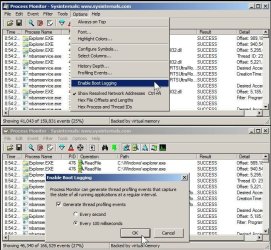
Have your tried boot logging with Process Monitor? You can start with a 1 second interval or go with 100 milliseconds for highest boot detail

Process Monitor

"Boot Logging

Process Monitor can log activity from a point very early in the boot process during the initialization of boot-start device drivers. Configure Process Monitor to log the next boot by selecting Enable Boot Logging from the Options menu. Process Monitor's driver will log activity at the next boot into a file in the %Windir% directory and will continue logging through the shutdown or until you run Process Monitor again. Thus, if you don't run Process Monitor during a boot session you will capture a trace of the entire boot to shutdown cycle. Process Monitor supports thread profiling capture in boot logging. When you enable boot logging on supported operating systems, Process Monitor will present a dialog that asks whether boot logging should include thread profiling, and if so, the rate of the profiling. Note that thread profiling will significantly grow the size of a boot log.
 

Attachments

  • 3.jpg
    3.jpg
    100.3 KB · Views: 17

My Computer My Computer

At a glance

Win7 pro x64stock i7 7700kCorsair Vengeance LPX 16GB (2x8GB) DDR4 @ 320...integrated Intel HD 630
Computer type
PC/Desktop
Computer Manufacturer/Model Number
diy
OS
Win7 pro x64
CPU
stock i7 7700k
Motherboard
Gigabyte Z270N-WIFI mini-ITX
Memory
Corsair Vengeance LPX 16GB (2x8GB) DDR4 @ 3200MHz
Graphics Card(s)
integrated Intel HD 630
Sound Card
onboard Realtek ALC1220
Monitor(s) Displays
two vertically mounted samsung 55" 4k un55mu8000
Screen Resolution
1920x1280
Hard Drives
256GB Samsung EVO 960 M.2 pci-e NVMe SSD
PSU
SilverStone Nightjar ST45NF 450Watt Fanless
Case
No case. Motherboard is mounted directly onto power supply
Cooling
Evercool low profile 815EP with Panaflow 12L fan at 7v
Keyboard
Ortek MCK-86 mini
Mouse
Belkin 5-button USB
Internet Speed
spectrum 400mbps
(Quick reply.)

Sorry for the late reply. I haven't forgotten, I just have been very busy. I'm still looking into this.

I'm not sure that any Windows-based app will help though since the pause takes place before Windows loads. It would need to be some sort of boot app... possibly loaded from a boot disk... to monitor the process during boot.

I'll follow up once I've had a chance to look into using the app. Thx.
 

My Computer My Computer

At a glance

Win7 Home Premium x64AMD Phenom II x4 9208gbRadeon 5850
Computer Manufacturer/Model Number
homebrew
OS
Win7 Home Premium x64
CPU
AMD Phenom II x4 920
Motherboard
Gigabyte MA790gs-ds4h
Memory
8gb
Graphics Card(s)
Radeon 5850
Sound Card
Realtek
Monitor(s) Displays
Asus 26" lcd
Screen Resolution
1920x1200
Hard Drives
120gb Corsair Force GT SSD
1TB C:
500GB D:
various external drives
PSU
CoolerMax 750watt
Case
Antec
Cooling
Fans (5)
Keyboard
standard-101
Mouse
MS Optical trackball
Internet Speed
DSL 1.5gbit
Have your tried boot logging with Process Monitor?

Dude, you are awesome! :D

The Process Monitor picked up 4 big gaps early in the boot process (even at 1sec intervals, the log was ENORMOUS! Who knew so so much happened every second? 200 pages of events in some instances.)

I located 4 "large" gaps early on that accounted for 76 of my 81 second delay, and two of those were while executing apps related to my "Advanced System Care" maintenance software (I suspect I had v9 when the backup was created 8 months ago, and v10 installed on my PC since then, causing some sort of hickup.)

I completely uninstalled ASC, rebooted and the pause was gone! Great! Thanks. :D
 

My Computer My Computer

At a glance

Win7 Home Premium x64AMD Phenom II x4 9208gbRadeon 5850
Computer Manufacturer/Model Number
homebrew
OS
Win7 Home Premium x64
CPU
AMD Phenom II x4 920
Motherboard
Gigabyte MA790gs-ds4h
Memory
8gb
Graphics Card(s)
Radeon 5850
Sound Card
Realtek
Monitor(s) Displays
Asus 26" lcd
Screen Resolution
1920x1200
Hard Drives
120gb Corsair Force GT SSD
1TB C:
500GB D:
various external drives
PSU
CoolerMax 750watt
Case
Antec
Cooling
Fans (5)
Keyboard
standard-101
Mouse
MS Optical trackball
Internet Speed
DSL 1.5gbit
After using "Advanced System Care", you are very lucky you saved your system without a Clean Install.

Using any program from IOBits is risky at best.

Just my opinion.

Jack
 

My Computer My Computer

At a glance

Windows 10 Pro. 64/ version 1709 Windows 7 Pr...Intel i7-6800K @ 4.3Corsair Platinum 16 gig @2400EVGA GTX 1070 OC
Computer type
PC/Desktop
Computer Manufacturer/Model Number
Home made Desktop
OS
Windows 10 Pro. 64/ version 1709 Windows 7 Pro/64
CPU
Intel i7-6800K @ 4.3
Motherboard
ASUS X-99 Deluxe II
Memory
Corsair Platinum 16 gig @2400
Graphics Card(s)
EVGA GTX 1070 OC
Monitor(s) Displays
Asus 27" LED LCD/VE278Q
Screen Resolution
1920-1080 or 1280-720 HDMI
Hard Drives
INTEL SSD 730-240 Gb Sata 3.0/
PSU
EVGA Platium 1200W
Case
Phanteks Luxe Tempered Glass 8 fans/ one radiator
Cooling
XSPC/ Water Cooled CPU
Keyboard
Das 4 Professional
Mouse
Logitech M705/MX Anywhere 2-S
Internet Speed
100 mbits
Antivirus
Microsoft Security Essentials/ Malwarebytes Premium 3.0/ SAS
Browser
I.E. 11 default/Firefox/ ISP Time Warner Cable/Spectrum
Other Info
LG BluRay Burner/
Sound system-KLipsch-THX/
Icy Dock ssd Hot Swap bays.
Back
Top