HELP!!!! Buffalo external hard drive shows empty on Windows 7 pro

christianmunoz

New member
Local time
3:56 PM
Messages
2
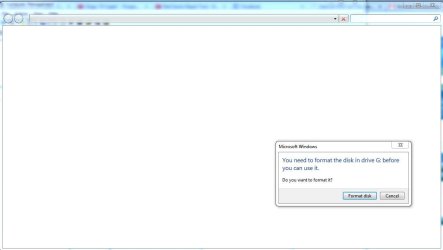
My Buffalo external drive shows empty on window 7 pro, no previous signs of malfunction just a little slow before this incident.
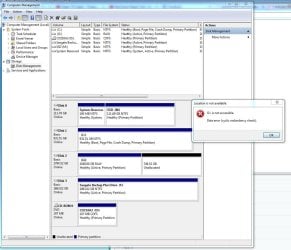
when i trying to right click and check properties, after a while windows shows a message saying " data error (Cyclic redundancy check)"
It contains all my family photos for the last years, please if anyone can help me with this issue I will appreciate
thanks
 

Attachments
  • 33.JPG
    33.JPG
    116.7 KB · Views: 3
  • 44.JPG
    44.JPG
    129.6 KB · Views: 2
  • 2 2.JPG
    2 2.JPG
    34.3 KB · Views: 1

My Computer My Computer

At a glance

windows 7 pro 64Intel(R) Core(TM) i7-4930K CPU @ 3.40GHz32 gbNVIDIA Quadro K2000
Computer type
PC/Desktop
Computer Manufacturer/Model Number
no name
OS
windows 7 pro 64
CPU
Intel(R) Core(TM) i7-4930K CPU @ 3.40GHz
Motherboard
asus P
Memory
32 gb
Graphics Card(s)
NVIDIA Quadro K2000
Hard Drives
primary 1 t
secondary ssd 120 gb
Antivirus
norton 360
Browser
firefox
Do not under any circumstances format or re-partition that disk until a forum member with some experience in this area can help you out. Doing so might destroy the data on the disk, and make the situation worse.
 

My Computer My Computer

At a glance

Win 7 Pro x64/Win 10 Pro x64 dual bootAMD FX 8350 Vishera @ 420016 GB Mushkin Blackline DDR3-2400 @ 1866 (9-1...XFX Radeon R9 280 Double D Black Edition
Computer type
PC/Desktop
Computer Manufacturer/Model Number
Mellon Labs (custom build)
OS
Win 7 Pro x64/Win 10 Pro x64 dual boot
CPU
AMD FX 8350 Vishera @ 4200
Motherboard
ASUS M5A97 R2.0
Memory
16 GB Mushkin Blackline DDR3-2400 @ 1866 (9-10-10-10-31)
Graphics Card(s)
XFX Radeon R9 280 Double D Black Edition
Sound Card
Realtek HD Audio on MB. Sounds great.
Monitor(s) Displays
Acer 24", Acer 22"
Screen Resolution
3840 x 1080
Hard Drives
1 x Mushkin Chronos 120 GB SSD (Win 10)
1 x Samsung 850 EVO 250 GB SSD (Win 7)
1 x WD 1TB SATA Blue
1 x WD 1TB SATA Green
PSU
Corsair TX-750
Case
CoolerMaster HAF 912+
Cooling
Coolermaster Seidon 240M Liquid AIO. 6 case fans
Keyboard
Logitech G710+
Mouse
Logitech G500s
Internet Speed
Much better since I got fiber, but still way overpriced.
Antivirus
MSE, Malware Bytes for scanning
Browser
Firefox
Other Info
Corsair VOID USB headphones.

A Mellon Labs X-1 - LCD Smartie driven system status display.

Brought to you by the letter E
You need to run chkdsk
https://www.youtube.com/watch?v=iyy5MZphd3U

chkdsk /f C: When you use this command, Check Disk performs an analysis of the disk and then repairs any errors it finds, provided that the disk isn't in use. If the disk is in use, Check Disk displays a prompt that asks whether you want to schedule the disk to be checked the next time you restart the system.

And just use /r instead of /f as it does more work.

We seem to be experiencing a bit of a language barrier, so I will try to explain again.

If you use CHKDSK /R that means that you are automatically using CHKDSK /R /F. The /R mean that everything that /F does is done as well as anything extra that /R does. Since everything that it does has already been accounted for, there is no reason to use the /F at all.

In summary, my option is to use CHKDSK /R only. Do not use either of the other ones.

In addition, it is probably excessive to run CHKDSK every single day. Once a month or when told to do so by the operating system should be more than enough. I believe it has been years since I've used it myself.
chkdsk /f /r or chkdsk /r /f? - Microsoft Community
 

My Computer My Computer

At a glance

Windows 7 Ultimate x64
OS
Windows 7 Ultimate x64
Where was this drive being used before? different PC? different OS?

How was it connected to that PC? directly to the USB port? through a dock? through a third party external case?

Were you able to see the full 3TB before?

If you had formatted it before anytime how was it formatted?

How many partitions did it have? Give the partition details.

How much data you have on that drive? Also give the model no. of the Buffalo External drive.

Install MiniTool Partition Wizard Free Edition 9.1 Best Free Partition Manager for Windows | MiniTool Partition Free and post a screenshot of how your Buffalo looks in it (the very first screen after you launch the application). Remove all other external drives/ pendrives from your system
 
Last edited:

My Computer My Computer

At a glance

Windows 7 Home Premium 32 bit
OS
Windows 7 Home Premium 32 bit
Reply to thread 'HELP!!!! Buffalo external hard drive shows empty on W

Jumanji, first at all thanks for your help
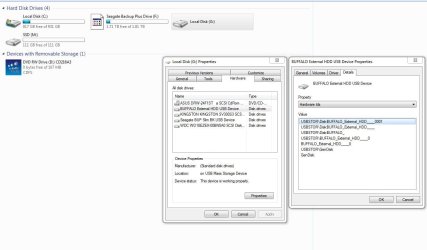
the ext hard drive is a buffalo HD-LB3.OTU3,
It was connected to the PC thru a usb,
it is was connected to the same PC,
no partitions

sdowney717, thanks for your help
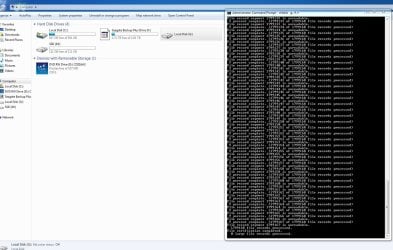
i run chkdsk /f /r G:
see the results on the attached screen shot

Mellon head, i did not format the ext hard drive
also thanks for your help
 

Attachments

  • 99.JPG
    99.JPG
    124.9 KB · Views: 3
  • 77.JPG
    77.JPG
    217.9 KB · Views: 4
  • 88.JPG
    88.JPG
    81.8 KB · Views: 3
Last edited:

My Computer My Computer

At a glance

windows 7 pro 64Intel(R) Core(TM) i7-4930K CPU @ 3.40GHz32 gbNVIDIA Quadro K2000
Computer type
PC/Desktop
Computer Manufacturer/Model Number
no name
OS
windows 7 pro 64
CPU
Intel(R) Core(TM) i7-4930K CPU @ 3.40GHz
Motherboard
asus P
Memory
32 gb
Graphics Card(s)
NVIDIA Quadro K2000
Hard Drives
primary 1 t
secondary ssd 120 gb
Antivirus
norton 360
Browser
firefox
CHKDSK error message - The type of the filesystem is RAW

This says it can recover files from file systems saying the disk is RAW.

In digital image recovery mode program operates as freeware with no functional limitations. List of known compatible digital camera models and image formats is available at the known camera compatibility list.

It does say it works unlimited freeware for pictures. I have not used ZAR before.

You also could use ddrescue or another linux tool possibly
https://help.ubuntu.com/community/DataRecovery
To do that, you create a live USB and boot from the USB into Ubuntu.
 

My Computer My Computer

At a glance

Windows 7 Ultimate x64
OS
Windows 7 Ultimate x64
Hi christianmunoz,

Partition Wizard shows your drive as Bad Disk - not a very good sign. My analysis says that the SATA to USB Interface inside the enclosure has failed and that is why your drive shows up as a 2TB drive RAW +746GB Unallocated.In effect it is reading it as a 512 bytes/sector drive instead of 4096 bytes/sector drive.

Try Zero Assumption Recovery as sdowney717 suggested. Data Recovery Software, Solutions, Tutorials - ZAR Data Recovery Digital Image Recovery module in it is free as he had stated.. So no worries. Your wallet is safe :).

ddrescue also may work, provided you get exactly the same Buffalo HD-LB3.OTU3 and try to clone to it. I am assuming it will clone each and every 512 byte sector faithfully and then when reading, the good SATA to USB bridge will see the drive as 4096 byte/sector sized and show you all the data as before. Barring some unknown factor, it should be successful. Your wallet will be thinner by USD 230 :).

I asked how much data you have on that drive. I haven't got the answer. It may be possible to get all data (not only photos .jpg) out using TestDisk and copy it to any other external drive/drives having a total combined free space equivalent to your data measure.

Also remember that in Data Recovery we always talk of possibility and not certainty :).

Now you can go ahead with Zero Assumption Recovery. Let us see how far its zero assumption works.
 

My Computer My Computer

At a glance

Windows 7 Home Premium 32 bit
OS
Windows 7 Home Premium 32 bit
Do not under any circumstances format or re-partition that disk until a forum member with some experience in this area can help you out. Doing so might destroy the data on the disk, and make the situation worse.

I agree with what Mr.Mellon Head said.I have faced same situation with my friend's 500gb transcend portable hardrive.Do not format it under any situation......
If i'm in your place,i will make a live usb linux distro(ubuntu or mint),copy every thing from my ext hardrive and will do a clean format......
 

My Computer My Computer

At a glance

windows 7 ultimate 64 bitIntel core i3-2350M cpu@!2.30 Ghz4.00 GBAMD RADEON HD 6370M(1GB)
Computer type
Laptop
Computer Manufacturer/Model Number
LENOVO G570
OS
windows 7 ultimate 64 bit
CPU
Intel core i3-2350M cpu@!2.30 Ghz
Motherboard
Lenovo
Memory
4.00 GB
Graphics Card(s)
AMD RADEON HD 6370M(1GB)
Monitor(s) Displays
Generic pnp Monitor
Screen Resolution
1366*768
Hard Drives
ST9500325AS ATA device(500GB) NTFS
Keyboard
Standard ps/2 keyboard
Mouse
synaptics ps/2 port Touchpad
Internet Speed
921.6 kbps(Dial up Connection)
Antivirus
Quick Heal,MSE
Browser
Opera,Chrome
[.......I have faced same situation with my friend's 500gb transcend portable hardrive.Do not format it under any situation......
If i'm in your place,i will make a live usb linux distro(ubuntu or mint),copy every thing from my ext hardrive and will do a clean format......

:) There is a lot of technical differences between a 500GB external and Advance formatted 3TB externals. What applies to a 500GB external need not necessarily apply to a 3TB external.
 

My Computer My Computer

At a glance

Windows 7 Home Premium 32 bit
OS
Windows 7 Home Premium 32 bit
Back
Top