Solved HELP-Cannot Format Drive D

denneny

New member
Local time
4:27 PM
Messages
12
My D Drive apparently has a System partition. I cannot format the drive. There are three folders on drive backups, Wiindows, Program Files. These files are leftovers from a former PC. I have logged into D as an Administrator. When I try to format, I get message that System Partition cannot be formatted and the process stops.

Can someone tell me how to format this drive. Thanks.
 

My Computer

Computer type
PC/Desktop
Computer Manufacturer/Model Number
custom
OS
Win 7 64 Pro

My Computer

Computer Manufacturer/Model Number
Custom Built
OS
Windows 7 Ultimate 32-Bit & Windows 7 Ultimate 64-Bit
CPU
Intel Core i7 CPU 950 @ 3.07GHz
Motherboard
ASUS P6T DELUXE V2
Memory
OCZ 6GB (3 x 2GB) 240-Pin DDR3 SDRAM DDR3 1600 OCZ3X1600R2
Graphics Card(s)
ATI Radeon HD 5700 Series
Sound Card
OnBoard
Hard Drives
WD6400AACS-00M3B0 (640GB SATA )
PSU
CORSAIR 850w
Case
NZXT LEXA
Cooling
Intel Stock Heatsink Fan
Keyboard
Microsoft Wireless Laser Keyboard 7000
Mouse
Microsoft Wireless Laser Mouse 7000
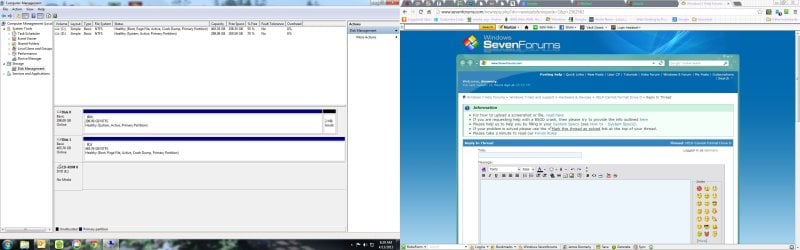
I have attached Computer Management screenshot. It is a 473.1 KB file. I hope you can find it.
 

Attachments

  • Computer Management.jpg
    Computer Management.jpg
    215.9 KB · Views: 17

My Computer

Computer type
PC/Desktop
Computer Manufacturer/Model Number
custom
OS
Win 7 64 Pro

My Computer

Computer type
PC/Desktop
Computer Manufacturer/Model Number
Home Built Desktop By DataTech
OS
Windows 7 Ultimate X64 SP1
CPU
Intel i5-2550K, Differing ~4.4-4.8GHz No built in GPU
Motherboard
ASUS P8Z68-V PRO/GEN3
Memory
16GB G.Skill Sniper 1866MHz @ 2133MHz 2x8GB
Graphics Card(s)
ASUS GTX650TIB-DC2OC-2GD5, (650TI Boost)
Sound Card
Onboard Realtek 5-1
Monitor(s) Displays
Samsung P2570HD
Screen Resolution
1920x1080
Hard Drives
Samsung 840 Pro 256GB SSD for OS, 500GB Seagate Constellation (Enterprise drive) for Data
PSU
Corsair HX650W
Case
Inwin Dragon Rider
Cooling
Hyper 212 EVO w/two Noctua fans, push-pull, @1300 RPM
Keyboard
E-Z Eyes, bright yellow keys with large characters
Mouse
steelseries SENSEI Laser Pro Gaming
Internet Speed
48-51Mbs Mbs down, 11 Mbs up Xfinity Cable
Antivirus
Norton Internet Security 2013
Browser
IE 10, Opera, Pale Moon if needed
Other Info
4 case fans, LG BluRay-RE, ASUS DVD-RW, Mr. Fusion power supply, 1.21 gigawatts.
OK. I inactivated D drive. Next, I attempted to delete the volume in Disk Management. I was told drive is in use. I overrode that and said continue with delete.

It started but returned error message:

"Delete is not allowed on current boot, system, pagefile, crashdump or hibernation volume"

What is wrong? Do I need to reboot or change some setting first?

Jim Denneny
 

My Computer

Computer type
PC/Desktop
Computer Manufacturer/Model Number
custom
OS
Win 7 64 Pro
Yeah, try a reboot, or better power off and back on. Are your sure your deactivated the D\?
 

My Computer

Computer type
PC/Desktop
Computer Manufacturer/Model Number
Home Built Desktop By DataTech
OS
Windows 7 Ultimate X64 SP1
CPU
Intel i5-2550K, Differing ~4.4-4.8GHz No built in GPU
Motherboard
ASUS P8Z68-V PRO/GEN3
Memory
16GB G.Skill Sniper 1866MHz @ 2133MHz 2x8GB
Graphics Card(s)
ASUS GTX650TIB-DC2OC-2GD5, (650TI Boost)
Sound Card
Onboard Realtek 5-1
Monitor(s) Displays
Samsung P2570HD
Screen Resolution
1920x1080
Hard Drives
Samsung 840 Pro 256GB SSD for OS, 500GB Seagate Constellation (Enterprise drive) for Data
PSU
Corsair HX650W
Case
Inwin Dragon Rider
Cooling
Hyper 212 EVO w/two Noctua fans, push-pull, @1300 RPM
Keyboard
E-Z Eyes, bright yellow keys with large characters
Mouse
steelseries SENSEI Laser Pro Gaming
Internet Speed
48-51Mbs Mbs down, 11 Mbs up Xfinity Cable
Antivirus
Norton Internet Security 2013
Browser
IE 10, Opera, Pale Moon if needed
Other Info
4 case fans, LG BluRay-RE, ASUS DVD-RW, Mr. Fusion power supply, 1.21 gigawatts.
Have you tried using Diskpart to format the drive?

Click on :orb: type CMD inside Search programs and files box . Right click on CMD underneath Program(1) choose Run as administrator. Command Prompt will open up to this path C:\Windows\System32>_ . Type in the commands below press <ENTER> after each line

DISKPART LIST DISK SELECT DISK 0 CLEAN CREATE PARTITION PRIMARY SELECT PARTITION 1 FORMAT FS=NTFS QUICK EXIT EXIT


   Note
Disk 0 is where your D drive is which is your first hard drive
 

My Computer

Computer Manufacturer/Model Number
Custom Built
OS
Windows 7 Ultimate 32-Bit & Windows 7 Ultimate 64-Bit
CPU
Intel Core i7 CPU 950 @ 3.07GHz
Motherboard
ASUS P6T DELUXE V2
Memory
OCZ 6GB (3 x 2GB) 240-Pin DDR3 SDRAM DDR3 1600 OCZ3X1600R2
Graphics Card(s)
ATI Radeon HD 5700 Series
Sound Card
OnBoard
Hard Drives
WD6400AACS-00M3B0 (640GB SATA )
PSU
CORSAIR 850w
Case
NZXT LEXA
Cooling
Intel Stock Heatsink Fan
Keyboard
Microsoft Wireless Laser Keyboard 7000
Mouse
Microsoft Wireless Laser Mouse 7000
D Drive Format

Finally, got D Drive formatted. That was not smart on my part. When I built PC, I had tech move data & program files to D: so as not to have to reinstall Win 7 from scratch. I moved Programs back over to C: and reinstalled them to get registry right. I moved data (docs, pictures, Data etc) back over to C:. He also moved system partition to D: for some unknown reason.

The computer would not reboot as Sys files had been removed from D: by format process. Thank God for Acronis Recovery disk with bootable media. I have done a recovery which should put D drive back into active status.

I won't try this again and if I ever install an OS upgrade again, it will be a total, fresh, clean install.

Thanks for the attempted help.

Jim Denneny
 

My Computer

Computer type
PC/Desktop
Computer Manufacturer/Model Number
custom
OS
Win 7 64 Pro
Clean Install

You are probably correct - clean re-install Win 7. I have a very smart friend taking a crack at it before that step is taken. D Drive had not been re-formatted as I thought. I recovered C Drive and its MBR using Acronis Recovery. Really weird BIOS sees both drives under hard drive but under boot priority it only sees the D Drive and CD/DVD. It will not boot period.
 

My Computer

Computer type
PC/Desktop
Computer Manufacturer/Model Number
custom
OS
Win 7 64 Pro
denneny

Are we reinstalling Windows ?
 

My Computer

Computer Manufacturer/Model Number
Custom Built
OS
Windows 7 Ultimate 32-Bit & Windows 7 Ultimate 64-Bit
CPU
Intel Core i7 CPU 950 @ 3.07GHz
Motherboard
ASUS P6T DELUXE V2
Memory
OCZ 6GB (3 x 2GB) 240-Pin DDR3 SDRAM DDR3 1600 OCZ3X1600R2
Graphics Card(s)
ATI Radeon HD 5700 Series
Sound Card
OnBoard
Hard Drives
WD6400AACS-00M3B0 (640GB SATA )
PSU
CORSAIR 850w
Case
NZXT LEXA
Cooling
Intel Stock Heatsink Fan
Keyboard
Microsoft Wireless Laser Keyboard 7000
Mouse
Microsoft Wireless Laser Mouse 7000
Problem is fixed - sort of. Computer boots. Friend used Windows Repair and got it running without a total re-install.

It is weird because he tells me it wants to boot off D Drive before C Drive will boot. BIOS will not let him boot directly off C MBR.

I guess it has been like this ever since the tech setup my system. If it works I am OK. Anything beats a complete re-install given all the programs I have plus networks etc.

He is going to do some research to see if we can get D Drive out of the boot loop short of a total re-install. We need to make BIOS boot off the C MBR. It is not a simple issue of reordering boot priority.

Jim Denneny
 
Last edited:

My Computer

Computer type
PC/Desktop
Computer Manufacturer/Model Number
custom
OS
Win 7 64 Pro
Very odd, Windows will name the currently booted OS drive as C\. You could physically disconnect the D\ and see if you can boot. If it asks to do a startup repair, do it. You may need to run it 3 time to place the bootrec back on the C\
With D\ inactive it shouldn't be booting at all.
 

My Computer

Computer type
PC/Desktop
Computer Manufacturer/Model Number
Home Built Desktop By DataTech
OS
Windows 7 Ultimate X64 SP1
CPU
Intel i5-2550K, Differing ~4.4-4.8GHz No built in GPU
Motherboard
ASUS P8Z68-V PRO/GEN3
Memory
16GB G.Skill Sniper 1866MHz @ 2133MHz 2x8GB
Graphics Card(s)
ASUS GTX650TIB-DC2OC-2GD5, (650TI Boost)
Sound Card
Onboard Realtek 5-1
Monitor(s) Displays
Samsung P2570HD
Screen Resolution
1920x1080
Hard Drives
Samsung 840 Pro 256GB SSD for OS, 500GB Seagate Constellation (Enterprise drive) for Data
PSU
Corsair HX650W
Case
Inwin Dragon Rider
Cooling
Hyper 212 EVO w/two Noctua fans, push-pull, @1300 RPM
Keyboard
E-Z Eyes, bright yellow keys with large characters
Mouse
steelseries SENSEI Laser Pro Gaming
Internet Speed
48-51Mbs Mbs down, 11 Mbs up Xfinity Cable
Antivirus
Norton Internet Security 2013
Browser
IE 10, Opera, Pale Moon if needed
Other Info
4 case fans, LG BluRay-RE, ASUS DVD-RW, Mr. Fusion power supply, 1.21 gigawatts.
Thank you so much for your help. You nailed it. My friend did exactly what you suggested and it worked. Disconnected D Drive - Windows Repair established boot link to C Drive. Wiped D Drive clean.

Dodged a bullet thanks to you. I was all set to reinstall Win 7 with all the associated misery until you came along.

Jim
 

My Computer

Computer type
PC/Desktop
Computer Manufacturer/Model Number
custom
OS
Win 7 64 Pro
Cool, good to know they got it sorted out. :D
 

My Computer

Computer type
PC/Desktop
Computer Manufacturer/Model Number
Home Built Desktop By DataTech
OS
Windows 7 Ultimate X64 SP1
CPU
Intel i5-2550K, Differing ~4.4-4.8GHz No built in GPU
Motherboard
ASUS P8Z68-V PRO/GEN3
Memory
16GB G.Skill Sniper 1866MHz @ 2133MHz 2x8GB
Graphics Card(s)
ASUS GTX650TIB-DC2OC-2GD5, (650TI Boost)
Sound Card
Onboard Realtek 5-1
Monitor(s) Displays
Samsung P2570HD
Screen Resolution
1920x1080
Hard Drives
Samsung 840 Pro 256GB SSD for OS, 500GB Seagate Constellation (Enterprise drive) for Data
PSU
Corsair HX650W
Case
Inwin Dragon Rider
Cooling
Hyper 212 EVO w/two Noctua fans, push-pull, @1300 RPM
Keyboard
E-Z Eyes, bright yellow keys with large characters
Mouse
steelseries SENSEI Laser Pro Gaming
Internet Speed
48-51Mbs Mbs down, 11 Mbs up Xfinity Cable
Antivirus
Norton Internet Security 2013
Browser
IE 10, Opera, Pale Moon if needed
Other Info
4 case fans, LG BluRay-RE, ASUS DVD-RW, Mr. Fusion power supply, 1.21 gigawatts.
Back
Top