
[Help] Can't detect graphics card or install drivers

syalam

New member
Local time
10:56 AM
Messages
17
Hi,
(sorry, but this needs a bit of background)

I've been using a custom PC since June, picked the parts, got it put together in a shop. Recently, I've been having occasional BSODs and a message that says "PFN_LIST_CORRUPT". After the latest BSOD and reboot, my PC couldn't detect the GTX560 graphics card (from Palit) in device manager. Under display adapters it shows "Standard VGA Graphics Adapter" instead of the gtx560.

I tried to update the driver with the latest download from Nvidia (version 280.26), but when I try to it informs me "This graphics driver could not find compatible graphics hardware". I've reinstalled windows 7 and the drivers for Ethernet, motherboard, chipset, etc., but I've still got the same problem when trying to install the graphics driver.

When I open the "Properties" window of the "Standard VGA Graphics Adapter" in device manager, under details->hardware ids the following information is shown:
PCI\VEN_10DE&DEV_1209&SUBSYS_00000000&REV_A1
PCI\VEN_10DE&DEV_1209&SUBSYS_00000000
PCI\VEN_10DE&DEV_1209&REV_A1
PCI\VEN_10DE&DEV_1209
PCI\VEN_10DE&DEV_1209&CC_030000
PCI\VEN_10DE&DEV_1209&CC_0300

Any help?
 
Last edited:

My Computer My Computer

OS
windows 7 home premium 64bit
CPU
Intel(R) Core(TM) i5-2400 CPU @ 3.10GHz
Motherboard
Gigabyte Technology Co., Ltd. P67A-UD3-B3
Memory
Kingston 4GB KVR1333D3N9/4G
Graphics Card(s)
Nvidia GX560 (Palit)
Sound Card
Microsoft High Definition Audio Device
Hello syalam. Welcome to the Forum.

Have you made any changes or added any new hardware to your system around the time this error began to appear?

That VEN is nVidia, but the DEV is a Fast Ethernet Controller.
It could be that Windows has mixed up the registry folder for the device, or the plug and play feature in the video cards firmware could be corrupted, or there is another corruption in the system.

You can try reinstalling the video card clean:

  • Be sure you have the most current known good driver downloaded.
  • Create a System Restore Point.
  • Now go into Windows Explorer and in the C: drive find the nVidia folder (inside will be Drivers > your driver version) and delete it (the whole folder).
  • Go into Start > Control Panel > Remove a Program and uninstall all programs for the video card. Do PhysX and Stereoscopic 3D first, then the driver. The control panel will uninstall with the driver.
  • Shut down computer, wait 30 seconds, and then boot the computer.
  • When it reaches the desktop Windows will find new hardware and will install it's own WDDM1.1 driver. Let it. You will be asked to restart. Do it.
  • Once back on the desktop you can now install the nVidia driver package for your card.
Try that and see if it works. That PFN_LIST_CORRUPT error can be caused by other bad drivers too, and by bad RAM. But lets check that video card installation first.
 

My Computer My Computer

Computer type
PC/Desktop
Computer Manufacturer/Model Number
Home Built - Jan 2013
OS
Windows 7 64 Bit Home Premium SP1
CPU
i7-3820
Motherboard
Asus P9X79-PRO - Bios 4608
Memory
GSkill F3-14900CL9Q - 16GB
Graphics Card(s)
EVGA GeForce GTX660 - Driver 352.86
Sound Card
On board Realtek ALC898
Monitor(s) Displays
Acer S271HL
Screen Resolution
1920 x 1080
Hard Drives
#1- Samsung 840 Pro Series
#2- Western Digital WD1002FAEX Sata3 Black
#3- Western Digital WD1002FAEX Sata3 Black
PSU
Corsair CMPSU-850TX-V2 - 850 watt (by Seasonic)
Case
Corsair Obsidian 550D
Cooling
Standard 3 120mm case fans, Cooler Master Hyper 212 EVO
Keyboard
MS KC-0405
Mouse
Intellimouse 5-button
Internet Speed
56 Mbits/Sec (on a good day)
Antivirus
Avast & Malwarebytes
Browser
Firefox
Other Info
Asus DVD - DRW-24B1ST 24X
I would reset the bios for good measure too.
 

My Computer My Computer

Computer Manufacturer/Model Number
Insane hobo technologies. ;-)
OS
Windows 7 x64
CPU
Intel i7 2600k
Motherboard
Asrock z68 extreme 4 gen 3
Memory
G.skill Ripjaw 16gigs @ 1866
Graphics Card(s)
Nvidia gtx580 (evga)
Sound Card
Integrated HD audio + hdmi
Monitor(s) Displays
24" ASUS widescreen + 42" insignia
Screen Resolution
1080p (1920x1080)
Hard Drives
128 Samsung 830
256 Samsung 840
3 x 1tb storage drive (various)
1 western digital 1tb (eSATA)
1 Seagate 1tb (eSATA)
PSU
1 kilowatt SLI/Crossfire rated Silverstone modular
Case
NZXT Phantom + additional 220 fan
Cooling
Zalmann
Keyboard
Microsoft wireless 3000 (v2)
Mouse
MS - wireless 5000 (bluetrack)
Internet Speed
depends on if you ask me or my provider.
Other Info
The above information is provided as is, and the author assumes no responsibility for issues it may cause with your sanity or fanboyism.
Thanks, TVeblen,

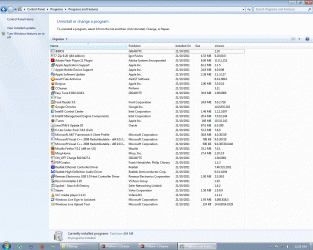
I've tried your advice to make a clean install of the card, but no dice. I deleted the NVidia folder, but couldn't find any trace of related programs like PhysX or the drivers in control panel or anywhere else (see screenshot). I reinstalled windows on the same partition earlier, so I don't think they're on the computer.

When I rebooted, windows didn't find any new hardware and install it's own driver. I tried running the NVidia installer, but windows still only shows the "standard VGA graphics adapter" in device manager, so that didn't work. Since I reinstalled windows, the computer is still going through the phase where windows seems to be finding new updates with every other boot; I'm not sure if this may be a problem.

One thing to note that I didn't mention earlier: I brought it back to the shop a few days earlier. When I collected it the guy booted it up for me and the card was detected under device manager. He also claimed to have performed a memory test and that the memory is clean. But when I brought it back and booted up, the card wasn't found under device manager anymore. I opened up the case earlier today to check if the card is physically loose. It seems okay, but then I may not be right, so I'll try and post a photo tomorrow.
 

Attachments

  • UninstallPrograms.gif
    UninstallPrograms.gif
    305.3 KB · Views: 502

My Computer My Computer

OS
windows 7 home premium 64bit
CPU
Intel(R) Core(TM) i5-2400 CPU @ 3.10GHz
Motherboard
Gigabyte Technology Co., Ltd. P67A-UD3-B3
Memory
Kingston 4GB KVR1333D3N9/4G
Graphics Card(s)
Nvidia GX560 (Palit)
Sound Card
Microsoft High Definition Audio Device
I like the idea of resetting the BIOS. Go into your BIOS settings and go to the EXIT tab and choose "Reset BIOS Defaults", or similar language.

Two other possible solutions you could try:

1- run a Repair Install to try and correct the driver errors. Something smells like the guy you dropped this thing off to played the computer version of "52 card pick-up". A Repair install may set this right: http://www.sevenforums.com/tutorials/3413-repair-install.html . Be sure to read all those warnings in that Tutorial.

2- Update the video cards firmware (Video card BIOS): HOWTO: nVidia BIOS Flashing - Overclock.net - Overclocking.net . That may correct why the card is not recognized and being seen as a Ethernet Controller - which is the actual cause of your issue - but the issue is "Why?".

Which one of these you try first is up to you. I might try the firmware update first myself.

And we can't overlook the possibility that the video card is no good. That would also explain it.
 

My Computer My Computer

Computer type
PC/Desktop
Computer Manufacturer/Model Number
Home Built - Jan 2013
OS
Windows 7 64 Bit Home Premium SP1
CPU
i7-3820
Motherboard
Asus P9X79-PRO - Bios 4608
Memory
GSkill F3-14900CL9Q - 16GB
Graphics Card(s)
EVGA GeForce GTX660 - Driver 352.86
Sound Card
On board Realtek ALC898
Monitor(s) Displays
Acer S271HL
Screen Resolution
1920 x 1080
Hard Drives
#1- Samsung 840 Pro Series
#2- Western Digital WD1002FAEX Sata3 Black
#3- Western Digital WD1002FAEX Sata3 Black
PSU
Corsair CMPSU-850TX-V2 - 850 watt (by Seasonic)
Case
Corsair Obsidian 550D
Cooling
Standard 3 120mm case fans, Cooler Master Hyper 212 EVO
Keyboard
MS KC-0405
Mouse
Intellimouse 5-button
Internet Speed
56 Mbits/Sec (on a good day)
Antivirus
Avast & Malwarebytes
Browser
Firefox
Other Info
Asus DVD - DRW-24B1ST 24X
I'm not clear on something, are you getting your current display via a built in graphics device?
What company is that device by?
Have you disabled it completely before installing the upgraded card?
This could simply be a hardware conflict on the motherboard.
Windows 7 doesn't like 2 different graphics devices under certain circumstances.
Though this problem has been greatly reduced after more recent updates.
 

My Computer My Computer

Computer Manufacturer/Model Number
Insane hobo technologies. ;-)
OS
Windows 7 x64
CPU
Intel i7 2600k
Motherboard
Asrock z68 extreme 4 gen 3
Memory
G.skill Ripjaw 16gigs @ 1866
Graphics Card(s)
Nvidia gtx580 (evga)
Sound Card
Integrated HD audio + hdmi
Monitor(s) Displays
24" ASUS widescreen + 42" insignia
Screen Resolution
1080p (1920x1080)
Hard Drives
128 Samsung 830
256 Samsung 840
3 x 1tb storage drive (various)
1 western digital 1tb (eSATA)
1 Seagate 1tb (eSATA)
PSU
1 kilowatt SLI/Crossfire rated Silverstone modular
Case
NZXT Phantom + additional 220 fan
Cooling
Zalmann
Keyboard
Microsoft wireless 3000 (v2)
Mouse
MS - wireless 5000 (bluetrack)
Internet Speed
depends on if you ask me or my provider.
Other Info
The above information is provided as is, and the author assumes no responsibility for issues it may cause with your sanity or fanboyism.
+1^
 

My Computer My Computer

Computer type
PC/Desktop
Computer Manufacturer/Model Number
Home Built - Jan 2013
OS
Windows 7 64 Bit Home Premium SP1
CPU
i7-3820
Motherboard
Asus P9X79-PRO - Bios 4608
Memory
GSkill F3-14900CL9Q - 16GB
Graphics Card(s)
EVGA GeForce GTX660 - Driver 352.86
Sound Card
On board Realtek ALC898
Monitor(s) Displays
Acer S271HL
Screen Resolution
1920 x 1080
Hard Drives
#1- Samsung 840 Pro Series
#2- Western Digital WD1002FAEX Sata3 Black
#3- Western Digital WD1002FAEX Sata3 Black
PSU
Corsair CMPSU-850TX-V2 - 850 watt (by Seasonic)
Case
Corsair Obsidian 550D
Cooling
Standard 3 120mm case fans, Cooler Master Hyper 212 EVO
Keyboard
MS KC-0405
Mouse
Intellimouse 5-button
Internet Speed
56 Mbits/Sec (on a good day)
Antivirus
Avast & Malwarebytes
Browser
Firefox
Other Info
Asus DVD - DRW-24B1ST 24X
@ Maguscreed

I think the current display is from a built in graphics device, as I don't think I have any other graphics hardware. Under device manager-> Computer it lists ACPI x64-based PC. I'm using a Gigabyte P67A-UD3-B3 motherboard (Model Name GA-P67A-UD3-B3, IntelP67/rev1.1) and a i5-2400 lga1155 processor.

I've reset the BIOS (use optimized defaults) and I'm going to try the repair install now. I'm not too sure about the procedure for flashing the NVIDIA BIOS (and I can only use a DVD or usb flash drive), could you please advise? Thanks.
 

My Computer My Computer

OS
windows 7 home premium 64bit
CPU
Intel(R) Core(TM) i5-2400 CPU @ 3.10GHz
Motherboard
Gigabyte Technology Co., Ltd. P67A-UD3-B3
Memory
Kingston 4GB KVR1333D3N9/4G
Graphics Card(s)
Nvidia GX560 (Palit)
Sound Card
Microsoft High Definition Audio Device
Okay that motherboard does not have a built in graphics so you are using the card.

If reformatting doesn't fix your problem, I would start taking steps to rma the card.
Unless you are not meeting the power requirements of the card, the card itself would appear to be bad.
 

My Computer My Computer

Computer Manufacturer/Model Number
Insane hobo technologies. ;-)
OS
Windows 7 x64
CPU
Intel i7 2600k
Motherboard
Asrock z68 extreme 4 gen 3
Memory
G.skill Ripjaw 16gigs @ 1866
Graphics Card(s)
Nvidia gtx580 (evga)
Sound Card
Integrated HD audio + hdmi
Monitor(s) Displays
24" ASUS widescreen + 42" insignia
Screen Resolution
1080p (1920x1080)
Hard Drives
128 Samsung 830
256 Samsung 840
3 x 1tb storage drive (various)
1 western digital 1tb (eSATA)
1 Seagate 1tb (eSATA)
PSU
1 kilowatt SLI/Crossfire rated Silverstone modular
Case
NZXT Phantom + additional 220 fan
Cooling
Zalmann
Keyboard
Microsoft wireless 3000 (v2)
Mouse
MS - wireless 5000 (bluetrack)
Internet Speed
depends on if you ask me or my provider.
Other Info
The above information is provided as is, and the author assumes no responsibility for issues it may cause with your sanity or fanboyism.
I've done a repair install of Windows 7, but it still doesn't detect the card. I think it reinstalls the drivers for the card though, because in C the NVIDIA folder is created again, and the latest driver (280.26) is there.

Any advice/tips for flashing the card's BIOS (I don't want to brick it)? If that doesn't work out too I'll take it back to the shop (good thing it's still under warranty)
 

My Computer My Computer

OS
windows 7 home premium 64bit
CPU
Intel(R) Core(TM) i5-2400 CPU @ 3.10GHz
Motherboard
Gigabyte Technology Co., Ltd. P67A-UD3-B3
Memory
Kingston 4GB KVR1333D3N9/4G
Graphics Card(s)
Nvidia GX560 (Palit)
Sound Card
Microsoft High Definition Audio Device
Flashing the card while it's under warranty might not be a good idea, and you shouldn't even have to do this just to get it working under Windows.

The nVidia folder in the root of C: is simply the result of the downloaded .exe unpacking itself before the driver install begins. It doesn't mean that the driver is installed - that folder is just an extract waiting to be installed.
 

My Computer My Computer

Computer type
PC/Desktop
Computer Manufacturer/Model Number
Custom-built
OS
Windows 7 Professional SP1 32-bit
CPU
Intel Core 2 Duo E6600 2.4GHz
Motherboard
Asus PL5D2
Memory
4GB DDR2-667 (4x1GB in dual-channel config)
Graphics Card(s)
nVidia GeForce 9800 GT
Sound Card
Creative X-Fi XtremeMusic
Monitor(s) Displays
Acer P236H
Screen Resolution
1920x1200 (DVI)
Hard Drives
OCZ SSD Vertex Plus 60GB SATA (Firmware 3.55), 64MB cache
Hitachi HD321KJ SATA, 320GB, 7200rpm, 16MB cache
PSU
Antec TruePower 2.0
Case
Cooler Master Centurion
Cooling
Too many fans
Keyboard
Standard
Mouse
Microsoft wireless optical mouse
Internet Speed
AT&T U-verse (18mbit/sec)
Antivirus
Microsoft Security Essentials
Browser
Firefox
Other Info
Other devices:
Compaq CQ-60 laptop
Google Nexus 7 (2012) tablet
Nvidia SHIELD tablet (US/LTE)
Hardkernel ODROID-XU single-board computer (Samsung Exynos 5420)
+1^

Do not try to flash the video card BIOS if it is under warranty. I must have missed that bit of information.

Return it for a replacement.
 

My Computer My Computer

Computer type
PC/Desktop
Computer Manufacturer/Model Number
Home Built - Jan 2013
OS
Windows 7 64 Bit Home Premium SP1
CPU
i7-3820
Motherboard
Asus P9X79-PRO - Bios 4608
Memory
GSkill F3-14900CL9Q - 16GB
Graphics Card(s)
EVGA GeForce GTX660 - Driver 352.86
Sound Card
On board Realtek ALC898
Monitor(s) Displays
Acer S271HL
Screen Resolution
1920 x 1080
Hard Drives
#1- Samsung 840 Pro Series
#2- Western Digital WD1002FAEX Sata3 Black
#3- Western Digital WD1002FAEX Sata3 Black
PSU
Corsair CMPSU-850TX-V2 - 850 watt (by Seasonic)
Case
Corsair Obsidian 550D
Cooling
Standard 3 120mm case fans, Cooler Master Hyper 212 EVO
Keyboard
MS KC-0405
Mouse
Intellimouse 5-button
Internet Speed
56 Mbits/Sec (on a good day)
Antivirus
Avast & Malwarebytes
Browser
Firefox
Other Info
Asus DVD - DRW-24B1ST 24X
yeah it's return time man.
If you are confident your psu is giving it enough juice. Then the card is already bricked.
 

My Computer My Computer

Computer Manufacturer/Model Number
Insane hobo technologies. ;-)
OS
Windows 7 x64
CPU
Intel i7 2600k
Motherboard
Asrock z68 extreme 4 gen 3
Memory
G.skill Ripjaw 16gigs @ 1866
Graphics Card(s)
Nvidia gtx580 (evga)
Sound Card
Integrated HD audio + hdmi
Monitor(s) Displays
24" ASUS widescreen + 42" insignia
Screen Resolution
1080p (1920x1080)
Hard Drives
128 Samsung 830
256 Samsung 840
3 x 1tb storage drive (various)
1 western digital 1tb (eSATA)
1 Seagate 1tb (eSATA)
PSU
1 kilowatt SLI/Crossfire rated Silverstone modular
Case
NZXT Phantom + additional 220 fan
Cooling
Zalmann
Keyboard
Microsoft wireless 3000 (v2)
Mouse
MS - wireless 5000 (bluetrack)
Internet Speed
depends on if you ask me or my provider.
Other Info
The above information is provided as is, and the author assumes no responsibility for issues it may cause with your sanity or fanboyism.
Back
Top