
Solved Help? Clonezilla/Boot USB to Migrate original HDD to New SandDisk SSD

This again a bit strange. The powercfg should work.

Is there another way to turn hibernate off? Or for that matter, confirm it's an option on my system?

I also disabled defrag on my other laptop (Samsung) that I migrated to SSD a few days ago, and got the same message regarding trying to turn off hibernate. The Samsung is Windows 7 Ultimate. Toshiba (SanDisk SSD) is Windows 7 Professional.....

:rolleyes:
 

My Computer My Computer

At a glance

windows 7 professional 64 bit Version 6.1.760...Intel(R) Pentium(R) CPU B970 @ 2.30GHz, 2300 ...8GbIntel HD Graphics Driver Vers 9.17.10.3347 Da...
Computer type
Laptop
Computer Manufacturer/Model Number
Toshiba Satellite c855-s5214
OS
windows 7 professional 64 bit Version 6.1.7601 Service Pack 1 Build 7601
CPU
Intel(R) Pentium(R) CPU B970 @ 2.30GHz, 2300 Mhz, 2 cores
Motherboard
Toshiba Portable BIOS Insyde Corp Version 1.60 Date 4/20/12
Memory
8Gb
Graphics Card(s)
Intel HD Graphics Driver Vers 9.17.10.3347 Date 10/31/20
Hard Drives
SanDisk Extreme Pro SSD 480 Gb (approx. 381gb free)
Firmware Version X21200RL
Migrated and Installed 4/3/2015
Antivirus
BitDefender AntiVirus Free Edition Version 1.0.21.1099
Browser
Internet Explorer 11 update version 11.0.16
Other Info
Additional Systems:

Samsung NP-QX410 Laptop Windows 7 Home Premium SP1
Samsung 850 EVO 250G 4G ram
Avast! Free 2015

Toshiba A205-S7468 Laptop Windows 7 Ultimate
WD 320G HDD 4G ram
AVG free 2015
Something is not right. Run sfc /scannow in eleveated command prompt
 

My Computer My Computer

At a glance

Vista, Windows7, Mint Mate, Zorin, Windows 8from 1.6GHz Duo to i7
Computer Manufacturer/Model Number
HP, Dell, Gateway, Toshiba - 4 laptops and 2 desktops
OS
Vista, Windows7, Mint Mate, Zorin, Windows 8
CPU
from 1.6GHz Duo to i7
Monitor(s) Displays
2x HP w2207
Hard Drives
5x HDD, 7x SSD, 12x Externals
Keyboard
with trackball - no mices
Mouse
Trackball mice
Internet Speed
DSL 6000
Something is not right. Run sfc /scannow in eleveated command prompt

@whs

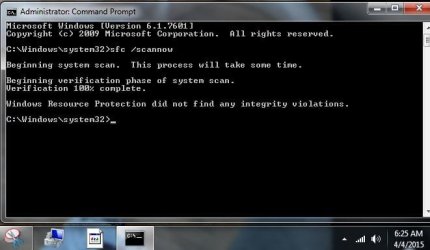
Here's SFC /scannow (screenshot results)

Also, I went ahead and ran CHKDSK /f /r (attached are zip files of App and Sys event viewer logs)

I also found this on Microsoft site:

Let me fix it myself

To make hibernation unavailable, follow these steps:
  1. Click Start, and then type cmd in the Start Search box.
  2. In the search results list, right-click Command Prompt, and then click Run as Administrator.
  3. When you are prompted by User Account Control, click Continue.
  4. At the command prompt, type powercfg.exe /hibernate off, and then press Enter.
  5. Type exit, and then press Enter to close the Command Prompt window.
To make hibernation available, follow these steps:
  1. Click Start, and then type cmd in the Start Search box.
  2. In the search results list, right-click Command Prompt, and then click Run as Administrator.
  3. When you are prompted by User Account Control, click Continue.
  4. At the command prompt, type powercfg.exe /hibernate on, and then press Enter.
  5. Type exit, and then press Enter to close the Command Prompt window.
 

Attachments

  • Appevt.zip
    Appevt.zip
    1.8 MB · Views: 0
  • Sysevt.zip
    Sysevt.zip
    3.4 MB · Views: 0
  • SFC scannow for whs.JPG
    SFC scannow for whs.JPG
    33.7 KB · Views: 18
Last edited:

My Computer My Computer

At a glance

windows 7 professional 64 bit Version 6.1.760...Intel(R) Pentium(R) CPU B970 @ 2.30GHz, 2300 ...8GbIntel HD Graphics Driver Vers 9.17.10.3347 Da...
Computer type
Laptop
Computer Manufacturer/Model Number
Toshiba Satellite c855-s5214
OS
windows 7 professional 64 bit Version 6.1.7601 Service Pack 1 Build 7601
CPU
Intel(R) Pentium(R) CPU B970 @ 2.30GHz, 2300 Mhz, 2 cores
Motherboard
Toshiba Portable BIOS Insyde Corp Version 1.60 Date 4/20/12
Memory
8Gb
Graphics Card(s)
Intel HD Graphics Driver Vers 9.17.10.3347 Date 10/31/20
Hard Drives
SanDisk Extreme Pro SSD 480 Gb (approx. 381gb free)
Firmware Version X21200RL
Migrated and Installed 4/3/2015
Antivirus
BitDefender AntiVirus Free Edition Version 1.0.21.1099
Browser
Internet Explorer 11 update version 11.0.16
Other Info
Additional Systems:

Samsung NP-QX410 Laptop Windows 7 Home Premium SP1
Samsung 850 EVO 250G 4G ram
Avast! Free 2015

Toshiba A205-S7468 Laptop Windows 7 Ultimate
WD 320G HDD 4G ram
AVG free 2015
@ whs & @Ignatzatsonic

Happy Easter!
 

My Computer My Computer

At a glance

windows 7 professional 64 bit Version 6.1.760...Intel(R) Pentium(R) CPU B970 @ 2.30GHz, 2300 ...8GbIntel HD Graphics Driver Vers 9.17.10.3347 Da...
Computer type
Laptop
Computer Manufacturer/Model Number
Toshiba Satellite c855-s5214
OS
windows 7 professional 64 bit Version 6.1.7601 Service Pack 1 Build 7601
CPU
Intel(R) Pentium(R) CPU B970 @ 2.30GHz, 2300 Mhz, 2 cores
Motherboard
Toshiba Portable BIOS Insyde Corp Version 1.60 Date 4/20/12
Memory
8Gb
Graphics Card(s)
Intel HD Graphics Driver Vers 9.17.10.3347 Date 10/31/20
Hard Drives
SanDisk Extreme Pro SSD 480 Gb (approx. 381gb free)
Firmware Version X21200RL
Migrated and Installed 4/3/2015
Antivirus
BitDefender AntiVirus Free Edition Version 1.0.21.1099
Browser
Internet Explorer 11 update version 11.0.16
Other Info
Additional Systems:

Samsung NP-QX410 Laptop Windows 7 Home Premium SP1
Samsung 850 EVO 250G 4G ram
Avast! Free 2015

Toshiba A205-S7468 Laptop Windows 7 Ultimate
WD 320G HDD 4G ram
AVG free 2015
@ whs

FYI,

I ran the turn hibernate off (ECP instructions from Microsoft site) and it worked:

How to disable and re-enable hibernation on a computer that is running Windows

To make hibernation unavailable, follow these steps:
  1. Click Start, and then type cmd in the Start Search box.
  2. In the search results list, right-click Command Prompt, and then click Run as Administrator.
  3. When you are prompted by User Account Control, click Continue.
  4. At the command prompt, type powercfg.exe /hibernate off, and then press Enter.
  5. Type exit, and then press Enter to close the Command Prompt window.
To make hibernation available, follow these steps:
  1. Click Start, and then type cmd in the Start Search box.
  2. In the search results list, right-click Command Prompt, and then click Run as Administrator.
  3. When you are prompted by User Account Control, click Continue.
  4. At the command prompt, type powercfg.exe /hibernate on, and then press Enter.
  5. Type exit, and then press Enter to close the Command Prompt window.
I'm marking Thread SOLVED. If you guys have any other thoughts or advice please don't hesitate to let me know.

THANK YOU AGAIN FOR YOUR HELP!!
 

My Computer My Computer

At a glance

windows 7 professional 64 bit Version 6.1.760...Intel(R) Pentium(R) CPU B970 @ 2.30GHz, 2300 ...8GbIntel HD Graphics Driver Vers 9.17.10.3347 Da...
Computer type
Laptop
Computer Manufacturer/Model Number
Toshiba Satellite c855-s5214
OS
windows 7 professional 64 bit Version 6.1.7601 Service Pack 1 Build 7601
CPU
Intel(R) Pentium(R) CPU B970 @ 2.30GHz, 2300 Mhz, 2 cores
Motherboard
Toshiba Portable BIOS Insyde Corp Version 1.60 Date 4/20/12
Memory
8Gb
Graphics Card(s)
Intel HD Graphics Driver Vers 9.17.10.3347 Date 10/31/20
Hard Drives
SanDisk Extreme Pro SSD 480 Gb (approx. 381gb free)
Firmware Version X21200RL
Migrated and Installed 4/3/2015
Antivirus
BitDefender AntiVirus Free Edition Version 1.0.21.1099
Browser
Internet Explorer 11 update version 11.0.16
Other Info
Additional Systems:

Samsung NP-QX410 Laptop Windows 7 Home Premium SP1
Samsung 850 EVO 250G 4G ram
Avast! Free 2015

Toshiba A205-S7468 Laptop Windows 7 Ultimate
WD 320G HDD 4G ram
AVG free 2015
Back
Top