
[help] disable NT kernel & system

itvn

New member
Local time
4:14 PM
Messages
3
I'm using Windows 7. I installed xampp. The default port of Apache is 80. If I start Apache with this default port, I can't start it.
After searching google, i found process NT Kernel & System (with PID of 4 ) listening on port 80. Some friends disable manually it by end process in Task Manager.
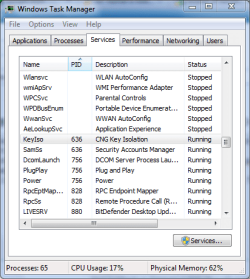
At my PC, I open Task Manager, click tab Services, I don't see PID =4. At my PC, Task Manager display PID >=636 as attachment image

Thus, I configured Apache listening on 8080 for using http://localhost:8080/
Help me how to disable NT Kernel & System, and how to re-open this process.
Thanks a lot~
 

Attachments
  • Capture.PNG
    Capture.PNG
    19.3 KB · Views: 156

My Computer

OS
windows 7
Have you tried "taskkill": TASKKILL Kill or stop a running process or application.

Check the command help for options

Please notice that I don't know what you are trying to accomplish and what effects it will have on your computer
 

My Computer

Computer Manufacturer/Model Number
Wally, Innc.
OS
Windows 7 x64 finally!
CPU
AMD Athlon II X2 240
Motherboard
Biostar TA790GX XE
Memory
OCZ Platinum 4GB DDR2 1066 (will not work past 800MHz)
Graphics Card(s)
MSI R4670-MD1G Radeon HD 4670 1GB 128-bit GDDR3
Sound Card
ATI High Definition Audio Device Realtek ALC888
Monitor(s) Displays
HP w19e
Screen Resolution
1440x900
Hard Drives
Western Digital Caviar Green WD5000AADS 500GB SATA
Western Digital Caviar Blue WD5000AAKS 500GB SATA
PSU
Athena Power Micro ATX 400W
Case
HEC 6T 6T10BB Black MicroATX Mini Tower
Cooling
stock
Keyboard
wired, many keys
Mouse
HP wireless, 2 buttons, 1 wheel
Internet Speed
DSL 2Mb (recently getting 1.65M!)
Uhh...You are looking in the wrong place. Another application you installed is listening on port 80. Could be IIS or some other application that uses "system" as a proxy. Further more you cannot kill "system" unless you want the computer to blue screen.
 

My Computer

Computer type
PC/Desktop
Computer Manufacturer/Model Number
Alienware Aurora ALX R4
OS
Windows 10 Pro (x64)
CPU
Intel Core i7-3930K (3.2GHz - 4.5GHz)
Motherboard
Alienware Aurora-R4 x79
Memory
4x Samsung 4GB PC3-12800 DDR3 (16GB 1600MHz)
Graphics Card(s)
Nvidia Geforce GTX 690
Sound Card
SteelSeries Siberia Elite
Monitor(s) Displays
Dell UltraSharp U3011
Screen Resolution
2560x1600
Hard Drives
Samsung 850 Pro 256 GB, Seagate 1TB Desktop Hybrid HDD, 2x Western Digital 4TB Green HDD
PSU
875W Some Dell PSU <.<
Case
Alienware Aurora ALX
Cooling
Custom Liquid Cooling (EK CPU & GPU blocks) dual EK 480RAD
Keyboard
Logitech G710+ Mechanical
Mouse
Logitech G700s
Internet Speed
Verizon Fios (50 mbps average)
Other Info
Server: Intel NUC D54250WYK: i5-4250U, 16GB, 256 GB mSATA, Windows Server 2012 R2
I found that NT Kernel & system is generated by http.sys. It is a part of win 7, it use port 80. This is different form win xp. Can you tell me about this?
 

My Computer

OS
windows 7
You have IIS installed. HTTP.sys is what IIS uses. Either turn IIS off, uninstall it or change its port.
 

My Computer

Computer type
PC/Desktop
Computer Manufacturer/Model Number
Alienware Aurora ALX R4
OS
Windows 10 Pro (x64)
CPU
Intel Core i7-3930K (3.2GHz - 4.5GHz)
Motherboard
Alienware Aurora-R4 x79
Memory
4x Samsung 4GB PC3-12800 DDR3 (16GB 1600MHz)
Graphics Card(s)
Nvidia Geforce GTX 690
Sound Card
SteelSeries Siberia Elite
Monitor(s) Displays
Dell UltraSharp U3011
Screen Resolution
2560x1600
Hard Drives
Samsung 850 Pro 256 GB, Seagate 1TB Desktop Hybrid HDD, 2x Western Digital 4TB Green HDD
PSU
875W Some Dell PSU <.<
Case
Alienware Aurora ALX
Cooling
Custom Liquid Cooling (EK CPU & GPU blocks) dual EK 480RAD
Keyboard
Logitech G710+ Mechanical
Mouse
Logitech G700s
Internet Speed
Verizon Fios (50 mbps average)
Other Info
Server: Intel NUC D54250WYK: i5-4250U, 16GB, 256 GB mSATA, Windows Server 2012 R2
You have IIS installed. HTTP.sys is what IIS uses. Either turn IIS off, uninstall it or change its port.
how to do this?
I've never ever used IIS. I open Windows Features [ Control Panel/Programs and Features/Turn Windows Features on or of ] . I try to turn of IIS, but in the list, the check box of Internet Information Services is unchecked.
 

My Computer

OS
windows 7
just found this on a google search, and figured it out, it was the world wide web publishing service, under services panel. Hard to locate, since a netstat -ab says 'Can not obtain ownership information'
 

My Computer

OS
win7 all versions
Hi guys,
Thanks for a great thread. I solved my (port 80 busy) problem by reading this thread.

I can add, that the service is called Web Deployment Agent Service in the Services panel. The full description is "Remote Agent service for the Microsoft Web deploy 2.0".

I chose to Disable it, so it will not bother me in the future. Now I can start and run Apache via XAMPP control panel. - that is just great.

Thanks,
 

My Computer

OS
win7 - 32bit
Motherboard
asus
Hard Drives
3
Back
Top