
Help !!!! Disk partitioning!!!!

andykhatter

New member
Local time
9:20 AM
Messages
10
Hi

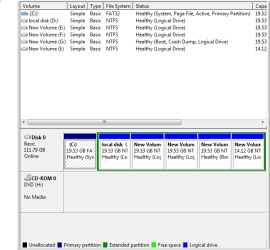
So my hard drive has 6 partitions ,one of them that is c: is primary partition(as i see it in the disk manager) my windows 7 is installed on G: and i dont see anything on the c: but it says it has 4 gb of data on it which is not visible to me ....i have change my OS 4 times since I bought my laptop and when I start my laptop it shows the options for all the windows but though i have deleted the other ones ...i dunno why does that happen. Ok so the question is what is the difference between the primary drive and logical drive? Since I have installed the windows on a logical drive what is the best solution ? Can I anyhow merge the primary and the logical drive where my windows is installed without effectinf my OS.Please help my partitions are so messed up!!!!
 

My Computer

OS
Windows 7 ultimate 32bit
Logical partitions are when an extended partition (think of this as special primary partition) that can be split into as many logical partitions are there drive letter assignments available. It is usually recommended that you do not install a Windows OS on a logical partition. The reason you are able to now is cause you have another OS and boot loader/manager sitting on a primary and active partition.

You said you have 6 partitions? What is on each of them? It would best to back up any data on partitions delete any unnecessary partitions (don't delete your other OS partition or the recovery one) and re-install Windows, use the Windows setup to partition your drive. During setup, you should only create the partition for the OS you're installing. Assuming you're dual booting and have a recovery partition, you should be just fine to have 3 Primary + 1 Extended (from which you can create logical partitions for what ever use).
 

My Computer

Computer Manufacturer/Model Number
Lenovo Thinkpad T510 4314-2PU
OS
Windows 7 Professional 64-bit
CPU
Intel Core i5 540M 2.53GHz
Motherboard
Thinkpad 510 4314-2PU
Memory
Samsung 2 x 2GB PC3-8500 (1066MHz) CL7
Graphics Card(s)
NVIDIA Quadro NVS 3100M
Sound Card
Conexant 20585 SmartAudio HD
Monitor(s) Displays
15.6" Notebook LCD 1600x900
Hard Drives
Seagate ST9500420AS 500GB 7200.4 SATA 2
moz-screenshot.png


Thanks for the reply..Above is the diskmanagement snapshot of my drives...NOw the boot as the manager says is in my local drive itself...and the page file is in my primary drive ... And i cant reinstall the OS...cz i dun have the setup anymore .... Can I format my c:(primary drive)? I want to extend my logical drive where the OS has been installed....
 

Attachments

  • Capture.PNG
    Capture.PNG
    10.3 KB · Views: 66

My Computer

OS
Windows 7 ultimate 32bit
I'm not 100% certain, but I don't think you can convert a logical partition to without first deleting it (losing all data on it) and repartitioning it.

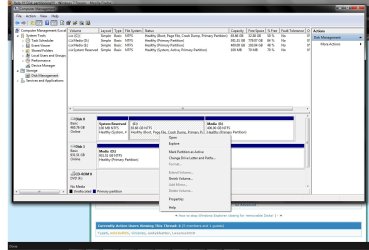
On the other logical partitions there, is there anything on them? An OS? Data? On any of them that aren't being used or important, delete them. I am using Windows 7 atm and my recollection of XP is gettig fuzzier the more I get accustomed to 7 but when you available partitioned space, if you right click on your G: partition, you should see the options Shrink Volume and Extend Volume (again not sure if this was an option in XP, never really mucked with partitions after an install on my os drives).

So what you want to do here is:

1. Check all those partitions (the logical ones) and see what is on them, back up anything you need on partitions you can delete.
2. On the partitions you want to delete, right click on each, and select Delete Volume...
3. You'll now see unpartitioned portion of the Extended Parition which a black bar running on the top.
4. Click on your partition marked as G:, if the option is available, select Extend Volume... and it will ask you how much you want to add to it.

I don't really recommend this though, the best way would be to re-do that extended partition all together, and re-install that OS on a primary partition but you don't have the setup disc alas.
 

Attachments

  • dskmngmnt.jpg
    dskmngmnt.jpg
    120 KB · Views: 44

My Computer

Computer Manufacturer/Model Number
Lenovo Thinkpad T510 4314-2PU
OS
Windows 7 Professional 64-bit
CPU
Intel Core i5 540M 2.53GHz
Motherboard
Thinkpad 510 4314-2PU
Memory
Samsung 2 x 2GB PC3-8500 (1066MHz) CL7
Graphics Card(s)
NVIDIA Quadro NVS 3100M
Sound Card
Conexant 20585 SmartAudio HD
Monitor(s) Displays
15.6" Notebook LCD 1600x900
Hard Drives
Seagate ST9500420AS 500GB 7200.4 SATA 2
Can i format my c: ??? hope it wont effect my OS in any way i mean the boot and all?? and is there a way i could erase the options i see for the other windows which i have already deleted !?
 

My Computer

OS
Windows 7 ultimate 32bit
No, do not format C:, it is your active primary partition holding your boot manager. Windows shouldn't even allow you to do anything to that partition aside from naming it. If you somehow managed to format it, you would no longer be able to boot into Windows (or any OS) and would have re-install. Just leave it as it is since you're not planning on re-installing Windows.

As removing all the boot options, are you using Windows XP or older?
 

My Computer

Computer Manufacturer/Model Number
Lenovo Thinkpad T510 4314-2PU
OS
Windows 7 Professional 64-bit
CPU
Intel Core i5 540M 2.53GHz
Motherboard
Thinkpad 510 4314-2PU
Memory
Samsung 2 x 2GB PC3-8500 (1066MHz) CL7
Graphics Card(s)
NVIDIA Quadro NVS 3100M
Sound Card
Conexant 20585 SmartAudio HD
Monitor(s) Displays
15.6" Notebook LCD 1600x900
Hard Drives
Seagate ST9500420AS 500GB 7200.4 SATA 2
i am using windows 7 ultimate....and why does it say boot in my G: and not in c: ??
 

My Computer

OS
Windows 7 ultimate 32bit
I'm not sure of how you got the setup but you, or someone, at some point set that partition to be your active primary partition and default paging file. When you installed your current Windows installation, you installed it on a logical partition. Again, not sure of how you or somebody else did that as I wasn't there. Your Windows boot drive not being C: isn't a problem, Windows knows what drive letter it's on and so will any decently written program.

Youre using Windows 7 Ultimate, well I'm not too experience with editing the bootmgr of Windows 6 (Vista) and above other than you use a tool called EasyBCD. I didn't find a guide (only searched quickly) on the forums here, so it would be best to wait for someone with experience using that tool to help with editing your boot options.
 

My Computer

Computer Manufacturer/Model Number
Lenovo Thinkpad T510 4314-2PU
OS
Windows 7 Professional 64-bit
CPU
Intel Core i5 540M 2.53GHz
Motherboard
Thinkpad 510 4314-2PU
Memory
Samsung 2 x 2GB PC3-8500 (1066MHz) CL7
Graphics Card(s)
NVIDIA Quadro NVS 3100M
Sound Card
Conexant 20585 SmartAudio HD
Monitor(s) Displays
15.6" Notebook LCD 1600x900
Hard Drives
Seagate ST9500420AS 500GB 7200.4 SATA 2
i deleted my e: but now i dont see the extend option highlighted on the G: i see it on the d: tho :(((((((((((((((( Whats goin onnn??? And also it doesnot show in the unallocated space it shows in the free space!!
 

My Computer

OS
Windows 7 ultimate 32bit
Unless you have some data on one of those partitions, I don't know that I wouldn't just go ahead and re-partition the whole drive, reformat, and reinstall 7. It seems like you've got a rat's nest of things going on with that hard drive and starting from scratch seems like the best idea. Of course, if you've got alot of data that you'll need, then another solution is in order....

I have to ask why there are 6 partitions, 20 Gs each.
 

My Computer

Computer type
PC/Desktop
Computer Manufacturer/Model Number
iBuyPower NZXT
OS
Microsoft Windows 10 Home Build 15036
CPU
Intel(R) Core(TM) i7-860 @ 2.80GHz
Motherboard
Gigabyte Technology Co., Ltd. P55-UD3L
Memory
4.00 GB
Graphics Card(s)
NVIDIA GeForce GTX 750
Sound Card
(1) Line 6 UX2 (2) Realtek High Definition Audio
Monitor(s) Displays
23" acer
Screen Resolution
1920 x 1080 x 32 bits (4294967296 colors) @ 60 Hz
Hard Drives
(1) WDC WD5000AAKS-00D2B0 ATA Device (2) Seagate FreeAgent Go 250G USB Device
Cooling
Corsair H75 liquid cooler (Very easy to install, actually)
Internet Speed
60M cable modem-->Linksys E1200-->1Gbps net card
Browser
Chrome
Other Info
This is probably the longest I've ever had a Windows machine run without having to restore it to scratch. I'm used to restoring to "factory" about every 2 yrs. I've run with Win7 since new in 2009 and only recently (Nov, '14) restored to clean up the machine from all my 'xperimenting. LOL!! I may never need another machine.

Upgraded to 10 when it was still free, then installed 2017 update.
this is an old laptop of mine and a naive cousin of mine created all these drives. And i never bothered to change it...But now i am having a problem with the disk space on my G:...And i want to extend it....So all i want to do is extend my G:....For that i deleted my E: and now i have a free space of 20GB which i want to merge with my G: which has all the 20GB space occupied!!!! but the extend option when i right click the G: does not HIGHLIGHT!!!!??????? Any solution??
 

My Computer

OS
Windows 7 ultimate 32bit
Hello andykhatter, welcome to Seven Forums!


If G: is directly to the right of the Windows 7 Logical drive and it is "Free Space" right click that free space and delete that then you should be able to right click the Windows 7 drive and click "Extend" to add the now unallocated free space from G: to the Windows 7 drive.
 

My Computer

Computer Manufacturer/Model Number
* BFK Customs *
OS
W 7 64-bit Ultimate
CPU
Intel Q9550 Yorkfield
Motherboard
ASUS P5Q Pro
Memory
8GB Dominator 8500C5D
Graphics Card(s)
ATI : XFX 5870
Sound Card
Realtek HD Audio 7-1
Monitor(s) Displays
1x 47" LCD HDMI & 3x 26" LCD HDMI
Screen Resolution
1920x1080P & 1920x1200
Hard Drives
1x 80GB Intel X25-M G2 SSD : 1x 500GB & 1x 640GB WD Caviar Black(s)
PSU
Corsair 620HX
Case
Cooler Master RC-690
Cooling
Tuniq Tower 120, 2x 140mm and 3x 120mm case fans
Keyboard
Microsoft 500
Mouse
Razer Diamondback 3G
Internet Speed
14 Mb/s
Other Info
1x Koutech 3Gb/s SATA HDD Hot Swap Rack
I just looked at the snip again and it looks like the Windows 7 partition is on a FAT32 file system and all the other Extended/Logical drives are in NTFS file system and they are not compatible and I have no further advice for you as I have almost no experience with the FAT file system.


Edit: I'm going to have a look at the Partition Wizard program to see if that will help, I'll be back after while if you don't get it sorted before that.
 

My Computer

Computer Manufacturer/Model Number
* BFK Customs *
OS
W 7 64-bit Ultimate
CPU
Intel Q9550 Yorkfield
Motherboard
ASUS P5Q Pro
Memory
8GB Dominator 8500C5D
Graphics Card(s)
ATI : XFX 5870
Sound Card
Realtek HD Audio 7-1
Monitor(s) Displays
1x 47" LCD HDMI & 3x 26" LCD HDMI
Screen Resolution
1920x1080P & 1920x1200
Hard Drives
1x 80GB Intel X25-M G2 SSD : 1x 500GB & 1x 640GB WD Caviar Black(s)
PSU
Corsair 620HX
Case
Cooler Master RC-690
Cooling
Tuniq Tower 120, 2x 140mm and 3x 120mm case fans
Keyboard
Microsoft 500
Mouse
Razer Diamondback 3G
Internet Speed
14 Mb/s
Other Info
1x Koutech 3Gb/s SATA HDD Hot Swap Rack
yes it is FAT ...is it a problem?....Is it like i can only extend my logical drive if the empty space is immediately right to my drive that i want to extend??
 

My Computer

OS
Windows 7 ultimate 32bit
I'm at a loss, I can't even get it to install in FAT32 in VirtualBox, I've asked another member to have a look over here, he has a wider range of experience than I, perhaps he'll have some ideas for you, though I'll have a look at other options in the mean-time.

Keep checking back.
click to enlarge
Test.jpg
 

My Computer

Computer Manufacturer/Model Number
* BFK Customs *
OS
W 7 64-bit Ultimate
CPU
Intel Q9550 Yorkfield
Motherboard
ASUS P5Q Pro
Memory
8GB Dominator 8500C5D
Graphics Card(s)
ATI : XFX 5870
Sound Card
Realtek HD Audio 7-1
Monitor(s) Displays
1x 47" LCD HDMI & 3x 26" LCD HDMI
Screen Resolution
1920x1080P & 1920x1200
Hard Drives
1x 80GB Intel X25-M G2 SSD : 1x 500GB & 1x 640GB WD Caviar Black(s)
PSU
Corsair 620HX
Case
Cooler Master RC-690
Cooling
Tuniq Tower 120, 2x 140mm and 3x 120mm case fans
Keyboard
Microsoft 500
Mouse
Razer Diamondback 3G
Internet Speed
14 Mb/s
Other Info
1x Koutech 3Gb/s SATA HDD Hot Swap Rack
Can you find a Win7 installer to do a clean reinstall following these tips to get the best install? http://www.sevenforums.com/installation-setup/125874-re-install-windows-7-a.html#post1086729

If not, back up your files and boot free Partition Wizard bootable CD to see if it will rightclick>Delete all of the partitions besides your C and G partitions, click OK. http://www.partitionwizard.com/download.html

Next rightclick G>Resize and slide the left and right grey borders outward to include all space to the right of the C>partition. Click OK, Apply all steps.

Now restart the computer to see if Win7 will still start.

If not, boot the Win7 Repair CD to http://www.sevenforums.com/tutorials/105541-startup-repair-run-3-separate-times.html. Try also the Rebuild MBR function on the Disk tab of PW CD, making sure C is still marked Active. http://www.sevenforums.com/tutorials/2083-system-repair-disc-create.html

If Win7 will still not start, use PW CD to rightclick>Delete C, then rightclick G>Modify>Convert to Primary, then G>Modify>Set to Active, try Rebuild MBR on PW CD again, if necessary run the Repairs again.
 
I'm at a loss, I can't even get it to install in FAT32 in VirtualBox, I've asked another member to have a look over here, he has a wider range of experience than I, perhaps he'll have some ideas for you, though I'll have a look at other options in the mean-time.

Keep checking back.
click to enlarge
View attachment 141871
Just subscribing to this thread . I am sure I will learn something new from it .
 

My Computer

Computer type
PC/Desktop
Computer Manufacturer/Model Number
Self Assembled
OS
Microsoft Windows 10 Pro Insider Preview 64-bit
CPU
Intel(R) Core(TM) i3-4130 CPU @ 3.40GHz
Motherboard
Gigabyte Technology Co., Ltd. B85M-D3H
Memory
Corsair Vengence 4GB x2 (8.00GB Dual-Channel DDR3 @ 798MHz)
Graphics Card(s)
2047MB GeForce GTS 450 (ZOTAC International)
Sound Card
Onboard (Realtek High Definition Audio)
Monitor(s) Displays
LG Flatron E2040T
Screen Resolution
1600x900
Hard Drives
Western Digital 1 TB
Seagate 500 GB
PSU
Corsair VS550
Case
Cooler Master K380
Cooling
Cooler Master Seidon 120V Plus
Keyboard
Logitech MK260r
Mouse
Logitech MK260r
Internet Speed
PMPL Broadband
Antivirus
Windows Defender + MBAM
Browser
Firefox
Other Info
Dell Studio 15" Laptop
I just found the set up of Windows 7 on my system :D can i reinstall it without the product key?? will it keep me registered?
 

My Computer

OS
Windows 7 ultimate 32bit
Before you delete the old Windows 7, use this app at the link below to edit out the activation key so you can use that again to activate the new installation; before you do anything make sure you can retrieve the key, it will be 5 sets of 5 letters / numbers that resemble this one below.

G0BUY-TH3S0-FTWAR-3ATMI-CS0FT


SIW - System Information for Windows
 

My Computer

Computer Manufacturer/Model Number
* BFK Customs *
OS
W 7 64-bit Ultimate
CPU
Intel Q9550 Yorkfield
Motherboard
ASUS P5Q Pro
Memory
8GB Dominator 8500C5D
Graphics Card(s)
ATI : XFX 5870
Sound Card
Realtek HD Audio 7-1
Monitor(s) Displays
1x 47" LCD HDMI & 3x 26" LCD HDMI
Screen Resolution
1920x1080P & 1920x1200
Hard Drives
1x 80GB Intel X25-M G2 SSD : 1x 500GB & 1x 640GB WD Caviar Black(s)
PSU
Corsair 620HX
Case
Cooler Master RC-690
Cooling
Tuniq Tower 120, 2x 140mm and 3x 120mm case fans
Keyboard
Microsoft 500
Mouse
Razer Diamondback 3G
Internet Speed
14 Mb/s
Other Info
1x Koutech 3Gb/s SATA HDD Hot Swap Rack
Back
Top