[Help]Driver Acer Aspire 4540

ffilasta

New member
Local time
8:30 AM
Messages
4
i have problem with my acer laptop.

specs:
AMD Turion X2 dual core
ATI Radeon HD4200
2GB DDR2 of RAM

when i installed windows 7 ultimate my graphic, sound bluetooth, wifi, all of them work very worse. . . help me friends...

sorry with my bad english..
:(:(:(:(:(:(
 

My Computer

Computer Manufacturer/Model Number
Acer Aspire 4540
OS
Windows 7
CPU
AMD Turion II X2 Dual Core
Motherboard
-
Memory
2 GB DDR2
Graphics Card(s)
ATI Radeon HD4200
Sound Card
-
Hello, Welcome!

I am afraid you have not given us enough info to help you. Could you please be more specific in your description of your problems?

I am responding almost blindly to your problem, but because you posted this in the Drivers section, try going into Device Manager. Could you please post a screenshot?

Thanks,
~Jonathan
 

My Computer

Computer Manufacturer/Model Number
Custom
OS
Windows 7 Professional x64
CPU
Intel i7 2600K OC'd @ 4620 MHz
Motherboard
Asus P8Z68-V Pro
Memory
16GB GSkill Sniper 2133 Mhz (4x4GB)
Graphics Card(s)
EVGA GeForce GTX 480 SuperClocked+
Sound Card
Realtek High Definition Audio
Monitor(s) Displays
2x Acer S273HLbmii 27"
Screen Resolution
2 x 1920x1080
Hard Drives
64GB Crucial M4 SSD

Storage: Hitachi 1TB 5400RPM, Samsung 1.5TB 5400RPM
PSU
Corsair HW Series 750w (modular)
Case
Cooler Master HAF 932 Advanced Blue Edition
Cooling
CM Hyper 212+ CPU cooler, 3x 230mm + 1x 140mm case fans
Keyboard
Logitech MK320 (wireless)
Mouse
Logitech MK320 (wireless)
Internet Speed
30 Mb/s : 2 Mb/s
Hey! I have the same problem with my new Acer Aspire 4540 and I think I can provide more information.

SPECS:
-AMD Athlon II x2 processor M300 @2.0GHz, 1MB L2 cache
-ATI Radeon HD4200 Graphics
-2GB DDR2 RAM
-BIOS Version 1.03

The laptop came without OS, so I installed my old Windows XP version into it. The only problem is that, apparently, there are no drivers for it. So I did the next best thing, which was finally buying Windows 7. I bought the 32 bits Ultimate version and installed it on the laptop. Everything went very smoothly and I had no trouble whatsoever.

The bad stuff began when I tried to install the drivers that I found on the manufacturers page (link at the bottom). Almost all of them worked, except for the wireless and the video card controller. It's an ATI Radeon HD4200 @256MB.

What I've tried so far:

-Download and install the Vista version of the driver using Windows 7 compatibility option.
-Download and install the Windows 7 drivers.
-Download and install the XP version from the ATI webpage (link at the bottom), using Windows 7 compatibility option.

None of those worked. So I went to the Device Manager and noticed that it was using a standar VGA card with a PnP generic monitor. I tried to uninstall both drivers to try installing the setup packages, but that didn't work because the laptop asked me to restart, and when the OS launched, it told me that "The new drivers were installed and working correctly", referring to the same VGA standar card. At this point I almost started crying.

Anyway, I went to the folder were I installed the ATI drivers and noticed something else: there are 4 Windows Installer packages, called "atiicdxx", "chipset", "tvtablerev1" and "TVW_USB_ID", and all of them give the same error message when I double-clic them. As I'm not using the english version of the OS, I'll try my best to translate, but it goes like "It's not possible to open this installation package. Call the manufacturer of the aplication to check if it's a valid Windows Installer package".

I hope this is enough information for you to help me. If you need anything else, please ask. i will be very grateful if you can help me out of this.

EDIT: forgot to add the links ^^

Service & Support
 

My Computer

OS
Windows XP
Welcome!

Thanks for providing us with your specs. :)

Why are you trying to install the drivers? Is your wireless or video giving you problems?

If not, you might was well leave them alone. If we can determine that you do need drivers, we will do our best to find them for you.
 

My Computer

Computer Manufacturer/Model Number
Custom
OS
Windows 7 Professional x64
CPU
Intel i7 2600K OC'd @ 4620 MHz
Motherboard
Asus P8Z68-V Pro
Memory
16GB GSkill Sniper 2133 Mhz (4x4GB)
Graphics Card(s)
EVGA GeForce GTX 480 SuperClocked+
Sound Card
Realtek High Definition Audio
Monitor(s) Displays
2x Acer S273HLbmii 27"
Screen Resolution
2 x 1920x1080
Hard Drives
64GB Crucial M4 SSD

Storage: Hitachi 1TB 5400RPM, Samsung 1.5TB 5400RPM
PSU
Corsair HW Series 750w (modular)
Case
Cooler Master HAF 932 Advanced Blue Edition
Cooling
CM Hyper 212+ CPU cooler, 3x 230mm + 1x 140mm case fans
Keyboard
Logitech MK320 (wireless)
Mouse
Logitech MK320 (wireless)
Internet Speed
30 Mb/s : 2 Mb/s
Well, I'm trying to install the drivers because I don't like the 1024x768 resolution on my 16:9 14" HD screen :D I can't configure the screen to it's normal resolution (which I think is 1366x768), which leads me to think it needs the drivers installed.
 

My Computer

OS
Windows XP
Try going into Device Manager, right-clicking on your card, and selecting Update Drivers.

Does it find anything?
 

My Computer

Computer Manufacturer/Model Number
Custom
OS
Windows 7 Professional x64
CPU
Intel i7 2600K OC'd @ 4620 MHz
Motherboard
Asus P8Z68-V Pro
Memory
16GB GSkill Sniper 2133 Mhz (4x4GB)
Graphics Card(s)
EVGA GeForce GTX 480 SuperClocked+
Sound Card
Realtek High Definition Audio
Monitor(s) Displays
2x Acer S273HLbmii 27"
Screen Resolution
2 x 1920x1080
Hard Drives
64GB Crucial M4 SSD

Storage: Hitachi 1TB 5400RPM, Samsung 1.5TB 5400RPM
PSU
Corsair HW Series 750w (modular)
Case
Cooler Master HAF 932 Advanced Blue Edition
Cooling
CM Hyper 212+ CPU cooler, 3x 230mm + 1x 140mm case fans
Keyboard
Logitech MK320 (wireless)
Mouse
Logitech MK320 (wireless)
Internet Speed
30 Mb/s : 2 Mb/s
I will try that as soon as I can. I screwed up somewhere and now windows won't boot. I'll reinstall and be right back. Thanks for your concern!
 

My Computer

OS
Windows XP
Ok, I've formated the whole HDD and installed Windows 7 again from scratch, just to be sure. The good thing is that I have everything, but the graphics card, workign properly. Now, I searched for the driver at ATI's webpage and found the correct drivers for the HD 4200, although nothing changed. I got the log from the installation. I'm sorry its in spanish, but I think its pretty straight forward:

Administrador de instalación Catalyst™
Informe de instalación
01/29/10 22:08:32

Información de hardware
NombreATI Mobility Radeon HD 4200FabricanteATI Technologies IncID del dispositivo0x9712ID del proveedor0x1002Código de clase0x030000ID de revisión0x00ID de subsistema0x027dID de proveedor de subsistema0x1025Otro hardwarePaquetes existentesATI Administrador de instalación CatalystMicrosoft Visual C++ 2008 SP1 Redistributable 32bitRegistro de CatalystTranscodificación de arrastrar y soltar de AMDPaquetes para instalación
ATI Administrador de instalación CatalystEstado final:ÉxitoVersión del elemento:3.0.758.0Tamaño:20 Mbytes
Otros dispositivos detectados
FabricanteATI Technologies IncID del dispositivo0x9601ID del proveedor0x1022Código de clase0x060000ID de revisión0x00ID de subsistema0x027dID de proveedor de subsistema0x1025
FabricanteATI Technologies IncID del dispositivo0x970fID del proveedor0x1002Código de clase0x040300ID de revisión0x00ID de subsistema0x970fID de proveedor de subsistema0x1002
FabricanteATI Technologies IncID del dispositivo0x4384ID del proveedor0x1002Código de clase0x060401ID de revisión0x00ID de subsistema0x0000ID de proveedor de subsistema0x0000
FabricanteATI Technologies IncID del dispositivo0x4384ID del proveedor0x1002Código de clase0x060401ID de revisión0x00ID de subsistema0x0000ID de proveedor de subsistema0x0000ATI Integrated SATA Support
FabricanteATI Technologies IncID del dispositivo0x4391ID del proveedor0x1002Código de clase0x010601ID de revisión0x00ID de subsistema0x027dID de proveedor de subsistema0x1025ATI Integrated SMBus Support
FabricanteATI Technologies IncID del dispositivo0x4385ID del proveedor0x1002Código de clase0x0c0500ID de revisión0x3cID de subsistema0x027dID de proveedor de subsistema0x1025ATI Integrated Azalia Support
FabricanteATI Technologies IncID del dispositivo0x4383ID del proveedor0x1002Código de clase0x040300ID de revisión0x00ID de subsistema0x027dID de proveedor de subsistema0x1025
FabricanteATI Technologies IncID del dispositivo0x4384ID del proveedor0x1002Código de clase0x060401ID de revisión0x00ID de subsistema0x0000ID de proveedor de subsistema0x0000
FabricanteATI Technologies IncID del dispositivo0x1200ID del proveedor0x1022Código de clase0x060000ID de revisión0x00ID de subsistema0x0000ID de proveedor de subsistema0x0000
FabricanteATI Technologies IncID del dispositivo0x1201ID del proveedor0x1022Código de clase0x060000ID de revisión0x00ID de subsistema0x0000ID de proveedor de subsistema0x0000
FabricanteATI Technologies IncID del dispositivo0x1202ID del proveedor0x1022Código de clase0x060000ID de revisión0x00ID de subsistema0x0000ID de proveedor de subsistema0x0000
FabricanteATI Technologies IncID del dispositivo0x1203ID del proveedor0x1022Código de clase0x060000ID de revisión0x00ID de subsistema0x0000ID de proveedor de subsistema0x0000
FabricanteATI Technologies IncID del dispositivo0x1204ID del proveedor0x1022Código de clase0x060000ID de revisión0x00ID de subsistema0x0000ID de proveedor de subsistema0x0000
Mensajes de error
----------------------------------

I just pasted this in case it might help somebody. Anyway, I tried to update the drivers that appear in the Device Manager, but Windows said the drivers were up to date (6/21/2006) by Microsoft. I will also paste the Hardware ID for it, just in case.

PCI\VEN_1002&DEV_9712&SUBSYS_027D1025&REV_00
PCI\VEN_1002&DEV_9712&SUBSYS_027D1025
PCI\VEN_1002&DEV_9712&CC_030000
PCI\VEN_1002&DEV_9712&CC_0300

Is there anything else I should type here? Please help, I'm running desperate D:

EDIT: This looks messy. I'll post screencaps better.

 

My Computer

OS
Windows XP
1) Get the latest chipset driver from ATI which may include the 4200 driver.

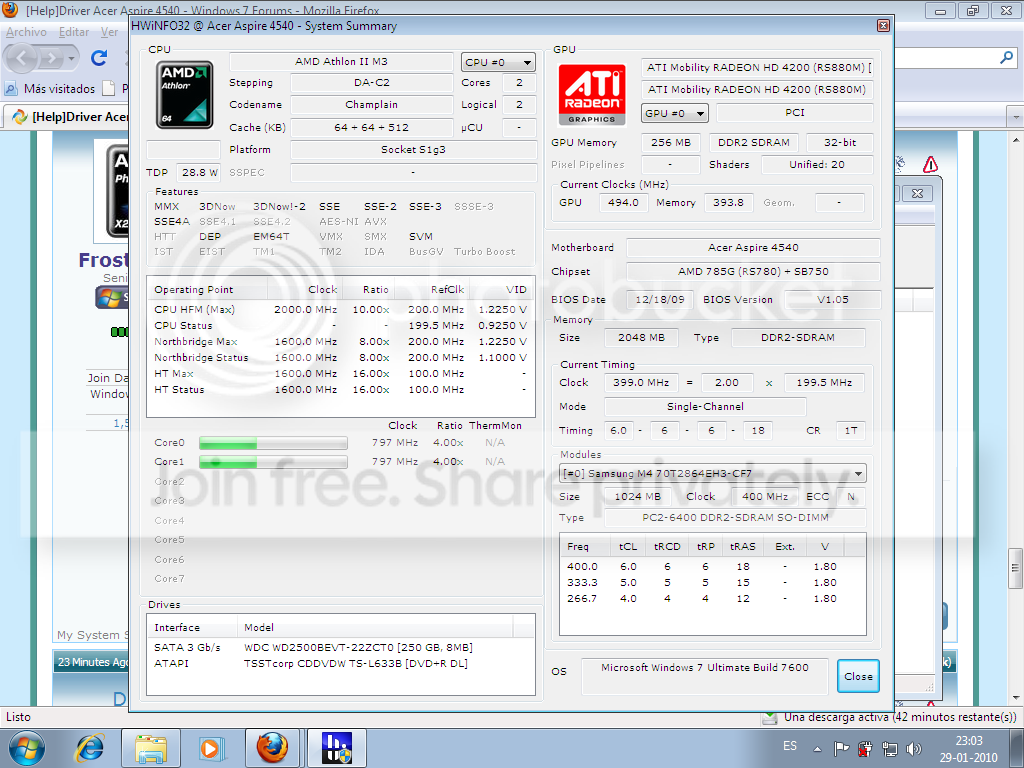
2) Use HWInfo32 and post a screenshot of the summary screen if you are unsure of the chipset.

3) Reboot.

4) If that doesn't work, get the latest driver from the manufacturer of your laptop and model.
 

My Computer

Computer Manufacturer/Model Number
Sony Vaio Z46GDU
OS
Windows 7 Ultimate x86-64
CPU
[email protected] 1066MHz FSB
Motherboard
Sony branded
Memory
6GB DDR3 1066MHz
Graphics Card(s)
9300M GS 256MB Dedicated (Speed) + Intel4500MHD (Stamina)
Sound Card
Realtek HD Audio
Monitor(s) Displays
13.1' WXGA
Screen Resolution
1600x900
Hard Drives
320GB 7200RPM w/ 16MB cache
Internet Speed
1MB/s
1) Get the latest chipset driver from ATI which may include the 4200 driver.

2) Use HWInfo32 and post a screenshot of the summary screen if you are unsure of the chipset.

3) Reboot.

4) If that doesn't work, get the latest driver from the manufacturer of your laptop and model.

Will do. What's HWInfo32 and how do I access it?
 

My Computer

OS
Windows XP
Its a sysinfo tool. Get it here:

HWiNFO32 Download

From the primary slovakia mirror and the .exe.
 

My Computer

Computer Manufacturer/Model Number
Sony Vaio Z46GDU
OS
Windows 7 Ultimate x86-64
CPU
[email protected] 1066MHz FSB
Motherboard
Sony branded
Memory
6GB DDR3 1066MHz
Graphics Card(s)
9300M GS 256MB Dedicated (Speed) + Intel4500MHD (Stamina)
Sound Card
Realtek HD Audio
Monitor(s) Displays
13.1' WXGA
Screen Resolution
1600x900
Hard Drives
320GB 7200RPM w/ 16MB cache
Internet Speed
1MB/s
screenshot.png
 

My Computer

OS
Windows XP
1) Get the driver from AMD's web site, select if you x86 or x64 7, then choose mobility radeon, then the 4000 series.

2) If necessary, look up the 4540 on acer's site and see if a chipset driver is there.

You need Mobility Radeon.
 

My Computer

Computer Manufacturer/Model Number
Sony Vaio Z46GDU
OS
Windows 7 Ultimate x86-64
CPU
[email protected] 1066MHz FSB
Motherboard
Sony branded
Memory
6GB DDR3 1066MHz
Graphics Card(s)
9300M GS 256MB Dedicated (Speed) + Intel4500MHD (Stamina)
Sound Card
Realtek HD Audio
Monitor(s) Displays
13.1' WXGA
Screen Resolution
1600x900
Hard Drives
320GB 7200RPM w/ 16MB cache
Internet Speed
1MB/s
In your C:/ drive you should have an ATI folder, update the driver via device manager, then choose have file, and go through the resulting options.
 

My Computer

Computer Manufacturer/Model Number
Sony Vaio Z46GDU
OS
Windows 7 Ultimate x86-64
CPU
[email protected] 1066MHz FSB
Motherboard
Sony branded
Memory
6GB DDR3 1066MHz
Graphics Card(s)
9300M GS 256MB Dedicated (Speed) + Intel4500MHD (Stamina)
Sound Card
Realtek HD Audio
Monitor(s) Displays
13.1' WXGA
Screen Resolution
1600x900
Hard Drives
320GB 7200RPM w/ 16MB cache
Internet Speed
1MB/s

My Computer

Computer Manufacturer/Model Number
Self Built
OS
Windows 7 ultimate 64 bit / XP Home sp3
CPU
intel Core 2 Duo E8400 3.0ghz
Motherboard
Asus P5ND bios 1401
Memory
8 gigs 1066 OCZ Fata1ty
Graphics Card(s)
EVGA GTX 580 Call of Duty Black Ops Edition
Sound Card
Creative Soundblaster Audigy 2zs
Monitor(s) Displays
Asus 24in LCD's 2MS X2
Screen Resolution
1920x1080p @60Hz
Hard Drives
WD Caviar 500 Black/ WD Caviar 200 Blue
PSU
OCZ 700W GameXtreme
Case
NZXT Apollo
Cooling
Corsair H50 CPU/120mm x3 /60mm x2 /Corsair Dominator Ram
Keyboard
Logitech Bluetooth Wireless MX5000
Mouse
Logitech Bluetooth Wireless MX1000
Internet Speed
Download 19.83 Upload 0.97
Other Info
Logitech Z2300 Speakers/ Bose Noise Cancelling Headphones/Avermedia PCI-e Hybrid TV Bravo/Epson NX415 all in one/ 4 Port Powered USB Hub/ LG 10x Bluray Burner /TSST Corp DVDRW External
Well, I got this thing fixed and it was so easy I feel stupid now. The laptop came with a resource CD, which had all the necessary drivers for it. Problem fixed instantly :D

Anyway... thanks to all of you for your concern through this last 2 days!
 

My Computer

OS
Windows XP
Now whenever you have solved your problem you just need to click on the red triangel and write solved, and it will appear with a green check mark so everyone else will know. (already did this) Just so you know. Fabe
 

My Computer

Computer Manufacturer/Model Number
Self Built
OS
Windows 7 ultimate 64 bit / XP Home sp3
CPU
intel Core 2 Duo E8400 3.0ghz
Motherboard
Asus P5ND bios 1401
Memory
8 gigs 1066 OCZ Fata1ty
Graphics Card(s)
EVGA GTX 580 Call of Duty Black Ops Edition
Sound Card
Creative Soundblaster Audigy 2zs
Monitor(s) Displays
Asus 24in LCD's 2MS X2
Screen Resolution
1920x1080p @60Hz
Hard Drives
WD Caviar 500 Black/ WD Caviar 200 Blue
PSU
OCZ 700W GameXtreme
Case
NZXT Apollo
Cooling
Corsair H50 CPU/120mm x3 /60mm x2 /Corsair Dominator Ram
Keyboard
Logitech Bluetooth Wireless MX5000
Mouse
Logitech Bluetooth Wireless MX1000
Internet Speed
Download 19.83 Upload 0.97
Other Info
Logitech Z2300 Speakers/ Bose Noise Cancelling Headphones/Avermedia PCI-e Hybrid TV Bravo/Epson NX415 all in one/ 4 Port Powered USB Hub/ LG 10x Bluray Burner /TSST Corp DVDRW External
i have meet this problem also,
my step is set the BIOS HDD to IDE mode, and use necessary drivers only from the Acer 4540 support DVD
 

My Computer

Computer Manufacturer/Model Number
Acer
OS
windows 7, windows xp, linux red hat 8
CPU
AMD Turion II
Motherboard
AMD
Memory
4 Gb
Graphics Card(s)
ATI Radeon 4200
Sound Card
Realtek
Monitor(s) Displays
Standard Acer LCD
Hard Drives
320 Gb
Back
Top