
Help finding compatible drivers for laptop with only vista supplied

turtlebain

New member
Local time
12:40 PM
Messages
26
Location
Binghamton, NY
Hi all,

I have just purchased a Sony Vaio VGN-FZ140E from a friend which had vista on it. I was initially just going to do a system wipe for him and give it back from him to sell, then he told me he was only looking to get a hundered out of it >> MINE.

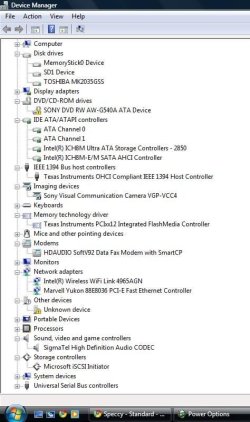
This laptop will replace my netbook with the annoyingly slow hyperthreaded 1.6. Only problem is they don't supply Windows 7 drivers, only Vista.. and only 32-bit. I have attached a full specification sheet from Piriform's Speccy, and a device manager screenshot with what I don't think Windows 7 will pick up automatically expanded.
 

Attachments
  • Untitled.jpg
    Untitled.jpg
    57.8 KB · Views: 10
  • OWNER-PC.txt
    OWNER-PC.txt
    20.5 KB · Views: 8

My Computer My Computer

Computer Manufacturer/Model Number
Custom / Myself / One
OS
Windows 7 Pro 64-bit
CPU
AMD Phenom II x4 955 @ 3.62 GHz
Motherboard
Gigabyte GA-MA770T-UD3P
Memory
4 GB G.Skill DDR3 1600
Graphics Card(s)
Nvidia GTX 460 825 MHz (gpu) 4400 MHz (Vram)
Sound Card
Nvidia GTX 460
Monitor(s) Displays
VIZIO 32" 1080p LCD (60 Hz)
Screen Resolution
1920x1080
Hard Drives
500 GB WD Caviar Black (System)
1 TB WD Caviar Green - saved from an external that had an unfortunate shelf incident
Case
Antec 300
Cooling
Corsair H50
Keyboard
i-rocks back lit wired
Mouse
Logitech VX Revolution
Other Info
Monoprice 22 AWG High Speed / Shielded HDMI 1.4 for audio / video to TV to Stereo
Monoprice tilting / swiveling tv wall mount
If you still have Vista on it, run the Windows 7 Upgrade Advisor

The Win7 installer is mostly driver-complete, with newer arriving quickly via optional Windows Updates. Enable hardware driver auto-updating to assure this: Automatically get recommended drivers and updates for your hardware

Any drivers then missing in Device manager can be found on the Support Downloads webpage for computer model - Vista drivers will work ok - or for the Device itself.

You qualify for Upgrade version with Vista OEM, but I'd wipe the HD to get the cleanest possible install: SSD / HDD : Optimize for Windows Reinstallation

If you install to wiped HD, the installer will issue a 100mb System Reserved boot partition which conveniently places the Repair Console (normally only on the DVD or Repair CD) on the F8 Advanced Boot Tools menu. So I would choose Custom Install and then Drive Options to partition as you wish and format: Clean Install Windows 7

Leave the Product key blank during install if you wipe the HD, then afterwards do the quick registry workaround given in this tutorial to allow activation with upgrade version key: http://www.sevenforums.com/tutorials/31402-clean-install-upgrade-windows-7-version.html

Install updates and then programs slowly over time to gauge performance after each. Don't let any programs write themselves into msconfig>Startup as they slow startup, become freeloaders on your RAM/CPU and can spy on you. I only allow AV and gadgets. Startup Programs - Change

Use a lightweight free AV like MS Security Essentials which works perfectly with Windows 7 Firewall. http://www.microsoft.com/security_essentials/

When it is finished, clean and order the HD perfectly using state-of-the-art free CCleaner then Auslogics Disk Defragger monthly.
CCleaner - Free software downloads and software reviews - CNET Download.com
http://download.cnet.com/Auslogics-D...-10567503.html

Then save a Windows 7 Backup image externally so you never have to reinstall again, just reimage the HD or replacement using DVD or Repair CD. Backup Complete Computer - Create an Image Backup
 
If you still have Vista on it, run the Windows 7 Upgrade Advisor

The Win7 installer is mostly driver-complete, with newer arriving quickly via optional Windows Updates. Enable hardware driver auto-updating to assure this: Automatically get recommended drivers and updates for your hardware

Any drivers then missing in Device manager can be found on the Support Downloads webpage for computer model - Vista drivers will work ok - or for the Device itself.

You qualify for Upgrade version with Vista OEM, but I'd wipe the HD to get the cleanest possible install: SSD / HDD : Optimize for Windows Reinstallation

If you install to wiped HD, the installer will issue a 100mb System Reserved boot partition which conveniently places the Repair Console (normally only on the DVD or Repair CD) on the F8 Advanced Boot Tools menu. So I would choose Custom Install and then Drive Options to partition as you wish and format: Clean Install Windows 7

Leave the Product key blank during install if you wipe the HD, then afterwards do the quick registry workaround given in this tutorial to allow activation with upgrade version key: http://www.sevenforums.com/tutorials/31402-clean-install-upgrade-windows-7-version.html

Install updates and then programs slowly over time to gauge performance after each. Don't let any programs write themselves into msconfig>Startup as they slow startup, become freeloaders on your RAM/CPU and can spy on you. I only allow AV and gadgets. Startup Programs - Change

Use a lightweight free AV like MS Security Essentials which works perfectly with Windows 7 Firewall. http://www.microsoft.com/security_essentials/

When it is finished, clean and order the HD perfectly using state-of-the-art free CCleaner then Auslogics Disk Defragger monthly.
CCleaner - Free software downloads and software reviews - CNET Download.com
http://download.cnet.com/Auslogics-D...-10567503.html

Then save a Windows 7 Backup image externally so you never have to reinstall again, just reimage the HD or replacement using DVD or Repair CD. Backup Complete Computer - Create an Image Backup

Thanks for the enormous amount of detail. Yeah, I use the software you just mentioned on all my computers. Usually use Piriform Defraggler instead of the mentioned in combination with windows defrag.. would there be any advantage to using the ausligics?

I do nothing but clean installs, however I did not know you could do a clean install from an upgrade.

I want to use drivers that are meant for or okay'd for windows 7, I know that many will 'work' in compatibility mode, but I also believe there is a reason thery're not win 7 signed drivers, and they wont be the most efficient to use. In my experiences I have been very pleased with the lack of effort I have to put into the 'post install' portion of a full reboot. Just recently, I reset a friend's computer to XP sp3 from sp...0. Ahh the good old days.
 

My Computer My Computer

Computer Manufacturer/Model Number
Custom / Myself / One
OS
Windows 7 Pro 64-bit
CPU
AMD Phenom II x4 955 @ 3.62 GHz
Motherboard
Gigabyte GA-MA770T-UD3P
Memory
4 GB G.Skill DDR3 1600
Graphics Card(s)
Nvidia GTX 460 825 MHz (gpu) 4400 MHz (Vram)
Sound Card
Nvidia GTX 460
Monitor(s) Displays
VIZIO 32" 1080p LCD (60 Hz)
Screen Resolution
1920x1080
Hard Drives
500 GB WD Caviar Black (System)
1 TB WD Caviar Green - saved from an external that had an unfortunate shelf incident
Case
Antec 300
Cooling
Corsair H50
Keyboard
i-rocks back lit wired
Mouse
Logitech VX Revolution
Other Info
Monoprice 22 AWG High Speed / Shielded HDMI 1.4 for audio / video to TV to Stereo
Monoprice tilting / swiveling tv wall mount
Defraggler is comparable to Auslogics.

I would not change out any drivers given by the Win7 installer or quickly updated by optional Windows Updates unless there is a performance reason to do so. Win7 is the top authority on its drivers. MS spent a fortune getting them into the installer and via Updates. This is not comparable at all to Vista or XP.

Feel free to keep us posted on your progress, and enjoy Win7.
 

My Computer My Computer

Computer Manufacturer/Model Number
Custom / Myself / One
OS
Windows 7 Pro 64-bit
CPU
AMD Phenom II x4 955 @ 3.62 GHz
Motherboard
Gigabyte GA-MA770T-UD3P
Memory
4 GB G.Skill DDR3 1600
Graphics Card(s)
Nvidia GTX 460 825 MHz (gpu) 4400 MHz (Vram)
Sound Card
Nvidia GTX 460
Monitor(s) Displays
VIZIO 32" 1080p LCD (60 Hz)
Screen Resolution
1920x1080
Hard Drives
500 GB WD Caviar Black (System)
1 TB WD Caviar Green - saved from an external that had an unfortunate shelf incident
Case
Antec 300
Cooling
Corsair H50
Keyboard
i-rocks back lit wired
Mouse
Logitech VX Revolution
Other Info
Monoprice 22 AWG High Speed / Shielded HDMI 1.4 for audio / video to TV to Stereo
Monoprice tilting / swiveling tv wall mount
running startup disk>diskpart> clean all currently.. apparently itll take about 1 hour to complete.
 

My Computer My Computer

Computer Manufacturer/Model Number
Custom / Myself / One
OS
Windows 7 Pro 64-bit
CPU
AMD Phenom II x4 955 @ 3.62 GHz
Motherboard
Gigabyte GA-MA770T-UD3P
Memory
4 GB G.Skill DDR3 1600
Graphics Card(s)
Nvidia GTX 460 825 MHz (gpu) 4400 MHz (Vram)
Sound Card
Nvidia GTX 460
Monitor(s) Displays
VIZIO 32" 1080p LCD (60 Hz)
Screen Resolution
1920x1080
Hard Drives
500 GB WD Caviar Black (System)
1 TB WD Caviar Green - saved from an external that had an unfortunate shelf incident
Case
Antec 300
Cooling
Corsair H50
Keyboard
i-rocks back lit wired
Mouse
Logitech VX Revolution
Other Info
Monoprice 22 AWG High Speed / Shielded HDMI 1.4 for audio / video to TV to Stereo
Monoprice tilting / swiveling tv wall mount
It did take a long time, about 2 hours for my 200 GB. I used Windows' 100 MB recovery partition just like you suggested. And ran updates. I still have yet to activate using the workaround, and therefore I do not have anti-virus because I'm holding out for MS Security Essentials.
 

My Computer My Computer

Computer Manufacturer/Model Number
Custom / Myself / One
OS
Windows 7 Pro 64-bit
CPU
AMD Phenom II x4 955 @ 3.62 GHz
Motherboard
Gigabyte GA-MA770T-UD3P
Memory
4 GB G.Skill DDR3 1600
Graphics Card(s)
Nvidia GTX 460 825 MHz (gpu) 4400 MHz (Vram)
Sound Card
Nvidia GTX 460
Monitor(s) Displays
VIZIO 32" 1080p LCD (60 Hz)
Screen Resolution
1920x1080
Hard Drives
500 GB WD Caviar Black (System)
1 TB WD Caviar Green - saved from an external that had an unfortunate shelf incident
Case
Antec 300
Cooling
Corsair H50
Keyboard
i-rocks back lit wired
Mouse
Logitech VX Revolution
Other Info
Monoprice 22 AWG High Speed / Shielded HDMI 1.4 for audio / video to TV to Stereo
Monoprice tilting / swiveling tv wall mount
You qualify for Upgrade version with Vista OEM, but I'd wipe the HD to get the cleanest possible install: ]

I am trying to figure out what this means..

All I have right at this moment is my OEM Vista license on the sticker via the bottom of the laptop. What must I do to get my Windows 7 Ultimate upgrade key?
 

My Computer My Computer

Computer Manufacturer/Model Number
Custom / Myself / One
OS
Windows 7 Pro 64-bit
CPU
AMD Phenom II x4 955 @ 3.62 GHz
Motherboard
Gigabyte GA-MA770T-UD3P
Memory
4 GB G.Skill DDR3 1600
Graphics Card(s)
Nvidia GTX 460 825 MHz (gpu) 4400 MHz (Vram)
Sound Card
Nvidia GTX 460
Monitor(s) Displays
VIZIO 32" 1080p LCD (60 Hz)
Screen Resolution
1920x1080
Hard Drives
500 GB WD Caviar Black (System)
1 TB WD Caviar Green - saved from an external that had an unfortunate shelf incident
Case
Antec 300
Cooling
Corsair H50
Keyboard
i-rocks back lit wired
Mouse
Logitech VX Revolution
Other Info
Monoprice 22 AWG High Speed / Shielded HDMI 1.4 for audio / video to TV to Stereo
Monoprice tilting / swiveling tv wall mount
Didn't you buy Win7 to get the installation DVD? Use the Product Key which came in the package.

Since you've wiped the HD do the quick registry edit in this tutorial to activate Upgrade Version on a wiped HD: http://www.sevenforums.com/tutorials/31402-clean-install-upgrade-windows-7-version.html

If you haven't bought your key yet: Make sure you need all of the features in Ultimate, as most users can get by fine with Home Premium which is quite a bit cheaper. Right now HP Upgrade family 3-pack is $129 which is 3 licenses for almost the price of one. http://windows.microsoft.com/en-US/windows7/products/compare

I would not buy a key off of ebay or any but major retailers, Newegg, Amazon, etc.

If you need more time to shop for Win7: http://www.sevenforums.com/tutorials/875-activation-trial-period-extend-up-120-days.html

We can also help you change to a lesser version if necessary, or reinstall the Vista which is licensed on that machine.
 
Last edited:
Back
Top