A friend of mine phoned in a panic, she has been proof reading a document for a fellow student and has been making notes etc in the document.
the original doc was sent to her via email in a zip folder.
she opened the zip and went about making notations on the doc.when done she saved it and now cannot find it.
im thinking the zip file was saved in temp and the save went into the temp that was opened originally, she cant find the zip in temp, and there are no .asd files in word/roaming
its also not in the default save location that is users/documents.
any other ideas where it may be or whether it has not saved due to it being from the zip would be welcome.
My Computer
Computer Manufacturer/Model Number
Hewlett packard/p6512uk
OS
Microsoft Windows 7 Home Premium 64-bit 7600
CPU
IIx4 amd athelon 635 processor
Motherboard
FOXCONN 2AA9
Memory
2x2gb
Graphics Card(s)
ati radeon HD 5450
Sound Card
(1) Realtek High Definition Audio (2) AMD High Definition
Monitor(s) Displays
samsung lcd tv 32"
Screen Resolution
1360x 768
Hard Drives
(1) WDC WD10 01FAES-60Z2A0 SATA Disk Device (2) Maxtor OneTouch USB Device (3) ST310003 33AS USB Device (4) WD My Book 1111 USB Device
It was office word she was using,
i will have to wait til she calls to check downloads, good idea.
i think its a online email client rather than office outlook or live.
so just going to do kiddie bedtime stories then i will chase her up to check some more.
thanks for the ideas.
My Computer
Computer Manufacturer/Model Number
Hewlett packard/p6512uk
OS
Microsoft Windows 7 Home Premium 64-bit 7600
CPU
IIx4 amd athelon 635 processor
Motherboard
FOXCONN 2AA9
Memory
2x2gb
Graphics Card(s)
ati radeon HD 5450
Sound Card
(1) Realtek High Definition Audio (2) AMD High Definition
Monitor(s) Displays
samsung lcd tv 32"
Screen Resolution
1360x 768
Hard Drives
(1) WDC WD10 01FAES-60Z2A0 SATA Disk Device (2) Maxtor OneTouch USB Device (3) ST310003 33AS USB Device (4) WD My Book 1111 USB Device
she tinks it was saved to the temp location as that is where the zip was when she opened it from the email.
now there is no zip which seems odd.
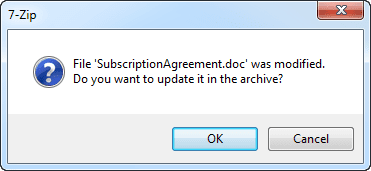
she recalls a message about the doc having changed in the temp zip and did she want to save changes.
i dont know whether she did, giong to ring her now and she can clarify it.
My Computer
Computer Manufacturer/Model Number
Hewlett packard/p6512uk
OS
Microsoft Windows 7 Home Premium 64-bit 7600
CPU
IIx4 amd athelon 635 processor
Motherboard
FOXCONN 2AA9
Memory
2x2gb
Graphics Card(s)
ati radeon HD 5450
Sound Card
(1) Realtek High Definition Audio (2) AMD High Definition
Monitor(s) Displays
samsung lcd tv 32"
Screen Resolution
1360x 768
Hard Drives
(1) WDC WD10 01FAES-60Z2A0 SATA Disk Device (2) Maxtor OneTouch USB Device (3) ST310003 33AS USB Device (4) WD My Book 1111 USB Device
ok ,weve established it was a rar file that was opened , we managed to find some tmp rar files in appadata but when opened in word it was all symbols and "gobbledygook" so no joy.
at least the original is safe and she will have to re proof read. ive stressed the importance of extracting the files from the rar or zip before working and saving them.
lesson learned the hard way i guess.
thanks for your input guys
thanks kari, we went through those steps first and the recent items from the right click on the word taskbar icon.
still no joy ,it is a mystery that it dissapeared.
it may be user error i think. or its leaning that way as there is usually some sort of recovery method for a document.
My Computer
Computer Manufacturer/Model Number
Hewlett packard/p6512uk
OS
Microsoft Windows 7 Home Premium 64-bit 7600
CPU
IIx4 amd athelon 635 processor
Motherboard
FOXCONN 2AA9
Memory
2x2gb
Graphics Card(s)
ati radeon HD 5450
Sound Card
(1) Realtek High Definition Audio (2) AMD High Definition
Monitor(s) Displays
samsung lcd tv 32"
Screen Resolution
1360x 768
Hard Drives
(1) WDC WD10 01FAES-60Z2A0 SATA Disk Device (2) Maxtor OneTouch USB Device (3) ST310003 33AS USB Device (4) WD My Book 1111 USB Device
Unfortunately the changes may be lost. If the RAR/ZIP was opened directly from he email client the the changes were probably no saved.
If the attachment was first save then then changes may have got saved back into the RAR (or ZIP) file.
I compressed a Word DOC with WinRAR to a .RAR and 7Zip to a .zip. I opened the compressed files in their associated app. I click on the Word file to open in word. I made some changes and saved the document and closed Word. Each time WinRAR and 7Zip ask if I wanted to update the archive. If I said yes the changes were saved int he archive.
While in Word 2010 I did a "Save As" to see where the file was. With both apps it was in the folder C:\Users\<username>\AppData\Local\temp. After the apps were closed the temp files were automatically deleted deleted. The changes were saved into the archive. See attached image
I attached the archives to an email. I opened the archives direct from Outlook 2010. Made changes Saved the changes to the archives. All changes were lost because Outlook does not update the attachment
The key is to save the attachment outside the Email client. Now you can open the saved attchent and your edits will nto be lost.



 ARTIAL FILENAME.